

A shooting schedule is not just a plan for what gets filmed when. It is one of the strongest budgeting tools a producer has.
Every strip on the board carries financial information. A cast-heavy day affects talent costs. A remote location affects transportation. A night shoot affects crew hours. A company move affects time, trucks, meals, and possibly overtime. A Day Out of Days report affects actor costs. A location schedule affects permits, site fees, parking, security, and travel.
When producers ask how much a film will cost, the answer does not live only in the script. It also lives in the schedule.
That is why learning how to create a film budget from a shooting schedule is so important. The schedule turns the script into a practical production plan, and the budget turns that plan into numbers. When those two documents work together, producers can make better decisions before the shoot begins.
Why the Shooting Schedule Matters to the Budget
A script tells you what the story needs. A shooting schedule tells you how the production plans to capture it.
That difference matters.
A screenplay might show three scenes at a diner, two scenes in a car, one apartment scene, and a night exterior. But the schedule decides whether those scenes are grouped efficiently, whether the diner is shot in one day or three, whether the night exterior creates a turnaround problem, whether the car scene requires a process trailer, and whether cast members are working consecutive days or scattered across the shoot.
Those scheduling choices have budget consequences.
If the schedule is efficient, the budget may become leaner and more predictable. If the schedule is chaotic, the budget will start collecting costs like burrs on a wool coat. Extra cast days, unnecessary company moves, longer rentals, additional location fees, and rushed overtime can all emerge from weak scheduling.
A good budget should not be built from vague assumptions. It should be built from the actual plan.
👉 How to Schedule a Film Shoot (Step-by-Step Guide for Filmmakers)
Start with a Finished Script Breakdown
Before the shooting schedule can support the budget, the script needs to be properly broken down.
A script breakdown identifies the production elements in each scene: cast, background actors, props, wardrobe, vehicles, animals, stunts, special effects, visual effects, locations, makeup, sound needs, production design, and other requirements. These elements eventually shape both the schedule and the budget.
If the breakdown is incomplete, the schedule may miss important planning details. If the schedule misses those details, the budget may miss costs.
For example, a scene with a dog, rain effect, background actors, period wardrobe, and picture vehicles is not just “one page.” It is a bundle of production requirements. Those requirements affect how the scene should be scheduled and how much money should be assigned to departments.
The script breakdown is the first bridge between the written screenplay and the production budget.
👉 How to Turn a Script Breakdown Into a Film Budget
Build the Shooting Schedule Around Real Production Logic
Once the script is broken down, the assistant director or scheduling team builds the shooting schedule.
This schedule should not simply follow script order. Films are usually scheduled around production logic: locations, cast availability, day and night work, company moves, scene complexity, weather, stunts, special equipment, child actors, animals, and other practical concerns.
The schedule is where creative ambition meets production gravity.
A scene that looks simple in the script may become expensive if it is placed badly in the schedule. A location that appears only briefly may still require a full day of company travel. A cast member with scattered work days may become more expensive than expected. A night shoot placed before an early day call may create turnaround issues. A company move in the middle of the day may reduce shootable hours and increase labor pressure.
Before building the budget, producers should review the schedule for financial logic, not just shooting order.
👉 Shooting Schedule Mistakes: 10 Common Problems That Cost Productions Time and Money
Use Shoot Days as the First Budget Driver
The most obvious way a shooting schedule affects the budget is through shoot days.
Each shooting day can trigger costs for crew, cast, locations, equipment, vehicles, meals, insurance, production staff, payroll services, walkies, generators, expendables, and other daily expenses. Even if some costs are weekly, the number of shooting days still affects how long resources are needed.
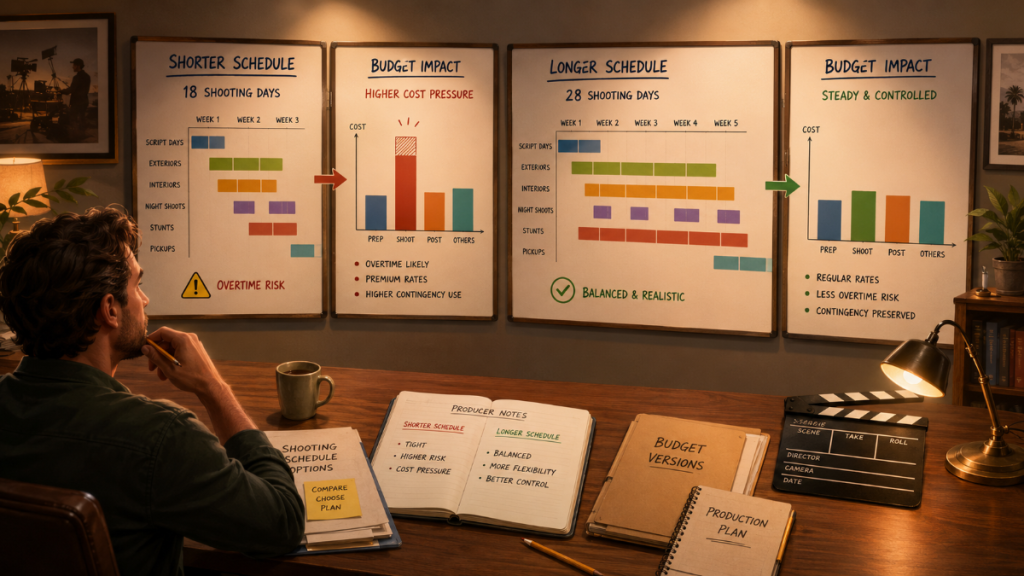
A 12-day schedule and an 18-day schedule may tell the same story, but they do not tell the same budget story.
That does not mean fewer days are always cheaper. Sometimes compressing the schedule creates overtime, rushed work, company moves, safety concerns, or creative compromises that cost more later. The producer’s job is to understand the tradeoff.
When creating a film budget from a shooting schedule, start by identifying the total number of shoot days, prep days, wrap days, travel days, and any special days that may require different budgeting treatment.

Use the Day Out of Days Report for Cast Costs
The Day Out of Days report, often called a DOOD, is one of the most important links between the shooting schedule and the film budget.
A DOOD report shows when each actor works, starts, holds, travels, rehearses, or finishes. For budgeting, this matters because actor costs are usually not based only on the number of scenes. They are based on work days, hold days, travel days, start and finish dates, and other scheduling factors.
A character with five scenes could be cheap or expensive depending on how those scenes are spread across the schedule.
If those five scenes are shot across two consecutive days, the actor may be relatively easy to budget. If those same five scenes are spread across four different weeks, the cost may change dramatically. Holds, travel, lodging, per diem, scheduling conflicts, and availability issues can all come into play.
The DOOD turns cast scheduling into budget information.
When building the budget, producers should use DOOD totals to estimate cast day counts, travel needs, lodging, per diem, and related payroll costs.
Translate Locations into Budget Lines
Locations are one of the easiest areas to underbudget when the schedule is not being used carefully.
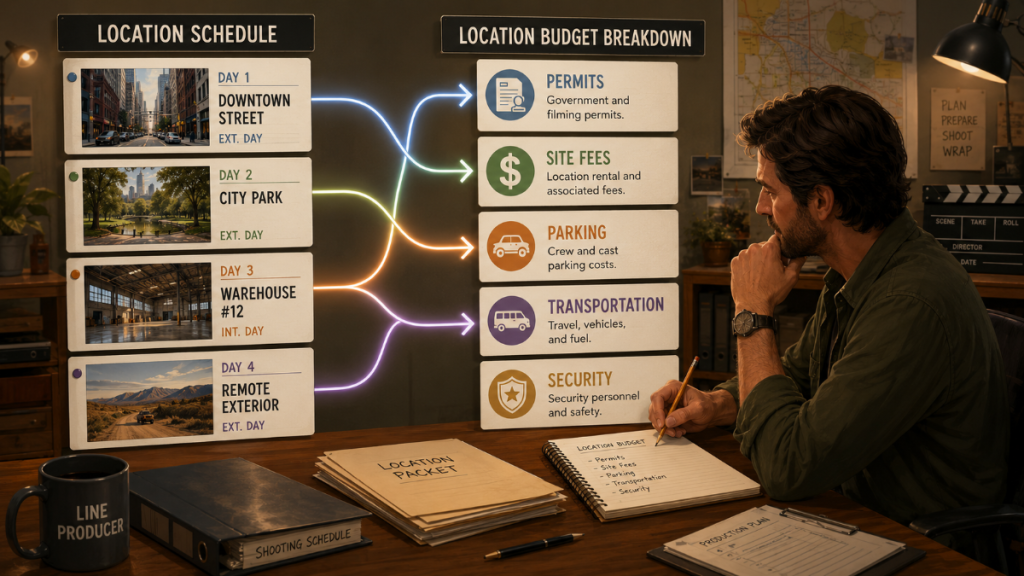
A location is not just a fee. It may involve permits, site reps, police, fire safety, parking, security, cleaning, holding areas, restrooms, generators, neighbors, location repairs, insurance requirements, and transportation. The schedule determines when those locations are used, how long they are needed, and whether the company has to move between them.
A location scheduled for one day may be manageable. A location spread across multiple nonconsecutive days may create additional costs. A remote location may affect trucks, crew travel, lodging, meals, and company moves. A night location may affect labor and safety requirements.
When creating the budget, producers should review the schedule by location, not just by scene.
Group the location days. Identify company moves. Look for distant locations. Flag locations with special access rules. Then translate those needs into budget lines for permits, location fees, transportation, parking, security, site reps, and related production costs.
Convert Production Strips into Department Costs
Production strips are not just colored cards. They are cost signals.
Each strip contains scene information that can affect the budget: scene number, location, day or night, interior or exterior, cast, page count, special requirements, and other breakdown details. When producers review strips carefully, they can see where department costs are likely to rise.
A night exterior may affect lighting, generators, crew hours, safety, and permits. A scene with multiple vehicles may affect transportation, picture cars, insurance, and coordination. A scene with background actors may affect casting, wardrobe, meals, holding, and payroll. A stunt scene may affect safety personnel, rehearsal, special equipment, and insurance.
The budget should not treat all scenes equally. The schedule helps show which scenes are heavier.
A practical budgeting workflow looks at the strips and asks: What does this day require from each department? Which scenes are simple? Which scenes carry hidden costs? Which days need more support?
Budget Crew Based on the Schedule’s Actual Needs
Crew budgeting depends heavily on the schedule.
The number of shoot days affects crew labor. Prep and wrap days affect department heads and production staff. Night shoots may affect rates or working conditions. Company moves may affect transportation and time. Complex days may require additional crew, specialty technicians, or extra support.
A budget should account for the actual work pattern, not just a generic crew list.
For example, a small interior dialogue film may use a lean crew with limited equipment moves. A schedule with multiple locations, night exteriors, stunts, background actors, and company moves will likely need more crew support and more logistical planning. The budget should reflect those differences.
This is where rate assumptions matter. Producers need current labor rates, accurate day counts, and a clear understanding of which crew positions are needed for prep, shoot, wrap, and post-production handoff.
Gorilla Budgeting can work with rates from Gorilla Scheduling when available, and The Gorilla Ratebook add-on provides access to thousands of industry labor rates, including SAG, DGA, Local 600, Basic Crafts, WGA, Canada, Commercials, Area Standards, and other rate categories.
👉 Film Budgeting Software: What to Look for Before You Choose
Use Schedule Data to Estimate Equipment and Rentals
Equipment costs are tied to time.
Camera packages, grip and electric equipment, sound gear, production vehicles, walkies, generators, specialty rigs, lighting packages, lenses, props, wardrobe racks, and other rentals may be priced by day, week, or production period. The schedule helps determine how long each item is needed.
If the production only needs a specialty lens for two days, the budget should not automatically carry it for the full shoot. If a location requires a generator for a week, the budget should reflect that. If night work requires additional lighting support, the schedule should make that visible.
A shooting schedule gives producers a way to avoid both underbudgeting and overbudgeting equipment.
The key is to identify which equipment is needed for the entire shoot, which is needed only on specific days, and which depends on certain scenes, locations, or departments. A clean schedule makes those decisions easier.
Account for Company Moves
Company moves are one of the great budget goblins of film production.
A company move does not just mean moving from one location to another. It can mean packing equipment, loading trucks, moving crew, resetting departments, parking vehicles, reestablishing base camp, relighting, feeding people, and losing shootable hours.
The schedule reveals where those moves happen.
If a production has too many company moves, the budget may show pressure in transportation, labor, meals, locations, equipment, and overtime. Even when a move does not have a direct line item, it can create indirect costs by reducing efficiency.
When building the budget from the schedule, producers should identify all company moves and ask whether they are worth the cost. Sometimes a move is creatively necessary. Sometimes better location grouping can save money without harming the film.
A budget should not ignore time lost to movement. Time is one of the most expensive line items, even when it is wearing an invisible hat.
Watch for Day/Night Scheduling Costs
Day and night work can change the budget.
Night shoots may require additional lighting, generators, safety support, permits, transportation planning, meal timing, and labor considerations. They can also affect turnaround, which may push the next day’s schedule or create overtime risk.
A night scene is not automatically a budget problem. But night work should be visible in the schedule and reflected in the budget.
The same is true for early calls, split days, long exterior days, and scenes that depend on sunrise or sunset. These schedule choices affect crew energy, logistics, meal planning, transportation, and production efficiency.
When turning a schedule into a budget, producers should review all day/night designations and identify any days that may require additional cost assumptions.
Build Budget Detail Lines from Schedule Information
Once the schedule has been reviewed, the producer or line producer can begin translating schedule information into budget detail lines.
This is where the budget becomes specific.
Shoot days become crew day counts. DOOD totals become cast day assumptions. Location days become permit, site, and location fee estimates. Company moves become transportation and labor considerations. Night work becomes lighting and schedule pressure. Special scenes become department-specific costs.
The goal is not to copy the schedule into the budget. The goal is to convert production reality into financial assumptions.
A professional budget usually has a structure that moves from a high-level topsheet into accounts and then into detail lines. The detail lines explain where the numbers come from: rate, quantity, days, weeks, units, fringes, notes, and other calculations.
Gorilla Budgeting uses a professional three-level budget structure: Topsheet, Account, and Detail. That structure makes it easier to keep the overall budget readable while still supporting the detailed assumptions needed to price the production accurately.
Use Fringes, Globals, and Contingency Carefully
Once the schedule-driven budget lines are in place, producers need to apply the broader budgeting tools that make the numbers more accurate.
Fringes help account for additional labor-related costs beyond base rates. Globals can simplify repeated assumptions, such as shoot days, prep weeks, mileage, kit fees, or other reusable values. Contingency helps protect the production from the costs that cannot be predicted perfectly.
These tools are important because a schedule-based budget can still be wrong if the calculations behind it are incomplete.
For example, a crew day count may be correct, but if fringes are missing, the labor cost may be too low. A location day count may be correct, but if contingency is weak, the production may not have room for permit changes or weather delays. A repeated assumption may be used across multiple accounts, but if it is not controlled by a global, the budget may become harder to update.
Gorilla Budgeting supports percentage and flat-rate fringes, globals, contingency, and related reports that help producers review those assumptions clearly.
Compare Budget Versions Against Schedule Versions
Many productions create multiple versions of the schedule before settling on the final plan.
There may be a lean version, a standard version, and a fuller version. One version may reduce shoot days. Another may group locations more efficiently. Another may keep creative preferences intact but require more money. Each schedule version can create a different budget.
This is where budget comparison becomes valuable.
A producer can ask: What does the 12-day version cost? What does the 16-day version cost? Does the shorter schedule actually save money, or does it create overtime risk? Does the more expensive schedule protect production value? Which version gives the best balance of creative ambition and financial control?
The schedule is not only a logistical plan. It is a financial scenario.
Gorilla Budgeting includes budget sets and budget groups, which can help organize different versions and compare possible budget structures. When schedule versions and budget versions are reviewed together, producers can make decisions with fewer blind spots.
Track Expenses Back to the Schedule-Based Budget
A film budget built from the shooting schedule should not sit untouched once production begins.
As expenses come in, they should be tracked against the budgeted accounts. This helps producers see whether the assumptions built from the schedule are holding up in reality.
If a location is more expensive than expected, the budget should show that. If transportation is running high because of company moves, the team should know. If meals, overtime, or equipment rentals are climbing, producers need visibility before the overage becomes irreversible.
Expense tracking turns the budget from a planning document into a production management tool.
Gorilla Budgeting includes an accounting module attached to the Account level, allowing expenses to be tracked against budgeted accounts. Its Budget Balance Report compares budgeted amount, expenses, and remaining balance, helping producers see where the production stands.
Why Connected Scheduling and Budgeting Saves Time
When scheduling and budgeting are disconnected, producers often have to transfer information manually.
That means cast days, location days, crew needs, breakdown elements, and DOOD totals may have to be copied from one place to another. Each manual transfer creates room for errors. If the schedule changes, someone has to remember to update the budget. If the budget changes, someone has to understand whether the schedule caused the change.
Disconnected workflows are not impossible, but they are fragile.
Connected scheduling and budgeting help reduce that fragility. When the budget can import or reference scheduling information, the producer starts with more accurate assumptions and spends less time rebuilding the same information in different places.
Gorilla Scheduling can link to Gorilla Budgeting. Gorilla Budgeting can import cast, crew, locations, breakdown elements, rates from Gorilla Scheduling when available, and DOOD totals into budget line day counts. This helps producers move from scheduling logic to budget detail more efficiently.
The value is not just speed. It is clarity.
A Practical Workflow for Creating a Budget from a Shooting Schedule
The process does not need to be mysterious.
Start with the script breakdown. Build a realistic shooting schedule. Review the schedule for shoot days, cast days, location days, company moves, day/night work, and special production requirements. Use the DOOD report for actor day counts. Translate location and department needs into budget detail lines. Apply current rates, fringes, globals, and contingency. Review reports. Track expenses against the budget during production.
That workflow gives the budget a stronger foundation because it is based on production reality.
The schedule shows how the film will be made. The budget shows what that plan will cost.
When those two documents agree, producers can make smarter decisions. When they disagree, the production is flying with one wing made of numbers and the other made of wishful thinking.
Using Gorilla Scheduling and Gorilla Budgeting Together
Gorilla Scheduling helps filmmakers import screenplay data, create script breakdowns, organize production strips, build stripboards, generate Day Out of Days reports, create actor and location records, and produce scheduling reports.
Gorilla Budgeting helps producers build professional film budgets using a Topsheet, Account, and Detail structure, with budget templates, fringes, globals, contingency, budget groups, budget sets, multiple currencies, expense tracking, film credits, and production-ready reports.
When the two work together, scheduling information can help inform the budget. Gorilla Budgeting can import linked schedule data, including cast, crew, locations, breakdown elements, rates when available, and DOOD totals into budget line day counts.
That means the budget can begin closer to the actual production plan instead of being built from scratch in a separate document.
For productions that need detailed labor assumptions, the Gorilla Ratebook add-on provides access to thousands of industry labor rates, including SAG, DGA, Local 600, Basic Crafts, WGA, Canada, Commercials, Area Standards, and other rate categories.
The goal is simple: turn the schedule into a smarter budget.
👉 Film Scheduling Software: What to Look for Before You Choose
👉 Film Budgeting Software: What to Look for Before You Choose
Final Thoughts: The Schedule Is the Budget’s Blueprint
A film budget should not be built in isolation.
The shooting schedule contains the practical information producers need to understand cost: shoot days, cast work days, location groupings, company moves, day/night work, department needs, and production complexity. When that information is translated into the budget, the numbers become more realistic.
A schedule-based budget does not guarantee that nothing will change. Productions always change. But it gives the team a clearer starting point and a better way to understand the financial impact of those changes.
The script tells you what the film wants to be.
The schedule tells you how the film will be made.
The budget tells you what that plan will cost.
When those three documents work together, the production has a better chance of protecting both the money and the movie.
Explore Gorilla
Creating a film budget from a shooting schedule is easier when your breakdown, schedule, DOOD report, budget detail lines, and expense tracking can work together.
Explore Gorilla Scheduling to import screenplay data, create script breakdowns, build production strips and stripboards, generate Day Out of Days reports, and organize the practical information behind the shoot.
Explore Gorilla Budgeting to create professional film budgets with Topsheet, Account, and Detail levels, budget templates, fringes, globals, contingency, budget sets, expense tracking, budget balance reports, multiple currencies, and linked schedule imports.
Explore Koala Call Sheets when you are ready to turn the finished schedule into call sheets for cast and crew.
Explore Breakdown Assistant AI if you want AI-assisted script breakdown tools for identifying production elements before the schedule and budget are built.
Gorilla Scheduling
https://junglesoftware.com/gorilla-scheduling/
Gorilla Budgeting
https://junglesoftware.com/gorilla-budgeting/
Koala Call Sheets
https://junglesoftware.com/koala/
Breakdown Assistant AI
https://junglesoftware.com/breakdown-assistant-ai/
Questions or Comments?
Have a question about stripboards or film scheduling? Feel free to leave a comment below — or reach out if you want to learn more about how professional tools can streamline your workflow.