

Scheduling actors is one of the most important parts of building a film schedule.
Locations matter. Page count matters. Equipment matters. But actors are often the heartbeat of the shooting schedule. If the right actor is not available on the right day, the scene cannot happen. If cast days are scattered inefficiently, the budget can grow. If call times are unclear, the production day can start wobbling before the first cup of coffee has surrendered.
Actor scheduling is not just about asking, “Who is in this scene?”
It is about understanding which characters appear in the script, which actors are playing those characters, when they are available, how many days they work, when they start, when they finish, and how their schedule affects the budget, call sheets, wardrobe, makeup, travel, and production planning.
For a small short film, this may be simple.
For a feature film, series, commercial, or larger indie production, actor scheduling becomes a serious pre-production puzzle. The assistant director, producer, casting team, and production office all need clean information.
A good actor schedule helps protect the shoot.
A bad one turns into a tiny paperwork thunderstorm with headshots. 🎬
In this guide, we will break down how to schedule actors for a film shoot, how cast members connect to the script breakdown, how actor availability affects the stripboard, and how tools like Gorilla Scheduling and Gorilla Budgeting can help keep cast information organized from breakdown to call sheet.
Start with the Script Breakdown
Actor scheduling begins with the script breakdown.
Before you can schedule actors, you need to know which characters appear in each scene. A screenplay may introduce characters clearly, but production needs more than story awareness. It needs a scene-by-scene record of who is required for each shooting day.
During the script breakdown, each scene is analyzed for production elements, including:
- Cast members
- Background actors
- Stunts
- Props
- Wardrobe
- Vehicles
- Locations
- Special makeup
- Visual effects
- Animals
- Notes that affect production
For actor scheduling, the most important question is:
Which characters are needed in each scene?
Once those characters are identified, they can be tracked as cast members inside the schedule.
This distinction matters.
A cast member usually refers to the character or role in the script.
An actor is the real person playing that character.
For example:
Cast Member / Character: Detective Harris
Actor: Jordan Lee
That may sound obvious, but in professional scheduling, keeping this distinction clean is extremely useful. The script gives you characters. Production hires actors. The schedule needs to understand both.
Cast Members vs. Actors
In film scheduling, cast members and actors are related, but they are not the same thing.
A cast member is usually imported or created from the screenplay breakdown. This is the character required for a scene.
An actor is the person playing that role.
That actor may need contact information, agent information, dietary notes, wardrobe measurements, headshots, rate information, and other production details. The character does not need those things. The actor does.
This is why actor records are valuable.
In Gorilla Scheduling, actors can be created and then attached to cast members, which are often imported into the schedule from the screenplay. This means the production can track the character as part of the script breakdown while also tracking the real actor who will appear on set.
That gives the schedule a cleaner structure:
The script breakdown tracks characters.
The actor record tracks the person.
The shooting schedule connects the person to the days they are needed.
The call sheet shows the actor and role clearly for production.
That connection helps reduce confusion, especially when the production has many roles, multiple actors under consideration, or complex casting needs.
Build Actor Records Early
Once actors are being considered or cast, create a central place for their information.
Actor records should include practical production details such as:
- Actor name
- Character or role
- Phone number
- Email address
- Address
- Agent or representative
- Emergency or alternate contact
- Availability notes
- Dietary restrictions
- Wardrobe measurements
- Headshot
- Rate information
- Special notes
Some of this may be handled by casting. Some may be handled by the production office. Some may come from deal memos, start paperwork, or wardrobe forms.
The important thing is that the information should not be scattered across texts, emails, spreadsheets, headshot folders, and someone’s notebook named “CAST MAYBE FINAL.”
A central actor record keeps production information easier to access.
Gorilla Scheduling allows production teams to enter actor contact information and other actor-specific details directly into the actor record. That can include name, phone, email, address, agent information, dietary restrictions, actor statistics, and headshots.
This is especially helpful because actor scheduling is not only about the schedule. It also touches wardrobe, makeup, transportation, catering, call sheets, and budget.
An actor is not just a name on a scene row.
They are a real person who needs to be contacted, prepared, scheduled, paid, fed, fitted, and called to set at the right time.

Connect Actors to Roles
Most actor scheduling is straightforward: one actor plays one character.
But not always.
Sometimes one actor plays multiple roles. A performer may play twins, disguises, multiple versions of the same person, creature work, voice roles, flashback versions, or comedic double roles.
In those cases, the schedule must clearly show which actor is connected to which role.
For example, an actor might play:
Austin Powers
Dr. Evil
If the same performer is playing both characters, the production still needs to schedule the scenes correctly. Wardrobe, makeup, prosthetics, hair, camera setup, and turnaround between roles may all affect the day.
In Gorilla Scheduling, an actor can be attached to more than one cast member or character. The Name/Role section can reflect these relationships, making it easier to track when the same actor is playing multiple parts.
That matters because the schedule needs to think beyond names.
If the same actor plays two roles in the same scene, that may require special planning.
If the actor plays two roles on the same day, wardrobe and makeup changes may add time.
If one role requires prosthetics or special costume work, the call time may need to shift earlier.
If visual effects are involved, the production may need additional setup time.
Actor scheduling is not just about whether the actor is available.
It is about what the actor has to do.
Track Actor Availability Before Building the Final Schedule
Actor availability can reshape the entire shooting schedule.
A producer may want to group scenes by location, but a lead actor’s limited availability may force a different approach. A supporting actor may only be available for two days. A child actor may have restricted working hours. A guest star may need to be scheduled within a short window.
Before locking the schedule, gather actor availability.
Ask:
Which actors are fully available?
Which actors have limited dates?
Which actors need to travel?
Which actors have union or work-hour restrictions?
Which actors have school requirements?
Which actors need fittings, rehearsals, or makeup tests?
Which actors have other productions, stage commitments, or conflicts?
Which actors need to be wrapped by a certain time?
The earlier you know these constraints, the better.
Actor availability should be considered alongside locations, page count, day/night work, company moves, and scene complexity. If availability is ignored until late in prep, the stripboard may need painful surgery.
A strong schedule does not treat actors as interchangeable dots on a chart.
It treats their availability as one of the main forces shaping the production plan.
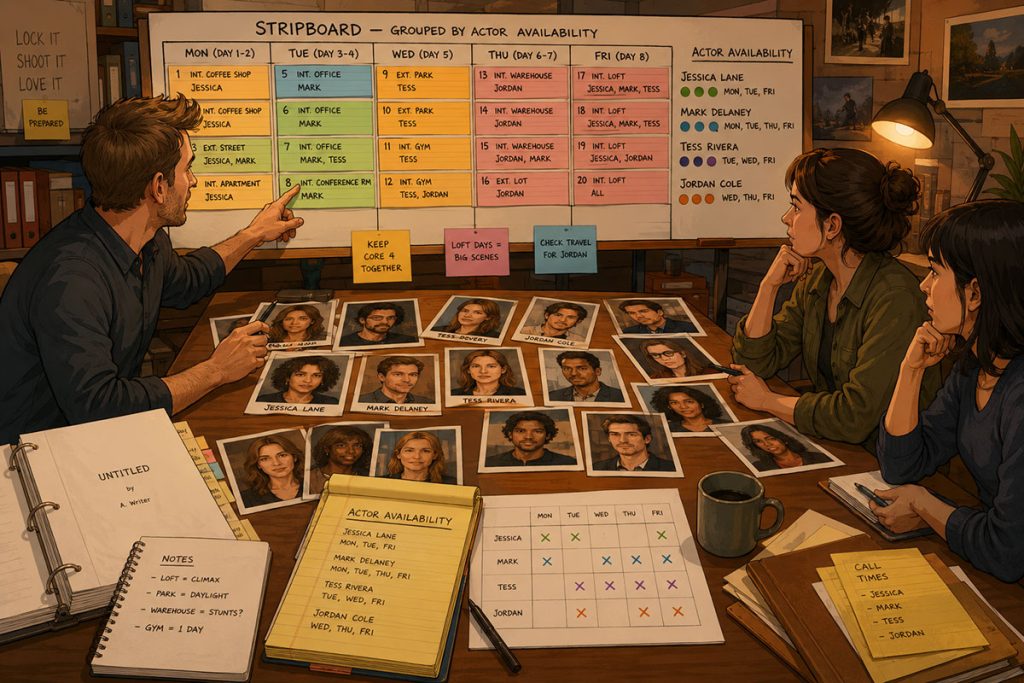
Use the Stripboard to Cluster Actor Days
Once cast requirements are known, the stripboard helps the assistant director group scenes efficiently.
Actor scheduling often involves clustering scenes so cast members work fewer scattered days. This can reduce travel, holding, scheduling conflicts, and sometimes cost.
or example, suppose a supporting actor appears in five scenes:
Scene 8
Scene 22
Scene 35
Scene 47
Scene 70
In story order, those scenes are spread throughout the script.
But if they all take place at the same office location, the assistant director may be able to schedule them on one or two shoot days.
That can be much more efficient.
When reviewing the stripboard, look for:
- Scenes featuring the same actor
- Scenes with the full principal cast
- Scenes with expensive or limited-availability actors
- Scenes with child actors
- Scenes requiring special makeup or wardrobe
- Scenes requiring background actors
- Scenes that can be grouped by location and cast
- Scenes that spread one actor across too many days
Gorilla Scheduling can display character or cast member names directly on production strips instead of only showing board IDs. This can make cast clustering easier to understand during a schedule meeting.
Instead of decoding numbers, the team can see character names at a glance.
That saves time, especially when producers, directors, and department heads are reviewing the board together.
Understand the Day Out of Days Report
The Day Out of Days report, often called a DOOD, is one of the most important tools for actor scheduling.
A DOOD shows when each actor works across the shooting schedule. It tracks patterns such as:
- Start work
- Work days
- Hold days
- Travel days
- Finish days
- Days off
- Total days worked
For producers, this report is essential because cast days can affect the budget.
For assistant directors, it is useful because it reveals whether the schedule is efficient or scattered.
For production managers, it helps track cost, travel, and logistics.
A DOOD can reveal problems such as:
A supporting actor working one day, holding three days, then working again
A guest actor spread across too many shoot weeks
A child actor scheduled on overly heavy days
A lead actor needed every day with no breathing room
A background group required across multiple nonconsecutive days
A role that could be scheduled more efficiently
If the DOOD looks inefficient, the stripboard may need to be revised.
Gorilla Scheduling can create Day Out of Days reports for cast members and other breakdown element categories. That means the DOOD workflow can be used not only for actors, but also for props, wardrobe, set dressing, background actors, visual effects, and other production elements.
For actor scheduling, the cast DOOD is the main report to watch.
It is the actor schedule translated into production logic.
Read the DOOD Before You Lock the Schedule
A common mistake is building a shooting schedule and only reviewing the DOOD afterward.
That is backwards.
The DOOD should be reviewed before the schedule is locked.
Why? Because the stripboard may look reasonable by location, but inefficient by cast.
A schedule may group all diner scenes beautifully, but if one actor is dragged across too many days because of a few scattered scenes, the DOOD will reveal it.
Review the DOOD and ask:
Are actor days grouped efficiently?
Are any actors holding unnecessarily?
Are guest actors spread across too many days?
Are child actor days realistic?
Are expensive actors clustered?
Are actors traveling for too little work?
Are major cast members given enough rest?
Are background groups scheduled efficiently?
Does the schedule create avoidable cost?
The DOOD is where the actor schedule stops being theoretical.
It shows the real work pattern.
A stripboard may whisper, “This is fine.”
The DOOD may yell, “Why is this actor here for six days to shoot two scenes?”
Listen to the DOOD.
Actor Scheduling and the Budget
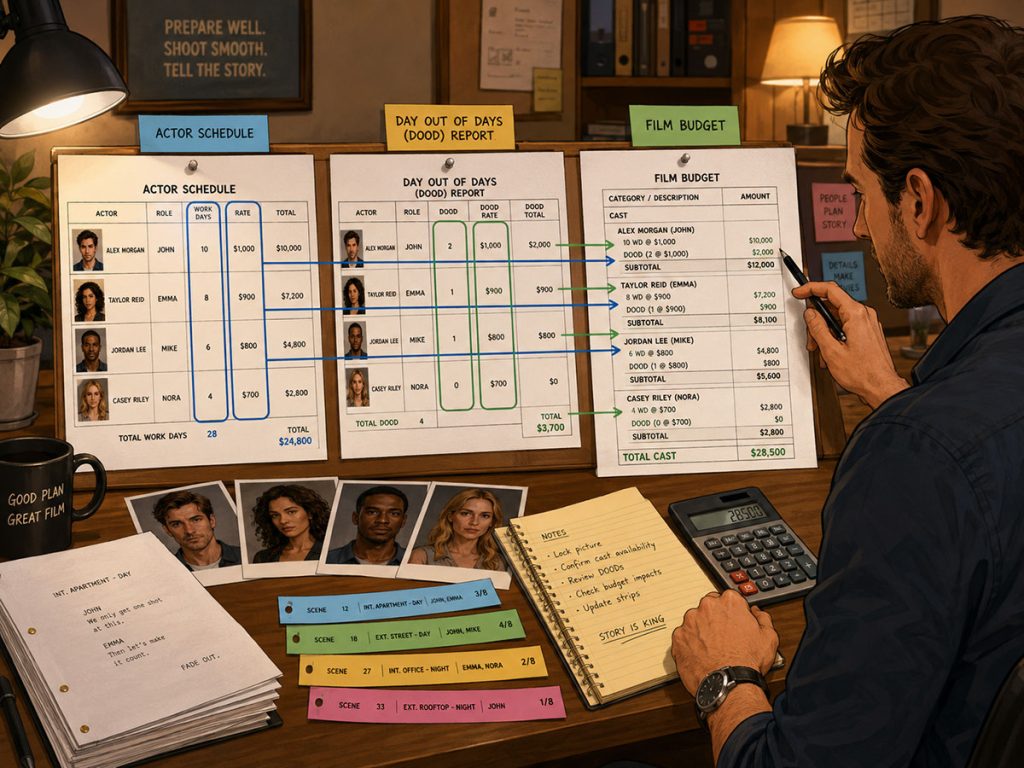
Actor scheduling directly affects the film budget.
Cast costs may be based on day rates, weekly rates, guarantees, travel days, hold days, rehearsal days, fittings, overtime, or contract terms.
If actors are scheduled inefficiently, the budget can rise.
For example:
A supporting actor scattered across five shoot days may cost more than the same scenes grouped into two days.
A guest star may become more expensive if their scenes are not clustered.
A background group may increase cost if used across too many days.
A child actor may require additional planning and shorter work windows.
An actor with special makeup may need longer call times and additional crew support.
An actor with dietary restrictions may affect catering notes and call sheet planning.
Wardrobe measurements and fitting requirements may affect prep time.
Gorilla Scheduling can store actor rate information, and those rates can be linked to Gorilla Budgeting in the cast category. This helps connect actor scheduling decisions to budget planning.
That matters because actor scheduling is not just a calendar issue.
It is a cost issue.
When schedule and budget communicate, the producer can make smarter decisions before the shoot begins.
Actor Information Helps Other Departments
Actor scheduling is not isolated to the AD department.
Actor information affects many parts of production.
Wardrobe
Wardrobe needs actor sizes, body measurements, fitting dates, costume notes, and continuity needs. If an actor appears in multiple story days, wardrobe must plan changes and repeats.
Makeup and Hair
Makeup and hair may need photos, notes, special looks, aging, wounds, prosthetics, or continuity tracking.
Transportation
Actors may need pickups, travel arrangements, parking, or location-specific transportation instructions.
Catering
Dietary restrictions should be known before the shoot day, not discovered when lunch turns into a small diplomatic incident.
Production Office
The office needs contact details, paperwork, call information, deal memos, and emergency communication paths.
Casting
Casting may need headshots, actor statistics, agent information, role assignments, and notes about who is under consideration.
Gorilla Scheduling allows actor records to include information such as headshots, actor statistics, agent details, dietary restrictions, and contact information. Actor statistics can include details such as height, weight, hair color, eye color, body measurements, and other information useful for wardrobe and casting preparation.
This is one reason actor records are more than schedule entries.
They are part of the production database.
Use Actor Headshots for Clarity
Headshots are useful because they make actor records easier to identify visually.
During casting, production meetings, or schedule reviews, a headshot can help the team quickly connect the actor to the role.
This is especially helpful when:
The production has a large cast
Multiple actors are being considered
Actors are playing multiple roles
The casting team and production team are sharing information
The director or producer needs quick visual reference
Wardrobe, makeup, or hair needs to identify performers
Gorilla Scheduling allows headshots to be imported into actor records, which can help make casting and scheduling information more readable.
A clean actor database with headshots, roles, contact information, and production notes can reduce confusion during prep.
And in casting, reducing confusion is a gift wrapped in a manila folder.
Create Actor Reports
Reports help turn actor scheduling data into useful production documents.
Common actor-related reports may include:
- Cast call report
- Casting report
- Call sheets
- Day Out of Days report
- Cast availability report
- Contact lists
- Production schedule reports
In Gorilla Scheduling, reports such as call sheets, cast call reports, and casting reports can display the actor name alongside the cast member or character name. This makes reports easier to read.
For example, instead of seeing only:
Detective Harris
The report can show:
Jordan Lee / Detective Harris
That is clearer for the production office, AD team, director, makeup, wardrobe, transportation, and anyone who needs to understand both the actor and the role.
When actor and character names appear together, the schedule becomes more human-readable.
That matters because production reports are not decorative paperwork. They are working tools.
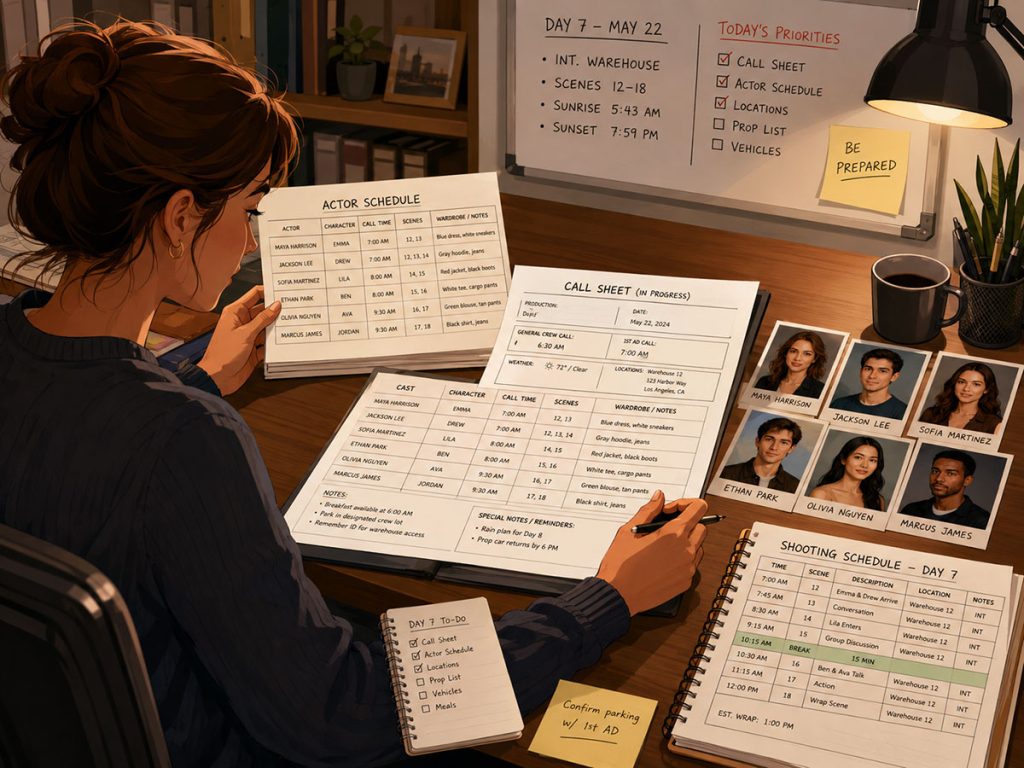
Build Call Sheets from the Actor Schedule
The call sheet depends on the shooting schedule.
Once the day’s scenes are scheduled, the call sheet tells cast and crew what is happening that day.
For actors, the call sheet usually includes:
- Actor name
- Character name
- Call time
- Scenes being shot
- Set/location
- Makeup and wardrobe notes
- Meal information
- Special instructions
- Transportation or parking notes
- Weather notes
- Contact information
- Safety notes
If actor scheduling is sloppy, call sheets become harder to build accurately.
If actors are properly attached to cast members, availability is tracked, and the shooting schedule is clean, call sheets become much easier to prepare.
A call sheet is only as good as the schedule behind it.
The actor schedule feeds the call sheet. The call sheet feeds the shoot day.
If that chain is weak, the morning starts with confusion and ends with someone asking if anyone has the actor’s phone number.
Reuse Actor Information Across Projects
Production companies, casting teams, and recurring collaborators often work with the same actors across multiple projects.
Re-entering actor information every time wastes time and invites errors.
Gorilla Scheduling allows actors to be imported from one schedule to another. This can make it much easier to bring actor information into a new schedule when working with repeat performers or an existing company talent database.
That is helpful for:
Recurring actors
Production companies with multiple projects
Casting directors maintaining actor information
Series work
Commercial production teams
Companies that regularly use the same performers
Productions with multiple related schedules
If actor records include contact information, headshots, role history, notes, and production details, importing that information into a new schedule can save prep time.
It also helps maintain consistency.
A good actor database becomes more valuable over time.
Common Mistakes When Scheduling Actors
Mistake 1: Confusing Character Names with Actor Names
The script gives you characters. Production hires actors.
Track both clearly.
Mistake 2: Waiting Too Long to Gather Availability
Actor availability should shape the schedule early, not after the stripboard is mostly locked.
Mistake 3: Scheduling by Location Only
Location grouping is important, but actor work patterns matter too. A schedule can be efficient by location and inefficient by cast.
Mistake 4: Ignoring the Day Out of Days Report
The DOOD reveals scattered work days, holds, and inefficient cast usage. Review it before locking the schedule.
Mistake 5: Not Tracking Actor Contact Information
The production office needs reliable phone, email, address, agent, and contact details. Do not let actor information live only in someone’s inbox.
Mistake 6: Forgetting Wardrobe and Dietary Details
Actor scheduling affects wardrobe fittings, meal planning, makeup, transportation, and prep. Small details become large problems when they appear on the shoot day.
Mistake 7: Not Connecting Actor Days to the Budget
Actor work days affect cast costs. If the schedule changes, the budget may need to change too.
Mistake 8: Not Updating Reports
Call sheets, cast reports, DOODs, and schedules should reflect the current actor information. Outdated reports are little paper gremlins.
Practical Workflow: How to Schedule Actors for a Film Shoot
Here is a clean actor scheduling workflow:
- Break down the script scene by scene.
- Identify every cast member or character needed in each scene.
- Create actor records for cast or potential cast.
- Attach actors to the appropriate cast members or roles.
- Enter contact information, agent details, notes, and availability.
- Add actor headshots and relevant statistics if useful for casting or wardrobe.
- Track actor rates if they affect the budget.
- Build the stripboard using cast requirements.
- Group scenes by location, cast availability, and page count.
- Review the Day Out of Days report.
- Adjust the stripboard to reduce inefficient actor days.
- Check how actor scheduling affects the budget.
- Generate cast reports, call sheets, and production schedules.
- Keep actor records updated as casting changes.
The workflow is not complicated, but it does require discipline.
Actor scheduling works best when character, actor, schedule, and budget information all speak to each other.
How Gorilla Scheduling Helps Schedule Actors
Gorilla Scheduling supports actor scheduling by helping connect the script breakdown, cast members, actor records, stripboard, reports, and call sheets.
Useful actor scheduling features include:
- Creating actors and attaching them to cast members or characters
- Storing actor contact information, including phone, email, address, and other details
- Tracking agent information and dietary restrictions
- Entering actor statistics such as height, weight, hair color, eye color, and measurements
- Importing actor headshots
- Attaching one actor to more than one character or role
- Importing actors from one schedule to another
- Displaying actor names alongside cast member names in reports
- Creating call sheets, cast call reports, casting reports, and Day Out of Days reports
- Showing character names on production strips for easier schedule review
- Linking actor rate information to Gorilla Budgeting cast categories
These features help keep actor information organized throughout pre-production.
The goal is not to turn casting into paperwork soup.
The goal is to make sure the right actor, playing the right role, with the right information, appears on the right day, at the right location, with the right call time.
That is a lot of “right.”
A good actor scheduling system helps keep it from going sideways.
Final Thoughts
Scheduling actors is one of the most important parts of film pre-production.
It begins with the script breakdown, but it does not end there. The production must connect characters to actors, track availability, cluster scenes intelligently, review Day Out of Days reports, prepare call sheets, support wardrobe and makeup, and understand how cast days affect the budget.
For a very small project, this may be simple.
For a larger production, actor scheduling needs structure.
A strong actor schedule helps the production avoid unnecessary cast days, missed availability conflicts, confusing call sheets, wardrobe surprises, and budget creep.
It also helps everyone communicate more clearly.
Because in the end, scheduling actors is not just about filling boxes on a calendar.
It is about making sure the people who bring the story to life are properly planned, prepared, and supported before the cameras roll.
Continue Learning Film Production Planning
If you’re diving deeper into production planning, understanding how stripboards connect to scheduling and budgeting is essential.
You may also find these guides helpful:
- How to Schedule a Film Shoot
- Film Budget Template (Free Guide)
- What is a Stripboard and How to Create one
- How to Write a Filmable Screenplay
- What Is a Call Sheet in Film? (Free Download)
- What Is a Crew Deal Memo (And Why It Can Save Your Production)
- Film Budget Categories Explained
- How a Shooting Schedule Impacts Your Film Budget
- What Is a Production Strip in Film Scheduling?
- How to Turn a Script Breakdown Into a Film Budget
Together, these form the foundation of an efficient, well-organized production.
Questions or Comments?
Have a question about stripboards or film scheduling? Feel free to leave a comment below — or reach out if you want to learn more about how professional tools can streamline your workflow.