

A shooting schedule can make a production feel calm, efficient, and prepared.
It can also quietly become the reason everyone is tired, late, over budget, and wondering why the company is moving across town for one-eighth of a page.
The shooting schedule is more than a list of scenes. It affects cast work days, crew hours, locations, equipment rentals, company moves, call sheets, meal planning, overtime, and the budget. When the schedule is weak, the problems do not stay in the schedule. They spread.
A bad scheduling decision rarely stays contained. One poorly grouped location can become an expensive extra location day. One missed cast conflict can force the entire week to be rebuilt. A night shoot that looks manageable on paper can drain the crew before the next call time. If the Day Out of Days report is ignored too long, unnecessary hold days can quietly creep into the budget. And when the schedule lives in disconnected spreadsheets, the wrong version can travel to the wrong people at exactly the wrong time.
The good news is that many scheduling problems are preventable.
Here are 10 common shooting schedule mistakes that cost productions time and money, along with practical ways to avoid them.
1. Scheduling in Script Order Instead of Production Order
One of the first mistakes new filmmakers make is assuming the movie should be shot in script order.
It usually should not.
Scripts are written for story flow. Shooting schedules are built for production efficiency. The order that makes emotional sense for an audience may be completely impractical for a crew.
A screenplay may move from an apartment to a car to a restaurant to a park to the same apartment again. Shooting in script order would mean returning to locations multiple times, rebuilding setups, bringing actors back unnecessarily, and wasting valuable prep.
A strong shooting schedule groups scenes based on production logic:
Location.
Set.
Cast availability.
Day or night requirements.
Page count.
Scene complexity.
Company moves.
Equipment needs.
Weather risks.
Budget impact.
That does not mean creative priorities disappear. Sometimes a director needs to shoot a scene earlier for performance reasons. Sometimes an actor’s emotional arc matters. But those decisions should be made intentionally, not because the schedule simply followed page one to the end.
How to avoid it:
Start with a script breakdown and production strips. Arrange scenes on a stripboard so you can see the production logic clearly before locking the shooting order.
Gorilla Scheduling helps filmmakers move from screenplay data into breakdowns, production strips, and stripboards, making it easier to schedule based on production needs instead of script order alone.
👉 How to Schedule a Film Shoot
2. Ignoring Location Grouping
Locations are one of the biggest scheduling drivers.
If a production has five scenes in the same location, those scenes should usually be considered together. Scattering them across the schedule can mean extra location fees, repeated company moves, more transportation time, repeated setup, and additional coordination with property owners.
Ignoring location grouping is especially dangerous on low-budget productions because every move costs time. Even a “short” company move can eat hours once you include loading, travel, parking, unloading, relighting, resetting departments, and getting everyone focused again.
Location grouping helps reduce friction.
It can also reveal opportunities. Maybe two short scenes at the same house can be shot on the same day. Maybe a day exterior and night exterior at the same location should be scheduled together with a planned turnaround. Maybe a location can be released earlier if all its scenes are completed in one block.
How to avoid it:
Use location reports and sort scenes by set and physical location before finalizing the schedule. Review whether each location is being used efficiently.
Gorilla Scheduling distinguishes between screenplay sets and physical locations, and its location records can include address, contact information, permits, photos, available days, shoot days, electrical information, holding areas, and other practical details.
👉 How to Schedule Locations for a Film Production

3. Underestimating Company Moves
A company move is never just “drive to the next place.”
It is wrap, load, transport, park, unload, reset, relight, reblock, reorient departments, and restart momentum. If the move involves a large crew, difficult parking, multiple trucks, city permits, special equipment, or a company meal, the time loss can be significant.
Many shooting schedule mistakes come from treating a company move like a line break instead of a production event.
A schedule might look reasonable on paper:
Morning scene at House.
Afternoon scene at Café.
Evening scene at Alley.
But if each location requires a full company move, the day may collapse before the final setup.
How to avoid it:
Build realistic move time into the schedule. Ask the production manager, location manager, assistant director, transportation, grip/electric, and camera department what the move actually requires.
Also ask whether the move is worth it. Sometimes the smartest scheduling choice is to remove the move entirely by grouping scenes differently.
👉 How to Read a Shooting Schedule
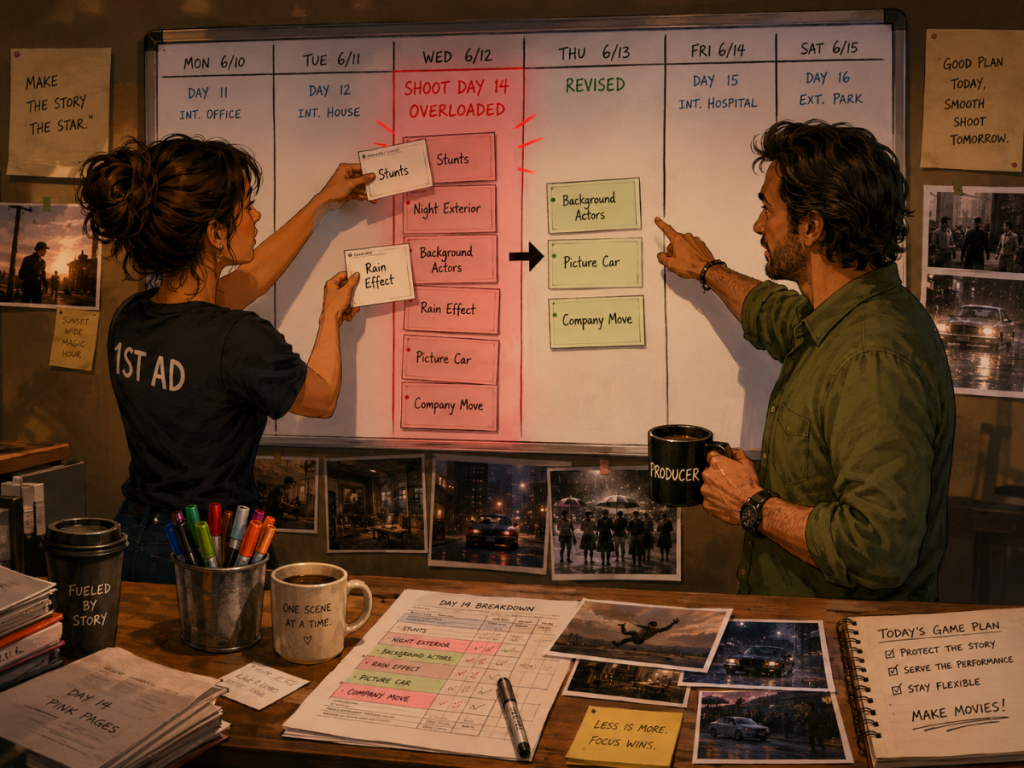
4. Stacking Too Many Difficult Scenes in One Day
Not all script pages are equal.
One page of dialogue in a kitchen is not the same as one page with rain effects, background actors, picture vehicles, stunts, animals, practical effects, and multiple company moves.
One of the most expensive shooting schedule mistakes is building days by page count alone. Page count matters, but complexity matters more.
A “five-page day” may be completely manageable if it is one controlled interior dialogue scene with a small cast and simple coverage. A “two-page day,” on the other hand, can become brutal if it involves night exterior work, stunts, multiple locations, background actors, picture vehicles, and complicated setups. When a day is overloaded, the impact spreads quickly. Crew overtime becomes more likely, safety margins get thinner, performances can suffer, departments lose prep time, coverage gets rushed, morale drops, meal penalties creep in, and the budget starts absorbing the damage. Even the next day can suffer, because a crew that finishes exhausted does not magically reset by call time.
How to avoid it:
Use the script breakdown to evaluate scene complexity before assigning scenes to shoot days. Look at cast, locations, props, wardrobe, stunts, vehicles, background actors, visual effects, and special equipment.
A strong stripboard workflow helps the assistant director and producer see which days are overloaded before the schedule reaches the crew.
👉 How to Break Down a Script for Film Production
5. Mishandling Day and Night Work
Day and night scenes are not just labels. They affect crew hours, lighting plans, location availability, actor energy, turnaround, safety, and cost.
A schedule that jumps carelessly between day and night work can create fatigue and inefficiency. Night shoots often require different planning, especially if the production must protect crew rest, manage neighborhood restrictions, coordinate lighting, or schedule exterior work around available darkness.
Mistakes include:
Scheduling night work without enough prep.
Switching between day and night too abruptly.
Forgetting crew turnaround.
Underestimating lighting time.
Planning too many night scenes in a row.
Ignoring location restrictions for night shooting.
Night work can be powerful creatively, but it should be scheduled with respect. A night exterior is not just a daytime scene wearing a darker hat.
How to avoid it:
Sort scenes by day/night and review how night work clusters across the schedule. Make sure the production has realistic lighting, turnaround, location, and safety planning.
Gorilla Scheduling allows schedules and stripboards to be organized by day/night and other criteria, helping production teams see these patterns more clearly.
👉 Film Scheduling Software: What to Look for Before You Choose
6. Forgetting Cast Availability and Hold Days
Cast scheduling can quietly become one of the most expensive parts of the production plan.
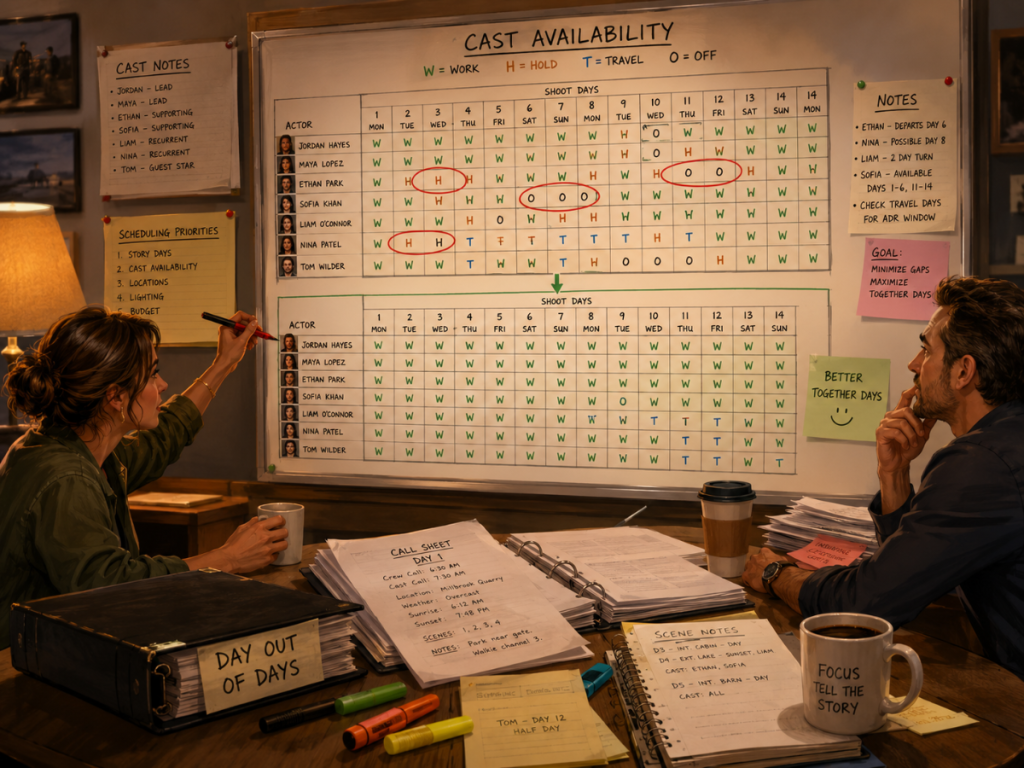
If an actor works Monday, sits idle Tuesday and Wednesday, then works Thursday, the production may still have costs connected to that gap depending on the deal, travel, lodging, or hold requirements.
A poor schedule can create unnecessary hold days, extra travel, inefficient actor work patterns, and avoidable budget pressure.
This often happens when the schedule is built scene by scene without reviewing the cast pattern across the whole shoot.
A single scene with one supporting actor may seem harmless. But if that scene forces the actor to remain available for an additional week, the cost may be larger than expected.
How to avoid it:
Review cast reports and Day Out of Days reports before locking the schedule. Look for gaps, inefficient work patterns, and opportunities to consolidate actor scenes.
Gorilla Scheduling can create Day Out of Days reports for cast, helping producers and assistant directors see work patterns and reduce unnecessary scheduling waste.
👉 How to Schedule Actors for a Film Shoot
7. Waiting Too Long to Use a Day Out of Days Report
The Day Out of Days report is sometimes treated like a final paperwork step. That is a mistake.
A DOOD should be used while the schedule is being built, not only after the schedule is finished. It helps reveal cast work patterns, hold days, travel days, and possible inefficiencies early enough to fix them.
The DOOD can also help track breakdown elements across the shoot. Props, costumes, vehicles, background actors, visual effects, and set dressing may all have scheduling patterns that affect cost and prep.
If the schedule is locked before anyone reviews those patterns, the production may miss opportunities to save time and money.
How to avoid it:
Generate DOOD reports during schedule development. Review them with the producer, assistant director, production manager, and budget team before final approval.
Gorilla Scheduling can create DOOD reports for cast and other breakdown element categories. When linked with Gorilla Budgeting, DOOD totals can help inform budget line day counts.
👉 What is a Day out of Days (DOOD) Report?
8. Ignoring the Budget Impact of Schedule Changes
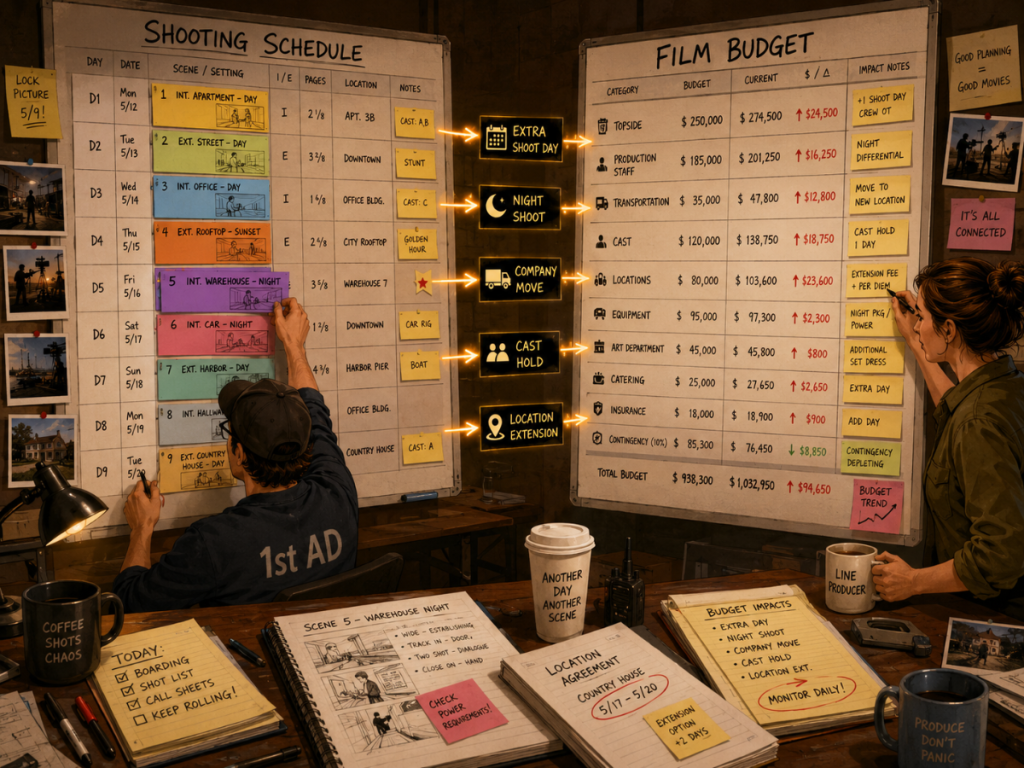
Every schedule decision has a cost shadow.
Add a shoot day, and the budget changes.
Move scenes to night, and costs may change.
Add a company move, and transportation or crew time may change.
Spread out cast days, and actor costs may change.
Add location days, and location fees may change.
Delay a scene with specialty equipment, and rental days may change.
One of the biggest shooting schedule mistakes is treating the schedule and budget as separate documents.
They are connected. Very connected. Siamese-twins-connected, but with clipboards.
A scheduling decision that looks harmless to the assistant director may be expensive to the producer. A budget assumption that looks reasonable in early planning may break once the schedule becomes more detailed.
How to avoid it:
Review schedule changes through a budget lens. Whenever the schedule changes, ask what changes financially.
Gorilla Scheduling can link with Gorilla Budgeting so schedule data can help inform the budget. Gorilla Budgeting can import cast, crew, locations, breakdown elements, rates when available, and DOOD totals into budget line day counts.
👉 How to Turn a Script Breakdown Into a Film Budget
9. Building the Schedule in Disconnected Spreadsheets
Spreadsheets are useful. They can help with early planning, small projects, and simple lists.
But a shooting schedule built entirely in disconnected spreadsheets can become fragile as the production grows. At first, the system may feel simple enough: one file for the schedule, another for cast, another for locations, another for call sheets, and maybe a few budget notes somewhere else. Then the revisions begin.
One person updates the schedule, another copies an older version into a call sheet, and someone else builds a report from totals that no longer match the latest breakdown. A formula breaks quietly. A scene number changes in one file but not another. Budget numbers stay tied to yesterday’s plan while the shooting schedule has already moved on.
That is when the spreadsheet stops feeling flexible and starts feeling like a filing cabinet with trapdoors.
The issue is not that spreadsheets are bad. The issue is that professional scheduling requires connected information.
A schedule is not only a table. It is a system of scenes, strips, cast, locations, page counts, day breaks, DOODs, reports, and call sheets.
If each piece lives in a separate file, the production team spends more time checking versions than making decisions.
How to avoid it:
Use spreadsheets where they make sense, but consider dedicated film scheduling software when the project requires a professional schedule, stripboard, reports, DOODs, and call sheet connections.Gorilla Scheduling is built for film scheduling workflows, including script breakdowns, production strips, stripboards, scheduling reports, DOODs, actor records, location records, and connections to Gorilla Budgeting and Koala Call Sheets.
👉 Film Scheduling Software vs Spreadsheets
10. Treating the Call Sheet as Separate From the Schedule
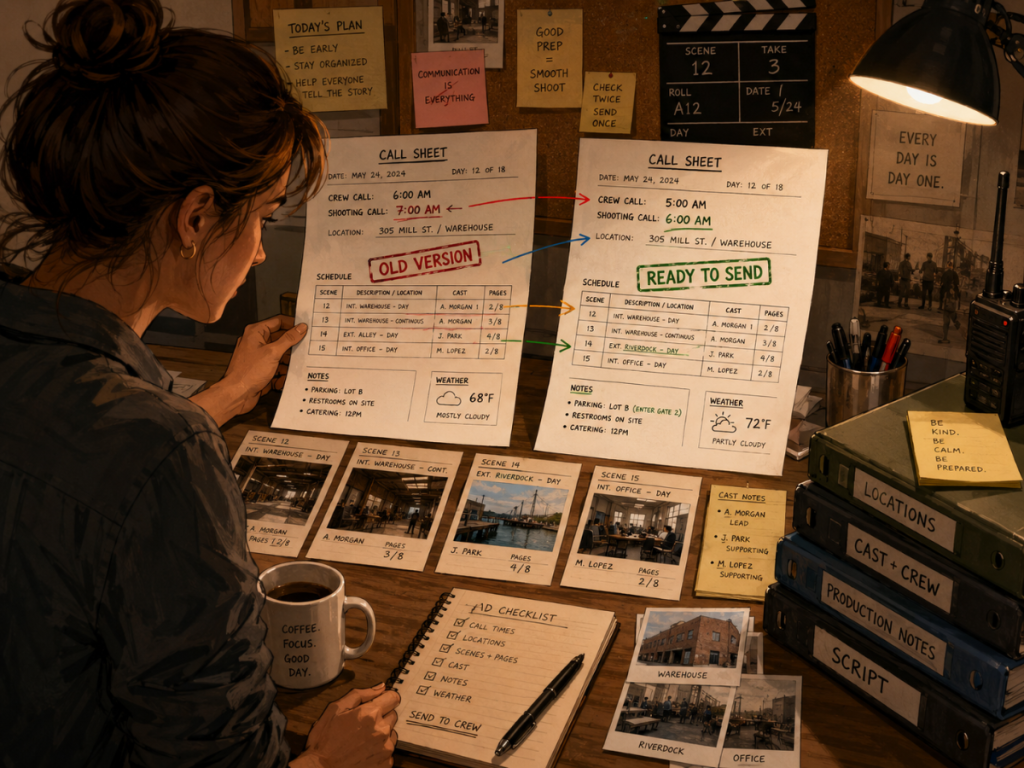
The call sheet is the daily expression of the shooting schedule, so even a small mismatch can ripple through the entire day. If the schedule changes but the call sheet is built from old information, the production may end up working from yesterday’s plan without realizing it.
A scene may have moved, a location may have changed, or a cast member may no longer be needed at the original call time. A day scene may have become a night scene, or a department may be preparing for the wrong setup. What looks like a simple paperwork error can quickly become a real production problem, sending people to the wrong place, delaying the first shot, confusing departments, or even creating safety issues.
This mistake often happens when the call sheet process is disconnected from the schedule. Someone copies information from a PDF, spreadsheet, or old version, then manually rebuilds the daily plan.
Manual call sheet creation can work, but it requires careful review. The more complex the shoot, the more valuable it becomes to connect call sheets to the schedule.
How to avoid it:
Build call sheets from current schedule information whenever possible. Review schedule revisions before distributing call sheets.
Koala Call Sheets can generate call sheets from Gorilla schedules, helping reduce duplicate entry and keep daily production information connected to the schedule.
👉 What Is a Call Sheet in Film?
How to Build a Better Shooting Schedule
Avoiding mistakes is only half the job. The stronger goal is to build a schedule that can survive real production pressure.
A better shooting schedule usually starts with a stronger breakdown. The assistant director and producer need to understand what each scene requires before assigning it to a shoot day.
From there, the production can use a stripboard to organize scenes by location, set, cast, day/night, page count, and complexity. The schedule can then be reviewed through reports such as one-liners, DOODs, cast reports, location reports, and schedule summaries.
The best schedules are not just efficient. They are understandable.
A producer should be able to see the budget logic.
A director should be able to see the creative flow.
A production manager should be able to see the logistics.
Department heads should be able to see what is coming.
Cast and crew should receive clear call sheets.
When the schedule becomes a shared source of truth, the production has a better chance of making the day.
Where Gorilla Scheduling Fits
Gorilla Scheduling is designed to help filmmakers avoid many of the scheduling problems that appear when scenes, strips, reports, cast, locations, and budgets are managed separately.
It supports screenplay import, script breakdowns, tagging, production strips, stripboards, shooting schedules, Day Out of Days reports, actor records, location records, and scheduling reports.
Its stripboard tools allow filmmakers to organize and sort scenes by practical production criteria such as set, location, day/night, and more. Gorilla Scheduling also supports horizontal or vertical stripboards, customizable board layouts, multiple boards, banners, split-screen views, a boneyard for sidelined strips, and Excel backups.
When connected with Gorilla Budgeting, schedule information can help inform the budget. With Koala Call Sheets, schedules can also support daily call sheet creation.
For productions that need more than a simple list of scenes, a connected scheduling workflow can help reduce errors, save time, and make the plan easier to manage.
Want to build stronger shooting schedules with professional stripboards, breakdowns, DOOD reports, actor and location records, and scheduling reports?
Explore Gorilla Scheduling from Jungle Software:
You can also explore:
Gorilla Budgeting
https://junglesoftware.com/gorilla-budgeting/
Koala Call Sheets
https://junglesoftware.com/koala/
Final Takeaway
Most shooting schedule mistakes come from the same root problem: the schedule is treated as a list instead of a production system.
A strong schedule must consider location grouping, cast availability, company moves, night work, scene complexity, DOOD reports, budget impact, and call sheet accuracy.
The schedule touches everything.
It affects the crew’s time, the producer’s budget, the director’s coverage, the actor’s availability, the location plan, and the daily call sheet.
A better shooting schedule will not remove every production problem. Filmmaking will always find a way to throw a chair into the gears.
But a strong schedule gives the team a clearer plan, fewer surprises, and a better chance of finishing the day without setting fire to the coffee cart.
Questions or Comments?
Have a question about stripboards or film scheduling? Feel free to leave a comment below — or reach out if you want to learn more about how professional tools can streamline your workflow.