

A film budget is not just a number. It is a living map of the production’s financial choices.
At the beginning of prep, the budget tells you what the movie is expected to cost. During production, it tells you where money is going. By the time the shoot is underway, the budget can reveal whether the production is still on course, drifting slightly, or quietly sailing toward the rocks with a polite smile and a clipboard.
That is where film budget reports matter.
Budget reports help producers, line producers, production managers, and department heads understand the financial shape of a production without digging through every individual line item. A good report can answer practical questions quickly: What is the total budget? Which accounts are heavy? What has already been spent? What is left? Are fringes calculated correctly? Are currency costs being handled clearly? Which budget version are we actually using?
In professional film budgeting, reports are not decorative paperwork. They are decision tools. They help a production decide whether to add a shooting day, reduce a company move, approve a special effect, defer a cost, change a location, or rethink a department’s allocation before the damage gets expensive.
This guide explains the key film budget reports every producer should understand, how they work together, and how they support real production decisions from prep through wrap.
What Are Film Budget Reports?
Film budget reports are organized views of the production budget. Instead of looking at the entire budget as one massive document, reports let you view the budget from different angles.
One report may show the entire budget on a single page. Another may break down account totals. Another may show every detail line. Another may compare budgeted amounts against actual expenses. Another may isolate fringes, globals, currency, credits, or remaining balances.
The budget itself is the master document. The reports are the lenses.
For example, a producer may begin with the Budget Topsheet to understand the overall financial picture. A line producer may move into the Account Level Report to see which departments are driving the cost. A production accountant may use a Tracking Expenses Report or Budget Balance Report to compare actual spending against the approved budget. A production manager may need a Detail Report to understand what is inside a specific account before approving a change.
The same budget can tell many stories. Reports help you hear the right one at the right moment.
👉 Film Budget Template (Free Guide + How to Build Your Budget)
Why Budget Reports Matter in Film Production
Film production budgets are built before all the facts are known. That is part of the strange sport of producing.
You may not yet have locked locations, final cast availability, weather concerns, union requirements, travel needs, company moves, overtime risk, visual effects complexity, post-production choices, or delivery requirements. The budget is created from the best available information, then revised as reality starts knocking on the stage door.
Budget reports help keep that process visible.
Without clear reports, the budget becomes a maze. Someone may know the total number, but not why the number changed. Someone may know that the art department is over, but not which line caused it. Someone may know expenses were entered, but not how they compare to the account budget. Decisions begin to rely on memory, instinct, or spreadsheet archaeology.
That is dangerous because production decisions are connected. A schedule change can affect location fees, cast days, crew labor, rentals, transportation, hotel nights, meals, fringes, and contingency. A budget report does not solve every problem, but it shows the consequences clearly enough for the team to make an informed call.
A well-built reporting workflow gives producers a financial dashboard instead of a pile of receipts wearing a trench coat.
The Budget Topsheet
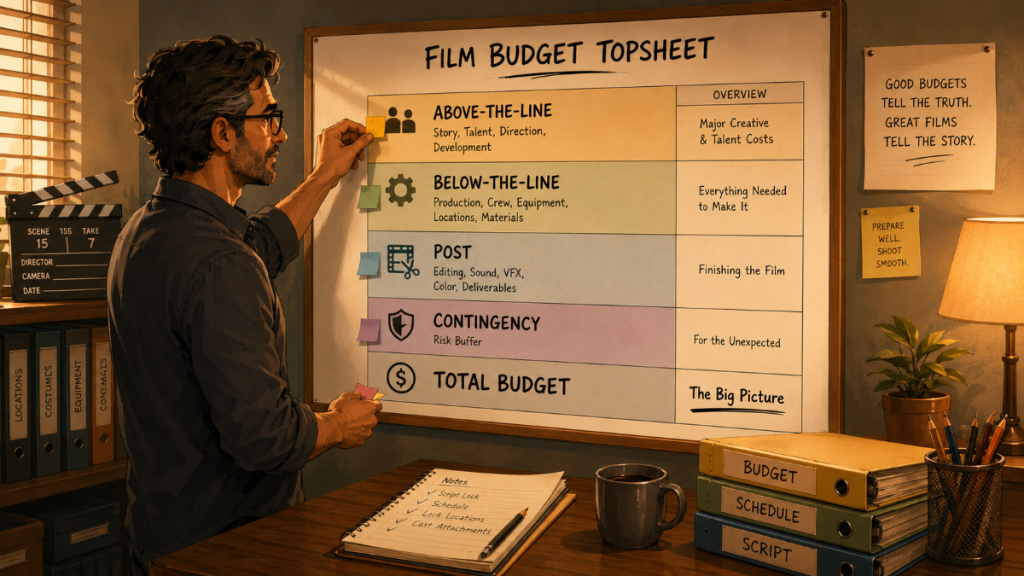
The Budget Topsheet is the big-picture report. It summarizes the major sections of the budget so producers can see the overall cost structure without reviewing every account or detail line.
In a professional film budget, the topsheet usually groups costs into major categories such as above-the-line, below-the-line, post-production, insurance, completion costs, contingency, and other major areas depending on the budget format. The exact structure can vary by template, studio requirement, financing arrangement, or production type.
The value of the topsheet is speed. It answers the first questions producers usually ask:
What is the total budget?
How much is above-the-line?
How much is below-the-line?
Where are the largest cost centers?
How much contingency is included?
Does the overall budget match the creative and logistical scale of the film?
The topsheet is especially important when comparing versions of a budget. If one version assumes a 20-day shoot and another assumes a 24-day shoot, the topsheet helps show the overall financial effect. If a producer is deciding whether to shoot locally or travel, the topsheet can reveal how much the entire budget shifts once transportation, housing, per diem, location costs, and labor changes are included.
In Gorilla Budgeting, the professional budget structure begins with the Topsheet, then moves into Account and Detail levels. That three-level structure is important because it lets the topsheet remain clean while still allowing the production team to drill deeper when needed.
The topsheet should be readable, not overloaded. Its job is not to explain every cost. Its job is to show the shape of the mountain before the team starts climbing.
👉 How a Shooting Schedule Impacts Your Film Budget (And Vice Versa)

The Account Level Report
The Account Level Report shows the budget at the account level. If the topsheet gives you the big financial landscape, the account report brings you closer to the road.
Accounts are the structured categories inside the budget. They might include director, cast, extras, production staff, camera, grip, electric, sound, locations, transportation, wardrobe, art department, set operations, post-production, and many others depending on the template.
This report helps producers and production managers see how money is distributed across departments and cost categories. It is useful because many budget conversations happen at the account level.
A producer may not need to know every wardrobe receipt during a meeting, but they may need to know whether wardrobe as an account is within range. A department head may ask whether there is room for an added rental or purchase. A line producer may need to quickly identify whether the cost pressure is coming from crew, equipment, locations, post, or cast-related expenses.The Account Level Report is also useful for approvals. Before a production approves a new cost, the team can look at the account and ask whether there is room inside that category or whether the budget needs to be revised.The Account Level Report is also useful for approvals. Before a production approves a new cost, the team can look at the account and ask whether there is room inside that category or whether the budget needs to be revised.
In Gorilla Budgeting, the accounting module is attached to the Account level, which makes this view especially important. When expenses are tracked against budgeted accounts, the account becomes more than a static category. It becomes a financial checkpoint.
A good Account Level Report helps the team avoid the classic production trap: the total budget looks fine until you discover that one department is eating the furniture.
The Detail Report
The Detail Report is where the budget becomes specific.
This report shows the individual detail lines inside accounts. These are the actual items, rates, quantities, days, units, fringes, currencies, notes, or calculations that build the account totals.
If the Account Level Report tells you that camera costs are high, the Detail Report tells you why. Maybe the camera package rental is expensive. Maybe extra shoot days increased the number of rental weeks. Maybe a specialty lens package was added. Maybe the crew rate changed. Maybe the production imported more detailed cost assumptions from another source.
The Detail Report is one of the most useful reports for line producers, production managers, and department-level conversations because it shows the assumptions behind the numbers.
Budget details often include rate, quantity, units, days, weeks, percentages, flat costs, deferments, in-kind donations, or other production-specific entries. A Detail Report helps the team see whether the budget reflects the actual plan or an old assumption that should have been revised three versions ago.
In Gorilla Budgeting, the standard structure moves from Topsheet to Account to Detail, and there is also an optional fourth level that allows Excel files to be imported as additional detail under an account. That can be useful when a department or producer has a more complex sub-budget that needs to live beneath a main account without turning the main budget into a swamp of tiny rows.
The Detail Report is not always the first report a producer reads, but it is often the report that settles arguments. When someone asks, “Why is that number so high?” the answer usually lives in the detail.
👉 Film Budget Categories Explained
The Tracking Expenses Report
A budget is a plan. Expenses are what actually happened.
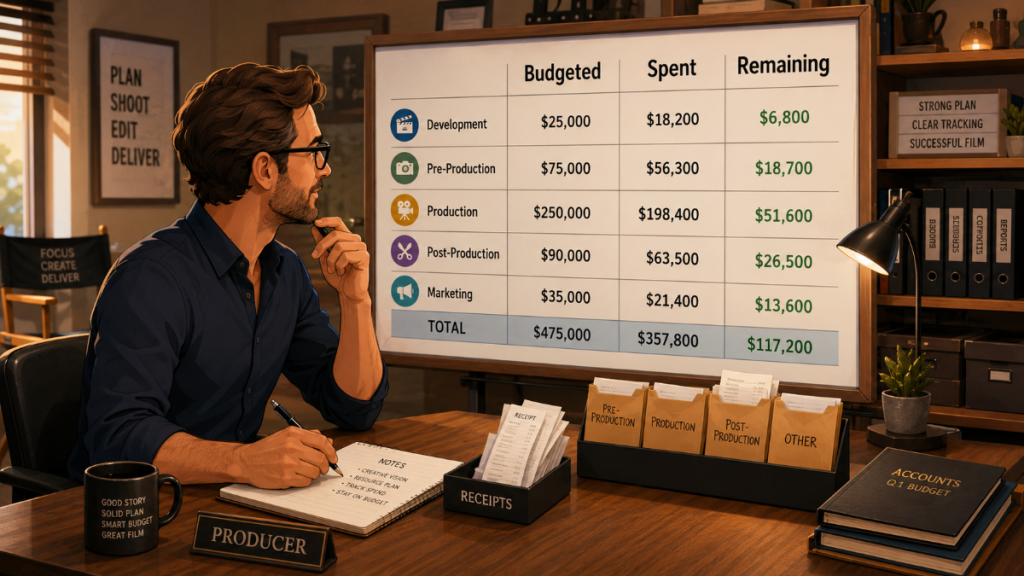
The Tracking Expenses Report helps production teams compare the intended budget against recorded spending. This is where the budget begins to shift from planning document to management tool.
During production, costs arrive from many directions: purchase orders, invoices, petty cash, credit cards, payroll, rentals, mileage, location fees, kit fees, meals, travel, art department purchases, wardrobe returns, expendables, post-production deposits, and a long parade of financial goblins with staplers.
If expenses are not tracked clearly, the budget can become misleading. A department may appear fine because costs have not been entered yet. Another account may look over budget because expenses were assigned incorrectly. A producer may think there is money left when the committed costs are already spoken for.
A Tracking Expenses Report helps show what has been entered and where it has been applied. It allows the production team to review spending by account and understand how actual costs are moving through the budget.
In Gorilla Budgeting, the accounting module can track expenses against budgeted accounts. That connection is important because it keeps spending tied to the budget structure instead of floating separately in a disconnected spreadsheet.
This report is especially valuable during production meetings, cost reviews, and wrap preparation. It helps answer not only “What did we budget?” but “What have we actually spent?”
👉 Film Budgeting Software: What to Look for Before You Choose
The Budget Balance Report
The Budget Balance Report is one of the most practical financial reports for active production management.
It compares the budgeted amount, recorded expenses, and remaining balance. In plain producer language, it helps answer:
What did we plan to spend?
What have we spent so far?
What is left?
This is where financial decision-making becomes clearer. If an account has a healthy remaining balance, the team may have flexibility. If an account is nearly exhausted, the production may need to slow approvals, reassign costs, reduce future spending, or revise the budget. If an account is over budget, the team needs to know whether the overage is temporary, structural, or caused by misallocated expenses.
The Budget Balance Report is useful because it turns the budget into a live comparison. Producers are rarely managing only the original plan. They are managing the relationship between the plan, the current spending, the schedule, and the remaining work.
For example, if the locations account is already strained halfway through the shoot, the team may need to revisit upcoming location days. If transportation costs are climbing, the schedule may be creating more moves than expected. If cast costs are rising, actor availability, overtime, travel, or additional work days may be affecting the budget.
In Gorilla Budgeting, the Budget Balance Report compares budgeted amount, expenses, and remaining balance. When used with account-level expense tracking, it gives the production team a clean view of where the budget stands.
This report often becomes the producer’s early-warning system. It does not shout. It simply points at the numbers and raises one eyebrow.
👉 Movie Magic Budgeting Alternative
The Globals Report
Globals are reusable values that can drive calculations throughout a budget.
A global might represent a standard rate, percentage, day count, week count, allowance, or other value used in multiple places. Instead of manually changing the same assumption throughout the budget, a global allows the production team to update the value once and have related calculations follow.
The Globals Report is important because it shows which global values are being used in the budget. This helps producers and production managers understand the assumptions behind repeated calculations.
For example, a production might use globals for shoot days, prep weeks, wrap weeks, mileage rates, per diem amounts, kit fees, payroll-related assumptions, or other repeated budget values. If one of those assumptions changes, the financial effect can ripple across the budget.
The danger with globals is that they are powerful enough to create quiet chaos if no one remembers what they control. A Globals Report gives the team a way to review those values and confirm that they still match the production plan.
In Gorilla Budgeting, globals can be used to simplify and standardize budget calculations. The Globals Report helps keep those assumptions visible.
A good global is like a well-labeled light switch. Everyone should know what turns on before someone flips it.
The Fringes Report
Fringes are additional costs attached to labor or other budget lines. They may include percentage-based charges, flat-rate charges, payroll-related costs, union-related costs, taxes, insurance, pension and health, workers’ compensation, or other production-specific add-ons depending on the budget and jurisdiction.
The Fringes Report helps producers understand how those additional costs are being calculated and applied.
This matters because fringes can significantly affect the true cost of labor. A crew member’s base rate is not always the full cost to the production. Depending on the project, fringes may add a meaningful percentage or flat amount. If those costs are missing, incorrect, or inconsistently applied, the budget may look healthier than it really is.
In Gorilla Budgeting, fringes can be percentage-based or flat-rate. That flexibility matters because not every fringe behaves the same way. Some are calculated as a percentage of a line item. Others may be fixed amounts. Some may apply only to specific categories or labor types.
The Fringes Report helps the team review fringe setup and understand how those costs affect the overall budget.
Fringes are not the glamorous part of filmmaking. Nobody frames the payroll burden and hangs it over the fireplace. But if fringes are wrong, the budget can be wrong in a very real way.
The Currency Report
Many productions spend money in more than one currency. A film may shoot in one country, post in another, hire vendors internationally, book travel, pay foreign locations, or work with multiple production entities.
The Currency Report helps identify and organize line items that use different currencies.
This is important because currency can affect both clarity and risk. A cost may appear reasonable in one currency but translate differently into the production’s base currency. Exchange rates may change. Department heads may submit numbers in local currency. Producers may need to understand which costs are exposed to currency changes.
In Gorilla Budgeting, multiple currency support allows productions to specify different currencies per line item. That makes the Currency Report useful for reviewing which parts of the budget are tied to which currencies.
For international productions, this report can help producers and production managers avoid confusion when comparing costs. It can also help during financing conversations, cash flow planning, or vendor review.
Currency issues often begin as tiny symbols next to numbers. Then, if ignored, they grow teeth.
The Credits Report
The Credits Report helps organize credit-related information connected to the budget.
In some productions, credits may be tied to contract terms, deferred compensation, in-kind contributions, producing arrangements, department roles, or negotiated obligations. A clean credits report can help the production team keep track of who is associated with which credit designation and where that information belongs in the production workflow.
Film credits may not seem like a budget issue at first glance, but they often connect to deal terms, agreements, compensation structures, and production records. If a credit is promised, deferred, exchanged, or negotiated as part of a deal, it should be tracked clearly.
Gorilla Budgeting includes film credits as part of its budgeting feature set, and the Credits Report gives the team a way to review that information in a structured format.
Credits are emotional currency as well as contractual information. Treat them casually and they become sparks in dry grass. Track them cleanly and they stay part of the production record.
Budget Comparison and Budget Sets
Many productions do not live with only one budget version.
There may be an early development budget, a financing budget, a director’s preferred version, a reduced version, a union version, a non-union version, a local shoot version, a travel version, or a version built around a shorter schedule. Producers often need to compare these possibilities before locking the final plan.
Budget comparison is useful because small creative or scheduling changes can have large financial consequences. Adding shoot days, changing locations, increasing cast work days, extending rentals, or shifting post-production assumptions can change the budget in ways that are easier to understand when versions are separated and compared.
Gorilla Budgeting includes budget sets and budget groups, which can help organize different versions or groupings within a budgeting workflow. Used thoughtfully, budget sets can help producers evaluate options without destroying the main working budget.
This is especially useful when the team is still shaping the production plan. A budget is not always a single answer. Sometimes it is a set of possible roads, each with its own toll booth.
👉 Film Budgeting Software vs Spreadsheets
Schedule-Linked Budget Reports
Film budgets and film schedules are deeply connected. A schedule determines how many days cast members work, how long locations are needed, how long equipment is rented, how many crew days are required, and how much time the production spends moving between setups.
That is why schedule-linked budgeting can be so valuable.

When budgeting and scheduling are disconnected, the team may have to manually transfer cast days, location days, breakdown elements, crew needs, and other information into the budget. Manual transfer creates room for missed updates. If the schedule changes but the budget does not, the production may be making decisions from outdated numbers.
Gorilla Scheduling can link to Gorilla Budgeting, allowing budget data to be built from scheduling information. Gorilla Budgeting can import linked scheduling data such as cast, crew, locations, and breakdown elements. It can also import rates from Gorilla Scheduling into budget detail lines when available, and import DOOD totals into budget line day counts.
That connection matters because Day Out of Days totals can directly affect cast costs, crew planning, travel needs, and other budget assumptions. If a character works more days than expected, or if a location requires additional shoot days, the budget should reflect that reality.
Schedule-linked reporting helps turn the budget into a more accurate picture of the production plan, not just a separate financial document sitting in another room wearing headphones.
How Producers Should Read Budget Reports Together
No single budget report tells the whole story.
The Topsheet shows the big picture. The Account Level Report shows department and category totals. The Detail Report explains the line-item assumptions. The Tracking Expenses Report shows recorded spending. The Budget Balance Report shows what remains. The Globals, Fringes, Currency, and Credits reports reveal specialized assumptions that can affect accuracy and decision-making.
A producer should move between these reports depending on the question.
If the question is, “Can we afford this version of the movie?” start with the Topsheet.
If the question is, “Which department is driving the increase?” move to the Account Level Report.
If the question is, “Why did that account go up?” review the Detail Report.
If the question is, “What have we actually spent?” check the Tracking Expenses Report.
If the question is, “How much is left?” use the Budget Balance Report.
If the question is, “Are our assumptions correct?” review Globals, Fringes, Currency, and other specialized reports.
The strongest budgeting workflow does not treat reports as paperwork at the end of the process. It uses them throughout prep and production as working instruments. The reports become a conversation between the creative plan and the financial reality.
That conversation is where producing actually happens.
Film Budget Reports and Real Production Decisions
The best budget reports support decisions before they become emergencies.
A producer may use the reports to decide whether to reduce a location move. A line producer may use them to evaluate whether another shooting day is cheaper than forcing too much overtime into the current schedule. A production manager may use them to identify which accounts can absorb a change and which cannot. A department head may use detail-level information to understand what was actually approved.
Budget reports also make communication cleaner. Instead of debating vague impressions, the team can look at the same report and discuss the same numbers.
This is especially important on independent productions, where money is often tight and decisions must be made quickly. A clear Budget Balance Report can prevent overcommitting. A strong Detail Report can reveal an outdated assumption. A Fringes Report can catch missing labor costs. A Currency Report can clarify international expenses before they become a surprise.
Reports do not replace judgment. They sharpen it.
Using Gorilla Budgeting for Film Budget Reports
Gorilla Budgeting is designed around professional film budgeting workflows, with a three-level structure that moves from Topsheet to Account to Detail. That structure gives producers a clear big-picture view while still allowing line producers and production managers to drill into the details behind each number.
For productions that need more depth, Gorilla Budgeting can also support an optional fourth level by importing Excel files as fourth-level detail under an account. This is useful when departments or producers need to preserve more detailed supporting calculations while keeping the main budget organized.
Gorilla Budgeting includes reports such as the Topsheet, Account Level Report, Detail Report, Tracking Expenses Report, Budget Balance Report, Globals Report, Fringes Report, Currency Report, and Credits Report. It also includes features such as fringes, globals, contingency, budget groups, budget sets, budget locations, in-kind donations, blocked and deferred line items, hidden sections, Excel import, multiple currencies, and film credits.
For productions using Gorilla Scheduling, Gorilla Budgeting can import linked scheduling information, including cast, crew, locations, breakdown elements, rates when available, and DOOD totals into budget line day counts. The Gorilla Ratebook add-on can also provide access to thousands of industry labor rates, including SAG, DGA, Local 600, Basic Crafts, WGA, Canada, Commercials, Area Standards, and other rate categories.
The goal is not simply to create a budget. The goal is to understand the budget well enough to make better production decisions.
Final Thoughts: Budget Reports Turn Numbers Into Producing Tools
Film budget reports are not just accounting documents. They are part of the production’s decision-making system.
A budget tells you what the film is expected to cost. Reports help you understand why, where, how, and what has changed.
The Budget Topsheet gives producers the overview. The Account Level Report shows the structure. The Detail Report explains the assumptions. The Tracking Expenses Report shows what has happened. The Budget Balance Report shows what remains. The Globals, Fringes, Currency, and Credits reports help protect the budget from hidden errors and misunderstood details.
For producers, line producers, and production managers, these reports are the financial instruments that keep the production honest. They help turn a budget from a static document into a working production tool.
Because in filmmaking, the numbers are never just numbers. They are locations, shoot days, cast availability, crew hours, weather risks, creative choices, and the quiet machinery that makes the movie possible.
Explore Gorilla
Professional film budgeting is easier when your budget structure, reports, expenses, and schedule data work together.
Explore Gorilla Budgeting to build professional film budgets with Topsheet, Account, Detail, expense tracking, budget balance reports, globals, fringes, multiple currencies, film credits, budget sets, and linked scheduling imports.
Explore Gorilla Scheduling to create breakdowns, production strips, stripboards, Day Out of Days reports, and scheduling reports that can connect directly to budgeting workflows.
Explore Koala Call Sheets when you are ready to turn your production schedule into call sheets for the cast and crew.
Explore Breakdown Assistant AI if you want AI-assisted script breakdown tools for identifying production elements during the breakdown process.