
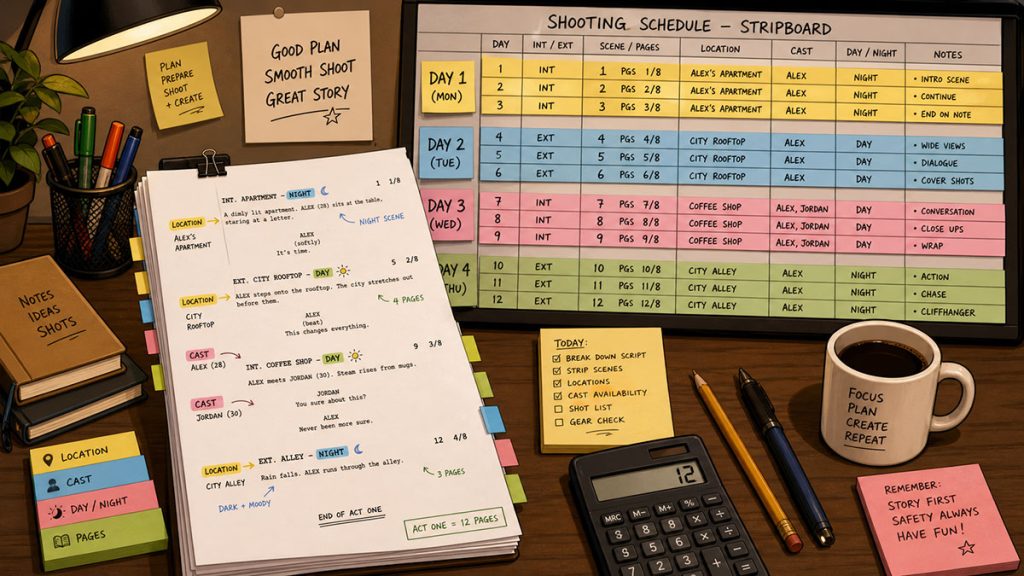
A screenplay can look deceptively simple on the page.
Two people talk in a kitchen.
A detective walks into a warehouse.
A car pulls up outside a motel.
A character runs through the rain.
On paper, those moments may only take a few lines.
On set, they can become half a day, a full day, or a tiny production goblin that eats the schedule while everyone pretends the coffee is helping.
That is why estimating shooting days from a screenplay is one of the most important steps in pre-production.
Before a producer can build a realistic budget, before an assistant director can create a shooting schedule, before a filmmaker can promise investors that the movie can be made in 12 days, 18 days, or 25 days, the team has to answer one basic question:
How many days will this script actually take to shoot?
The answer is never based on page count alone.
Page count matters, but so do locations, cast, company moves, night scenes, stunts, children, animals, vehicles, weather, special effects, visual effects, camera complexity, and the production style of the film.
A contained dialogue scene might allow a crew to shoot several pages in one day. A short action scene might take an entire day or more. A single eighth of a page can become expensive if it involves a stunt, rain effect, period wardrobe, extras, traffic control, or a difficult location.
In this guide, we will walk through how to estimate shooting days from a screenplay in a practical, production-minded way.
Why Estimating Shooting Days Matters
Estimating shooting days is not just a scheduling exercise.
It affects nearly every major production decision.
The number of shooting days influences:
- Cast costs
- Crew costs
- Equipment rentals
- Location fees
- Transportation
- Catering
- Production office costs
- Insurance
- Permits
- Overtime risk
- Travel and lodging
- Post-production planning
- Overall budget
A 10-day shoot and a 20-day shoot are not simply different lengths. They are different production realities.
A shorter schedule may reduce weekly costs but increase pressure on the crew, actors, director, and assistant director. A longer schedule may give the production more breathing room, but it may increase labor, equipment, location, and support costs.
The goal is not automatically to shoot as fast as possible.
The goal is to estimate a schedule that is realistic, efficient, safe, and appropriate for the script.
A rushed schedule can damage performances, create overtime, reduce coverage, and force compromises the director may regret in the edit. An overly long schedule can drain the budget and make the production harder to finance.
The right number of shooting days lives somewhere between panic and fantasy.
Start with the Page Count, But Do Not Stop There
A common starting point is the total number of script pages.
In standard screenplay formatting, one page often approximates one minute of screen time. That does not mean one page equals one day of shooting. It only gives the team an early sense of the project’s size.
Many productions begin by asking:
How many total pages are in the script?
How many pages can we reasonably shoot per day?
How complex are those pages?
What kind of film are we making?
What level of coverage does the director need?
How experienced is the crew?
How many locations and company moves are involved?
A small contained drama may shoot more pages per day than a stunt-heavy action film. A simple dialogue scene in one room may move quickly. A scene with complex blocking, children, animals, visual effects, or vehicles may move slowly.
For a rough early estimate, producers often think in terms of average pages per day.
A very rough indie production might estimate:
3 to 5 pages per day for many dialogue-driven films.
1 to 3 pages per day for more complex scenes or ambitious visual work.
5 or more pages per day for very contained, simple material with limited coverage.
These are not rules. They are starting points.
A script with 90 pages at 5 pages per day might suggest an 18-day shoot.
But if that same script has 40 locations, 12 night exteriors, car work, children, crowd scenes, and stunts, the real schedule may need to be longer.
Page count is the first lantern. It is not the whole cave.
Break Down the Script First
Before estimating shooting days seriously, the script should be broken down.
A script breakdown identifies the production elements in each scene, including:
- Cast
- Background actors
- Locations
- Sets
- Props
- Wardrobe
- Vehicles
- Stunts
- Special effects
- Visual effects
- Animals
- Makeup and hair
- Special equipment
- Music playback
- Production notes
This matters because the shooting day estimate should come from the actual production requirements of the script.
Without a breakdown, the team is guessing.
A 95-page script may look manageable until the breakdown reveals:
42 locations
18 night scenes
3 scenes with rain
2 child actors
6 picture vehicles
1 dog
4 crowd scenes
Multiple wardrobe changes
Several special effects
A difficult remote location
Suddenly, the page count tells only part of the story.
The breakdown reveals the weight of the script.
And in scheduling, weight matters more than page count alone.
Count the Locations
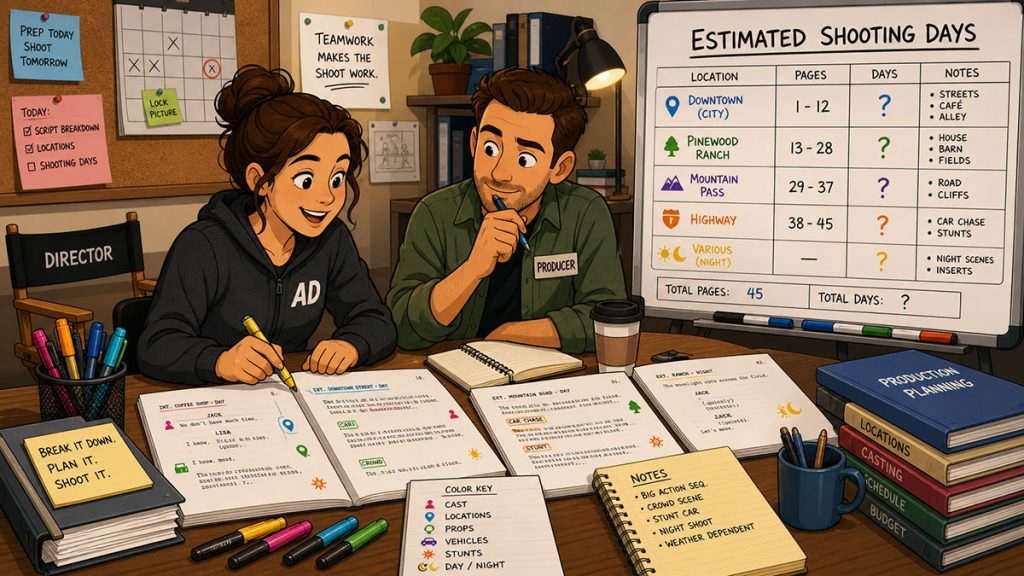
Locations are one of the biggest factors in estimating shooting days.
A script with fewer locations is usually easier to schedule than a script that constantly moves from place to place. Every new location may require scouting, permits, transportation, loading, unloading, dressing, lighting, sound control, base camp, parking, bathrooms, and company moves.
Even if a location is free, it is not necessarily cheap.
A “free” location with bad parking, difficult power, uncontrollable sound, and limited hours can cost the production in time and stress.
When estimating shooting days, ask:
How many locations are in the script?
How many sets are within each location?
Can multiple story locations be filmed at one real location?
Can scenes be grouped by location?
Are there company moves within a shoot day?
Are any locations remote or difficult to access?
Are permits or limited hours likely to affect scheduling?
A contained film set mostly in one house may shoot efficiently because the crew can stay in one place. A road movie with many locations may require more days because the company keeps moving.
Company moves are schedule predators. They look harmless from a distance and then quietly eat half the afternoon.
Separate Sets from Locations
A location is the physical place where filming happens.
A set is the story environment being filmed.
For example, one real location might contain several sets:
A house location may include:
- Kitchen
- Living room
- Bedroom
- Bathroom
- Garage
- Front porch
- Backyard
- Driveway
The production may be able to shoot several sets at one location, which can save time. But each set still requires setup, lighting, dressing, blocking, and coverage.
When estimating shooting days, do not only count locations. Count sets too.
A script with five physical locations but 25 sets may still require careful scheduling.
The stripboard is where this becomes visible. Production strips can be sorted and grouped by location, set, day/night, and cast needs. In professional scheduling software like Gorilla Scheduling, sorting by multiple criteria can help the assistant director see which scenes belong together and which scenes create schedule pressure.
That is where a rough estimate starts becoming a real plan.
Identify Day Scenes and Night Scenes
Day and night scenes have different scheduling implications.
A day interior can often be controlled more easily, especially on a stage or controlled location. A night exterior may require larger lighting setups, safety planning, weather awareness, schedule restrictions, and crew fatigue considerations.
Night scenes can also create turnaround issues. If the crew works late into the night, the next day’s call time may need to shift. That can ripple through the schedule.
When estimating shooting days, count:
How many day interiors?
How many day exteriors?
How many night interiors?
How many night exteriors?
Can night scenes be grouped together?
Are any night scenes especially complex?
Are locations available at night?
Will neighbors, permits, or sound restrictions limit night work?
A few night scenes may be manageable.
Many night scenes scattered throughout the script can make the schedule more difficult.
The AD’s job is often to group night work efficiently without exhausting the crew or creating impossible turnarounds. The budget’s job is to admit that night work is not a decorative adjective.
Estimate Pages Per Day by Scene Type
Not all pages are equal.
A dialogue-heavy interior scene may shoot faster than a heavily choreographed action scene. A simple exterior walk-and-talk may move quickly if sound and light cooperate. A car scene may take far longer than its page count suggests.
Instead of applying one page-per-day estimate across the whole script, group scenes by difficulty.
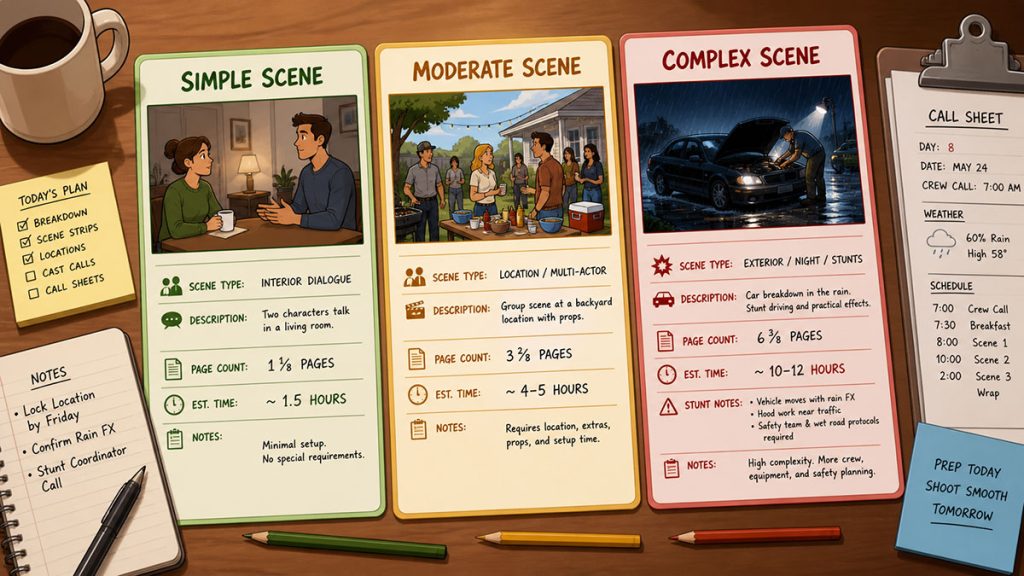
Simple Scenes
These may include:
- Two or three actors
- Controlled interior location
- Minimal movement
- No stunts
- No special effects
- Limited props
- Simple coverage
- Clean sound environment
These scenes may allow a higher page count per day.
Moderate Scenes
These may include:
- Several actors
- Multiple setups
- More coverage
- Minor company moves
- Some background actors
- Practical location challenges
- Wardrobe or prop continuity
- More complex blocking
These may require a more conservative page count.
Complex Scenes
These may include:
- Stunts
- Fight scenes
- Vehicles
- Rain, fire, smoke, or other effects
- Animals
- Children
- Large background
- Period wardrobe
- Complex art department
- Visual effects
- Night exteriors
- Remote locations
- Special camera movement
- Heavy emotional performance scenes requiring time
These may need their own dedicated shoot days or partial days.
The estimate should reflect scene difficulty, not just script length.
A half-page stunt can take longer than four pages of table dialogue.
The page count whispers. The complexity bangs a metal pot.
Use Scene Timing to Estimate the Day More Accurately
Page count gives you a useful starting point, but time is what the production actually spends.
A scene may only be 2/8 of a page, but if it requires a difficult lighting setup, careful blocking, rehearsal, special camera movement, or complicated sound, it may take longer than a full page of simple dialogue.
That is why scene timing can be useful when estimating shooting days.
Instead of only asking, “How many pages is this scene?” the assistant director can also ask:
How long will prep take?
How long will lighting take?
How long will rehearsal take?
How long will blocking take?
How long will camera setup take?
How many setups are needed?
How much time should be allowed for resets, company moves, or special requirements?
Gorilla Scheduling includes a Scene Timing feature that helps estimate how long a scene may take to shoot. This can be done in a few different ways.
One approach is to break the scene into production segments, such as prep, lighting, rehearsal, blocking, and camera setup, then assign estimated time to each segment. Together, those segments create an estimated shooting time for the scene.
Another approach is to let Gorilla estimate scene time based on page count. This may not be as accurate as a detailed timing breakdown, but it can provide a useful starting point for an early schedule pass.
A third option is to simply enter an estimated time directly into the scene’s estimated time field.
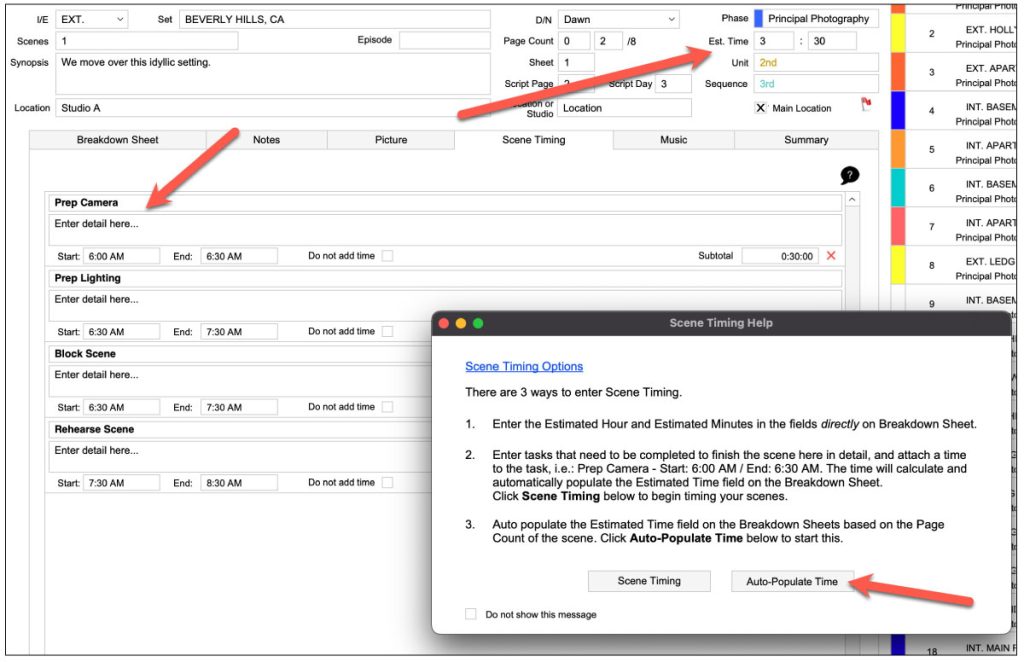
This gives the assistant director flexibility. Some scenes may only need a rough estimate. Others may need a more detailed timing breakdown because they carry more production risk.
For example, a simple half-page phone call may only need a direct time estimate. A night exterior with a dolly move, rain effect, and multiple actors may benefit from a more detailed timing breakdown.
Page count tells you how much script material exists.
Scene timing helps estimate how much production time that material may actually require.
Used together, they create a stronger shooting day estimate.
Consider Cast Availability
Cast availability can dramatically affect the shooting day estimate.
A script may seem like it can be shot in 15 days until the lead actor is only available for 10 of them. Or a supporting actor may appear in scenes scattered throughout the script, forcing the production to either hold the actor longer or reorganize the schedule.
When estimating shooting days, identify:
Which characters appear most often?
Which actors are needed on the most days?
Can their scenes be clustered?
Are any actors only available during specific dates?
Are there minors with work-hour restrictions?
Are there out-of-town actors with travel needs?
Are there expensive actors whose days should be minimized?
Do any scenes require many principal cast members at once?
This is where the Day Out of Days report becomes important. It shows when each actor works, starts, holds, travels, and finishes.
But before the DOOD exists, the estimate should already consider cast concentration.
A smart schedule often clusters actor days so the production does not pay for unnecessary holds or scattered work. This can reduce the number of shoot days or at least reduce cast-related costs within the planned schedule.
Gorilla Scheduling’s ability to show character or cast names directly on the stripboard can make this easier to see visually. Instead of decoding cast IDs, the team can quickly identify which scenes need which characters and where actor days can be grouped more efficiently.
Watch for Background Actors and Crowd Scenes
Background actors can change the pace of a shooting day.
A scene with two actors in a café is one thing.
A scene with two actors in a café surrounded by 35 background actors, waitstaff, wardrobe continuity, props, food service, and movement is another creature entirely.
Background work affects:
- Casting
- Wardrobe
- Makeup and hair
- Holding areas
- Assistant director staffing
- Meal counts
- Releases and paperwork
- Blocking
- Reset time
- Sound control
- Transportation
- Timing
Crowd scenes often require more time than filmmakers expect.
When estimating shooting days, flag any scene with significant background. These scenes may need more prep, more crew support, and more time on the day.
If the scene is important, budget and schedule for it properly.
If it is not important, consider whether the same story point can be made with fewer people.
Account for Company Moves
A company move happens when the production has to move from one shooting location to another during the same day.
Company moves are expensive in time.
The crew must wrap one location, move equipment, relocate vehicles, reset base camp or working areas, prepare the next location, relight, reblock, and restart momentum.
Even a “small” company move can cost hours.
When estimating shooting days, review whether the schedule will require:
One location per day
Multiple locations per day
Moves between nearby sets
Moves between distant locations
Moves from day interiors to night exteriors
Moves involving large equipment or crew footprint
A script with many small locations may need more shooting days simply because the company cannot move efficiently enough to cover everything in fewer days.
This is one of the reasons location grouping is so important.
A schedule that reduces company moves can often reduce cost and stress at the same time.
That is the rare scheduling gift basket.
Think About Coverage and Directing Style
Two directors can shoot the same scene at very different speeds.
One director may prefer minimal coverage and long takes. Another may want wide shots, mediums, close-ups, inserts, movement, alternate angles, and extensive performance exploration.
Neither approach is automatically wrong.
But the schedule has to reflect the directing style.
When estimating shooting days, ask:
How much coverage does the director want?
Are scenes dialogue-heavy?
Will the director rehearse extensively?
Are there long takes or complex blocking?
Will camera movement require extra setup time?
Is the production visual style simple or elaborate?
Is the director likely to need more time with actors?
The estimate should not assume a minimalist shooting style if the director plans a highly covered visual approach.
This is where producer, assistant director, and director conversations matter.
The schedule should support the film being made, not an imaginary version of the film that is easier to schedule.
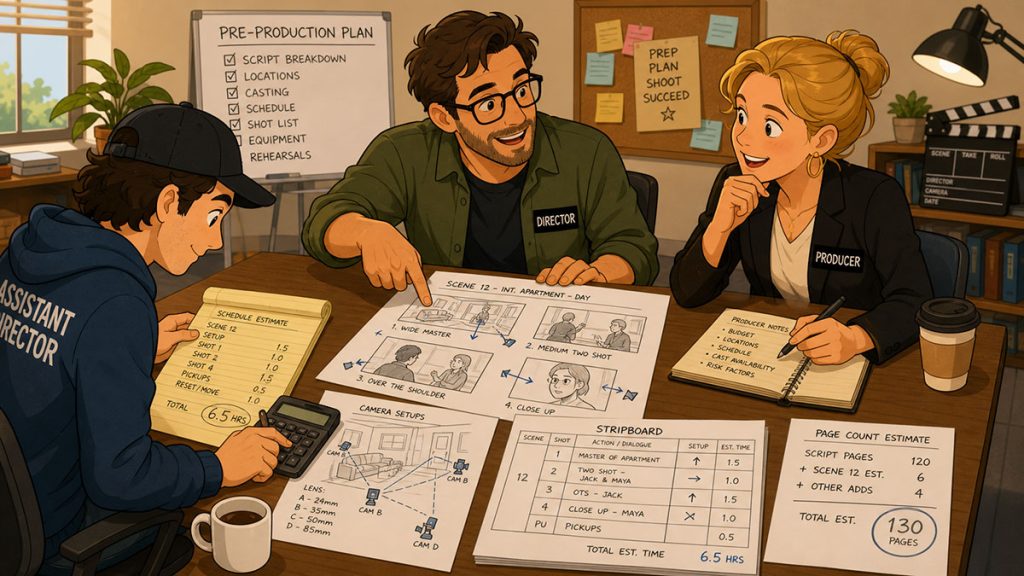
Identify Special Production Elements
Special production elements usually slow the schedule down.
These can include:
- Stunts
- Fight choreography
- Weapons
- Fire
- Rain
- Smoke
- Animals
- Children
- Vehicles
- Picture cars
- Process trailers
- Drones
- Green screen
- Visual effects
- Special makeup effects
- Period elements
- Music playback
- Dance or choreography
- Intimacy scenes
- Crowd work
- Water scenes
- Remote locations
Any scene with these elements deserves extra attention.
A script might only include one line:
The car flips into a ditch.
That is not one line of production.
That is stunt coordination, safety meetings, picture vehicles, special effects, permits, insurance, camera planning, cleanup, possible second unit, and a very serious conversation involving people with clipboards.
When estimating shooting days, flag every special element during the breakdown. Then decide whether those scenes can fit into normal shoot days or need dedicated time.
Build a First Pass Estimate
After reviewing page count, locations, sets, cast, day/night scenes, complexity, and special elements, create a first pass estimate.
This can be rough.
For example:
Total script length: 90 pages
Average target: 4 pages per day
Initial estimate: about 23 shooting days
Then adjust based on complexity.
If the script is mostly contained dialogue, maybe the estimate can tighten to 18 to 20 days.
If the script has many locations, night exteriors, stunts, and company moves, maybe it expands to 25 to 30 days.
This is not the final shooting schedule. It is a practical estimate.
A first pass might look like:
Apartment interiors: 5 days
Office scenes: 3 days
Street exteriors: 3 days
Diner scenes: 2 days
Warehouse scenes: 2 days
Night exteriors: 3 days
Car work: 2 days
Special scenes or pickups: 2 days
Total: 22 shooting days
Once that estimate exists, the team can begin testing it against the actual stripboard.
Use the Stripboard to Test the Estimate
The stripboard is where the estimate becomes real.
After the script breakdown is complete, each scene becomes a production strip. The assistant director can then organize those strips into shoot days.
This allows the team to test the estimate against reality.
Can the apartment scenes fit into five days?
Are the diner scenes too heavy for two days?
Are the night scenes grouped efficiently?
Does one day have too many pages?
Do cast days make sense?
Are there too many company moves?
Are difficult scenes spaced properly?
Does the schedule protect the most important scenes?
In Gorilla Scheduling, production strips can be sorted by multiple criteria, including location, set, day/night, and other schedule-relevant fields. That kind of sorting helps reveal whether the first estimate is realistic.
The stripboard may confirm the estimate.
Or it may politely set the estimate on fire.
Either result is useful.
It is better to discover the problem in prep than on Day 4 with the sun going down and half the page count still staring at you.
Use Day Breaks to Balance the Schedule
Once strips are placed on the board, day breaks divide them into shooting days.
Each day break allows the team to see how much material is scheduled for that day. Page count totals can help the assistant director identify overloaded or underloaded days.
For example:
Day 1: 4 1/8 pages
Day 2: 5 6/8 pages
Day 3: 2 pages with stunts
Day 4: 6 pages of dialogue
Day 5: 1 page of night exterior car work
The numbers need interpretation.
A 6-page interior dialogue day might be manageable. A 2-page stunt day might be ambitious. A 1-page night exterior with rain and traffic control might still be a full day.
Gorilla Scheduling includes an auto page break feature that can automatically insert a day break after a chosen amount of script pages. That can be useful for creating an early board structure or testing page-count scenarios.
But the assistant director still needs to refine the board based on complexity.
A good schedule is not just pages divided by days.
It is pages arranged with judgment.
Estimate the Budget Impact
Once the shooting day estimate begins to take shape, the budget impact becomes clearer.
More shooting days usually mean more:
- Crew wages
- Cast days
- Equipment rental days
- Location days
- Meals
- Production supplies
- Transportation
- Insurance exposure
- Lodging
- Production office support
Fewer shooting days may reduce some costs, but can increase overtime, fatigue, mistakes, rushed work, and schedule risk.
This is where scheduling and budgeting must talk to each other.
A producer might ask:
What happens if we shoot this in 18 days instead of 22?
What scenes become risky?
Do we lose coverage?
Do we increase overtime?
Can we reduce company moves?
Can we group locations better?
Can we cluster cast days?
What does the budget gain or lose?
The schedule is not separate from the budget. It is one of the budget’s main engines.
That is why estimating shooting days from the screenplay is such a critical early step.
Common Mistakes When Estimating Shooting Days
Mistake 1: Using Only Page Count
Page count is helpful, but it does not measure complexity.
A half-page stunt may take longer than three pages of simple dialogue.
Mistake 2: Ignoring Locations
Too many locations can increase company moves, prep time, transportation, permits, and location costs.
A script with many locations may need more days than its page count suggests.
Mistake 3: Underestimating Night Work
Night exteriors often require more time, more lighting, more safety planning, and more careful scheduling.
Mistake 4: Forgetting Cast Availability
The schedule must account for actor availability, travel, minors, holds, and clustering.
Mistake 5: Treating All Scenes Equally
Scenes differ in difficulty. Estimate simple, moderate, and complex scenes differently.
Mistake 6: Ignoring Company Moves
A company move can consume hours. Too many company moves can break a schedule.
Mistake 7: Not Testing the Estimate on a Stripboard
A rough estimate is not enough. The stripboard reveals whether the estimate can actually work.
Mistake 8: Cutting Days Without Changing the Script or Plan
If the estimate is too long, do not simply remove days and hope the crew moves faster.
Adjust the script, locations, coverage, schedule strategy, or production approach.
Hope is not a scheduling method. It is a decorative fog machine.
A Practical Shooting Day Estimate Workflow
Here is a useful workflow:
- Read the screenplay fully.
- Note the total page count.
- Break down the script scene by scene.
- Count locations and sets.
- Identify day scenes, night scenes, interiors, and exteriors.
- Flag complex scenes and special production elements.
- Review cast concentration and availability.
- Estimate rough pages per day by scene type.
- Create a first pass shooting day estimate.
- Build a stripboard from the breakdown.
- Group strips by location, set, day/night, and cast needs.
- Add day breaks and review page counts.
- Adjust for company moves, difficult days, and special elements.
- Review budget impact.
- Revise until the schedule is realistic.
This process does not guarantee a perfect schedule, because production always carries surprises.
But it creates a grounded estimate, and grounded estimates are much easier to defend than guesses.
How Gorilla Scheduling Helps Estimate Shooting Days
Estimating shooting days becomes easier when the script breakdown, production strips, stripboard, and reports are connected.
Gorilla Scheduling helps filmmakers move from screenplay import and breakdown to stripboard scheduling and professional reports.
For estimating shooting days, useful workflow features include:
- Creating production strips from the breakdown
- Sorting strips by multiple criteria such as set, location, and day/night
- Scene Timing tools for estimating scene duration by detailed production segments, page count, or manual time entry
- Auto page breaks after a chosen number of script pages
- Split-screen viewing of the breakdown sheet and stripboard
- Displaying cast or character names directly on strips
- Adding banners for company moves, lunch, travel, or production notes
- Attaching page counts to banners so they total on day breaks
- Creating multiple boards for schedule alternatives
- Selecting a default board for official reports
- Exporting the board to Excel
- Automatic Excel backups when the board is saved
- Restoring a stripboard from backup
These tools do not replace the assistant director’s judgment.
They support it.
The best schedule still comes from someone who understands page count, cast, locations, workload, safety, and the reality of production. Software helps organize the variables so the team can make better decisions faster.
A stripboard is where the screenplay becomes a plan.
Gorilla Scheduling gives filmmakers a professional way to build, test, revise, and protect that plan.
Final Thoughts
Estimating shooting days from a screenplay is part math, part logistics, part storytelling, and part weather prediction with a clipboard.
You begin with the page count, but you cannot end there.
The real estimate comes from understanding the script’s production demands: locations, sets, cast, page count, day/night work, scene complexity, special elements, company moves, coverage, and budget impact.
For screenwriters, this process reveals how writing choices affect production.
For producers, it helps determine whether the film is financially realistic.
For assistant directors, it is the beginning of the shooting schedule.
A good estimate does not make production easy. It makes production visible.
And visibility is where better decisions begin.
Continue Learning Film Production Planning
If you’re diving deeper into production planning, understanding how stripboards connect to scheduling and budgeting is essential.
You may also find these guides helpful:
- How to Schedule a Film Shoot
- Film Budget Template (Free Guide)
- What is a Stripboard and How to Create one
- How to Write a Filmable Screenplay
- What Is a Call Sheet in Film? (Free Download)
- Film Budget Categories Explained
- How a Shooting Schedule Impacts Your Film Budget
Together, these form the foundation of an efficient, well-organized production.
Questions or Comments?
Have a question about stripboards or film scheduling? Feel free to leave a comment below — or reach out if you want to learn more about how professional tools can streamline your workflow.