
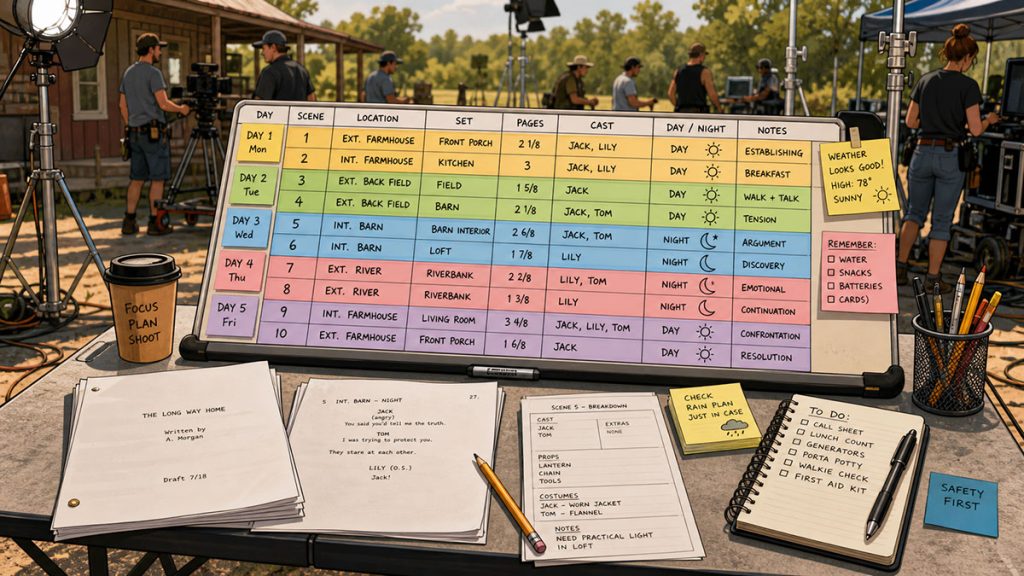
A production strip may look like a simple colored rectangle, but in film scheduling, it carries a surprising amount of power.
Each strip represents a scene. Move the strip, and you change the shooting schedule. Group several strips together, and you create a shoot day. Sort them by location, cast, day or night, interior or exterior, and suddenly the screenplay begins turning into a real production plan.
That is the quiet genius of the stripboard.
A screenplay is written in story order. A film is almost never shot that way.
The production strip is the bridge between those two worlds.
It allows the assistant director, producer, production manager, and director to reorganize the script into a schedule that makes practical sense. Instead of thinking only in terms of page 1, page 12, and page 87, the team starts thinking in terms of locations, cast availability, page count, company moves, night work, equipment needs, and production difficulty.
That is where scheduling begins to show its teeth.
In this guide, we will explain what a production strip is, what information it contains, how it works inside a stripboard, and why professional scheduling software can make strip-based scheduling much easier to manage.
What Is a Production Strip?
A production strip is a scheduling card that represents one scene or production element in a film, television, or video project.
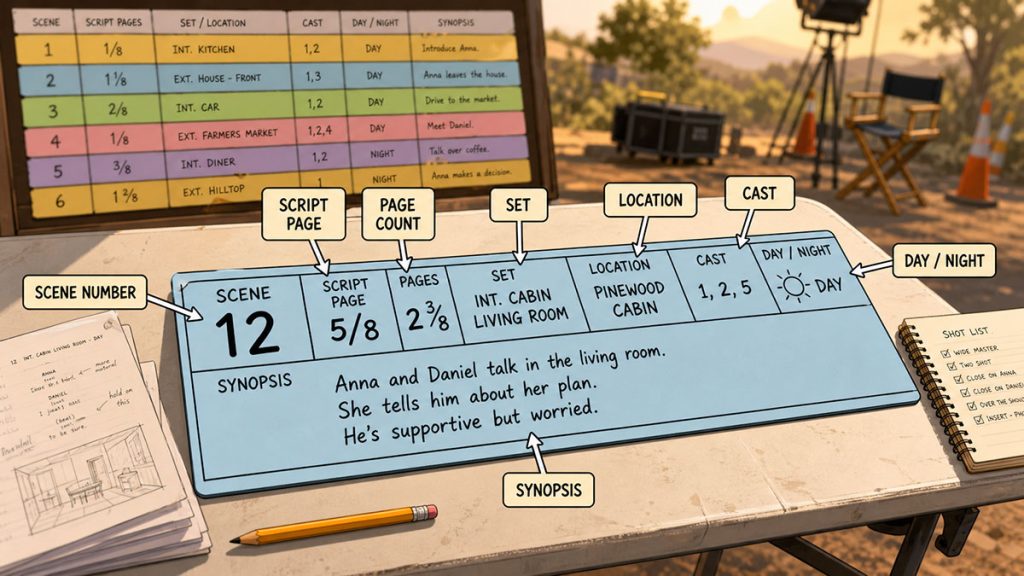
Each strip usually contains key information from the script breakdown, such as:
- Scene number
- Script page
- Page count
- Interior or exterior
- Day or night
- Set
- Location
- Cast required
- Scene description or synopsis
- Special notes
- Production requirements
When strips are arranged on a stripboard, they create the structure of the shooting schedule.
In the old days, production strips were physical paper or cardboard strips placed inside a production board. Assistant directors could remove, reorder, and regroup them by hand. Today, many productions use digital stripboards, but the basic idea remains the same.
Each strip is a movable piece of the schedule.
If the team wants to shoot all apartment scenes together, the apartment strips can be grouped. If an actor is only available for certain dates, their scenes can be clustered. If night exteriors are difficult, those strips can be reviewed separately. If a location is expensive, the schedule can be adjusted to minimize the number of days needed there.
A production strip gives the schedule something physical, visual, and movable.
That matters because scheduling is not just math. It is creative logistics with consequences.
Why Production Strips Matter
Production strips matter because they turn the script into a scheduling system.
A screenplay may be organized for emotional flow, but production must be organized for efficiency. A story may jump between a house, a street, a hospital, and a warehouse. The shooting schedule may need to group all the house scenes together, then all the warehouse scenes, then all the street scenes.
Without strips, that process becomes difficult to visualize.
Production strips help the team see:
Where scenes take place
Which cast members are needed
How many pages are being attempted each day
Which scenes are day or night
Which scenes are interiors or exteriors
Where company moves may occur
Which shoot days are overloaded
Which locations can be grouped
Which scenes may require special planning
The stripboard gives the assistant director and producer a practical way to test the schedule before the production commits to it.
A bad schedule can damage the budget.
A good schedule can save time, reduce stress, and protect the movie.
Production strips are one of the main tools used to find that better schedule.
What Information Goes on a Production Strip?
A production strip should contain enough information to help the production team make scheduling decisions quickly.
At minimum, most strips include the scene number, page count, set, location, interior or exterior, day or night, and cast requirements. Depending on the production, strips may also include the script page, synopsis, special equipment, vehicles, stunts, extras, animals, props, wardrobe, or other production notes.
The goal is not to cram every detail onto the strip. The goal is to include the information that helps the team make decisions.
For example, a strip might show:
Scene 24
INT. APARTMENT – NIGHT
Set: Apartment Bedroom
Location: Stage 2
Page Count: 2 1/8 pages
Cast: Sarah, Mark
Notes: Rain effect outside window
That one strip tells the scheduling team a great deal.
It is an interior night scene. It takes place in an apartment bedroom. It has two principal cast members. It is more than two pages. It has a rain effect. It probably needs to be grouped with other apartment scenes if possible. If the rain effect requires special equipment or crew, the scene may need additional planning.
The strip is not the entire breakdown sheet. It is the scheduling summary.
And a good scheduling summary can save a production from many tiny disasters wearing normal shoes.
Production Strip vs. Stripboard
A production strip is one individual scheduling card.
A stripboard is the full board where all the production strips are arranged into a shooting schedule.
Think of the production strip as one scene’s scheduling tile. The stripboard is the complete mosaic.
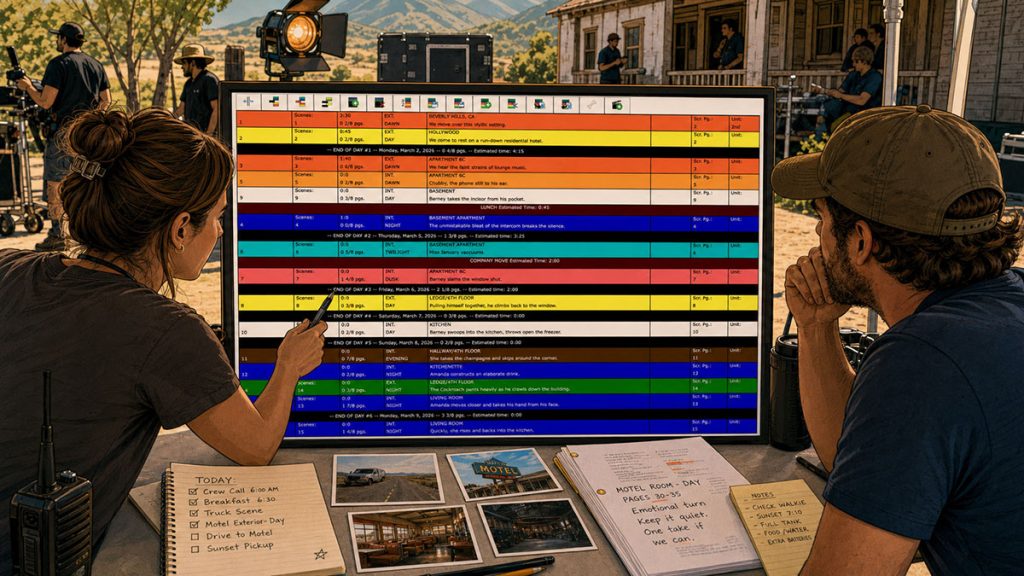
The stripboard allows the assistant director to organize strips into shooting days. Day breaks are added to divide the schedule. Each day can then be reviewed for page count, cast, location, company moves, and overall workload.
A stripboard might show:
Day 1: Apartment scenes
Day 2: Apartment and hallway scenes
Day 3: Exterior street scenes
Day 4: Diner scenes
Day 5: Warehouse scenes
Day 6: Night exterior alley scenes
The production strip is the unit.
The stripboard is the plan.
Once the board is built, it can become the foundation for other production reports, such as the shooting schedule, production calendar, Day Out of Days report, and call sheets.
How Production Strips Are Created
Production strips come from the script breakdown.
First, the script is broken down scene by scene. Each scene is identified, numbered, and analyzed for production elements. Once the breakdown is complete, the scheduling team creates production strips from those scenes.
Each strip inherits key information from the breakdown.
This is why an accurate script breakdown is so important. If the breakdown misses an important cast member, location, vehicle, prop, or special requirement, the stripboard may not properly reflect the reality of the scene.
That can lead to scheduling mistakes.
A scene might be scheduled without a required actor.
A location might be split across too many days.
A night scene might be placed in an impossible part of the schedule.
A company move might be overlooked.
A heavy art department scene might be treated like a simple dialogue scene.
Production strips are only as good as the information feeding them.
This is one reason professional scheduling software is useful. In Gorilla Scheduling, for example, the ability to view the breakdown sheet and stripboard in the same window can help the team stay connected to the details behind each strip. Instead of switching blindly between documents, the scheduler can see both the scene breakdown and the board context together.
That kind of split-screen workflow is not flashy. It is practical. It helps prevent information from getting lost during the schedule-building process.
How Production Strips Are Used to Build a Shooting Schedule
Once the production strips are created, the assistant director begins arranging them into a shooting schedule.
This process usually starts by grouping strips according to practical criteria.
Common scheduling criteria include:
- Location
- Set
- Interior or exterior
- Day or night
- Cast availability
- Page count
- Production difficulty
- Equipment needs
- Stunts or special effects
- Child actor rules
- Weather risk
- Company moves
The team may start by grouping all scenes that take place at the same location. Then they may separate day scenes from night scenes. Then they may check cast availability. Then they may look at page count and difficulty.
A strong schedule balances efficiency with realism.
If one shoot day contains eight pages, two company moves, a fight scene, a rain effect, a night exterior, and a cast member who has to leave early, the board may look efficient but the day itself may be a goblin with a clipboard.
That is why strips must be reviewed in context.
A production strip can be moved easily. A production day cannot.
Sorting Production Strips
Sorting strips is one of the most useful parts of digital scheduling.
A scheduler may need to sort scenes by location, then by set, then by day or night, then by cast. This helps reveal efficient groupings that may not be obvious when reading the script in story order.
For example, a script may return to the same diner in scenes 4, 17, 38, 52, and 79.
In story order, those scenes are scattered.
On a stripboard sorted by location, they appear together.
That allows the production team to ask:
Can all diner scenes be shot in two days?
Can day scenes and night scenes be separated cleanly?
Can the key cast be scheduled efficiently?
Can the art department dress the location once instead of repeatedly?
Can transportation and crew time be reduced?
Gorilla Scheduling supports sorting by multiple criteria, including set, location, day/night, and other useful scheduling fields. This is exactly the kind of feature that matters when the board starts to become complicated.
On a tiny project, manual sorting may feel manageable.
On a feature film with dozens or hundreds of strips, multiple locations, cast restrictions, and day/night concerns, multi-criteria sorting becomes less like a convenience and more like a survival mechanism.
Page Count and Day Breaks
Page count is one of the most important pieces of information on a production strip.
A scene that is 1/8 of a page is very different from a scene that is 4 pages. The stripboard must help the team understand how much script material is being scheduled each day.
Day breaks are used to divide the stripboard into shoot days. When the strips above a day break add up to a certain page count, the assistant director can evaluate whether that day is realistic.
For example:
Day 1: 4 7/8 pages
Day 2: 5 2/8 pages
Day 3: 2 5/8 pages with stunts
Day 4: 6 pages of simple dialogue
Day 5: 1 3/8 pages of night exterior car work
The page count alone does not tell the whole story. A day with fewer pages may be harder than a day with more pages. But page count is still one of the first warning lights.
Some scheduling software can help with this process automatically. Gorilla Scheduling includes the ability to automatically insert a day break after a chosen amount of script pages. That can be useful when building an early pass of the schedule or testing how a schedule might divide based on page count.
The assistant director still needs judgment. A computer can count pages. It cannot fully understand how painful a night exterior with rain, extras, and a company move may become.
But automated page breaks can give the schedule an initial structure. From there, the human scheduler can refine the board.
That is the healthy balance: software does the counting, humans do the thinking.
Banners and Schedule Notes
Not everything on a stripboard is a scene.
Sometimes the schedule needs notes, reminders, travel blocks, company moves, prep notes, second unit notes, or other production information. These can be handled with banners.
A banner is a strip-like note placed on the board. It may not be a scene, but it still affects the schedule.
For example, a banner might say:
COMPANY MOVE TO WAREHOUSE
MEAL BREAK
TRAVEL TO DESERT LOCATION
PRE-LIGHT STAGE 3
STUNT SAFETY MEETING
WEATHER HOLD
SECOND UNIT INSERTS
In Gorilla Scheduling, banners can be added to the board and can include a page count attached to the banner. That page count can total on the day break. This is especially useful when a non-scene event still consumes production time.
For example, if a company move will take a meaningful part of the day, attaching a page count equivalent or workload value to the banner can help represent that burden on the board.
A banner reminds the team that time is not only spent shooting pages.
Time is also spent moving trucks, resetting sets, feeding people, changing locations, rehearsing stunts, waiting for light, and discovering that the perfect parking plan was apparently written in disappearing ink.
Horizontal and Vertical Strips
Production strips can be displayed in different ways depending on the scheduling workflow.
Some teams prefer a horizontal stripboard, where strips run horizontally across the board. Others may prefer a vertical strip display, where strips stack in a different visual orientation.
The format is less important than readability.
The board should help the team quickly answer:
What scenes are scheduled?
Which day are they on?
How many pages are in that day?
Which cast members are needed?
Where is the company shooting?
Are there day/night concerns?
Are there production notes?
Is the day overloaded?
Gorilla Scheduling supports both horizontal and vertical strip displays, giving the scheduler more flexibility in how the board is viewed.
This can matter more than it sounds. When a schedule is complex, visual comfort is not decoration. It is speed. A board that is easier to read is easier to revise, explain, and defend.
Customizing Production Strip Information
Not every production needs the exact same information on its strips.
A small short film may only need scene number, location, page count, and cast. A larger feature may need more detailed strip information, including set, script page, synopsis, character names, special notes, or other fields.
Customizing strip data allows the board to reflect the needs of the project.
In Gorilla Scheduling, users can modify the placement of data on the board, including fields such as scene number, set, location, page count, and script page. Users can also adjust the length of columns for those fields.
This is valuable because scheduling is visual.
If the location field is too short, the board may become difficult to read. If the page count is buried, the assistant director may miss a workload issue. If cast information is unclear, the schedule may be harder to evaluate.
A stripboard should not force the production into a one-size-fits-all display. The board should support the way the production needs to think.
Showing Cast Names Instead of Board IDs
Many stripboards use board IDs to represent cast members.
That may work well for experienced schedulers who know the code system, but it can slow down other team members. A producer, director, or department head may not immediately remember that Cast ID 7 means Detective Harris or that Cast ID 12 means Young Maya.
When reviewing a board, visual clarity matters.
Gorilla Scheduling includes the ability to show character or cast member names instead of board IDs, making it easier to identify which cast members are needed for each scene.
This is especially useful during schedule meetings.
Instead of translating numbers into names, the team can quickly see:
Sarah is needed here.
Mark is needed there.
The child actor appears on these days.
The guest star is spread too far apart.
The expensive cast member has scenes that could be clustered.
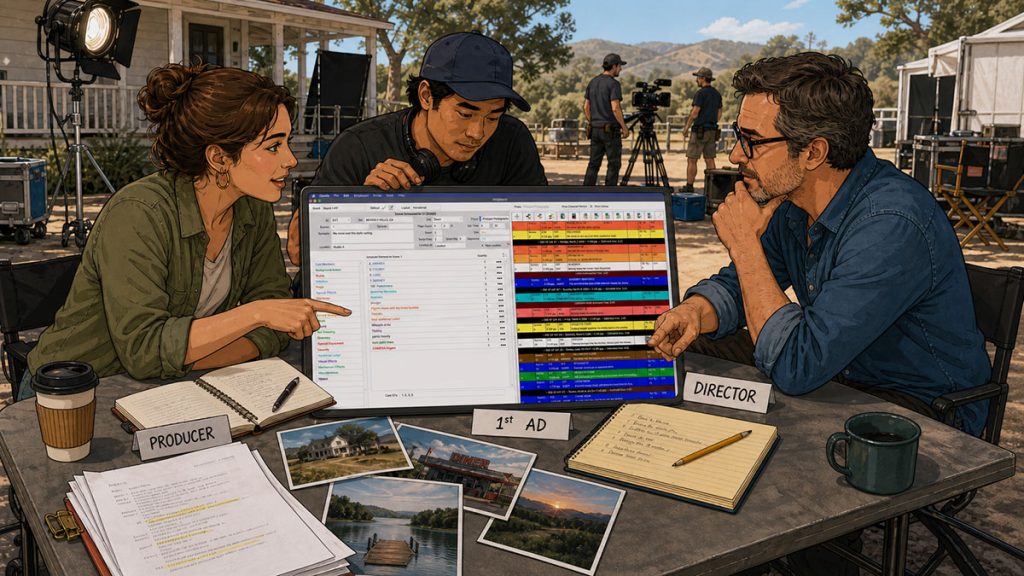
A stripboard is not only for the assistant director. It is a communication tool for the production team.
Showing character names can make that communication faster.
Using a Third Row for More Strip Detail
Many production strips use two rows of information.
That may be enough for simple schedules. But sometimes the scheduler needs more room.
A longer synopsis, character names, special production notes, or complex scene descriptions may not fit comfortably into a limited strip layout.
Gorilla Scheduling includes the ability to add a third row to the board. This gives the scheduler extra space for longer fields, such as synopsis or character names.
That additional row can make the board much more readable.
For example, a strip might show:
Row 1: Scene number, interior/exterior, day/night, page count
Row 2: Set and location
Row 3: Synopsis or character names
This can help when the team needs more context without opening every breakdown sheet.
Again, the purpose is not to make the strip crowded. The purpose is to make the board more useful.
The best stripboard gives the team the right amount of information at the right moment.
The Boneyard: Where Unused Strips Can Wait
Not every strip stays on the active board.
Sometimes scenes are removed temporarily. Sometimes the team is unsure where a scene belongs. Sometimes a scene is cut from the current schedule but may return later. Sometimes alternate versions of a schedule need to be tested.
This is where a boneyard can be helpful.
A boneyard is a section where unused strips can be placed without deleting them.
That matters because production schedules are fluid. A scene that seems unnecessary today may become important tomorrow. A postponed insert may need to be tracked. A scene removed from the schedule may still exist in the script and budget conversation.
Gorilla Scheduling includes a boneyard section where strips not currently used can be placed.
This gives the scheduler a holding area for scenes or production elements that are not part of the active board, without losing them completely.
Deleting a strip is final.
Moving it to the boneyard is a pause.
That difference can save a schedule from chaos when creative decisions change, which they almost always do.
Multiple Boards for the Same Schedule
A production may need more than one version of a board.
The assistant director may build a primary shooting schedule. The producer may want to test a shorter version. The director may want to see an alternate location grouping. A department head may want a board organized around their needs. The team may need to compare possibilities before choosing the final schedule.
Multiple boards allow the production to explore alternatives without destroying the main schedule.
Gorilla Scheduling allows users to create multiple boards for the same schedule and specify one as the default board used for reports such as the shooting schedule.
This is a professional workflow advantage because scheduling is often iterative.
The first board is rarely the final board.
A team may test:
A location-efficient version
A cast-efficient version
A budget-conscious version
A weather-friendly version
A director-preferred version
A shorter-shoot version
A safer version with fewer brutal days
Being able to keep multiple boards gives the production room to think.
Then, once the preferred board is selected, the default board can drive the reports that matter.
Backing Up and Exporting the Stripboard
A shooting schedule is too important to live dangerously.
Once a stripboard is built, it becomes a central production document. Losing it, corrupting it, or accidentally damaging a schedule version can create serious problems.
This is why backups and exports matter.
Gorilla Scheduling automatically backs up the stripboard to Excel each time the board is saved. It also allows users to restore a stripboard from an Excel backup and export the board to Excel.
These may sound like technical details, but in production, technical details can become rescue boats.
Excel export can help with sharing, reviewing, archiving, or handing schedule information to people outside the scheduling software. Automatic backups help protect the schedule from loss. Restore options give the team a path back if something goes wrong.
A stripboard is not just a planning board. It is a record of decisions.
Protecting that record matters.
Production Strips and Reports
The stripboard often becomes the foundation for other production reports.
Once the board is built, the information can feed the shooting schedule, Day Out of Days report, production calendar, and other scheduling documents.
This is why the default board matters.
If a production has multiple boards, the team needs to know which one is driving the official reports. Otherwise, the assistant director may be looking at one version, the producer may be reviewing another, and the production office may be building documents from the wrong schedule.
That is how small confusion becomes large confusion with a headset.
In a professional workflow, the active board should be clear. Reports should be generated from the correct schedule version. Everyone should know which board is official.
Production strips are not isolated scheduling cards. They are part of the larger production paperwork ecosystem.
Common Production Strip Mistakes
Mistake 1: Treating Strips Like Simple Scene Labels
A strip is not just a scene label. It is a scheduling tool.
If the strip does not contain useful information, the board becomes harder to evaluate.
Mistake 2: Ignoring Page Count
Page count is essential for estimating workload. A day with too many pages may become unrealistic, especially if the scenes are difficult.
Mistake 3: Grouping Only by Story Order
Films are usually not shot in script order. Strips should be grouped according to practical production logic, not just the order in which the story unfolds.
Mistake 4: Forgetting Cast Availability
A location-efficient schedule may still fail if it ignores actor availability. Cast needs must be checked carefully.
Mistake 5: Overloading Days with Hidden Complexity
A day may have a reasonable page count but still be too hard because of stunts, night work, children, animals, weather, company moves, or special equipment.
Mistake 6: Deleting Strips Too Quickly
If a scene is temporarily removed, it may be better to move it to a boneyard or holding area rather than delete it.
Mistake 7: Not Backing Up the Board
The stripboard is too important to risk. Backups, exports, and version control protect the schedule.
How Gorilla Scheduling Helps Manage Production Strips
Gorilla Scheduling is designed around the real workflow of building and managing film schedules.
For production strips and stripboards, features include:
- Automatic page breaks after a chosen number of script pages
- Sorting by multiple criteria, including set, location, day/night, and more
- Automatic Excel backups each time the board is saved
- Restoring a stripboard from an Excel backup
- Exporting the board to Excel
- Horizontal or vertical strip display
- Banners for schedule notes, with page counts that total on the day break
- Split-screen view showing the breakdown sheet and stripboard in the same window
- Customizable stripboard field placement
- Adjustable column lengths for fields such as scene number, set, location, page count, and script page
- Multiple boards for the same schedule
- Default board selection for reports such as the shooting schedule
- Displaying cast or character names instead of board IDs
- A boneyard section for unused strips
- Third-row strip display for longer fields such as synopsis or character names
The point of these features is not to make the board more complicated.
The point is to give the scheduler more control.
A stripboard changes constantly during prep. Scenes move. Locations change. Cast availability shifts. Page counts get rebalanced. Notes are added. Boards are tested. Reports are generated. Old versions need to be protected. New versions need to be shared.
Professional scheduling software helps keep that moving machinery organized.
The stripboard is not a static document. It is a living production tool.
Production Strip Checklist
When reviewing production strips, ask:
Does each strip have the correct scene number?
Is the page count accurate?
Is the location correct?
Is the set clearly identified?
Are interior/exterior and day/night marked properly?
Are cast requirements visible?
Are special production notes included where needed?
Are difficult scenes easy to identify?
Are unused strips safely held instead of lost?
Are day breaks reasonable?
Are page counts balanced?
Are location groups efficient?
Are cast days clustered where possible?
Is the active board clearly identified?
Is the board backed up or exported?
This checklist can help catch problems before they become expensive.
A stripboard problem caught in prep is a note.
A stripboard problem caught on set is a production meeting with a pulse.
Final Thoughts
A production strip is a small object with a large job.
It takes a scene from the script breakdown and turns it into something the production can schedule, move, group, test, revise, and eventually shoot.
One strip represents one scene.
A board full of strips represents the physical plan for making the movie.
That plan affects cast days, location costs, equipment rentals, crew workload, transportation, meals, call sheets, and the budget itself.
For screenwriters, production strips reveal how scenes become shoot days.
For assistant directors, they are the building blocks of the schedule.
For producers, they show how creative choices become logistical and financial commitments.
A good stripboard does not remove the difficulty of production. It makes the difficulty visible early enough to manage.
And in filmmaking, seeing the problem before the shoot day arrives is one of the great secret luxuries.
Continue Learning Film Production Planning
If you’re diving deeper into production planning, understanding how stripboards connect to scheduling and budgeting is essential.
You may also find these guides helpful:
- How to Schedule a Film Shoot
- Film Budget Template (Free Guide)
- What is a Stripboard and How to Create one
- How to Write a Filmable Screenplay
- What Is a Call Sheet in Film? (Free Download)
- What Is a Production Calendar in Film? A Practical Guide for Filmmakers
Together, these form the foundation of an efficient, well-organized production.
Questions or Comments?
Have a question about stripboards or film scheduling? Feel free to leave a comment below — or reach out if you want to learn more about how professional tools can streamline your workflow.