
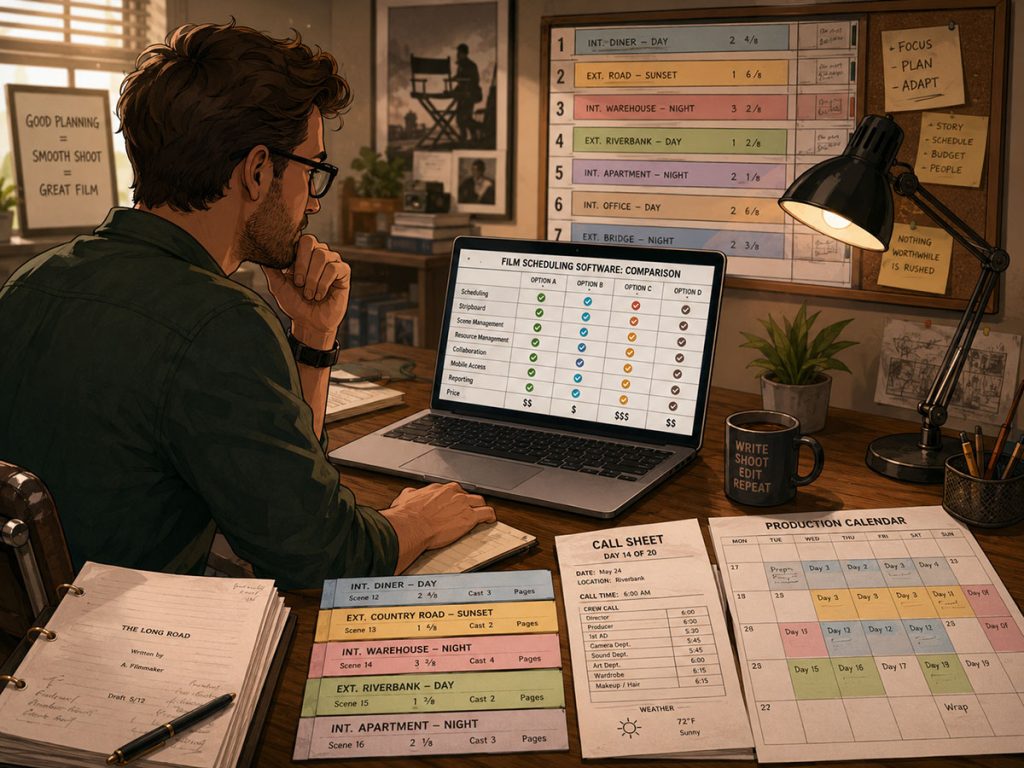
Choosing film scheduling software is not just about finding a tool that turns scenes into a nice-looking calendar.
A real production schedule is a living machine. It starts with the screenplay, pulls information from the breakdown, organizes scenes into production strips, builds a stripboard, tracks cast and locations, estimates shooting time, feeds Day Out of Days reports, supports call sheets, and helps producers understand how schedule choices affect the budget.
That is a lot more than drag-and-drop boxes on a calendar.
The right film scheduling software should help you think like an assistant director, producer, and production manager at the same time. It should make your schedule easier to build, revise, explain, and defend. The wrong tool may look simple at first, but once locations shift, actors become unavailable, page counts pile up, and departments need reports, that simplicity can melt into chaos soup.
This guide breaks down what filmmakers should look for before choosing film scheduling software, especially if you want a system that supports a real production workflow from script breakdown through the shooting schedule.
Why Film Scheduling Software Matters
A film schedule is not just a list of shoot days. It is the plan that tells every department what the production is trying to accomplish, when it is happening, who is needed, where everyone must be, and how the script will become shootable.
That means your scheduling software should help you answer practical production questions:
Can we shoot all scenes at this location together?
How many script pages are we attempting in one day?
Which actors are needed on each shoot day?
Are we stacking too many night scenes together?
What happens to the budget if we add another day?
Will the call sheet pull the correct location and cast information?
Can the schedule be revised quickly when something changes?
These are the questions that separate basic planning tools from true film scheduling software.
A spreadsheet can hold information. A calendar can display dates. But a production schedule needs relationships. Scenes connect to cast. Cast connects to availability. Locations connect to permits, travel, and company moves. Page counts connect to workload. Work days connect to the budget.
👉 Why Film Scheduling software usually works better than spreadsheets
That is why professional scheduling software matters. It helps the production team see those relationships before they become expensive surprises.
Start with the Script Breakdown
The best film scheduling software should begin where the schedule begins: the script breakdown.
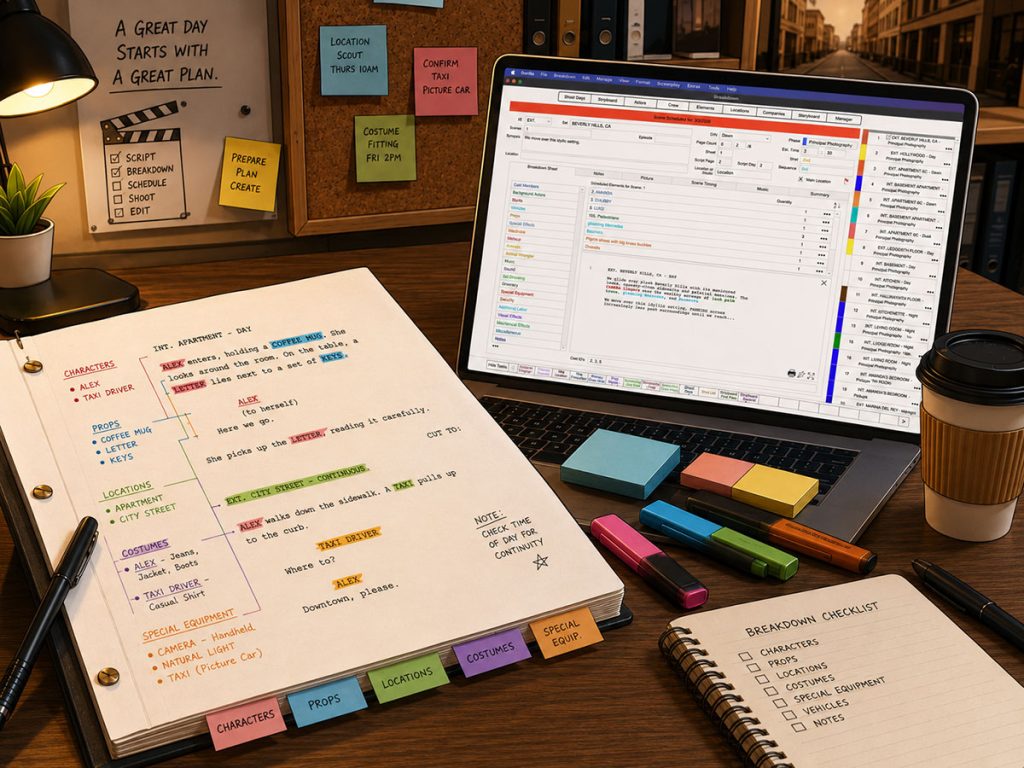
Before you can build a useful shooting schedule, you need to know what each scene requires. That includes cast, locations, props, vehicles, costumes, background actors, stunts, visual effects, special equipment, animals, picture vehicles, and anything else that affects production.
A weak scheduling tool forces you to manually recreate too much information. A stronger system lets you import screenplay data and build the schedule from actual breakdown information.
When evaluating film scheduling software, look for tools that help you:
Import screenplay data
Create breakdown sheets
Tag elements by category
Attach cast, props, locations, and other elements to scenes
Convert breakdown information into production strips
Keep breakdown details connected to the schedule
This connection is important because a schedule should not feel separate from the script. It should grow out of the script.
Gorilla Scheduling, for example, supports screenplay import and breakdown workflow, then uses that information to create production strips. That matters because the production strip is not just a colorful rectangle. It is a condensed version of the scene’s production needs.
👉 How to Break Down a Script for Film Production
Production Strips Should Carry Real Information
Production strips are the building blocks of a shooting schedule. Each strip represents a scene or scheduling unit and usually includes key information such as scene number, set, location, page count, day or night, cast, and other elements.
Good film scheduling software should make strips useful at a glance.
When comparing tools, ask:
Can I customize what appears on each strip?
Can I show cast names instead of only cast IDs?
Can I see longer fields like synopsis or character names clearly?
Can I display strips horizontally or vertically?
Can I move unused scenes out of the working board without deleting them?
Can I quickly identify page count, day/night status, location, and cast requirements?
This is where small features can make a huge difference during real scheduling work. If an assistant director has to keep opening pop-up windows to understand each strip, the schedule becomes harder to read and slower to revise.
Gorilla Scheduling includes customizable strip layouts, horizontal or vertical strip display, and the ability to show character or cast names instead of only Board IDs. It also includes a third row option for longer fields such as synopsis or character names, which can be useful when a strip needs more context than a tiny code can provide.
The goal is not visual decoration. The goal is readable decision-making.
The Stripboard Is Where the Schedule Becomes Real
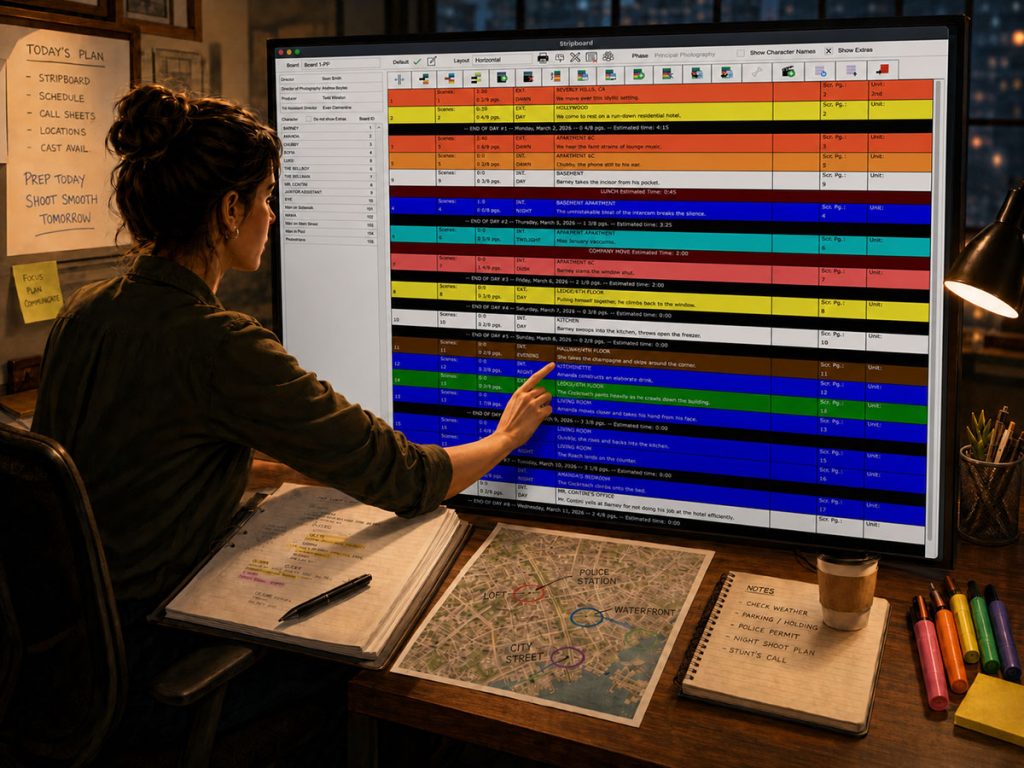
The stripboard is where scenes become shoot days.
A strong digital stripboard should help filmmakers sort, group, compare, rearrange, and revise scenes quickly. It should be easy to experiment with different scheduling logic without rebuilding the entire schedule from scratch.
Look for film scheduling software that allows sorting by:
Location
Set
Day or night
Interior or exterior
Script page count
Scene number
Other breakdown elements
Sorting matters because every production has different priorities. A low-budget feature may need to group scenes by location to reduce company moves. A television episode may need to manage cast availability. A complex production may need to isolate night work, special effects, or scenes involving minors.
A digital stripboard should let the production team test those choices. It should not trap the schedule inside one rigid view.
👉 How a Stripboard helps organize a Shooting Schedule
Gorilla Scheduling includes a digital stripboard and can sort by multiple criteria, including set, location, day/night, and other production details. It also supports split-screen viewing, allowing the breakdown sheet and stripboard to appear in one window. That can be especially helpful when you are checking whether each strip reflects the correct production information.
Day Breaks and Page Counts Should Be Easy to Track
One of the most practical questions in film scheduling is also one of the most dangerous:
How much are we trying to shoot in one day?
Page count is not a perfect measurement of difficulty, but it is still one of the most important scheduling indicators. A two-page dialogue scene at a table is not the same as a two-page stunt sequence in the rain, but page count gives the team a starting point for workload.
Good film scheduling software should make day breaks and page counts clear. You should be able to see how many script pages are assigned to each shoot day, where the day breaks fall, and whether the workload looks realistic.
Useful features include:
Automatic day breaks after a chosen number of script pages
Visible page count totals by shoot day
Manual control over day breaks
Notes or banners that can add context to the board
Tracking for special units, travel days, holidays, or production notes
Gorilla Scheduling includes an auto page break feature that can break after a chosen amount of script pages. It also includes banners with notes and optional page counts that total into day breaks. That is useful when you need to account for schedule items that are not standard scenes, such as travel, inserts, company moves, tests, or special production notes.
👉 How to Estimate Shooting Days from a Screenplay
A schedule should not only show what scenes are being shot. It should show whether the day is physically possible.
Scene Timing Tools Can Prevent Fantasy Scheduling
Page count is useful, but it does not tell the whole story.
Some scenes take longer because of lighting. Others take longer because of blocking, rehearsal, company moves, stunts, children, animals, special effects, or multiple camera setups. A production team needs a way to estimate time more intelligently than “three pages equals one day.”
This is where Scene Timing tools can be valuable.
When evaluating film scheduling software, look for ways to estimate scene time based on real production factors. Can the software help you break a scene into timed parts? Can you estimate time automatically based on page count? Can you manually override the estimate when the scene is unusual?
Gorilla Scheduling includes three approaches to Scene Timing:
You can break a scene into timed production segments, such as prep, lighting, rehearsal, blocking, and camera setup.
You can auto-estimate based on page count.
You can manually enter an estimated time.
This kind of flexibility matters because not every scene should be treated the same way. A good schedule respects the script, but it also respects the crew’s ability to actually shoot it.
👉 How to read a Shooting Schedule and understand daily workload
Day Out of Days Reports Are Essential
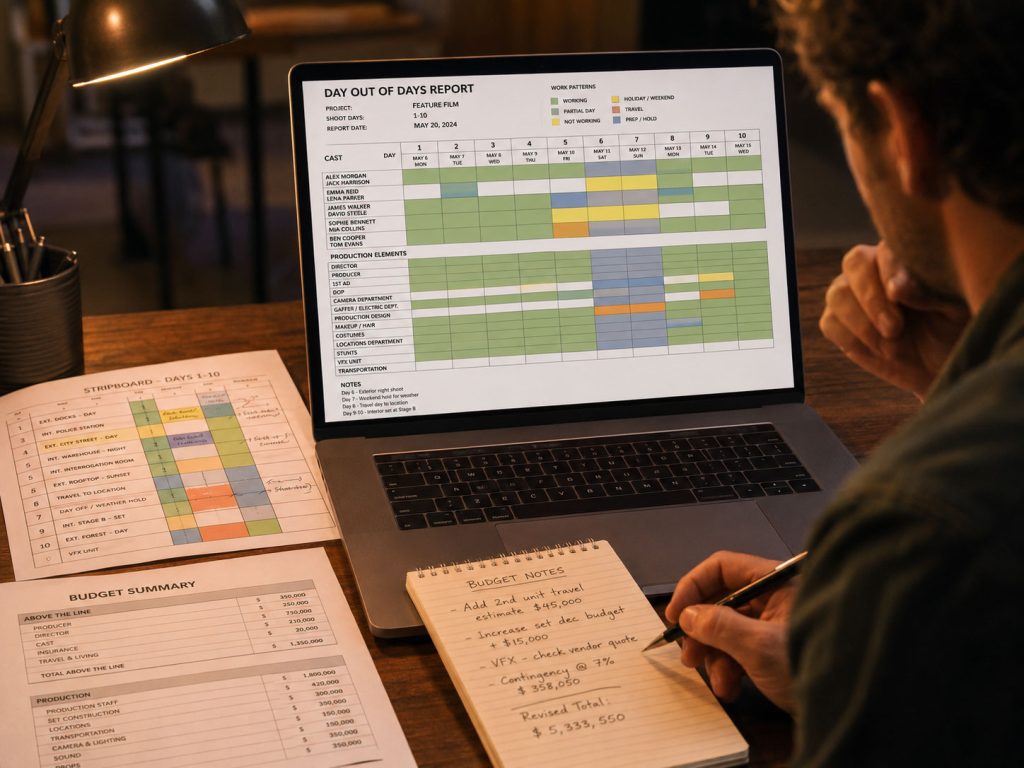
A Day Out of Days report, often called a DOOD, shows when cast members or other production elements are working, holding, traveling, starting, finishing, or not needed.
For producers, assistant directors, and production managers, this report is not optional. It affects actor scheduling, budgeting, contracts, transportation, lodging, and overall production planning.
Film scheduling software should make it easy to generate DOOD reports from the schedule. It should also ideally allow DOOD-style reporting beyond cast. Props, costumes, vehicles, background actors, special equipment, and other breakdown elements can also affect production logistics.
Look for software that can:
Generate cast DOOD reports
Track work days across the schedule
Show start, work, hold, travel, and finish patterns
Create DOOD reports for other element categories
Help producers understand total days worked
Connect scheduling data to budget planning
Gorilla Scheduling can create DOOD reports for cast and other breakdown element categories, including props, set dressing, costumes, background actors, and visual effects. Gorilla Budgeting can also link with scheduling data, including importing DOOD totals into budget line day counts.
That last point matters. The schedule and budget should not live in separate kingdoms throwing paper airplanes over the wall. Cast work days, location days, and element days often become budget costs. The more connected those systems are, the easier it is to see the financial impact of scheduling decisions.
👉 What a Day Out of Days report tells Producers
Actor and Cast Management Should Go Beyond Names
Scheduling actors is not just about placing cast IDs on strips. Real productions need contact details, roles, availability, agents, rates, dietary restrictions, wardrobe measurements, headshots, and notes.
👉 How to Schedule Actors for a Film Shoot
A simple scheduling tool may only track which cast members appear in which scenes. That might be enough for a student short or a tiny production, but larger projects need deeper cast management.
When comparing film scheduling software, ask:
Can actor records store contact information?
Can you attach headshots?
Can roles and cast information connect to scenes?
Can you track agent or representative details?
Can you record dietary restrictions or special notes?
Can you manage rates or production-related actor details?
Can reports pull actor information cleanly?
Gorilla Scheduling includes actor records with contact info, headshots, roles, agent details, dietary restrictions, measurements, and rates. Those details are not just administrative trivia. They help production teams avoid errors when creating call sheets, planning costumes, coordinating meals, or estimating costs.
A good scheduling system should remember the details that tired humans forget after hour twelve.
Location Management Can Make or Break the Schedule
Locations are one of the biggest drivers of a shooting schedule. A single location change can affect transportation, permits, crew parking, equipment needs, company moves, meals, and the number of scenes that can realistically be shot in a day.
That means film scheduling software should treat locations as more than text labels.
Look for location tools that can track:
- Address
- Contact Information
- Available Days
- Shoot Days
- Permits
- Photos
- Electrical Information
- Ceiling Height
- Amps
- Location Rates
- Attached scenes
- Main shooting location for call sheets
- Reports for location planning
Gorilla Scheduling includes a location module with detailed location records, including address, contact info, available days, shoot days, permits, photos, electrical info, ceiling height, amps, location rates, and attached scenes. It also includes a Main Location feature for call sheets.
Location reporting can be especially useful. Gorilla includes reports such as Location Fact Sheet, Photo Gallery, Location and Scenes Report, Locations for Schedule, and Locations, Scenes and Elements Report.
That kind of reporting helps the team answer practical questions quickly. What scenes are at this location? What elements are needed there? Which days are we shooting there? Do we have enough electrical capacity? Who is the location contact?
When location details are buried in emails, the schedule becomes fragile. When they are connected to the schedule, the plan becomes sturdier.
👉 How to Schedule Locations for a Film Production

Call Sheet Workflow Should Connect to the Schedule
A shooting schedule does not exist in isolation. Once the schedule is approved, the information flows into call sheets.
That means your scheduling software should support call sheet workflow, either directly or through a connected call sheet tool. At minimum, the schedule should make it easy to identify which scenes, cast, locations, and departments are needed each day.
Call sheets rely on scheduling accuracy. If the schedule contains outdated cast, location, or scene information, the call sheet can spread that error to the entire crew.
When evaluating software, ask:
- Can the schedule support daily call sheet creation?
- Can locations and scenes connect clearly to the call sheet?
- Can cast and background actor information be pulled from the schedule?
- Can the software identify the main location for the day?
- Can production details flow cleanly into call sheet planning?
Jungle Software offers Koala Call Sheets as an add-on for generating call sheets from the schedule. Gorilla’s Main Location feature also supports call sheet workflow by identifying the primary location for a shoot day.
This is the larger point: film scheduling software should help the production team move from planning to communication. A schedule only helps if the right people receive the right information at the right time.
👉 What a Call Sheet includes and why it matters
Multiple Boards Let You Explore Alternate Schedules
Scheduling is rarely a straight path. You may need one version grouped by location, another version organized around cast availability, and another version built for budget reduction.
That is why multiple boards can be valuable.
A single schedule may need alternate versions for:
- Director review
- Producer review
- Location-based shooting plan
- Cast availability plan
- Budget-conscious schedule
- Weather backup plan
- Reduced-day version
- Expanded-day version
- Pickup or second-unit plan
Film scheduling software should let you experiment without destroying your main schedule.
Gorilla Scheduling supports multiple boards within one schedule and lets you select one board as the default for reports. It also includes a boneyard for unused strips, which allows scenes to be removed from the working board without being deleted from the schedule.
That kind of flexibility is important because scheduling is a process of discovery. Sometimes you need to try a version, watch it fail, and then steal one useful idea from the wreckage.
A good scheduling tool gives you room to think.
Reporting Depth Separates Serious Tools from Pretty Tools
Some scheduling tools look clean on screen but become thin when it is time to generate reports.
A professional production needs reports. The assistant director, producer, production manager, location manager, cast coordinator, and department heads may all need different views of the same schedule.
Look for film scheduling software that can generate reports for:
- Shooting schedule
- One-liner schedule
- Day Out of Days
- Cast work days
- Location details
- Scenes by location
- Elements by scene
- Stripboard
Report depth matters because a schedule is not only for the person building it. It is for the people making decisions from it.
A producer may not want to study the entire stripboard, but they may need to know how many location days are planned. A location manager may not care about every cast pattern, but they need to know which scenes are attached to each location. A department head may need element reports. A director may need a clean one-liner.
The software should support all of those conversations.

Exporting and Backup Options Are Not Boring
Backup and export features may not sound exciting, but they become very exciting the moment something goes wrong.
Film schedules are revised constantly. Scenes move. Cast changes. Locations drop out. Producers request alternate versions. Department heads need copies. Someone accidentally changes the wrong board. A file gets corrupted. A laptop decides to become a paperweight with opinions.
Before choosing film scheduling software, look at how it handles exporting, backups, and recovery.
Useful features include:
- Exporting boards to Excel
- Automatic backups
- Restoring from backups
- Sharing reports in common formats
- Keeping alternate versions
- Protecting against accidental loss
Gorilla Scheduling includes auto-backups for the schedule plus Excel backup on save (Stripboard), restore from Excel backup (Stripboard), and export board to Excel. Those features are practical because many productions still rely on Excel-compatible workflows for sharing, review, backup, or handoff.
Even if your main schedule lives inside professional software, the ability to export and recover data gives the production team more control.
A schedule is too important to exist in only one fragile place.
Budgeting Connection Is a Major Advantage
The schedule and budget are two sides of the same production coin. Every schedule decision has a financial consequence.
Add a shoot day, and the budget changes.
Add a company move, and the budget changes.
Add night work, and the budget changes.
Increase cast work days, and the budget changes.
Extend a location, and the budget changes.
This is why film scheduling software should help producers understand how scheduling decisions affect budgeting. The connection does not have to be flashy, but it should be practical.
When comparing tools, ask:
Can scheduling data inform the budget?
Can cast days or DOOD totals be used in budgeting?
Can location days and shoot days be analyzed?
Can schedule changes help producers identify cost pressure?
Can the software support both AD and producer workflows?
Gorilla Budgeting can link with Gorilla Scheduling data, including importing DOOD totals into budget line day counts. That means the production team can use scheduling information to support more accurate budgeting decisions.
This is especially useful when building or revising a budget after the script breakdown and schedule have begun to take shape. Instead of estimating everything in a vacuum, the producer can use schedule-driven data.
👉 How to Turn a Script Breakdown Into a Film Budget
Ease of Revision May Be the Most Important Feature
A film schedule is never truly finished until production wraps. Even then, someone may ask for the old version.
Good film scheduling software should make revisions manageable. You should be able to move scenes, adjust day breaks, update cast or location information, create alternate boards, revise reports, and keep the production team aligned.
Ask yourself:
- How easy is it to move scenes?
- Can I test a new schedule version safely?
- Can I revise day breaks quickly?
- Do reports update from the schedule?
- Can unused strips be kept without deleting them?
- Can unused strips be kept without deleting them?
- Can I compare alternate approaches?
- Can I recover if something goes wrong?
This matters because productions change constantly. Weather changes. Cast availability changes. Locations change. Budget realities change. Creative priorities change. Sometimes the schedule changes because a scene that looked simple on paper suddenly requires a crane, a rain tower, three goats, and the patience of a monk.
The software should not punish you for revising. It should expect revision as part of the process.
Online Subscription vs. Desktop Scheduling Software
Many modern film scheduling tools are online subscription platforms. StudioBinder, Filmustage, and YAMDU are examples of online or subscription-based competitors in the production management space. Movie Magic Scheduling remains an older industry-standard competitor familiar to many professional assistant directors and production teams.
There is no single perfect tool for every filmmaker. The right choice depends on production size, workflow, budget, collaboration needs, reporting needs, and how much control you want over your scheduling files.
Online tools can be helpful for collaboration, browser access, and team visibility. Desktop or locally controlled tools may appeal to productions that want a more traditional professional scheduling workflow, direct control of files, or specific reporting and export options.
When comparing software, do not only ask, “Which one looks modern?”
Ask, “Which one supports the way this production actually works?”
A tool that looks simple may be too limited once the schedule becomes complex. A tool with more professional depth may require a little more learning but give you stronger control when the production grows.
The best choice is the tool that helps you build, revise, report, and communicate the schedule accurately.
Long-Term Support and Updates Matter
Film scheduling software is not something you want to choose only because it looks shiny today. You also want to know whether the company behind it understands production workflows and continues to support the product.
Look for signs of long-term reliability:
Has the software been around for years?
Does it receive updates?
Is tech support responsive?
Does the company understand film production terminology?
Are the features built around real scheduling needs?
Can the tool grow with more complex productions?
Gorilla Scheduling has been around for many years, receives frequent updates, and is supported by a company focused on film production software. That kind of continuity matters when you are relying on a tool for serious production planning.
Software support is not glamorous, but when a schedule issue lands during prep, responsive support can feel like finding a flashlight in a haunted prop warehouse.
What to Look for in Film Scheduling Software: A Practical Checklist
Before choosing film scheduling software, evaluate whether the tool can support the full workflow, not just one piece of it.
A strong film scheduling system should help you move from screenplay to production plan. It should support script import, breakdown sheets, production strips, a digital stripboard, day breaks, page counts, sorting, Scene Timing, DOOD reports, actor scheduling, location management, call sheet workflow, alternate boards, exports, backups, reports, and budgeting connections.
Here is the practical test:
Can the software help you understand the script?
Can it turn breakdown data into usable strips?
Can it help you build and revise the stripboard?
Can it show the workload of each shoot day?
Can it track cast and locations in enough detail?
Can it generate the reports your team needs?
Can it support call sheets and production communication?
Can it connect scheduling choices to budgeting consequences?
Can it survive revisions, exports, backups, and real-world production pressure?
If the answer is yes, you are looking at real film scheduling software. If the answer is no, you may be looking at a calendar wearing a filmmaker hat.
Build a Smarter Shooting Schedule with Gorilla Scheduling
Film scheduling software should do more than arrange scenes on a calendar. It should help you move from script breakdown to production strips, stripboards, Day Out of Days reports, location planning, actor scheduling, call sheet workflow, and budgeting decisions.
Gorilla Scheduling is built for filmmakers who need a professional scheduling workflow with real production depth. Import screenplay data, create breakdown sheets, build digital stripboards, manage cast and locations, generate reports, explore alternate boards, and connect scheduling information to Gorilla Budgeting.
Explore Gorilla Scheduling and see how it can help you plan your next production with more clarity and control.
Continue Learning Film Production Planning
If you’re diving deeper into production planning, understanding how stripboards connect to scheduling and budgeting is essential.
You may also find these guides helpful:
- How to Schedule a Film Shoot
- Film Budget Template (Free Guide)
- What is a Stripboard and How to Create one
- How to Write a Filmable Screenplay
- What Is a Call Sheet in Film? (Free Download)
- What Is a Crew Deal Memo (And Why It Can Save Your Production)
- Film Budget Categories Explained
- How a Shooting Schedule Impacts Your Film Budget
- What Is a Production Strip in Film Scheduling?
- How to Turn a Script Breakdown Into a Film Budget
Together, these form the foundation of an efficient, well-organized production.
Questions or Comments?
Have a question about stripboards or film scheduling? Feel free to leave a comment below — or reach out if you want to learn more about how professional tools can streamline your workflow.