
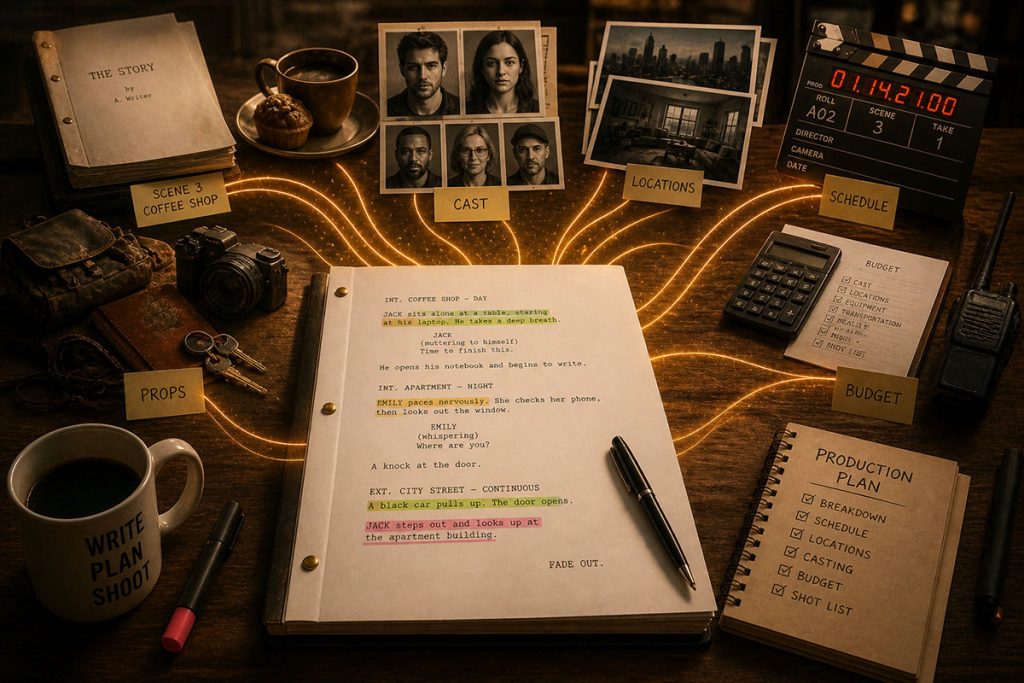
The Writing is Done… Finally!
You wrote the script.
You shaped the story, built the characters, refined the dialogue, and finally reached FADE OUT.
But once your screenplay enters production, something fundamental changes.
It stops being just a story.
It becomes a blueprint.
Every scene, every prop, every character, every location—everything inside that script gets identified, categorized, and translated into real-world requirements.
This process is called a script breakdown.
And it is the moment where your screenplay begins its transformation into a film.
Whether you are a filmmaker preparing for production or a screenwriter trying to understand how your work gets translated to the screen, learning how to break down a script is one of the most valuable skills you can develop.
Because this is where creative ideas meet practical reality.
What Is a Script Breakdown?
A script breakdown is the process of analyzing a screenplay and identifying every element required to shoot each scene.
That includes:
- Cast members
- Extras
- Props
- Locations
- Wardrobe
- Vehicles
- Special effects
- Equipment needs
Each of these elements gets tagged and organized so that the production team can plan how to shoot the film efficiently.
In professional filmmaking, this process is typically handled by the Assistant Director and production team during pre-production. But every department relies on it.
Without a proper breakdown, there is no clear path to building a schedule or a budget.
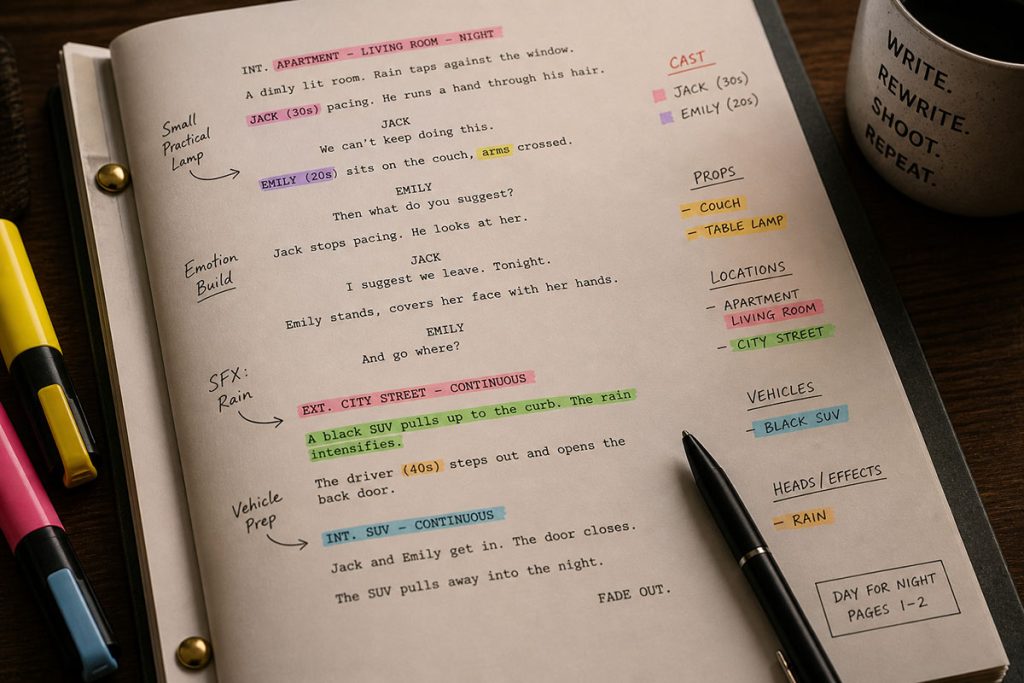
In the olden days a screenwriter that was going to breakdown his or her script needed three things: a quite place to work, a cup of coffee, and an assortment of colored highlighters.
Each color represented a different Element Category — GREEN could be Set Dressing. BLUE could be Vehicles. YELLOW could be… well anything. Eventually, scheduling programs killed the highlighters!
What Happens to Your Script During a Breakdown
This is the part most screenwriters never see.
When a script moves into production, it gets examined line by line—not for story, but for requirements.
A simple line like:
“He grabs his jacket and runs out to the car.”
Turns into multiple production elements:
- Actor (the character)
- Wardrobe (jacket)
- Prop (if specified)
- Location (interior/exterior)
- Vehicle (car)
This one line of Action can take hours to set-up and shoot and could be dozens of shots. Multiply that across an entire script, and you start to see how quickly complexity grows.
A single scene may contain dozens of elements that need to be tracked, sourced, scheduled, and budgeted.
This is why a script breakdown is not just a technical step.
It is a translation process.
It converts story into logistics.
Script Breakdown Categories (What You Actually Track)
To keep everything organized, productions use standardized categories when breaking down a script.
These categories ensure that nothing gets missed.
Common breakdown elements include:
- Cast (principal actors)
- Extras (background performers)
- Props (handheld objects)
- Set dressing
- Wardrobe and makeup
- Vehicles and animals
- Special effects (SFX)
- Visual effects (VFX)
- Stunts
- Locations
Each element gets assigned to a department, which then becomes responsible for sourcing, preparing, and managing it during production.
The more detailed your breakdown, the fewer surprises you’ll face later.
Element Linking (Advanced Breakdown Technique)
As your breakdown becomes more detailed, another layer of complexity starts to appear.
Some elements are not independent.
They are connected.
This is where a more advanced concept comes into play:
Element Linking.
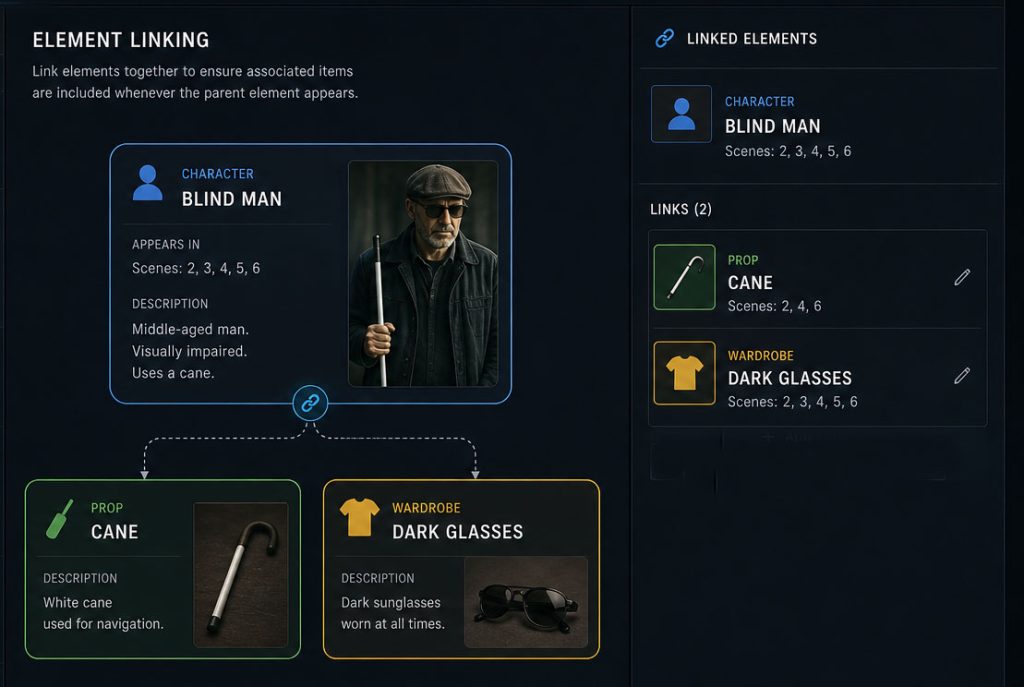
Element linking allows you to associate specific items across categories so that they always move together throughout the production process.
For example, imagine you have a recurring character in your script:
BLIND MAN
Every time this character appears, certain elements are almost always required:
- A cane (prop)
- Dark glasses (wardrobe)
Instead of tracking these items separately in every scene, element linking allows you to connect them directly to the character.
So whenever the Blind Man appears in a scene, those associated elements automatically follow.
This might seem like a small detail, but on a real production, it becomes incredibly powerful.
Because without element linking, it’s easy for things to slip through the cracks.
A prop might not get prepped for a scene.
Wardrobe might miss a required piece.
A department might assume something is not needed when it actually is.
These are the kinds of small oversights that cause delays on set.
And delays cost money.
Element linking helps eliminate that risk by creating relationships between elements instead of treating everything as isolated pieces.
It also improves communication between departments.
Props knows what needs to be ready.
Wardrobe knows what travels with the character.
The AD knows everything required when scheduling scenes.
Everything stays aligned.
🎯 Software Can Do It All
Modern scheduling tools take this concept even further.
With software like Gorilla Scheduling, you can link elements directly within your breakdown and scheduling workflow. That means when you build your stripboard or adjust your schedule, those linked elements remain connected automatically.
Instead of manually tracking dependencies, the system helps maintain consistency across your entire production.
That kind of visibility becomes especially valuable as your project grows in complexity.
Because the more moving parts you have…
The more important it becomes to keep them connected.
How Script Breakdowns Connect to Scheduling and Budgeting
Here’s where everything comes together.
A script breakdown is not the final step.
It is the foundation for everything that follows.
Once the script is broken down:
- Scenes are grouped → to create a stripboard
- Shoot days are planned → to build a schedule
- Costs are calculated → to build a budget
This is the bridge between your script and your production plan.
👉 Related subjects:
Without a breakdown, scheduling becomes guesswork.
Without scheduling, budgeting becomes inaccurate.
Everything starts here.
How Tools Like Gorilla Streamline Script Breakdowns
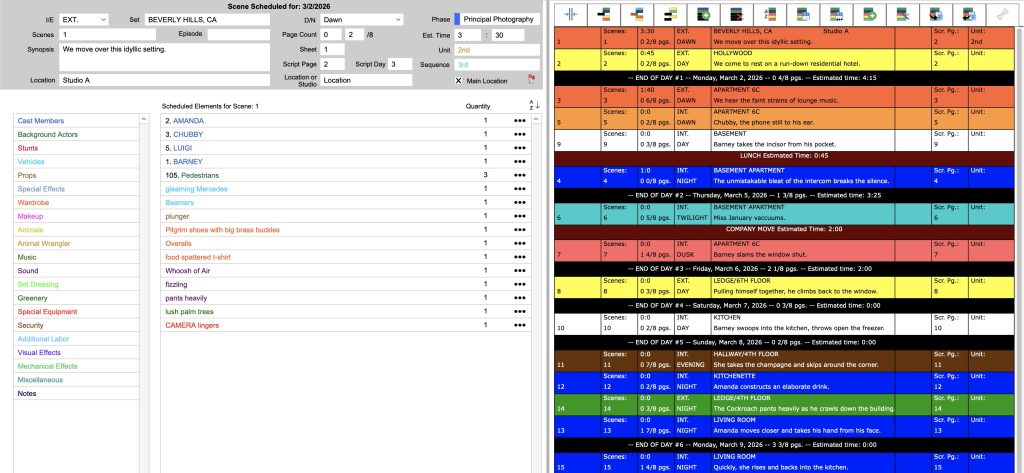
Traditionally, script breakdowns were done manually—highlighting pages, filling out breakdown sheets, and organizing everything by hand.
That process works, but it takes time and leaves room for error.
Modern tools simplify this dramatically.
With software like Gorilla, filmmakers can:
- Import scripts from programs like Final Draft
- Tag and organize elements digitally
- Build stripboards directly from the breakdown
- Connect breakdown elements to scheduling and budgeting
Instead of working across disconnected documents, everything lives in one system.
That connection reduces mistakes, saves time, and makes it easier to adjust plans before production begins.
Where Should You Tag Your Script? (Screenwriting Software vs Scheduling Tools)
Once you understand how script breakdowns work, a practical question comes up quickly:
Where should you actually do the tagging?
Inside your screenwriting software… or inside your scheduling program?
The answer is not one-size-fits-all.
Both approaches have clear advantages, and the right choice often depends on your workflow, your team, and the stage of your production.
Tagging in Screenwriting Software
Many modern screenwriting programs allow you to tag elements directly within the script.
This approach has one major advantage:
The breakdown lives inside the screenplay itself.
If multiple people are working on the script—writers, producers, or development teams—those tags stay embedded in the file. That means anyone opening the script can immediately see key elements like props, characters, or locations.
It keeps everything centralized at the writing stage.
For early development, this can be extremely useful. It allows writers and producers to think about production implications while the script is still evolving.
However, screenwriting tools are not always designed for full production workflows. While they handle tagging well, they typically lack deeper features for scheduling, budgeting, and managing complex dependencies between elements.
Tagging in Scheduling Software
Scheduling programs approach tagging from a different angle.
Instead of focusing on the script itself, they focus on what needs to happen during production.
When you tag elements in a scheduling tool like Gorilla Scheduling, those elements become part of a larger system. They can be:
- Organized into breakdown categories
- Linked to other elements (as in element linking)
- Integrated into stripboards
- Used directly for scheduling and budgeting
This is where tagging becomes more powerful.
You are no longer just identifying elements—you are actively building your production plan.
The trade-off is that these tags typically live inside the scheduling environment, not inside the screenplay file. That means they are part of the production workflow rather than the writing document.
The Best Approach? Often Both
In practice, many productions use a hybrid approach.
Early in development, tagging inside the screenwriting software helps shape the script with production awareness.
Later, once the project moves into pre-production, the script is imported into a scheduling tool where a more detailed and production-focused breakdown takes place.
This allows you to get the best of both worlds:
- Early visibility during writing
- Advanced control during production planning
The key is consistency.
No matter where you start, the goal is to ensure that your breakdown is accurate, complete, and usable by the entire production team.
Because at the end of the day, tagging is not just about organization.
It is about clarity.
And clarity is what keeps your production moving forward without surprises.
Conclusion
A script breakdown is where filmmaking truly begins.
It is the moment your story becomes actionable.
Every scene turns into requirements.
Every line turns into logistics.
Every idea turns into something that must be planned, scheduled, and paid for.
When done well, it creates clarity.
And clarity is what allows productions to move forward with confidence.
Because at the end of the day, great films are not just written.
They are built.
Questions or Comments?
Have a question about stripboards or film scheduling? Feel free to leave a comment below — or reach out if you want to learn more about how professional tools can streamline your workflow.