
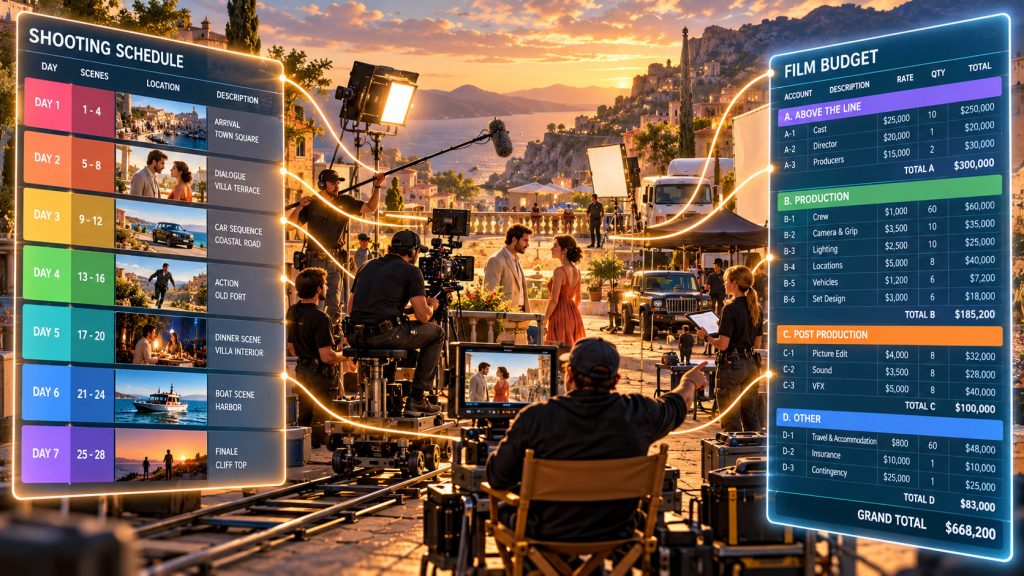
A shooting schedule and a film budget may look like two completely different documents, but they describe the same production from two different directions.
The schedule asks: What are we shooting, when are we shooting it, and what will we need?
The budget asks: What will that plan cost?
That is why film scheduling and budgeting work best when they are treated as connected parts of the same production process rather than isolated tasks.
Change the schedule and the budget may change with it. Add another shoot day, extend an actor, move to another location, add night work, or increase the number of company moves, and the financial consequences can ripple through the production.
With Gorilla Scheduling Online and Gorilla Budgeting Online, Jungle Software brings scheduling and budgeting into the same broader online production workflow, helping filmmakers move more clearly from script breakdown to shooting plan to production cost.
Film Scheduling and Budgeting Describe the Same Movie
Scheduling and budgeting are sometimes treated as separate departments because different people may be responsible for them.
The assistant director may build the schedule. The line producer or production manager may build the budget. The producer reviews both. The director may be more focused on creative priorities. Yet all of those documents are describing one production.
If a scene requires five principal actors, three vehicles, a specialty location, background performers, rain effects, and a night shoot, those requirements exist whether you are looking at the breakdown sheet, the stripboard, or the budget.
The scheduling side organizes those requirements into a practical shooting plan. The budgeting side translates them into financial assumptions.
Neither document tells the complete story by itself.
Related Article: How a Shooting Schedule impacts your Film Budget
It Starts with the Script Breakdown
Connected production data begins before the first scene is placed on a stripboard.
It begins with the script breakdown.
When a screenplay is broken down for production, each scene starts accumulating information: cast members, background actors, locations, props, wardrobe, vehicles, special equipment, animals, effects, and other production elements.
Those elements affect scheduling because the production needs to know when and where they are required.
They also affect budgeting because almost everything that appears in a breakdown has a potential cost.
A cast member may affect performer costs. A location may require permits, rentals, transportation, or security. A vehicle may require a rental and driver. Special effects may require equipment, crew, preparation, and additional safety considerations.
The breakdown becomes the first bridge between creative intent and production reality.
Related Article: How to Turn a Script Breakdown into a Film Budget
The Schedule Turns Requirements Into Time
Once the script is broken down, the production begins deciding when everything will be shot.
Scenes become production strips. Strips are rearranged into shoot days. Locations are grouped. Cast availability is considered. Day and night work is balanced. Company moves are evaluated. Page counts and scene complexity begin to shape the length of each day.
This is where production requirements acquire another important dimension:
time.
A cast member needed for two days costs differently from one needed for ten. A location used for one day creates a different budget assumption than a location needed for a full week. Adding another shoot day affects crew, equipment, transportation, catering, locations, insurance, and other costs.
Scheduling is therefore not simply about deciding what scene comes next.
It is one of the engines that drives the budget.
Related Article: Online Film Scheduling Software: What Productions Can Now Do from Anywhere
Shoot Days Become Budget Assumptions
A production schedule contains information that can directly influence the budget.
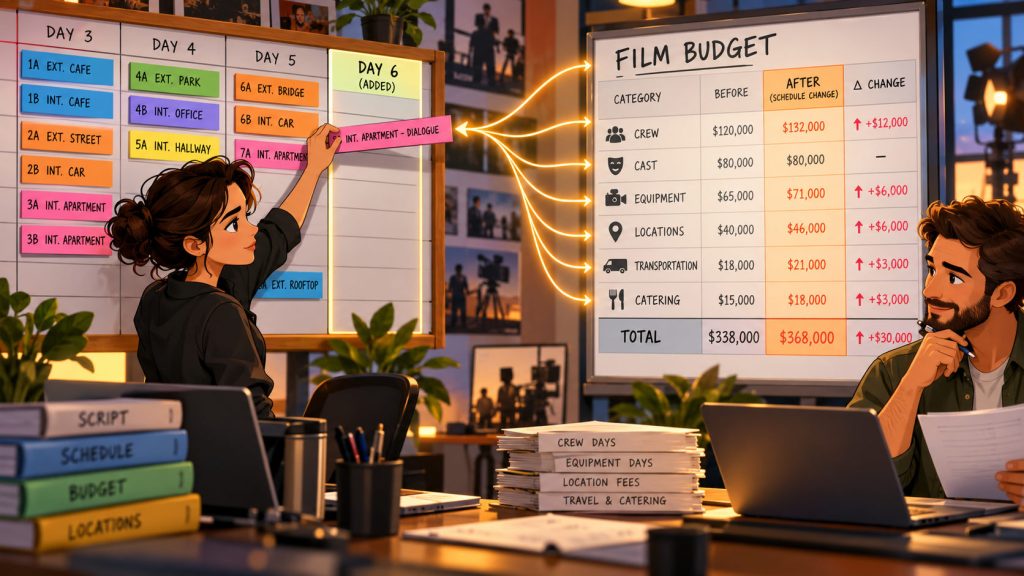
Consider a relatively simple decision: moving three scenes from one day to a newly created shoot day.
Creatively, very little may have changed. The scenes remain the same.
Financially, however, the picture can change considerably.
Another shoot day may mean another day of crew wages, equipment rentals, location fees, transportation, catering, production vehicles, insurance exposure, and cast costs. Depending on the production, overtime or turnaround implications may also enter the equation.
The reverse is also true. Compressing scenes into fewer days may reduce some costs, but an overloaded schedule can create overtime, rushed company moves, unfinished work, or additional pickup days.
Connected film scheduling and budgeting data makes those relationships easier to see.
Instead of treating the schedule as one plan and the budget as another, producers can evaluate whether the production plan and financial plan still agree with each other.
Cast Days Are a Perfect Example
Cast scheduling shows particularly clearly why scheduling and budgeting belong together.
A Day Out of Days report shows when performers work during the shooting schedule. From a scheduling perspective, this helps the production understand availability, work patterns, and when each performer is required.
From a budgeting perspective, those same work days influence performer costs.
If an actor originally works five days and a revised schedule increases that to seven, the scheduling change may need to be reflected in the budget.
Similarly, moving scenes may affect consecutive work patterns, travel, accommodations, holding days, or other assumptions depending on the production and performer agreement.
The important point is not that software should make every financial decision automatically. It should not.
The important point is that the same production information should be available when producers make both scheduling and budgeting decisions.
Locations Connect Logistics and Cost
Locations create another powerful link between the schedule and the budget.
From the scheduling side, grouping scenes by location can reduce company moves and make better use of the production day.
From the budgeting side, locations can affect rental fees, permits, transportation, parking, security, lodging, meals, equipment movement, and crew time.
Suppose a production schedules three scenes at the same location on consecutive days. That may create one financial picture.
Move one of those scenes to a later week and suddenly the production may need to return to the location, bring equipment back, recreate set dressing, reschedule cast, or pay another location fee.
The scene did not become more expensive because the screenplay changed.
It became more expensive because the schedule changed.
That is precisely why producers need to understand scheduling decisions while working on the budget.
DOOD Information Helps Turn a Schedule Into Cost
One of the most valuable scheduling reports for budgeting is the Day Out of Days report.
A DOOD summarizes how performers or other production elements are used across the shooting schedule. Instead of examining scenes individually, producers can see the overall work pattern.
That information is especially useful when estimating the number of days associated with cast and other budget assumptions.
In connected Gorilla scheduling and budgeting workflows, DOOD totals can help inform budget day counts rather than forcing producers to manually reconstruct every work pattern from scratch.
This is a good example of what connected production data should accomplish.
It does not replace the producer’s judgment.
It removes unnecessary duplication so that the producer can spend more time evaluating the numbers rather than repeatedly re-entering information that already exists elsewhere in the production plan.
Connected Data Does Not Mean Blind Automation
There is an important distinction here.
Connecting scheduling and budgeting does not mean that every schedule change should automatically rewrite the budget without review.
Production decisions are rarely that simple.
A schedule may say an actor works six days, but the actor’s deal may involve weekly rates, guarantees, travel, rehearsal, fittings, or other contractual considerations. A location may appear on three shoot days but be rented for an entire week. Equipment may be rented on weekly packages rather than daily rates.
Software can carry useful production information forward.
The producer still has to interpret it.
That is why the best connected workflow combines data continuity with human judgment.
The system helps move information. The filmmaker decides what that information means financially.
Gorilla Scheduling Online and Gorilla Budgeting Online
Gorilla Scheduling Online and Gorilla Budgeting Online are designed around two sides of pre-production planning.
Gorilla Scheduling Online helps productions import screenplay information, break down scenes, organize production elements, create strips, build stripboards, arrange shoot days, manage production information, and generate scheduling reports.
Gorilla Budgeting Online helps producers build structured production budgets, work with accounts and detail lines, manage globals and fringes, use reports, work with production rates, and revise financial assumptions.
Used together, they support a larger workflow:
Script → Breakdown → Stripboard → Shooting Schedule → Production Data → Budget
That sequence matters because each stage produces information that becomes useful in the next.
The goal is not simply to have two applications sitting beside each other in a browser.
The goal is to keep production information moving forward.
Connected Production Data Reduces Re-Entry
One of the least glamorous problems in production software is also one of the most expensive:
entering the same information again and again.
A character is entered in the breakdown. Then someone enters the character again in a cast list. Then someone types the name into a budget. A location appears in the schedule and then is re-entered into another spreadsheet.
Every duplicate entry creates another opportunity for disagreement.
Is the spelling identical? Is the correct rate attached? Is this the revised location? Does the budget still assume six days while the schedule now shows eight?
Connected production data reduces that friction.
When information can move through the production workflow instead of repeatedly being recreated, the schedule and budget have a better chance of describing the same movie.
That is not merely convenient.
It improves production clarity.

Better Data Makes “What If?” Questions More Useful
Some of the most important production decisions begin with two words:
What if?
What if we shoot this location in two days instead of three?
What if we move the exterior scenes together?
What if this actor finishes a day earlier?
What if we add another shoot day?
What if we reduce the number of company moves?
What if we move that expensive night scene?
Those questions live at the intersection of scheduling and budgeting.
An assistant director may see a better scheduling option, while a producer needs to understand its financial impact. A line producer may identify an expensive assumption and ask whether the schedule can be rearranged to reduce it.
When the production team can move comfortably between scheduling and budgeting information, “What if?” becomes a planning tool instead of a guessing game.
Reports Help Everyone See the Same Production
Connected production data becomes especially useful when it turns into reports.
Scheduling reports can help producers understand shoot days, cast usage, locations, elements, conflicts, and production requirements.
Budget reports can show topsheet totals, account information, detail assumptions, expenses, and remaining balances.
Together, those reports let different members of the production look at the same plan from different angles.
The AD may focus on whether a day is shootable.
The line producer may focus on what that day costs.
The producer needs both answers.
Why This Matters Even More for Indie Productions
Large productions may have entire departments dedicated to scheduling, budgeting, accounting, locations, transportation, and production management.
Independent films often do not.
The producer may also be the production manager. The AD may be helping with logistics. A very small team may be making scheduling and financial decisions almost simultaneously.
That makes connected information especially valuable.
An indie producer does not need more places to enter the same information. They need a clear path from the screenplay to the schedule to the budget.
Film schools have a similar need. Students learn production more effectively when they can see that scheduling and budgeting are not arbitrary classroom exercises. One determines the practical plan. The other reveals the financial consequences of that plan.
Together, they teach how production actually works.
Film Scheduling and Budgeting Are a Conversation
The schedule should influence the budget.
The budget should sometimes influence the schedule.
If the current shooting plan is too expensive, the answer may not simply be “cut the budget.” The production may need to rethink locations, cast days, equipment periods, company moves, or the number of shoot days.
Likewise, if the schedule is being built without understanding its financial consequences, an apparently efficient plan can create costs elsewhere.
This back-and-forth is not a flaw in pre-production.
It is pre-production.
The goal is to discover those problems while the production still has time to solve them.
Final Thoughts: One Production, Two Views
A film schedule organizes production in time.
A film budget organizes production in money.
But they are not describing two different projects.
They are describing the same movie.
Connected film scheduling and budgeting helps producers, assistant directors, line producers, and production managers understand how a change in one part of the plan may affect another.
With Gorilla Scheduling Online and Gorilla Budgeting Online, the broader Gorilla Online workflow brings those two sides of production planning closer together.
The value is not merely having scheduling software and budgeting software online.
The value is creating a clearer path from:
what the production wants to shoot
to
how the production plans to shoot it
to
what that plan is likely to cost.
That is where connected production data begins to earn its keep.
Explore Gorilla Online
Gorilla Scheduling Online helps productions move from screenplay import and script breakdown to stripboards, shoot days, reports, collaboration, and offline work with later sync.
Gorilla Budgeting Online brings professional production budgeting into the browser with structured budgets, globals, fringes, reports, rates, and connected production planning.
Explore the Gorilla Online ecosystem: