
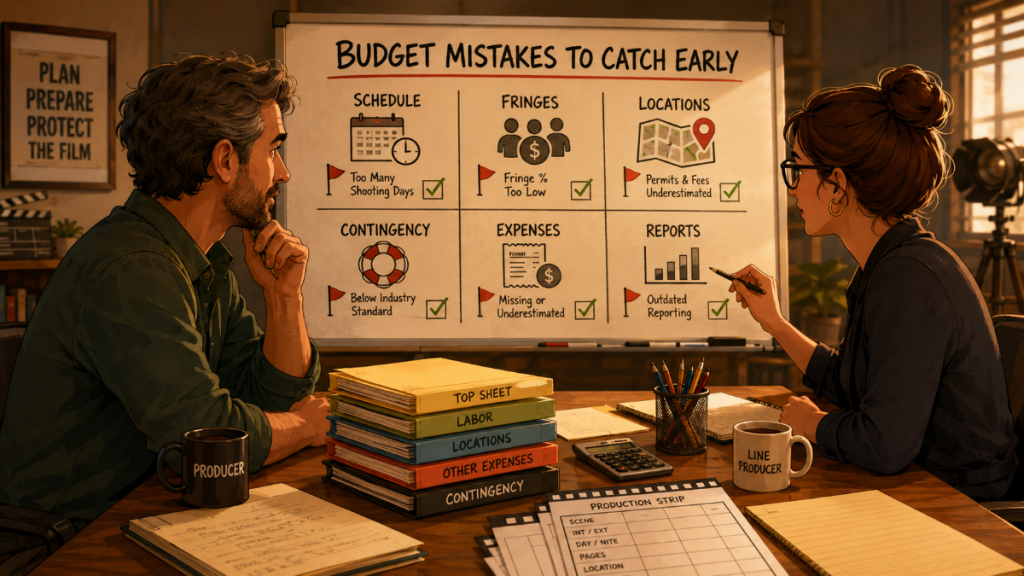
A film budget is not just a spreadsheet full of numbers. It is the financial version of the production plan. Every scene, location, actor, company move, rental, overtime risk, and creative decision eventually shows up somewhere in the budget.
That is why film budgeting mistakes can be so expensive.
A small oversight in prep can become a major problem during production. A missing location fee can turn into an emergency approval. An underestimated shoot day can affect cast, crew, equipment, transportation, meals, and fringes all at once. A weak contingency can disappear before the first week is over. A budget that looks clean on paper can fall apart if it is not connected to the actual schedule.
The goal of a film budget is not to predict the future perfectly. No budget can do that. The goal is to make the production’s assumptions visible enough that producers, line producers, and production managers can make better decisions before money starts leaking through the floorboards.
👉 Film Budget Template (Free Guide + How to Build Your Budget)
Why Film Budgeting Mistakes Happen
Most budgeting mistakes do not happen because someone is careless. They happen because film production is a moving machine.
The script changes. Locations change. Cast availability changes. The schedule changes. A department discovers something that was not obvious during the first pass. A scene that seemed simple becomes complicated. A company move takes longer than expected. A night shoot triggers additional labor pressure. A “small” creative request touches five departments before lunch.
A film budget has to account for all of that before the team has complete information. That is the difficult part. Producers are often building financial assumptions while the creative and logistical plan is still forming.
The strongest budgets are not the ones that pretend nothing will change. They are the ones that make changes easier to understand.
A good film budget gives the team structure. A weak budget gives the team fog.
Mistake #1: Budgeting Before the Schedule Is Realistic
One of the most common film budgeting mistakes is building a budget around an unrealistic schedule.
This happens when the budget assumes a certain number of shoot days before the production has properly examined scene complexity, cast availability, locations, company moves, day/night work, and page count. On paper, a 15-day shoot may look efficient. In reality, it may require overtime, rushed setups, extra pickups, or compromised production value.
The schedule drives the budget more than many filmmakers realize. Shoot days affect crew labor, cast costs, equipment rentals, location fees, transportation, meals, insurance, payroll costs, and more. If the schedule is wrong, the budget is usually wrong too.
A budget built from wishful scheduling can look attractive early in prep, especially when the team is trying to hit a target number. But once production begins, the real cost of time appears. The budget has to pay for what the schedule actually requires, not what everyone hoped it would require.
👉 How a Shooting Schedule Impacts Your Film Budget (And Vice Versa)
Mistake #2: Treating the Budget and Schedule as Separate Documents
A film schedule and a film budget should be in constant conversation.
If they are built separately, the production can quickly lose track of cause and effect. A schedule change might add a cast day, extend a location rental, require another truck day, increase meal costs, or change equipment rental periods. If those changes do not flow back into the budget, the numbers begin to drift away from reality.
This is especially risky when teams rely on disconnected spreadsheets. One person may update the schedule while another updates the budget. A third person may be looking at an older version. By the time everyone realizes the numbers are out of sync, decisions have already been made.
A strong workflow connects schedule information to budget assumptions wherever possible. Cast days, location days, breakdown elements, production strips, and Day Out of Days totals can all help the budget reflect the actual production plan.
Gorilla Scheduling and Gorilla Budgeting are designed to work together in this way. Gorilla Budgeting can import linked scheduling data, including cast, crew, locations, breakdown elements, rates when available, and DOOD totals into budget line day counts. That kind of connection helps reduce manual transfer errors and keeps the budget closer to the schedule.
👉 How to Turn a Script Breakdown Into a Film Budget
Mistake #3: Underestimating Fringes and Labor-Related Costs
Labor is rarely just the base rate.
Fringes, payroll costs, union-related costs, insurance, pension and health, workers’ compensation, taxes, and other labor add-ons can significantly increase the true cost of cast and crew. If a budget only accounts for base rates, the production may appear affordable when it is actually underfunded.
This mistake is especially dangerous because labor touches so many areas of the budget. Cast, crew, production staff, drivers, background actors, construction labor, post-production labor, and other personnel may all carry additional costs beyond the visible rate.
Some fringes are percentage-based. Others may be flat-rate. Some apply only to certain film budget categories or labor types. If those rules are not set up clearly, the budget can become inconsistent.
Gorilla Budgeting supports both percentage and flat-rate fringes, and the Fringes Report helps review how those costs are applied. That matters because fringe errors can hide inside a budget until payroll begins revealing the truth one invoice at a time.
👉 Film Budget Reports Explained: The Reports Every Producer Should Know
Mistake #4: Using Outdated or Guesswork Rates
A budget is only as good as the rates behind it.
If crew rates, union rates, rental rates, location costs, travel costs, or post-production estimates are outdated, the budget may look accurate while quietly lying to everyone. This is especially common when producers reuse an old budget template without updating the assumptions.
Rates change. Crew markets change. Union agreements change. Vendor pricing changes. Travel costs shift. A budget from a previous production may be a useful starting point, but it should not be treated as a sacred artifact pulled from an ancient producer’s tomb.
The danger is not just one wrong number. The danger is repeated wrong numbers. If a daily rate is low across multiple crew positions, or a rental assumption is outdated across multiple weeks, the error can multiply quickly.
Using reliable rate sources and current templates helps reduce this risk. Gorilla Budgeting includes budget templates ranging from simple independent budgets to studio-style budgets, and the Gorilla Ratebook add-on includes thousands of industry labor rates across categories such as SAG, DGA, Local 600, Basic Crafts, WGA, Canada, Commercials, Area Standards, and more.
The point is not to remove judgment from budgeting. It is to start with better assumptions.
👉 Film Budgeting Software: What to Look for Before You Choose
Mistake #5: Forgetting Location Costs Beyond the Location Fee
A location fee is only one part of the location cost.
A production may also need permits, police, fire safety, parking, holding areas, restrooms, generators, security, neighbors, cleaning, site reps, location repairs, company moves, transportation, lodging, meal logistics, and overtime caused by access restrictions.
A location that looks affordable at first may become expensive once the production accounts for the cost of shooting there.
This is one reason location scheduling and budgeting need to stay connected. A beautiful location that requires a long company move, limited access hours, distant parking, or expensive permits can affect multiple departments. The cost may not live only in the locations account. It may also appear in transportation, crew time, equipment, meals, and contingency.
A strong budget should ask not only “What does the location cost?” but “What does shooting at this location make the rest of the production cost?”
👉 How to Schedule Locations for a Film Production
Mistake #6: Weak or Unrealistic Contingency
Contingency is not a luxury. It is the production’s financial shock absorber.
A weak contingency can make a budget look more attractive during financing, but it can leave the production exposed once real problems appear. Weather changes. Equipment breaks. A location falls through. A scene takes longer. A department needs an urgent replacement. A vendor cost increases. A pickup becomes necessary.
When there is no realistic contingency, every surprise becomes a crisis. The team may have to cut creative value, delay approvals, ask for emergency funds, or shift money from areas that were already tight.
The size of contingency depends on the production, but the principle is simple: films are living organisms with invoices. A budget should include room for the unexpected because the unexpected has excellent attendance.
Gorilla Budgeting includes contingency features, which can help producers account for risk as part of the budget structure instead of treating it as an afterthought.
👉 Film Budget Reports Explained: The Reports Every Producer Should Know
Mistake #7: Not Tracking Expenses Against the Budget
A production budget is not finished when the budget is approved.
Once production begins, the team needs to track actual expenses against budgeted accounts. Without expense tracking, the budget becomes a frozen plan rather than a working management tool. The production may know what it intended to spend, but not what it is actually spending.
This is where many productions get into trouble. Receipts are collected but not categorized. Expenses are entered late. Department spending is reviewed after the money is already gone. Producers rely on bank balances instead of budget balances. The result is a financial fog machine.
Tracking expenses against budgeted accounts allows the team to see where money is going while there is still time to respond. If locations are running hot, the team can adjust upcoming location decisions. If transportation is climbing, the schedule may need review. If art department spending is ahead of plan, the producer can ask whether upcoming scenes are still realistic within the remaining balance.
Gorilla Budgeting includes an accounting module attached to the Account level, allowing expenses to be tracked against budgeted accounts. Its Budget Balance Report compares budgeted amount, expenses, and remaining balance, which gives producers a clearer picture of where the production stands.
Mistake #8: Building Too Much of the Budget in Disconnected Spreadsheets
Spreadsheets can be useful. They are flexible, familiar, and easy to start with.
The problem is not that spreadsheets exist. The problem is when a spreadsheet becomes the entire budgeting system for a production that needs structure, reporting, linked assumptions, account-level tracking, fringes, budget versions, currency handling, imports, and expense review.
A spreadsheet can become fragile as the production grows. Formulas break. Rows get copied incorrectly. Versions multiply. Someone hides a column. Someone edits a rate without telling anyone. A department sends a revised sheet that does not match the current budget. Soon the team is not producing the movie. It is producing spreadsheet weather.
Professional budgeting software helps reduce those risks by keeping the budget organized around production-specific structures. Gorilla Budgeting uses a professional three-level budget structure: Topsheet, Account, and Detail. It can also support an optional fourth level by importing Excel files as fourth-level detail under an account, which allows teams to preserve spreadsheet detail without letting the entire budget become a loose collection of files.
That balance is important. Spreadsheets can still support the workflow, but they should not be the only spine holding the production together.
👉 Film Budgeting Software vs Spreadsheets
Mistake #9: Ignoring Budget Versions and Comparisons
Productions often need more than one budget version.
There may be a preferred version, a reduced version, a union version, a non-union version, a local version, a travel version, a 20-day version, a 24-day version, or a version that assumes different cast or location choices. If these versions are not managed clearly, the team may accidentally compare the wrong numbers or approve decisions based on an outdated plan.
Budget comparison is especially useful during financing and prep. It helps producers see the cost of creative and logistical choices. What happens if the production adds two shoot days? What happens if it shoots out of town? What happens if a department receives the resources it actually needs? What happens if contingency is reduced?
The answer should not live in someone’s memory. It should live in a clearly organized budget set or comparison workflow.
Gorilla Budgeting includes budget groups and budget sets, which can help producers organize different versions or structures. Used carefully, budget sets make it easier to explore scenarios without mangling the main working budget.
A budget version is a fork in the road. Label the fork, or someone will drive the production into the wrong meadow.
Mistake #10: Missing In-Kind Donations, Deferrals, and Special Deal Terms
Not every production cost is paid in the same way.
Some items may be donated. Some may be deferred. Some may be discounted. Some may be blocked from active spending. Some may involve special arrangements with vendors, crew, locations, or collaborators. These items still need to be tracked clearly because they affect the true financial picture of the production.
In-kind donations can reduce cash spending, but they are still part of the production’s value and logistics. Deferred line items may not require immediate payment, but they can create obligations later. Blocked costs may help separate what is active from what is not yet approved. Hidden or special sections may be useful for internal planning, but they should be managed carefully.
If these items are not tracked properly, the production can misunderstand both cash needs and total value. That can affect financing, reporting, accounting, tax planning, investor communication, and final cost review.
Gorilla Budgeting includes features such as in-kind donations, blocked and deferred line items, hidden sections, film credits, and budget locations. These tools help producers keep special budget conditions visible instead of burying them in side notes and memory.
👉 Film Budget Categories Explained: Above-the-Line, Below-the-Line, Post, and Other Costs
Mistake #11: Not Accounting for Currency Clearly
Currency can quietly complicate a film budget.
This is especially true for international productions, remote post-production teams, foreign vendors, travel-heavy shoots, or productions working with multiple countries. A cost may be quoted in one currency, paid in another, and reported in a base budget currency. If that is not handled clearly, the budget can become confusing quickly.
Exchange rates may shift. Department heads may submit estimates in local currency. Vendors may quote in different formats. Producers may need to understand both the original currency and the converted budget impact.
A production does not need to be a giant international epic to run into this problem. Even a smaller project can face currency issues if it hires a foreign post vendor, books international travel, or shoots outside its home country.
Gorilla Budgeting supports multiple currencies, including specifying different currencies per line item. Its Currency Report helps producers review where different currencies appear in the budget, which can reduce confusion and improve financial visibility.
Mistake #12: Waiting Too Long to Review Budget Reports
Budget reports are most useful before the production is in trouble.
Too many teams treat reports as something to generate at the end of a process. But producers should be reviewing reports throughout prep and production. The Budget Topsheet, Account Level Report, Detail Report, Tracking Expenses Report, Budget Balance Report, Globals Report, Fringes Report, Currency Report, and Credits Report all reveal different parts of the financial story.
Reports can show whether assumptions still match the schedule. They can reveal which accounts are under pressure. They can expose spending patterns. They can help track remaining balances. They can highlight fringe or currency issues. They can clarify whether the team is still working from the correct budget version.
A report does not need to be dramatic to be useful. Sometimes the most valuable report is the one that quietly shows a problem early enough to fix it.
That is the real purpose of film budget reports. They turn numbers into decisions.
Mistake #13: Letting Creative Choices Drift Away from Financial Reality
Budgeting is not anti-creative. It is how creative choices survive contact with production.
A director may want a bigger location. A producer may want more shoot days. A department may want better materials. A scene may need more background actors, more vehicles, more effects, or more time. These choices may be completely valid. The mistake is not wanting them. The mistake is approving them without understanding what they do to the budget.
Good budgeting does not automatically say no. It asks better questions.
What does this choice affect?
Which accounts change?
Does it add shoot days?
Does it affect cast or crew time?
Does it require new equipment?
Does it increase transportation?
Can another section absorb the cost?
Does contingency cover it?
Is there a lower-cost way to achieve the same creative result?
A strong budget helps the team protect the story by making tradeoffs visible. The numbers do not replace taste, judgment, or ambition. They give those things a fighting chance.
👉 When Filmmaking Limitations Make the Movie Better
Mistake #14: Budgeting Without a Clear Script Breakdown
A film budget begins with the script, but not with the script as literature. It begins with the script as production information.
Every scene contains budget signals: cast, background actors, props, vehicles, animals, stunts, wardrobe, special effects, visual effects, locations, weather, time of day, period details, makeup, sound needs, and production design. If the breakdown is incomplete, the budget may miss real costs.
A weak breakdown can make a budget look cleaner than it is. Missing elements may not seem expensive when they are absent from the budget. Then prep begins, departments ask questions, and the missing costs start marching in with little boots.
Script breakdown is the bridge between creative writing and production budgeting. It helps producers understand what the script actually demands before those demands become urgent purchases.
Gorilla Scheduling can import screenplay data, create breakdowns, production strips, stripboards, Day Out of Days reports, actor records, location records, and scheduling reports. Breakdown Assistant AI can assist with identifying production elements during the breakdown process, helping teams catch more of what the script requires before the budget is built.
👉 Script Breakdown Software: What Filmmakers Should Look For Before Choosing a Tool
How to Avoid Film Budgeting Mistakes
The best way to avoid budgeting mistakes is to build a workflow that keeps assumptions visible.
Start with a strong script breakdown. Build a realistic shooting schedule. Use current rates. Account for fringes. Include contingency. Track expenses against budgeted accounts. Review reports during prep and production. Keep budget versions organized. Connect the schedule and budget wherever possible.
This does not make production easy. Nothing makes production easy. But it does make the financial reality easier to see.
A reliable budgeting workflow should help the team answer practical questions without chaos:
What is the total budget?
Which accounts are driving costs?
What assumptions created those numbers?
What has already been spent?
What remains?
What changed when the schedule changed?
Which version of the budget are we using?
Where are the risks?
When those answers are available, producers can make calmer, smarter decisions. The budget becomes a tool instead of a haunted cabinet.
Using Gorilla Budgeting to Build a More Reliable Budget
Gorilla Budgeting is designed for professional film budgeting workflows, from simple independent budgets to studio-level structures. It uses a three-level budget format: Topsheet, Account, and Detail. That structure gives producers a clear high-level view while allowing line producers and production managers to drill into the assumptions behind each account.
For productions that need additional depth, Gorilla Budgeting can import Excel files as fourth-level detail under an account. It also includes budget templates, globals, fringes, contingency, budget groups, budget sets, budget locations, in-kind donations, blocked and deferred line items, hidden sections, film credits, multiple currency support, and reporting tools.
Gorilla Budgeting’s reports include the Topsheet, Account Level Report, Detail Report, Tracking Expenses Report, Budget Balance Report, Globals Report, Fringes Report, Currency Report, and Credits Report. Its accounting module is attached to the Account level, allowing expenses to be tracked against budgeted accounts.
When linked with Gorilla Scheduling, Gorilla Budgeting can import schedule data such as cast, crew, locations, breakdown elements, available rates, and DOOD totals into budget line day counts. That connection helps keep the budget closer to the production plan and reduces the risk of manual transfer errors.
Budgeting will always require judgment. But better structure, better reports, and better schedule connections can prevent many of the mistakes that cost productions money.
Final Thoughts: A Strong Budget Protects the Film
Film budgeting mistakes do not always announce themselves loudly. Sometimes they hide inside a weak assumption, a missing fringe, an outdated rate, an unrealistic schedule, or an expense that never made it into the right account.
The damage shows up later.
That is why a strong film budget needs more than numbers. It needs structure, reports, current information, schedule awareness, and a workflow that lets producers see what is changing before the production runs out of options.
A budget should not smother the film. It should protect it.
When producers understand the common mistakes, they can build budgets that are clearer, more realistic, and more useful during production. That means fewer surprises, better decisions, and more of the money reaching the screen where it belongs.
Explore Gorilla
Professional budgeting is easier when your script breakdown, schedule, budget, reports, and expense tracking work together.
Explore Gorilla Budgeting to build professional film budgets with Topsheet, Account, Detail, expense tracking, budget balance reports, globals, fringes, multiple currencies, film credits, budget sets, and linked scheduling imports.
Explore Gorilla Scheduling to create script breakdowns, production strips, stripboards, Day Out of Days reports, actor records, location records, and scheduling reports that can connect directly to budgeting workflows.
Explore Koala Call Sheets when you are ready to turn your production schedule into call sheets for the cast and crew.
Explore Breakdown Assistant AI if you want AI-assisted script breakdown tools for identifying production elements during the breakdown process.