
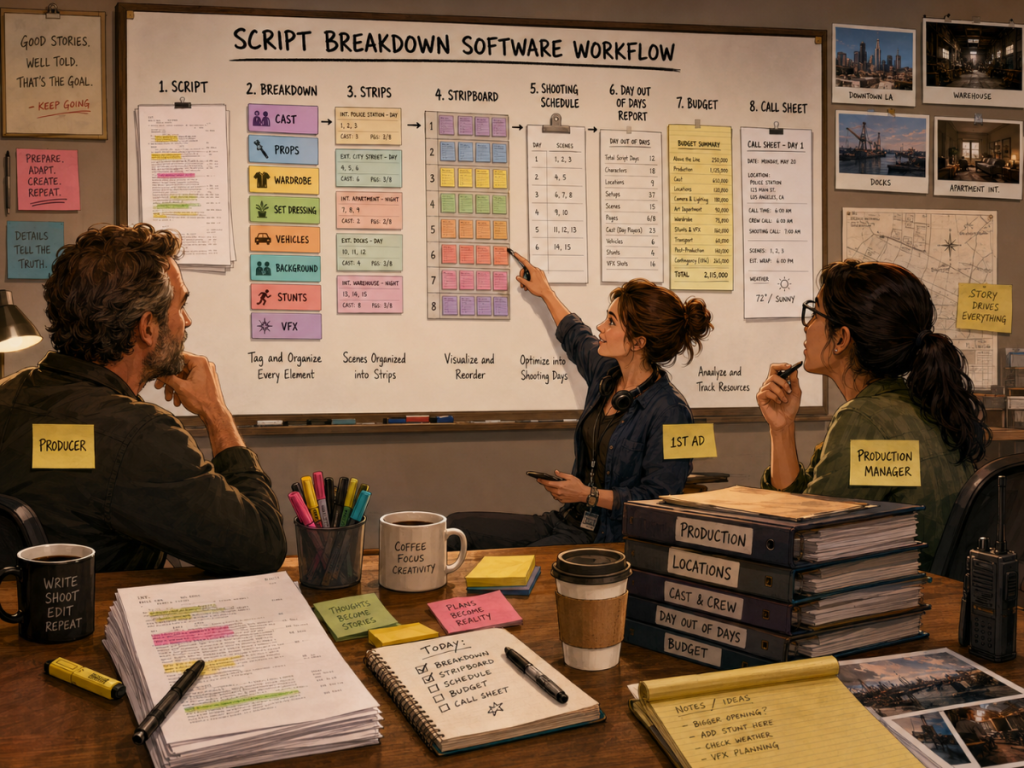
A script breakdown is where a screenplay starts becoming a production plan.
Before scenes can be scheduled, budgeted, grouped by location, assigned to shoot days, or turned into call sheets, someone has to identify what each scene actually requires. That means cast, props, wardrobe, vehicles, set dressing, background actors, stunts, animals, special effects, visual effects, makeup, locations, and all the other details that turn words on a page into work for a production team.
For years, this was done with printed scripts, colored highlighters, handwritten notes, and breakdown sheets. That process still works, especially when the person doing the breakdown has strong production experience. But as productions become more complex, and as schedules and budgets need to connect more directly, many filmmakers start looking for script breakdown software.
The question is not simply, “Can this tool tag a script?”
The better question is:
Can this tool help turn a screenplay into a schedule, budget, reports, and a real production workflow?
Good script breakdown software should do more than highlight props. It should help filmmakers organize scene elements, create production strips, support stripboards, generate reports, build Day Out of Days information, connect to scheduling, and ideally help the budget understand what the script requires.
This guide explains what filmmakers should look for before choosing script breakdown software, including manual tagging, AI-assisted breakdowns, Final Draft imports, production categories, reports, scheduling connections, budgeting workflows, and where Gorilla Scheduling and Breakdown Assistant AI fit into the process.
What Is Script Breakdown Software?
Script breakdown software helps filmmakers identify and organize the production elements in a screenplay.
Instead of marking up a printed script by hand and manually transferring the information into separate breakdown sheets, software can help keep those elements attached to scenes, categories, reports, and scheduling workflows.
A scene might include a character, a hero prop, a wardrobe change, a picture vehicle, background actors, a stunt, rain effects, and a specific location. Script breakdown software helps capture those requirements so they can be used later by the assistant director, producer, production manager, department heads, and budgeting team.
The best tools do not treat the breakdown as a dead-end list. They let the breakdown become the foundation for the rest of pre-production.
A tagged prop can appear in reports. A vehicle can be tracked across scenes. A cast member can appear in a Day Out of Days report. A location can influence the stripboard. A breakdown element can help inform the budget. A schedule can support the call sheet.
That is the difference between simply marking a script and building a production system.
👉 How to Break Down a Script for Film Production
Why Script Breakdown Software Matters
A screenplay can hide a surprising amount of production work inside a few lines.
A sentence like “The alley erupts into chaos as rain pours over the crowd and a motorcycle skids across the pavement” may involve background actors, rain effects, a motorcycle, stunt coordination, safety planning, wardrobe continuity, wet-down effects, lighting, traffic control, and location restrictions. On the page, it is one dramatic sentence. In production, it is a small weather system with paperwork.
Script breakdown software matters because it helps make those needs visible before the schedule is built.
When elements are missed, the problems usually appear later. A prop is not ready. A costume change is forgotten. A vehicle is not budgeted. A background actor group is underestimated. A visual effect is not flagged early enough. A location day becomes heavier than expected.
Good breakdown software helps the production catch those details while there is still time to plan.
It also helps different departments work from the same information. The assistant director can use the breakdown for scheduling. The producer can use it to understand cost. The production manager can use it to prepare logistics. Department heads can use it to plan what they need before the shoot day arrives.
A script breakdown is not just an inventory. It is a warning system.
Look for Flexible Breakdown Categories
The first thing script breakdown software should provide is a clear way to organize production elements by category.
Common breakdown categories include cast, background actors, props, wardrobe, vehicles, animals, stunts, special effects, visual effects, set dressing, makeup, locations, and notes. Different productions may need different categories, and the software should be flexible enough to support the way your team works.
A simple drama may not need many categories. A period film, action film, commercial, or effects-heavy project may need much more detail. A music video might care deeply about wardrobe, props, choreography, playback, and art department. A low-budget feature may need to track in-kind donations, picture vehicles, specialty props, and background actors carefully because every resource matters.
The software should make categories easy to use without turning the breakdown into a cluttered warehouse of tiny boxes.
Gorilla Scheduling supports breakdown categories such as cast, props, wardrobe, set dressing, vehicles, background, and many other production elements. The goal is not just to label items, but to help those items remain useful throughout scheduling and reporting.
👉 Film Scheduling Workflow: From Script Breakdown to Stripboard to Shooting Schedule
Look for More Than One Tagging Method
Not every production team breaks down a script the same way.
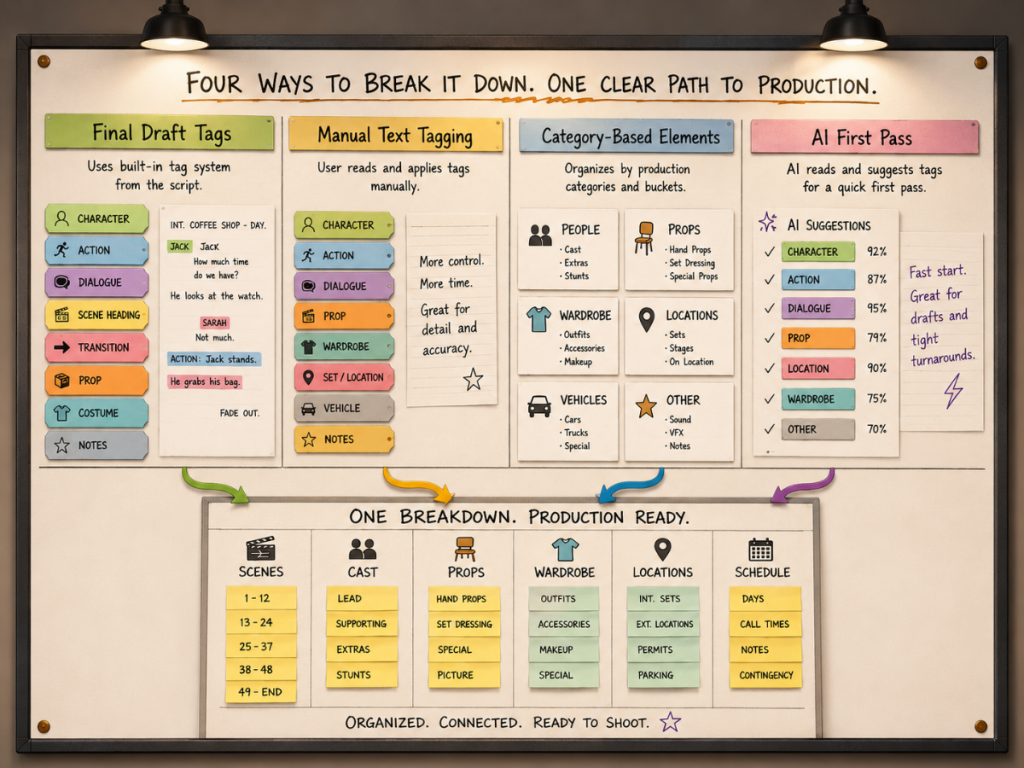
Some users want to tag elements in Final Draft before importing the screenplay. Some want to import the script and tag words or phrases directly inside the scheduling software. Some want to create elements by category and scene, especially when the production need is implied rather than clearly written on the page. Some may want AI to suggest a first pass, then review the results manually.
A strong script breakdown tool should support more than one workflow.
Final Draft tagging is useful when the script has already been marked up before scheduling begins. Manual text tagging is useful when the user wants exact control over which words or phrases become breakdown elements. Category-based element creation is useful when the production team needs to add practical elements that are not explicitly named in the screenplay. AI-assisted breakdown is useful when the team wants a fast first pass that can be reviewed and refined.
These methods should not be treated as enemies. They are different tools for different moments.
A filmmaker might import Final Draft tags, use AI to find additional candidates, manually tag important phrases, then add production-specific elements by category. That kind of hybrid workflow is often more realistic than trying to force every project into one rigid process.
👉 AI Script Breakdown vs Manual Tagging: Which Workflow Should Filmmakers Use?
Look for AI Assistance, But Keep Human Review
AI is becoming more useful in script breakdown workflows, especially for creating a fast first pass.
An AI script breakdown can scan screenplay text and suggest likely production elements. It may identify props, wardrobe, vehicles, set dressing, cast, background actors, visual effects, stunts, animals, or other categories that the team should consider. This can be a huge help when the script is long, the schedule is moving quickly, or the production team needs a starting point.
But AI should not be treated as the final authority.
A screenplay is full of implication and production context. AI may tag objects that do not need to be tracked, miss production needs that are implied, or misunderstand whether an item belongs under props, wardrobe, set dressing, vehicles, or another category. It may notice a “coffee mug” but miss the fact that a scene implies rain cover, duplicate wardrobe, safety planning, or a visual continuity issue.
That is why human review still matters.
Gorilla 11’s Breakdown Assistant AI is designed around this practical idea. It uses OpenAI to suggest breakdown elements, but the filmmaker remains in control. The user can review suggestions, accept what belongs, reject what does not, and refine the breakdown based on production judgment.
AI can help find the pieces. The production team still decides what matters.
Explore: Breakdown Assistant AI
https://junglesoftware.com/breakdown-assistant-ai/
Look for Script Import Support
Script breakdown software should make it easier to move from screenplay to production planning.
If the tool can import screenplay data, the production team avoids rebuilding the script manually. That matters because production planning already has enough friction. The last thing a filmmaker needs is to spend hours retyping scene headings, scene numbers, page counts, sets, locations, and character data if the software can help bring that information in.
Final Draft import can be especially useful because Final Draft is widely used in screenwriting and production workflows. If a script has already been written, revised, or tagged in Final Draft, the ability to move that material into scheduling software can save time and reduce errors.
Gorilla Scheduling can import screenplay data and use that information to help build the production workflow. When available, tagged data can help carry breakdown work forward instead of leaving it trapped inside the screenplay file.
The script should not sit outside the schedule like a mysterious locked suitcase. The production plan should be able to open it, read it, and use what is inside.
👉 Final Draft to Film Scheduling: How to Turn a Screenplay into a Shootable Schedule
Look for Reports That Production Teams Can Actually Use
A breakdown is only useful if the information can be turned into readable reports.
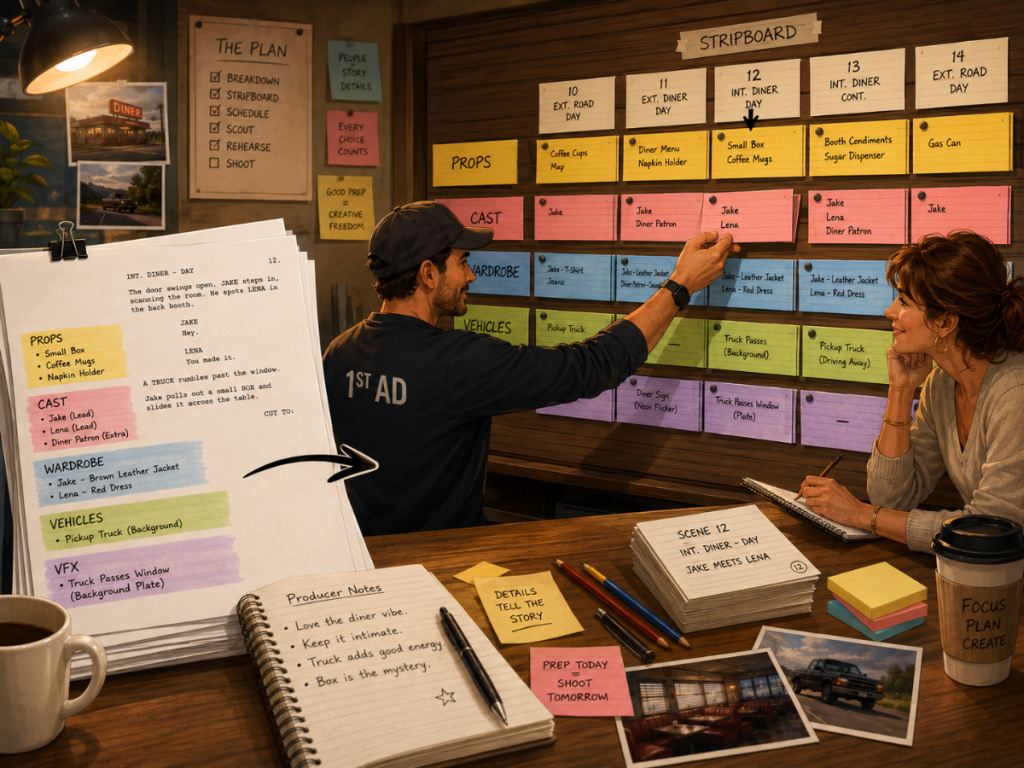
Different people need different views of the same script. The assistant director may need scene and strip information. The producer may want to see production complexity. The art department may need props and set dressing. Wardrobe may need costume elements. Locations may need scene groupings. The budget team may need a clearer picture of what the script requires.
Good script breakdown software should help generate practical reports, not just store tags.
A breakdown report should make it easy to see what elements are attached to each scene. Element reports should help departments focus on their own categories. Cast and location reports should support scheduling and logistics. Day Out of Days reports should show when cast or other elements appear across the schedule.
Reports are where breakdown data becomes shareable.
If the breakdown only lives inside one person’s notes, it cannot help the rest of the team very much. If the breakdown can generate clear reports, it becomes a production tool.
👉 Film Production Reports Explained and Film Scheduling Reports Explained
Look for Day Out of Days Support
A Day Out of Days report, often called a DOOD, is one of the most useful ways to see how cast and elements work across the schedule.
Many filmmakers think of the DOOD primarily as a cast report. That is important, but it is not the whole story. A DOOD can also be useful for tracking props, wardrobe, set dressing, background actors, vehicles, visual effects, and other breakdown elements across shoot days.
This matters because production elements often have cost and prep consequences. A picture vehicle that appears across five shoot days needs planning. A costume that appears in multiple scenes needs continuity. A prop that travels through the story may need duplicates, tracking, and department attention. A visual effect may need to be coordinated with specific shoot days.
When script breakdown software connects to scheduling, those elements can become part of DOOD reporting.
Gorilla Scheduling can create Day Out of Days reports for cast and for other breakdown element categories. That makes the breakdown more powerful because it helps the team see not just what appears in the script, but when those elements are needed during production.
👉 What Is a Day Out of Days Report?
Look for Budgeting Connections
A script breakdown is not only a scheduling tool. It also affects the budget.
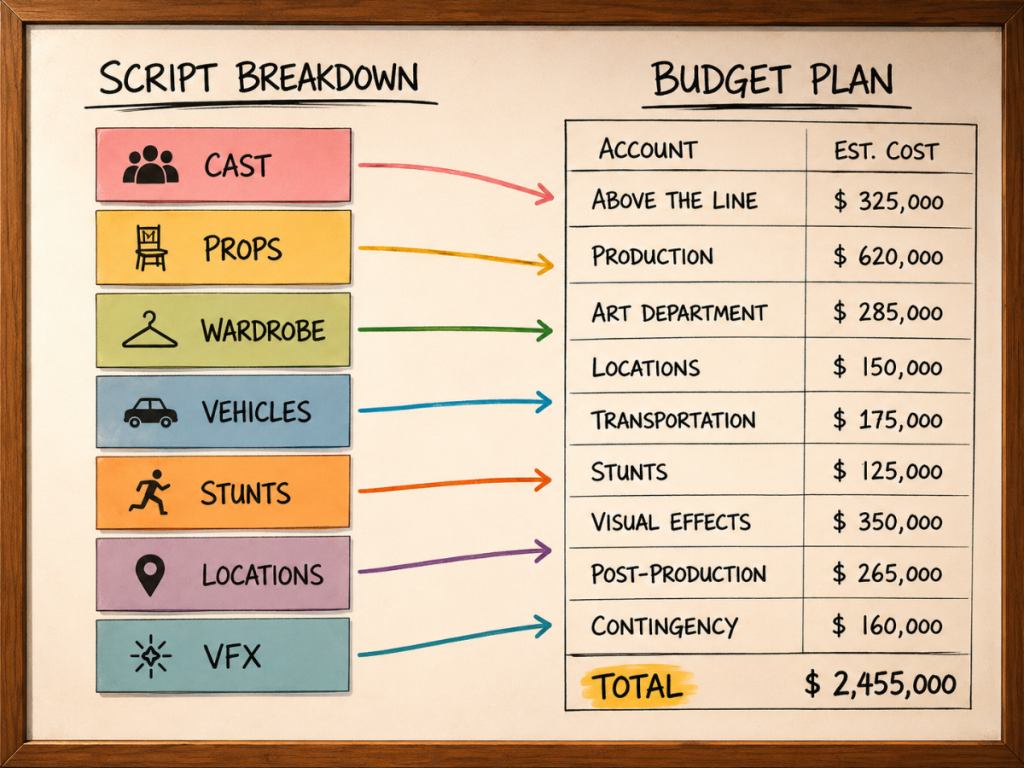
Every production element has potential cost implications. Cast, background actors, props, wardrobe, vehicles, animals, stunts, visual effects, special effects, makeup, set dressing, and locations can all influence the budget. If those items are not identified early, the budget may be incomplete.
The connection becomes even stronger when breakdown elements are tied to the schedule. The budget does not only need to know that a vehicle appears. It may need to know how many days that vehicle appears. It may need to know whether a cast member works three days or thirteen. It may need to know how often a location is used, or whether a stunt appears on a difficult night exterior.
Script breakdown software becomes more valuable when it supports this chain.
Gorilla Scheduling can link with Gorilla Budgeting, allowing schedule and breakdown data to help inform the budget. Gorilla Budgeting can import cast, crew, locations, breakdown elements, rates when available, and DOOD totals into budget line day counts.
That means the breakdown can help shape not just the schedule, but the financial plan.
👉 How to Turn a Script Breakdown Into a Film Budget
Look for Call Sheet Connections
The call sheet is the daily communication document for the shoot. It tells cast and crew where to go, when to arrive, what scenes are being filmed, who is needed, and what special notes apply.
A call sheet is strongest when it comes from current schedule information.
If breakdown elements and schedule data are organized properly, the call sheet can better reflect what the day actually requires. Scenes, cast, locations, special notes, department needs, and production details all flow more cleanly when the underlying schedule is accurate.
A disconnected workflow creates more room for mistakes. If someone manually builds a call sheet from old schedule information, a scene may be wrong, a cast member may be missing, or a location note may be outdated.
Koala Call Sheets can generate call sheets from Gorilla schedules, helping the daily production document stay connected to the scheduling workflow.
That matters because the call sheet is not just another piece of paperwork. It is the plan everyone sees.
👉 What Is a Call Sheet in Film?
Look for Review and Control
Script breakdown software should not make the user feel trapped by the software’s decisions.
This is especially important with AI-assisted breakdowns. The tool may suggest elements, but the filmmaker must be able to review, adjust, reject, reorganize, and refine. Production judgment changes from project to project. A low-budget indie drama will not break down the same way as a studio feature, a commercial, a period film, or an effects-heavy thriller.
Review and control matter because the breakdown becomes official production data.
Once an element is accepted into the breakdown, it may appear in reports, DOODs, department lists, schedules, budget workflows, and call sheets. If the software makes it difficult to correct or refine those elements, the production inherits unnecessary noise.
Good breakdown software should make the user feel faster, not less in control.
Breakdown Assistant AI in Gorilla 11 is useful because it is positioned as an assistant. It can help suggest elements, but the user remains responsible for the final breakdown. That keeps the workflow practical and credible.
AI can accelerate the first pass. The filmmaker still protects the final plan.
Look for a Workflow That Matches Your Production
The right script breakdown software depends on the type of production.
A small short film may only need basic scene elements and a simple schedule. An independent feature may need stronger tracking for cast, locations, props, wardrobe, and budget. A commercial may need precise art department and wardrobe coordination. A genre film may need detailed vehicles, stunts, special effects, visual effects, makeup, and background actor tracking.
The best tool is the one that supports the way the production actually works.
If the team already tags in Final Draft, import support matters. If the assistant director wants exact control, manual text tagging matters. If the production often adds implied elements, category-based creation matters. If speed is the priority, AI-assisted first-pass breakdown can be extremely helpful. If the project is moving into scheduling and budgeting, the breakdown needs to connect downstream.
That is why filmmakers should not choose script breakdown software based only on a feature list.
They should choose based on workflow.
The real test is whether the tool helps the production move from script to schedule, from schedule to budget, and from plan to shoot.
Where Gorilla Scheduling Fits
Gorilla Scheduling is designed to help filmmakers move from screenplay breakdown to production scheduling.
It can import screenplay data, support breakdown workflows, organize production elements, create production strips, build stripboards, generate Day Out of Days reports, manage actor and location records, and produce scheduling reports.
With Gorilla 11, Breakdown Assistant AI adds a new first-pass option for filmmakers who want AI-assisted suggestions using OpenAI. The user can review and refine those suggestions, keeping human judgment at the center of the process.
Gorilla also supports manual workflows. Users can tag elements from the screenplay display, create elements by category and scene, and work with imported script data from tools such as Final Draft.
The important point is that the breakdown does not stop at tagging. In Gorilla, breakdown data can support scheduling, stripboards, reports, DOODs, budgeting workflows, and call sheets through Koala Call Sheets.
For filmmakers who want a connected pre-production process, that matters.
Looking for script breakdown software that connects your screenplay to scheduling, reports, budgeting, and call sheets?
Explore Jungle Software’s production tools:
Gorilla Scheduling
https://junglesoftware.com/gorilla-scheduling/
Breakdown Assistant AI
https://junglesoftware.com/breakdown-assistant-ai/
Gorilla Budgeting
https://junglesoftware.com/gorilla-budgeting/
Koala Call Sheets
https://junglesoftware.com/koala/
Final Takeaway
Script breakdown software should do more than tag words in a screenplay.
It should help filmmakers turn the script into a production plan.
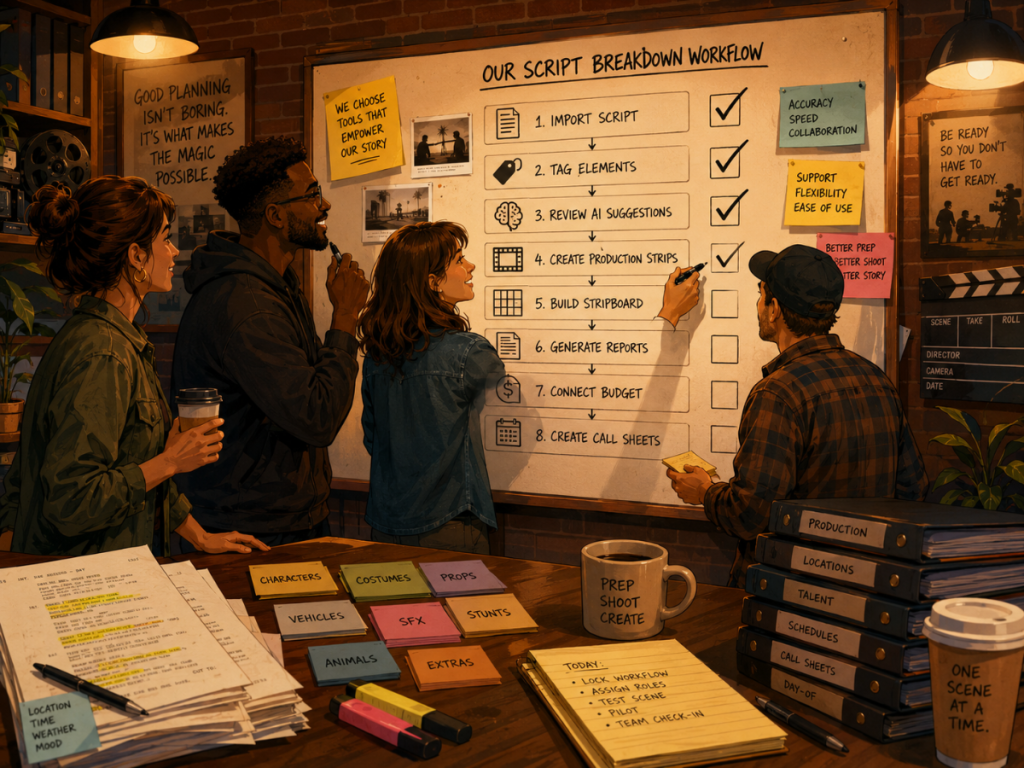
That means importing screenplay data, identifying breakdown elements, supporting manual and AI-assisted workflows, organizing categories, creating production strips, feeding the stripboard, generating reports, supporting Day Out of Days, connecting to budgeting, and helping call sheets reflect the current schedule.
AI can make the first pass faster. Manual tagging can make the breakdown more precise. Final Draft imports can preserve work already done. Category-based element creation can capture production needs that are implied rather than written directly on the page.
The best workflow may use all of these.
A good breakdown tool does not replace production judgment. It gives that judgment a better place to work.
Questions or Comments?
Have a question about stripboards or film scheduling? Feel free to leave a comment below — or reach out if you want to learn more about how professional tools can streamline your workflow.