
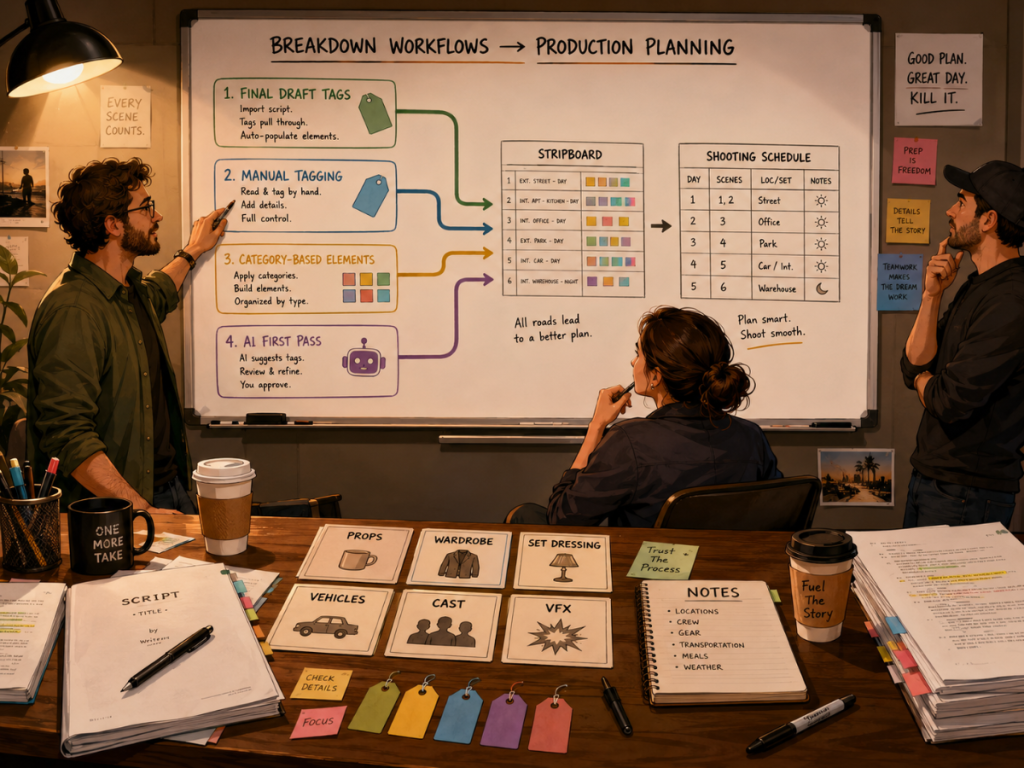
Breaking down a screenplay is one of the first moments when a film becomes a production.
Before the stripboard, before the shooting schedule, before the Day Out of Days report, before the budget can truly reflect the plan, someone has to look at the script and ask:
What does this scene actually require?
That means identifying cast, background actors, props, wardrobe, vehicles, animals, stunts, visual effects, special effects, set dressing, makeup, locations, and other production elements that need to be scheduled, budgeted, prepared, tracked, or communicated.
Traditionally, this has been a manual process. A producer, assistant director, production manager, or department head reads the script carefully and tags the elements scene by scene. That manual process still matters.
But AI is now becoming part of the conversation.
An AI script breakdown can help filmmakers create a faster first pass by suggesting likely breakdown elements from the screenplay. That can save time, especially on long scripts, early drafts, low-budget projects, or productions without a full pre-production team.
But AI should not be treated like a magic production oracle with a clipboard.
It can help. It can miss things. It can over-tag. It can misunderstand context. And it still needs human review.
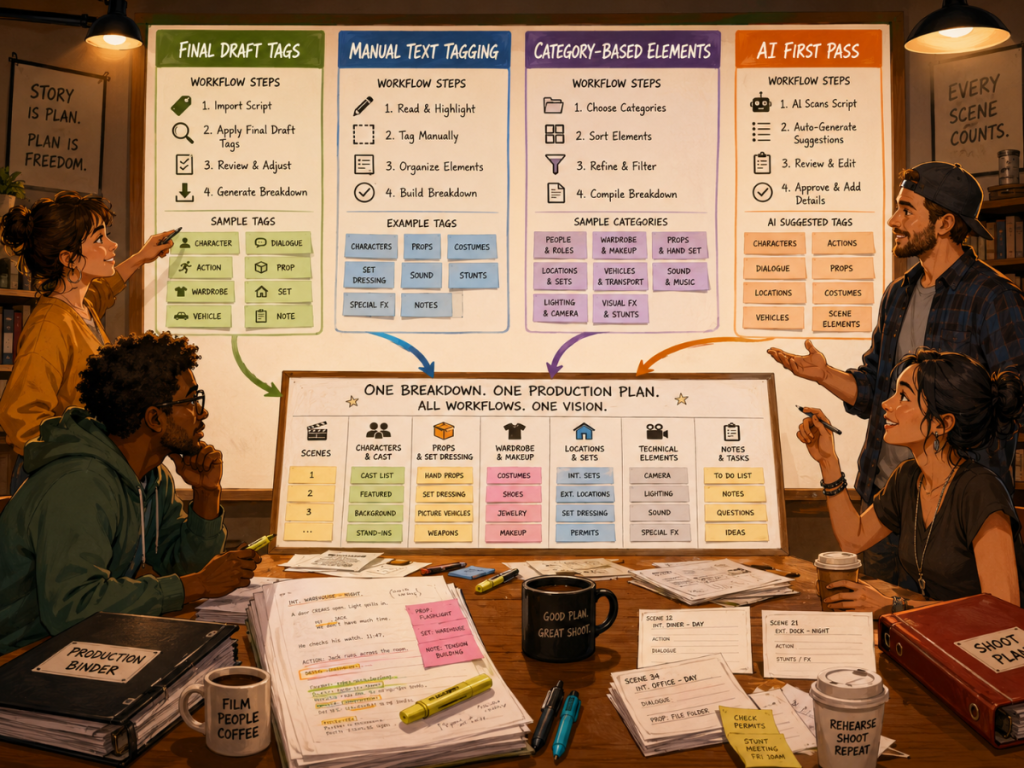
This guide compares AI script breakdown vs manual tagging, including several practical workflows filmmakers can use: tagging in Final Draft before importing, manually tagging inside Gorilla Scheduling, creating elements by category and scene, and using Breakdown Assistant AI in Gorilla 11.
The real question is not whether AI or manual tagging is “better.”
The better question is: which workflow gives your production the right balance of speed, accuracy, and control?
What Is a Script Breakdown?
A script breakdown is the process of identifying the production elements required by each scene in a screenplay.
If a scene mentions a “rusted pickup truck,” that may become a vehicle. If a character wears a “blood-stained tuxedo,” that may become wardrobe and makeup. If a room is filled with “old trophies, dusty photos, and half-packed moving boxes,” that may become set dressing and props.
A breakdown helps the production team understand what has to be prepared before the scene can be filmed.
It also supports the rest of pre-production. Once the script is broken down, the information can help build production strips, stripboards, shooting schedules, Day Out of Days reports, cast reports, location reports, budget estimates, and call sheets.
Without a solid breakdown, the schedule is weaker. The budget is weaker. Department prep is weaker. And the production may discover missing elements too late, usually when someone is already holding a walkie and looking worried.
👉 How to Break Down a Script for Film Production
What is an AI Script Breakdown?
An AI script breakdown uses artificial intelligence to analyze screenplay text and suggest production elements.
Instead of starting from a blank breakdown sheet, the filmmaker can begin with AI-generated suggestions. The AI may identify props, wardrobe, set dressing, vehicles, animals, stunts, visual effects, background actors, special equipment, or other elements that appear in the scene.
That can be useful because the first pass of a breakdown is often time-consuming. AI can scan the text quickly and surface items that the production team may want to review.
But the key word is suggest.
An AI breakdown should not automatically become the final production breakdown without review. A screenplay is full of nuance, implication, tone, and production judgment. AI can help find likely elements, but a human still needs to decide what matters for the actual shoot.
In Gorilla 11, Breakdown Assistant AI is designed around that idea. It can use OpenAI to suggest breakdown elements, but the user remains in control by reviewing, accepting, rejecting, or refining those suggestions.
That is the right place for AI in a professional workflow: useful assistant, not final authority.
Why Script Breakdown Workflow Matters
The way you break down the script affects everything that comes after it.
If a prop is missed during breakdown, it may not appear in the schedule or department prep. If a vehicle is not tagged, it may not be budgeted or arranged. If wardrobe changes are not noticed, the costume department may be surprised later. If background actors are not identified, the assistant director may underestimate the day.
A breakdown is not just a list. It is production memory.
Once elements are tagged or created, they can become part of the schedule’s structure. They can appear in reports. They can be tracked across scenes. They can feed Day Out of Days reports. They can inform the budget. They can help departments prepare.
This is why the workflow matters so much.
Speed is useful, but only if the result is trustworthy. Precision is useful, but only if the process does not become so slow that the production never catches up. The best breakdown method depends on the project, the team, and the stage of production.
A first draft may benefit from AI speed.
A locked shooting script may need careful manual review.
A production with heavy props, wardrobe, vehicles, or stunts may need department-level precision.
A rewrite may need a faster way to catch what changed.
The smartest workflow is often not one method. It is a combination.
Workflow 1: Tagging in Final Draft Before Importing
Some filmmakers prefer to tag breakdown elements directly in Final Draft (or another screenplay program) before bringing the screenplay into scheduling software.
This can be a good workflow when the writer, producer, or assistant director already uses Final Draft tagging as part of their process. The script file can carry important breakdown information before it ever enters the scheduling environment.
For productions that begin breakdown work inside the screenplay itself, this method can feel natural. The person reading the script highlights or tags elements as they go, and those tags can later be imported into Gorilla Scheduling along with the screenplay.
The advantage is continuity. The tags begin close to the writing process and can travel with the script into pre-production.
The limitation is that screenplay tagging may not capture every production decision. A writer may tag obvious props, but not the practical details a production manager would care about. An assistant director may still need to revise, reorganize, or expand the breakdown once the script becomes a shooting document.
This workflow is best when the script has already been thoughtfully tagged and the production wants to preserve that work during import.
👉 Final Draft to Film Scheduling: How to Turn a Screenplay into a Shootable Schedule
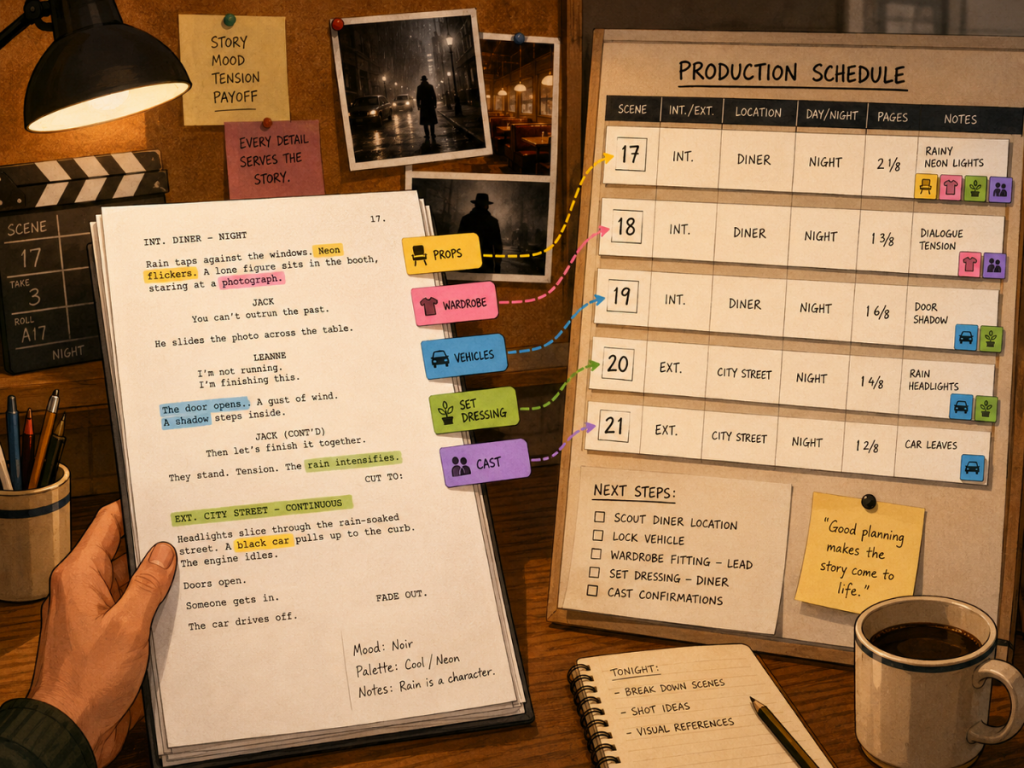
Workflow 2: Manually Tagging in Gorilla From the Screenplay DisplayAnother workflow is to import the screenplay into Gorilla Scheduling, then manually tag elements from the screenplay display.In this method, the user selects a word or phrase in the script and assigns it to a breakdown category. For example, a phrase might be attached to Props, Wardrobe, Set Dressing, Vehicles, Animals, Special Effects, or another category.This approach gives the user strong control.You are not relying on the script’s previous tags. You are not relying on AI suggestions. You are reading the screenplay as a production document and deciding exactly what should be attached to each scene.That can be especially valuable when precision matters. If the script says “silver lighter,” the user can tag that exact phrase as a prop. If the script says “torn leather jacket,” that phrase can become wardrobe. The breakdown stays connected to the actual words on the page.Manual tagging also helps the user make judgment calls. Not every object in a sentence needs to become a production element. Not every repeated mention should be tagged again. Some details matter to the department. Some are just descriptive texture.That judgment is where human breakdown work still shines.This workflow is best when the user wants careful control over the breakdown and wants each element tied directly to script text.
Workflow 3: Creating Elements by Category and Scene
Sometimes the element you need is not easy to tag as a clean word or phrase in the screenplay.
A script may imply production needs without naming them directly. A scene description might say, “The apartment has not changed since 1987.” That could imply set dressing, props, wallpaper, electronics, photos, furniture, wardrobe references, and aging details. But the script may not list each item.
In other cases, a production team may want to add practical elements that are not directly written in the script. A scene may require safety cones, rain cover, specialty makeup, a duplicate prop, extra wardrobe, background actor categories, or a production vehicle that is necessary for the shoot but not part of the story world.
That is where creating elements by category and scene becomes useful.
Instead of selecting a phrase in the screenplay, the user can choose a breakdown category and create the element for that scene. This allows the breakdown to reflect production reality, not just the literal text.
This workflow is especially useful for assistant directors, production managers, and department heads who are thinking beyond the script’s surface.
A screenplay may describe the story. A breakdown has to describe the production.
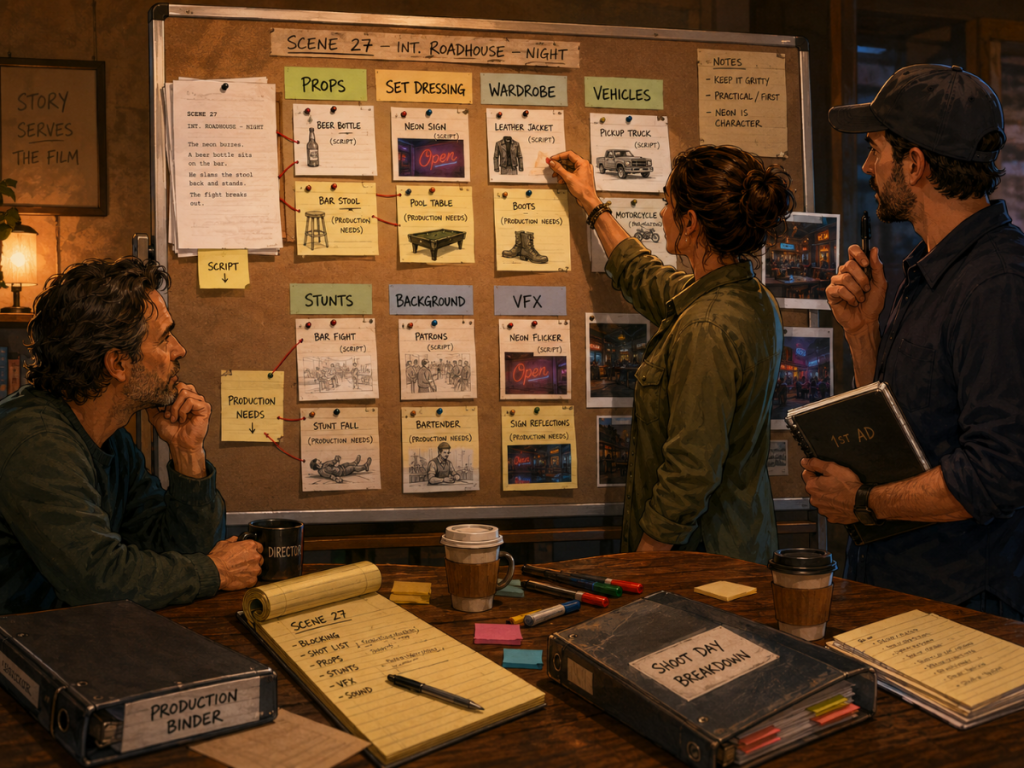
Workflow 4: Using AI for a First-Pass Breakdown
AI becomes most useful when the production needs a first pass quickly.
Instead of manually identifying every possible prop, costume, vehicle, set dressing item, or effect from scratch, the user can let AI suggest likely breakdown elements. The production team can then review those suggestions and decide what to keep.
This can be helpful for long scripts, early-stage schedules, low-budget productions, fast turnarounds, or rewrite comparisons. It can also help reduce blank-page friction. The user starts with a draft breakdown rather than an empty one.
In Gorilla 11, Breakdown Assistant AI is designed to help with this first-pass process. It can suggest breakdown elements from the screenplay using OpenAI, while still allowing the user to accept, reject, or refine the results.
That review step is essential.
AI may find things the user missed. It may also suggest things that do not matter. It may tag a generic object that never needs to be tracked. It may misunderstand whether an item is a prop, set dressing, wardrobe, or simply descriptive language.
The production team still decides what belongs in the breakdown.
This workflow is best when speed matters, but the user still wants control over the final tags.The Pros of AI Script Breakdown
The Pros of AI Script Breakdown
The biggest advantage of AI script breakdown is speed.
A screenplay can be long, dense, and full of small production details. AI can scan the text quickly and suggest elements that might take a human longer to identify manually. This can be especially valuable during early pre-production when the team needs a rough sense of what the script requires.
AI can also help with consistency. It may notice repeated elements across scenes, recognize likely categories, and provide a starting point for cast, props, wardrobe, set dressing, vehicles, and other production needs.
Another advantage is momentum. A blank breakdown can feel heavy, especially for independent filmmakers who are also producing, scheduling, budgeting, location scouting, and answering twelve emails about parking. AI can create the first layer of structure so the filmmaker has something to review.
That does not mean AI should decide the final breakdown. It means AI can help the production get started faster.
In the right workflow, AI becomes a first-pass assistant. The filmmaker becomes the editor.
The Cons and Limits of AI Script Breakdown
AI does not understand your production the way your team does.
It does not know your budget priorities, your location limitations, your department structure, your director’s style, or whether a line of description is meant to be tracked as a real production element.
AI can miss implied elements. If the script says a house feels “frozen in time,” a human production designer may know that means period-appropriate furniture, wall art, props, wardrobe references, dust, aging, and visual continuity. AI may not fully understand how that description should translate into production needs.
AI can also over-tag. It may identify every cup, chair, door, phone, bag, or passing object even when those items do not need to be tracked. A cluttered breakdown can become almost as unhelpful as an incomplete one.
It may also miscategorize elements. Something could be tagged as a prop when the production would treat it as set dressing. A wardrobe detail could be mistaken for makeup. A vehicle mentioned in dialogue may not actually appear on screen.
This is why human review is not optional. It is the part that turns AI suggestions into a real production breakdown.
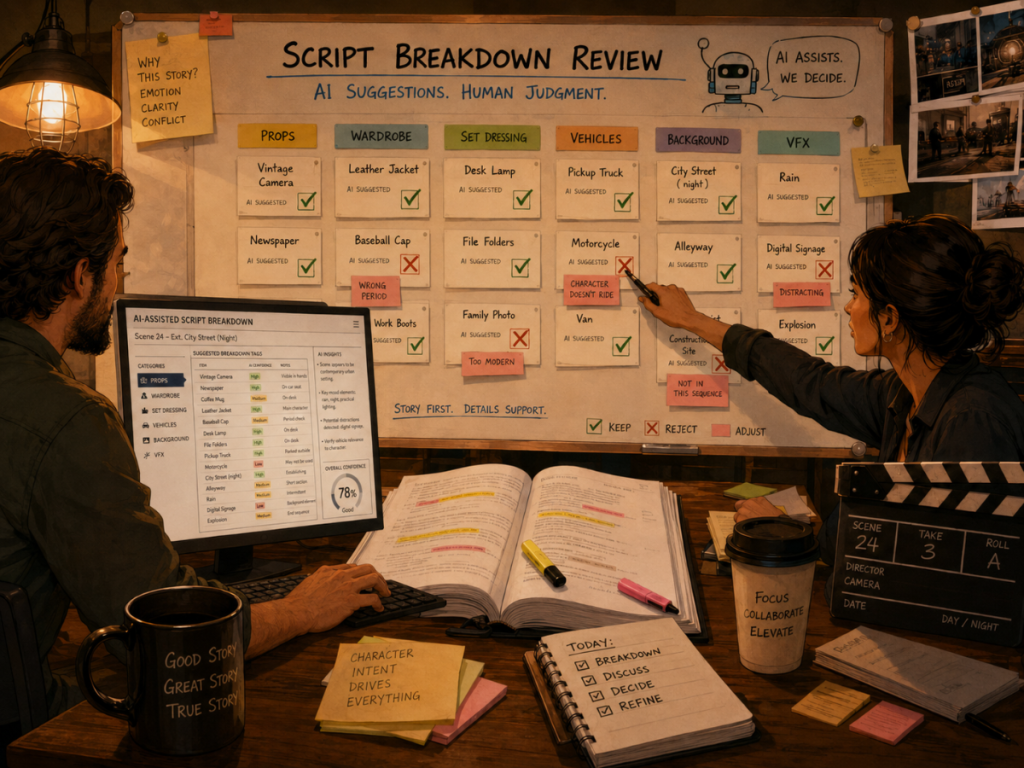
Why Human Review Still Matters
A good script breakdown is not just extraction. It is interpretation.
The person doing the breakdown is not only asking, “What words appear in the script?” They are asking, “What does the production need to make this scene work?”
That question requires context.
A prop may be important because an actor handles it. A costume may matter because it has continuity across several scenes. A vehicle may matter because it affects permits, parking, insurance, transportation, and budget. A background actor group may matter because it changes the scale of the day. A stunt may matter even if the action is described in one short sentence.
AI can help identify candidates. Human review decides significance.
That is especially important when the breakdown will feed into scheduling and budgeting. Once a breakdown element enters the schedule, it may appear in reports, Day Out of Days, department lists, and budget planning. Bad data travels. Good data travels too.
The human review stage protects the production from letting rough AI suggestions become official production information too quickly.
What AI May Miss
AI may miss production needs that are implied rather than explicitly stated.
For example, if a script describes a character as “fresh from a boxing match,” the production may need makeup, wardrobe distressing, blood effects, sweat, props, continuity photos, and possibly stunt or safety considerations. The script may not list those items one by one.
AI may also miss tone-based or design-based needs. A “cheap motel room” means something different in a thriller, a comedy, a period drama, or a music video. A human production team understands style, genre, budget, and the director’s intent.
Some elements are also production-specific. A location may require equipment, safety materials, signage, permits, or holding areas that do not appear in the story. Those needs may be added by the production team after reading the scene, even if they are not literal screenplay elements.
That is why manual category-based element creation remains important.
AI reads the text. The production team reads the movie.
What AI May Over-Tag
AI may also suggest too much.
A screenplay may mention a table, chair, coffee mug, phone, window, door, lamp, jacket, folder, sidewalk, and passing car in a single scene. Some of those may matter. Others may simply be normal environmental details that do not need to become tracked breakdown elements.
Over-tagging can create clutter.
If every object becomes a tracked element, reports become noisy. Department lists become harder to use. The schedule may appear more complicated than it really is. Producers and assistant directors may spend time cleaning the breakdown instead of using it.
A strong breakdown should be useful, not encyclopedic.
Human review helps decide whether an element needs attention. Is it handled by an actor? Does it have continuity? Does it need to be sourced, rented, built, cleared, scheduled, budgeted, or reported? If not, it may not need to become a breakdown element.
AI may be generous with suggestions. The production team needs to be selective.
AI Script Breakdown vs Manual Tagging: Which Is Better?
AI script breakdown is better when speed and first-pass coverage matter.
Manual tagging is better when precision, judgment, and production-specific control matter.
Final Draft tagging is useful when the screenplay has already been tagged before import. Manual text tagging in Gorilla is useful when the user wants to attach exact words or phrases to breakdown categories. Category-based element creation is useful when the element is implied or production-specific. AI breakdown is useful when the team wants fast suggestions that can be reviewed and refined.
The best workflow may combine all of them.
A filmmaker might import a screenplay with Final Draft tags, use Breakdown Assistant AI to suggest additional elements, manually tag important phrases that need precision, and create category-based elements for implied production needs.
That combination gives the production both speed and judgment.
The real goal is not to choose AI or human work as if they are enemies in tiny production vests. The goal is to create a breakdown that helps the production schedule, budget, prepare, and shoot the project more accurately.
How Breakdown Data Affects Scheduling
Breakdown data becomes the foundation for scheduling.
Once scenes have cast, locations, props, wardrobe, vehicles, stunts, background actors, and other elements attached, the assistant director can make smarter scheduling decisions.
A vehicle that appears in several scenes may need to be scheduled efficiently. A special costume may need continuity tracking. A prop may need to be ready across multiple shoot days. A background actor group may change the complexity of a scene. A stunt or special effect may require more time than the page count suggests.
This is why breakdown accuracy matters.
The stripboard depends on scene information. The shooting schedule depends on the stripboard. Reports depend on the schedule. Call sheets depend on the schedule. Budgeting may depend on breakdown elements and DOOD totals.
When the breakdown is incomplete, the whole production plan becomes less reliable.
👉 What Is a Production Strip in Film Scheduling?
How Breakdown Data Affects Budgeting
A script breakdown also affects the budget.
The budget needs to know what the production requires. Cast, crew, locations, props, wardrobe, vehicles, animals, stunts, special effects, visual effects, background actors, and other elements can all affect cost.
When the breakdown connects to the schedule, the budget can become even more accurate. The schedule can reveal how many days certain cast members work, how many days a location is needed, how many days a vehicle appears, or how often a breakdown element is required.
In Gorilla’s workflow, Gorilla Scheduling can link with Gorilla Budgeting. Gorilla Budgeting can import cast, crew, locations, breakdown elements, rates when available, and DOOD totals into budget line day counts.
That means breakdown data is not just helpful for organizing scenes. It can help shape the financial plan.
👉 How to Turn a Script Breakdown Into a Film Budget
Where Gorilla 11 Breakdown Assistant AI Fits
Gorilla 11’s Breakdown Assistant AI is designed to help filmmakers speed up the breakdown process while keeping the user in control.
Instead of treating AI suggestions as final, the workflow allows filmmakers to review proposed elements and decide what belongs in the breakdown. This matters because every production has different priorities. A prop-heavy comedy, a costume-heavy period film, a low-budget drama, and an effects-heavy thriller all require different kinds of breakdown judgment.
Breakdown Assistant AI can help identify likely elements from the screenplay, but the filmmaker still decides what to accept, reject, or adjust.
That makes it especially useful as a first-pass tool.
The user can begin with AI suggestions, then refine the breakdown manually, add implied production elements, or adjust categories based on how the production actually plans to shoot the script.
In a professional workflow, AI is not the final breakdown. It is the assistant that helps get the breakdown started.
Want a faster way to start your script breakdown while still keeping control over the final production elements?
Gorilla 11 includes Breakdown Assistant AI, designed to help filmmakers create a first-pass script breakdown using OpenAI, then review and refine the results inside Gorilla Scheduling.
Explore Gorilla Scheduling from Jungle Software:
You can also explore:
Breakdown Assistant AI
Gorilla Budgeting
https://junglesoftware.com/gorilla-budgeting/
Koala Call Sheets
https://junglesoftware.com/koala/