
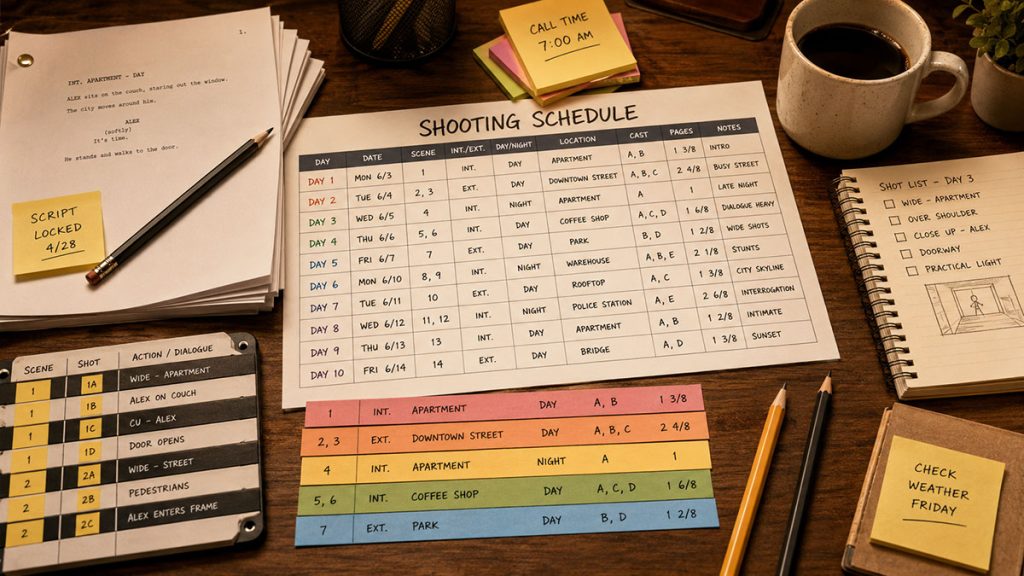
A shooting schedule can look like a strange production spellbook the first time you see one.
Scene numbers. Shoot days. Locations. Cast IDs. Page counts. Day and night labels. Interior and exterior codes. Company moves. Notes. Meal breaks. Production banners. Colored strips. Tiny abbreviations that seem to know more about the movie than you do.
But once you understand how to read a shooting schedule, the document becomes much less intimidating.
A shooting schedule is not just a list of scenes. It is the production’s plan for turning a screenplay into filmed material. It shows what will be shot, when it will be shot, where it will be shot, which cast members are needed, how much script material is scheduled each day, and what production factors may affect the work.
For assistant directors, the shooting schedule is a command center.
For producers, it is a budget warning system.
For directors, it shows when creative priorities must meet production reality.
For screenwriters, it reveals how scenes on the page become shoot days on the calendar.
And for the crew, it helps answer the question everyone eventually asks:
What are we shooting, and how hard is the day going to be?
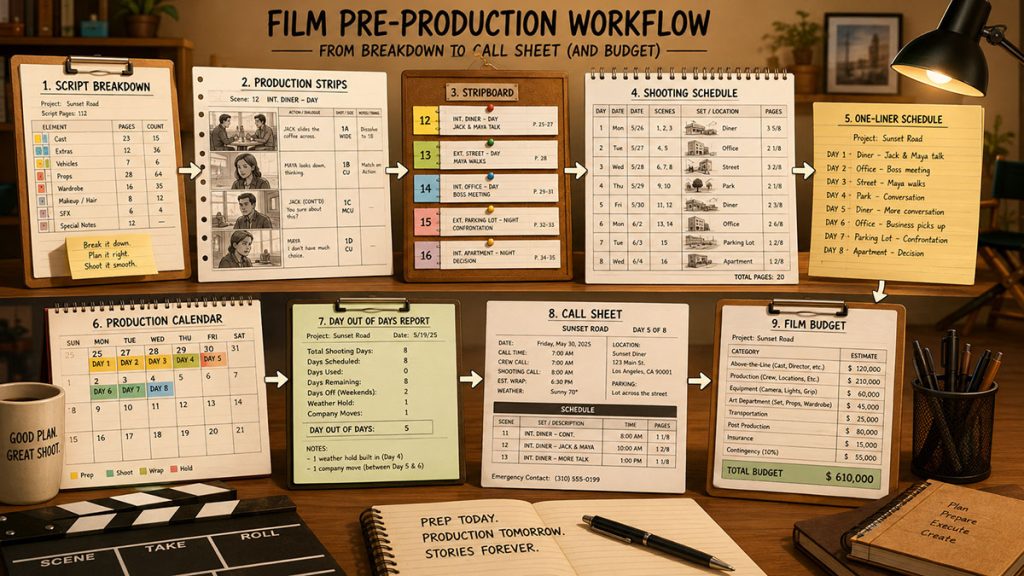
In this guide, we will break down how to read a shooting schedule, what each part means, and how it connects to the stripboard, one-liner schedule, production calendar, Day Out of Days report, call sheets, and budget.
What Is a Shooting Schedule?
A shooting schedule is a production document that organizes the scenes of a film into the order they will be filmed.
That order is usually different from the order of the screenplay.
A script is written for story flow. A shooting schedule is built for production efficiency.
Instead of shooting Scene 1, then Scene 2, then Scene 3, a production may shoot all scenes at one location first. Or it may group an actor’s scenes together. Or it may schedule all night exterior scenes in the same block. Or it may arrange the shoot around weather, location access, child actor rules, equipment availability, or budget limits.
The shooting schedule helps the team plan:
- Which scenes are filmed each day
- Where the company is shooting
- Which cast members are needed
- How many script pages are scheduled
- Whether scenes are interior or exterior
- Whether scenes are day or night
- Which locations are grouped together
- Where difficult or expensive scenes fall
- How the schedule affects the budget
A shooting schedule is usually built from the script breakdown and stripboard. Once the scenes are broken down into production strips, the assistant director can organize those strips into shoot days.
The result is a practical plan for production.
Shooting Schedule vs. Stripboard vs. One-Liner Schedule
These documents are related, but they are not exactly the same.
A stripboard is the working scheduling board. It uses production strips, usually one strip per scene, arranged into shoot days. The assistant director moves strips around to test and refine the schedule.
A shooting schedule is the formal schedule created from that board. It presents the shoot plan in a readable document format.
A one-liner schedule is a condensed version of the shooting schedule. It usually summarizes each shoot day in a compact format, often with one line per scene or setup.
Think of it this way:
The stripboard is where the schedule is built.
The shooting schedule is the detailed plan.
The one-liner schedule is the quick-reference version.
All three documents help the production understand what is being shot, but each one serves a different purpose.
The stripboard is best for building and revising. The shooting schedule is best for detailed planning. The one-liner is best for giving the team a fast overview.
Why Learning to Read a Shooting Schedule Matters
If you can read a shooting schedule, you can understand the production plan behind the movie.
That matters because the schedule affects nearly everything.
The shooting schedule helps determine:
- How many days the movie will shoot
- How cast days are grouped
- How locations are used
- How equipment is rented
- How crew time is budgeted
- When expensive scenes happen
- Where production risk may appear
- How call sheets are built
- How the production calendar is shaped
- How the film budget changes
A shooting schedule is not just administrative paperwork. It is a creative and financial document disguised as logistics.
If a schedule groups locations efficiently, the production may save money. If it scatters actor days carelessly, cast costs may increase. If it places too many difficult scenes into one day, the crew may fall behind. If it ignores company moves, the day may collapse before lunch. If it underestimates night work, the production may face safety, overtime, and fatigue problems.
Reading the shooting schedule helps you see those issues before they become set emergencies.
That is the whole trick: catch the problem while it is still ink on paper, not a producer staring into the middle distance while someone says, “We have one hour of daylight left.”
The Main Parts of a Shooting Schedule
A shooting schedule can vary by production, but most include several core pieces of information.
You will usually see:
- Shoot day
- Date
- Scene number
- Script page
- Page count
- Interior or exterior
- Day or night
- Set
- Location
- Cast required
- Scene description or synopsis
- Estimated scene time
- Company moves
- Meal breaks
- Banners or production notes
- Unit information
- Special requirements
Some schedules are very detailed. Others are more compact.
The purpose is always the same: to help the production team understand what needs to be filmed and how the shoot is organized.
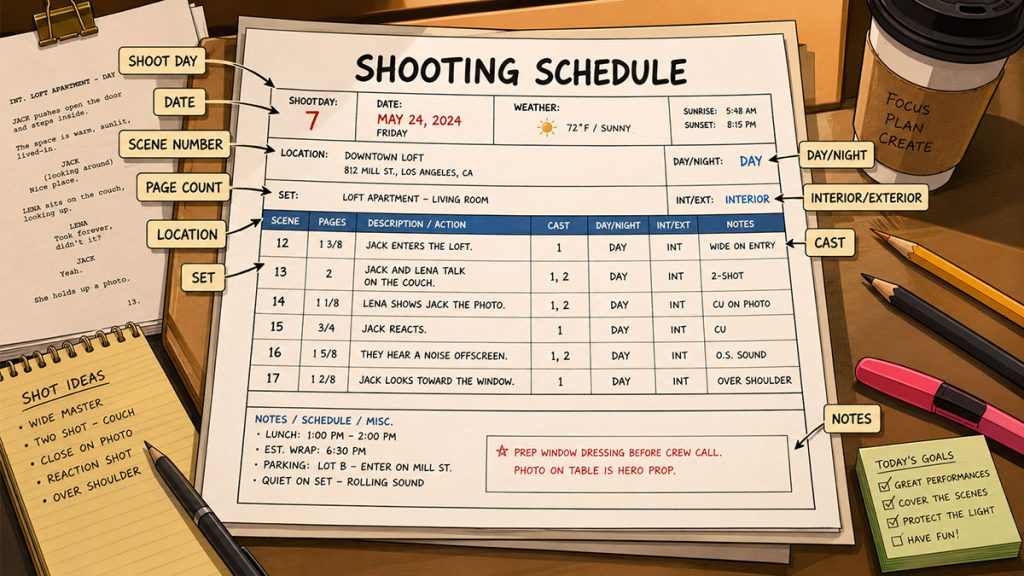
How to Read the Shoot Day
The shoot day tells you where you are in the production calendar.
A schedule might show:
Day 1
Day 2
Day 3
Or it may show the date as well:
Day 1 – Monday, March 2
Day 2 – Tuesday, March 3
Day 3 – Wednesday, March 4
This matters because production costs are often tied to days. Cast, crew, equipment, locations, catering, vehicles, and support services may all be budgeted by day, week, or rental period.
When reading the schedule, start with the shoot day and ask:
What is being shot that day?
How much material is scheduled?
Where is the company working?
Which cast members are needed?
Is the day simple, moderate, or difficult?
Is there a company move?
Is there night work?
Are there special requirements?
The shoot day is the schedule’s basic unit.
A film budget may think in categories, but a production lives one shoot day at a time.
How to Read Scene Numbers
Scene numbers identify which scenes from the script are being filmed.
A schedule might show scenes like:
Scene 12
Scene 37
Scene 48A
Scene numbers help everyone connect the schedule back to the screenplay, breakdown sheets, production strips, and call sheets.
It is normal for scene numbers to appear out of story order. For example, Day 1 might shoot Scenes 25, 26, 27, and 55 because they all happen in the same location.
That does not mean the schedule is wrong.
It means the production is being organized for efficiency instead of story sequence.
When reading scene numbers, pay attention to:
Whether scenes are grouped by location
Whether related scenes are being shot together
Whether a scene appears split across multiple days
Whether added scenes use letters, such as 24A or 24B
Whether deleted scenes are missing from the schedule
Whether revised scripts have changed the scene numbering
Scene numbers are the schedule’s anchor back to the script.
How to Read Interior and Exterior
Shooting schedules usually mark whether a scene is interior or exterior.
You may see:
INT. for interior
EXT. for exterior
INT./EXT. for a scene that involves both
This matters because interiors and exteriors create different production needs.
Interior scenes may require set dressing, lighting control, sound control, and location access. Exterior scenes may involve weather, sunlight, permits, noise, traffic, public access, and safety issues.
A day with all interiors may be easier to control than a day with multiple exteriors. A day with exterior scenes may be vulnerable to weather or daylight limits.
When reading the schedule, look for:
Too many exteriors packed together
Exterior scenes during risky weather periods
Exterior scenes that require specific light
Interior and exterior scenes mixed in one day
Scenes that require moving between indoor and outdoor setups
INT. and EXT. may look like tiny labels, but they can change the entire character of the shoot day.
How to Read Day and Night
Schedules also mark whether a scene takes place during the day or night.
You may see:
DAY
NIGHT
DAWN
DUSK
TWILIGHT
Day and night labels are important because they affect lighting, crew timing, permits, safety, and budget.
Night exteriors are often more complicated than day interiors. They may require larger lighting setups, additional safety planning, limited shooting windows, and careful crew turnaround management.
Dawn and dusk scenes can be especially tricky because the light changes quickly. They may look simple on the page, but on set they can become tiny clock-powered monsters.
When reading a shooting schedule, look for:
Night scenes grouped together
Night scenes scattered awkwardly across the shoot
Dawn or dusk scenes that require precise timing
Day scenes scheduled after late night work
Exterior night scenes with stunts, vehicles, or rain
Locations with limited night access
A schedule with many night scenes is not automatically bad. But it must be planned carefully.
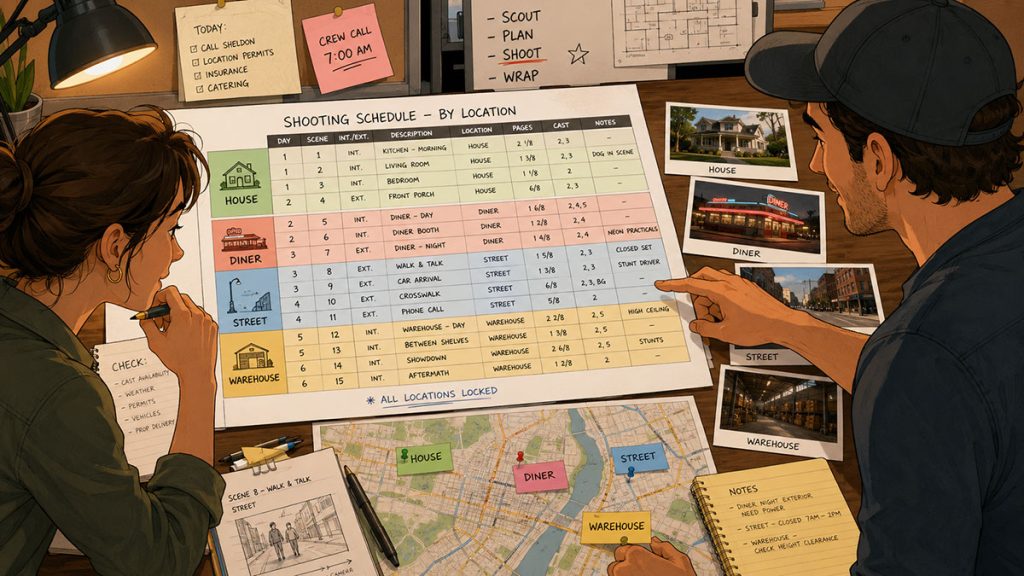
How to Read Locations and Sets
The location tells you where the production is filming.
The set tells you the story environment inside that location.
For example:
Location: Smith House
Set: Kitchen
Or:
Location: Downtown Office Building
Set: Conference Room
One physical location may contain several sets. A house might include a kitchen, bedroom, hallway, garage, backyard, and front porch. A hotel might include a lobby, room, hallway, office, parking lot, and exterior entrance.
When reading a shooting schedule, do not only look at the location. Look at the set.
The schedule may group several sets within one location to reduce moves. That can be efficient, but each set may still require dressing, lighting, blocking, and coverage.
Ask:
Are multiple sets being shot at one location?
Are scenes grouped efficiently by location?
Is the company moving between locations during the day?
Are there day and night scenes at the same location?
Does the location require prep or restoration?
Are there special restrictions on access, parking, or noise?
A schedule that groups locations well can save time and money.
A schedule that ignores location logic can become a map drawn by a raccoon with a grudge.
How to Read Page Count
Page count tells you how much script material is scheduled for a scene or shoot day.
Screenplays are often counted in eighths of a page.
You may see:
1/8
3/8
1 2/8
2 5/8
This is one of the most important parts of the schedule because it helps estimate workload.
A day with 6 pages of simple dialogue may be manageable. A day with 2 pages of stunts, vehicles, rain, and night exterior work may be extremely difficult.
Page count is useful, but it does not tell the whole story.
When reading page count, ask:
How many pages are scheduled for the day?
Are the pages simple or complex?
Are there company moves?
Are there stunts, vehicles, effects, children, animals, or background actors?
Are the scenes emotional or performance-heavy?
Are there many camera setups?
Is the page count realistic for the production style?
A page count is a clue, not a verdict.
Good assistant directors read the page count and then read the difficulty hiding behind it.
How to Read Cast Information
Cast information shows which actors or characters are needed for each scene.
Some schedules use cast IDs. Others show character names directly.
For example:
Cast: 1, 2, 5
or
Cast: Emma, Jack, Lily
Cast information matters because actor availability and cast days are major scheduling and budget factors.
When reading the schedule, look for:
Which actors are needed each day
Whether lead actors are working many days in a row
Whether supporting actors are scattered inefficiently
Whether child actors have restricted hours
Whether cast travel or holds are required
Whether expensive cast members can be grouped more efficiently
Whether large cast scenes need extra support
A schedule can look efficient by location but inefficient by cast.
That is why cast information must be read alongside location, page count, and shoot day.
Gorilla Scheduling can display cast or character names directly on production strips instead of only showing board IDs. This can make a schedule easier to review during meetings, especially for producers, directors, and department heads who may not immediately remember what every cast number represents.
Clarity saves time. Time saves money. Money saves the producer’s blood pressure.
How to Read Scene Descriptions or Synopsis
Many shooting schedules include a short scene description or synopsis.
This helps the team understand what happens in the scene without opening the script.
For example:
Emma confronts Jack in the diner.
The detective finds the missing photograph.
Car chase begins on the highway.
Maya escapes through the warehouse.
The synopsis is especially useful when scene numbers alone are not enough.
A producer may not remember what Scene 48 is, but they may immediately understand “night exterior rain fight.”
When reading the synopsis, look for signs of complexity:
Fight
Chase
Rain
Crowd
Explosion
Car work
Animal
Child actor
Music playback
Stunt
Visual effects
Heavy emotional scene
Special makeup
Period setting
Those words can signal that the scene may need more time, more crew, more planning, or more budget support.
How to Read Estimated Time
Some shooting schedules include estimated scene time.
Estimated time is different from screen time. It is the amount of time the production expects the scene to take during the shoot.
A scene may last 30 seconds in the finished film but take 4 hours to shoot.
Estimated time may be based on:
- Page count
- Scene complexity
- Number of setups
- Lighting needs
- Rehearsal time
- Blocking
- Camera movement
- Stunts
- Special effects
- Company moves
- Crew experience
Gorilla Scheduling includes Scene Timing tools that allow filmmakers to estimate scene time in several ways. A scene can be broken into production segments such as prep, lighting, rehearsal, blocking, and camera setup, with time assigned to each segment. Gorilla can also estimate time based on page count, or the user can enter a time manually into the estimated time field.
That flexibility matters because some scenes only need a rough time estimate, while others require more careful planning.
A two-person phone call may be easy to estimate. A night exterior car scene with rain, stunt work, and multiple camera setups deserves more detailed timing.
When reading a shooting schedule, estimated time helps answer:
Is the day realistic?
Are the hard scenes getting enough time?
Is the page count misleading?
Do banners or company moves consume part of the day?
Should a scene move to another day?
Will the schedule create overtime risk?
Estimated time turns the schedule from a page-count document into a production-time document.
How to Read Day Breaks
Day breaks separate one shoot day from the next on a stripboard or schedule.
A day break might show:
End of Day 1 – 4 5/8 pages
End of Day 2 – 3 2/8 pages
End of Day 3 – 5 pages
Day breaks help the assistant director and producer see how much material is assigned to each day.
But page count alone is not enough.
A day with 5 pages of simple interiors may be reasonable. A day with 3 pages, one company move, night exterior work, and a stunt may be overloaded.
When reading day breaks, ask:
How many pages are scheduled for the day?
What kind of scenes are included?
Are there difficult setups?
Is there a company move?
Are there banners for lunch, travel, or prep?
Are the cast and locations grouped efficiently?
Does the schedule allow enough time for the work?
Gorilla Scheduling includes the ability to automatically insert a day break after a chosen number of script pages. That can be helpful for creating an early schedule structure. But the assistant director still needs to adjust the board based on scene complexity and production reality.
Page-count automation can get the schedule started.
Human judgment makes it shootable.
How to Read Banners and Notes
Not everything on a shooting schedule is a scene.
Some schedules include banners or notes for production events such as:
- Lunch
- Company move
- Travel
- Pre-light
- Rehearsal
- Safety meeting
- Weather hold
- Second unit
- Insert shots
- Meal break
- Equipment pickup
- Location wrap
These notes matter because they consume time.
A company move may not add page count, but it can easily consume hours. A safety meeting may not appear in the script, but it may be essential for stunt work. A lunch break may seem obvious, but it still shapes the day.
Gorilla Scheduling allows users to add banners to the board, and those banners can include page counts that total on the day break. This is useful when a non-scene event still affects the workload.
For example, a long company move can be represented on the board so the day does not appear lighter than it actually is.
When reading a schedule, always look for the notes between the scenes.
Sometimes the schedule’s most important warning is not in a scene row. It is sitting in a banner, tapping its little foot.
How to Read Company Moves
A company move happens when the production moves from one location to another during the shoot day.
Company moves are a major schedule factor because they require time to wrap one location, move the crew and equipment, reset at the next location, and begin shooting again.
When reading a shooting schedule, look for:
Whether a day has more than one location
How far apart the locations are
Whether the move includes major equipment
Whether cast and crew parking changes
Whether the move happens before or after lunch
Whether the second location needs lighting or dressing
Whether the company move leaves enough time to shoot the next scene
A schedule with too many company moves can look efficient on paper and become miserable on set.
If a day has a company move plus several pages of material, read it carefully.
That day may be carrying a hidden brick in its backpack.
How to Read Special Requirements
Some scenes require special planning.
Watch for:
- Stunts
- Vehicles
- Animals
- Children
- Firearms
- Fire
- Rain
- Smoke
- Water
- Crowd scenes
- Background actors
- Visual effects
- Special makeup
- Period wardrobe
- Music playback
- Drones
- Process trailers
- Intimacy scenes
- Police or fire safety
- Night exterior work
These elements can affect time, budget, safety, crew needs, permits, and insurance.
When reading the shooting schedule, flag these scenes early. They may need more prep time, more crew, more equipment, or a different place in the schedule.
For example, a scene labeled:
EXT. HIGHWAY – NIGHT – Rain chase
should immediately raise questions.
How is the road controlled?
Are police or safety personnel required?
Are stunt drivers involved?
Is rain practical or visual effects?
How many vehicles are needed?
How much lighting is required?
What happens if the weather changes?
Is there enough time scheduled?
Special requirements turn ordinary schedule rows into production-risk zones.
How to Read the Schedule for Budget Impact
The shooting schedule is one of the strongest predictors of budget pressure.
As you read it, look for cost drivers:
Long shoot length
Too many locations
Scattered cast days
Many company moves
Night exterior work
Large background days
Special equipment days
Stunt or vehicle days
Remote locations
Heavy art department scenes
Long equipment rentals
Weather-sensitive scenes
Post-production-heavy scenes
If a budget is too high, the answer may not be to cut crew rates or remove contingency. The smarter move may be to improve the schedule.
Group locations.
Cluster actor days.
Reduce company moves.
Separate difficult scenes from overloaded days.
Avoid spreading specialty equipment across too many days.
Use the stripboard to test alternatives.
A shooting schedule is not just a plan for time.
It is a map of where the money will go.
How Shooting Schedules Connect to Other Production Documents
The shooting schedule does not live alone.
It connects to the rest of the production paperwork ecosystem.
The script breakdown identifies the production elements in each scene.
The production strips turn those scenes into movable scheduling units.
The stripboard arranges the production strips into shoot days.
The shooting schedule presents the plan in a detailed format.
The one-liner schedule gives a simplified overview of the plan.
The production calendar places the shoot into the larger timeline of prep, shoot, and wrap.
The Day Out of Days report shows when cast members work, hold, travel, start, and finish.
The call sheet tells the team what is happening on a specific shoot day.
The film budget uses the schedule to estimate costs.
Once you understand the shooting schedule, all these documents begin to make more sense.
The schedule is the hub.
Everything else either feeds into it or flows out of it.
Common Mistakes When Reading a Shooting Schedule
Mistake 1: Reading Only the Page Count
Page count matters, but difficulty matters more.
A day with fewer pages may still be harder if it includes night work, stunts, company moves, or special effects.
Mistake 2: Ignoring Cast Grouping
If cast days are scattered, the production may face unnecessary costs or scheduling problems.
Always check which actors are needed each day.
Mistake 3: Missing Company Moves
A day with two locations is not the same as a day with one location.
Company moves can consume major time.
Mistake 4: Treating Night Scenes Like Day Scenes
Night work often requires more planning, lighting, safety, and crew turnaround consideration.
Mistake 5: Not Reading the Notes
Banners, production notes, and special requirements may reveal the real difficulty of the day.
Mistake 6: Forgetting the Budget
The schedule affects cost. If a day looks inefficient, it may also be expensive.
Mistake 7: Assuming the Schedule Is Final
Shooting schedules change.
Locations change. Cast availability changes. Weather changes. Creative priorities change. The schedule is a plan, not a marble monument guarded by ancient scheduling monks.
Quick Checklist: How to Read a Shooting Schedule
When reviewing a shooting schedule, ask:
What shoot day is this?
What date is it?
Which scenes are being filmed?
Are they in story order or production order?
What are the locations and sets?
Are the scenes interior or exterior?
Are they day or night?
How many pages are scheduled?
Which cast members are needed?
Are there background actors?
Are there company moves?
Are there banners or notes?
Are there special production requirements?
Is the estimated time realistic?
Does the day look overloaded?
How does the schedule affect the budget?
Does this connect properly to the DOOD, call sheet, and production calendar?
This checklist can help filmmakers, producers, and department heads read the schedule more intelligently.
How Gorilla Scheduling Helps Create Readable Shooting Schedules
A shooting schedule is only useful if the production team can understand it, revise it, and trust it.
Gorilla Scheduling helps filmmakers move from script breakdown to stripboard to professional scheduling reports. The stripboard can be sorted by multiple criteria, such as set, location, day/night, and more, helping assistant directors build schedules that reflect actual production needs.
Gorilla Scheduling also supports features that make the schedule easier to manage and read, including:
- Production strips created from the script breakdown
- Sorting by set, location, day/night, and other criteria
- Scene Timing tools for estimating how long scenes may take
- Auto page breaks after a chosen number of script pages
- Banners for production notes, lunch, company moves, and other schedule events
- Page counts attached to banners that total on day breaks
- Split-screen view of the breakdown sheet and stripboard
- Horizontal or vertical strip display
- Customizable strip layout and field placement
- Adjustable column lengths for fields such as scene number, set, location, page count, and script page
- Displaying character names instead of only board IDs
- Multiple boards for the same schedule
- Default board selection for official reports
- Boneyard section for unused strips
- Exporting the board to Excel
- Automatic Excel backup when the board is saved
- Restoring a stripboard from an Excel backup
These tools support the real work of scheduling: organizing scenes, testing different versions, protecting the schedule, and turning the stripboard into useful reports.
The software does not replace the assistant director’s judgment.
It gives that judgment a better workspace.
Final Thoughts
Learning how to read a shooting schedule is learning how to see the movie as a production.
The schedule shows more than what scenes are being filmed. It reveals the plan behind the shoot: locations, cast, pages, time, complexity, risk, and cost.
A screenplay may tell the story.
A shooting schedule tells the crew how the story will be captured.
When you know how to read it, you can spot overloaded days, inefficient location moves, scattered cast work, underplanned night scenes, and budget pressure before they become set problems.
That is the real value of a shooting schedule.
It makes the invisible work visible.
And in film production, seeing the problem early is often the difference between a controlled shoot day and a beautiful little disaster with walkie-talkies.
Continue Learning Film Production Planning
If you’re diving deeper into production planning, understanding how stripboards connect to scheduling and budgeting is essential.
You may also find these guides helpful:
- How to Schedule a Film Shoot
- Film Budget Template (Free Guide)
- What is a Stripboard and How to Create one
- How to Write a Filmable Screenplay
- What Is a Call Sheet in Film? (Free Download)
- What Is a Crew Deal Memo (And Why It Can Save Your Production)
- Film Budget Categories Explained
- How a Shooting Schedule Impacts Your Film Budget
- What Is a Production Strip in Film Scheduling?
- How to Turn a Script Breakdown Into a Film Budget
Together, these form the foundation of an efficient, well-organized production.
Questions or Comments?
Have a question about stripboards or film scheduling? Feel free to leave a comment below — or reach out if you want to learn more about how professional tools can streamline your workflow.