
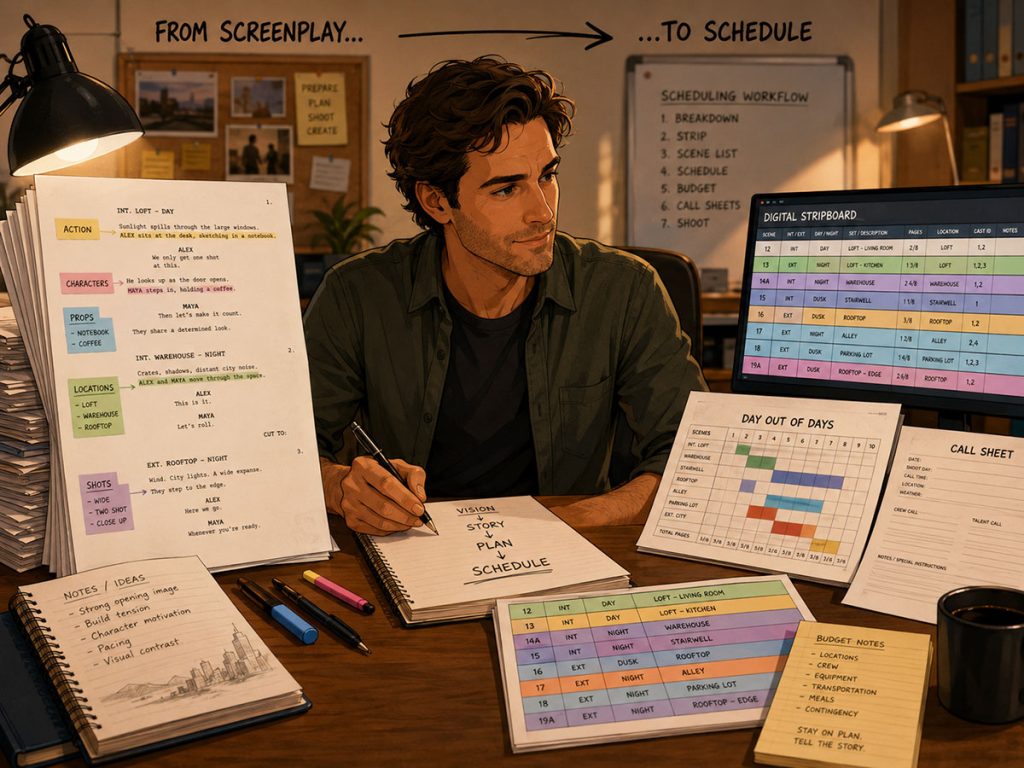
A screenplay is written to be read.
A shooting schedule is built so the movie can actually be made.
Between those two documents is one of the most important transitions in pre-production: turning script pages into shoot days, cast requirements, locations, production strips, breakdown elements, Day Out of Days reports, call sheets, and budget decisions.
That is where many productions start to feel the difference between a script that tells a story and a schedule that can survive the real world.
Final Draft is where many filmmakers write the screenplay. But once the script is ready for production, the question becomes:
How do you move from Final Draft to film scheduling without losing the details that actually matter on set?
A useful scheduling workflow should do more than import scene headings and page counts. It should help filmmakers carry the script’s production information into the breakdown, build a stripboard, manage locations, track actors, create shots, generate reports, and revise the schedule as the project evolves.
This guide explains how to turn a Final Draft screenplay into a shootable schedule, and what to look for in software that connects the writing draft to the production plan.
Why the Final Draft to Scheduling Workflow Matters
Most scheduling problems begin as information problems.
A scene may look simple in the slug line:
EXT. CITY STREET – NIGHT
But the action may reveal a completely different production reality:
Rain hammers down from a massive rain machine as a yellow picture car skids through the intersection, its headlights slicing through the mist. Police lights flash against the storefront windows while background pedestrians scatter in every direction. A stunt performer slips hard across the wet pavement, tumbling beside a practical fire effect burning near an overturned trash can. Across the street, a child actor clutches a soaked backpack while a barking dog pulls against its leash.
That one action paragraph contains a rain machine, picture car, police lights, background pedestrians, stunt work, a practical fire effect, a trash can, a child actor, and a dog.
If your scheduling workflow only captures the scene heading, page count, and speaking characters, much of the actual production complexity remains outside the schedule. The assistant director has to catch it manually, the producer has to budget around it manually, and department heads may discover key needs too late.
That is why a strong Final Draft to film scheduling workflow matters. It should preserve the production details hidden inside the screenplay, not flatten the script into a thin scene list.
👉 How to Break Down a Script for Film Production
The Goal Is Not Just Importing a Script
Importing a screenplay is only the first step.
The real goal is to turn that screenplay into a production-ready scheduling system. That means the software should help you move through the full chain:
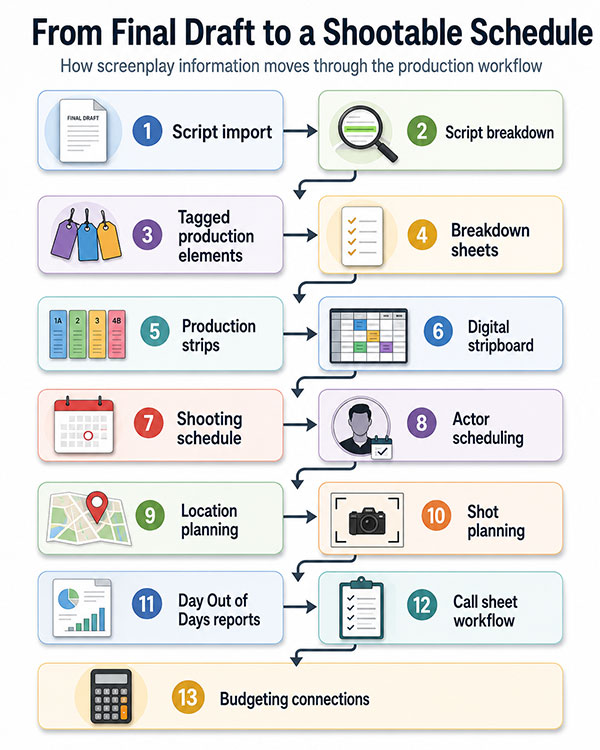
Importing Final Draft into Gorilla Scheduling
Gorilla Scheduling is designed to bring screenplay data from Final Draft into the scheduling environment so filmmakers can begin building the breakdown and schedule from the script itself.
This is important because a Final Draft file can carry more than scene headings. It can include the screenplay content, tagged elements, scene summary information, locations, and shot-related information depending on how the script has been prepared.
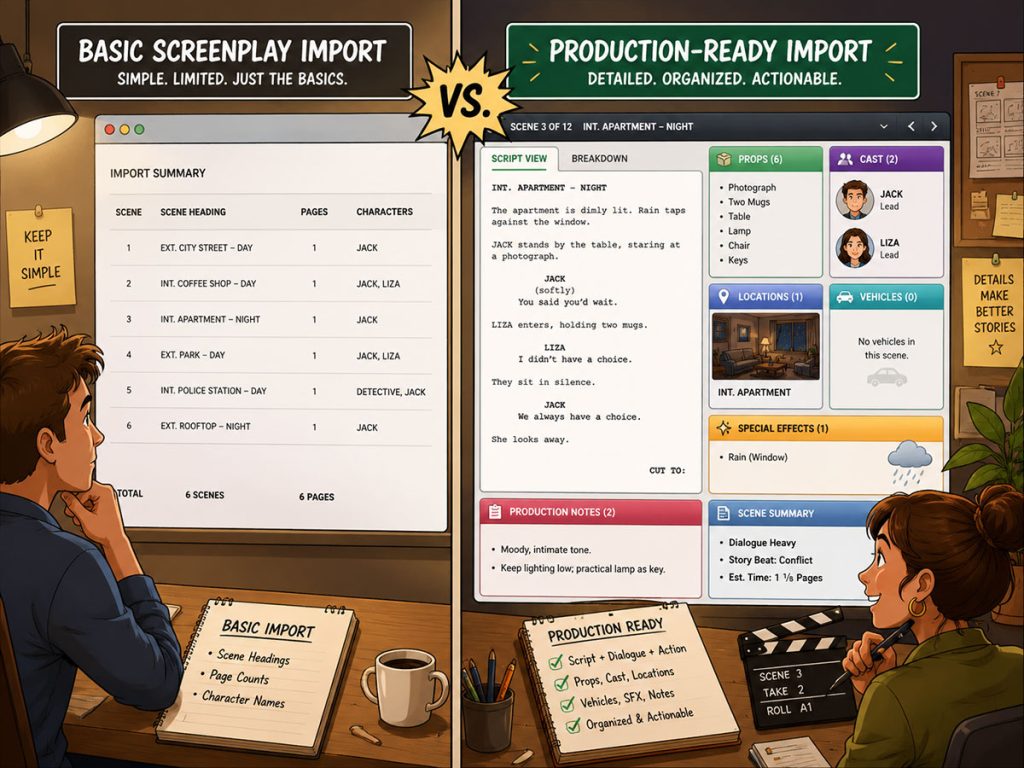
Once imported into Gorilla, the screenplay display can become part of the breakdown workflow. You are not just staring at a separate script PDF while building a schedule somewhere else. You can work from the script inside the scheduling tool.
That matters for assistant directors because breakdown work depends on context. You need to know not just where the scene happens, but what happens in the scene.
A character crossing a room is different from a character crossing a room while carrying a bloody prop, followed by a dog, during a rain effect, after a stunt fall. The action lines are where the production teeth often hide.
Tagging Elements After Import
One of the most useful parts of a connected Final Draft to scheduling workflow is tagging.
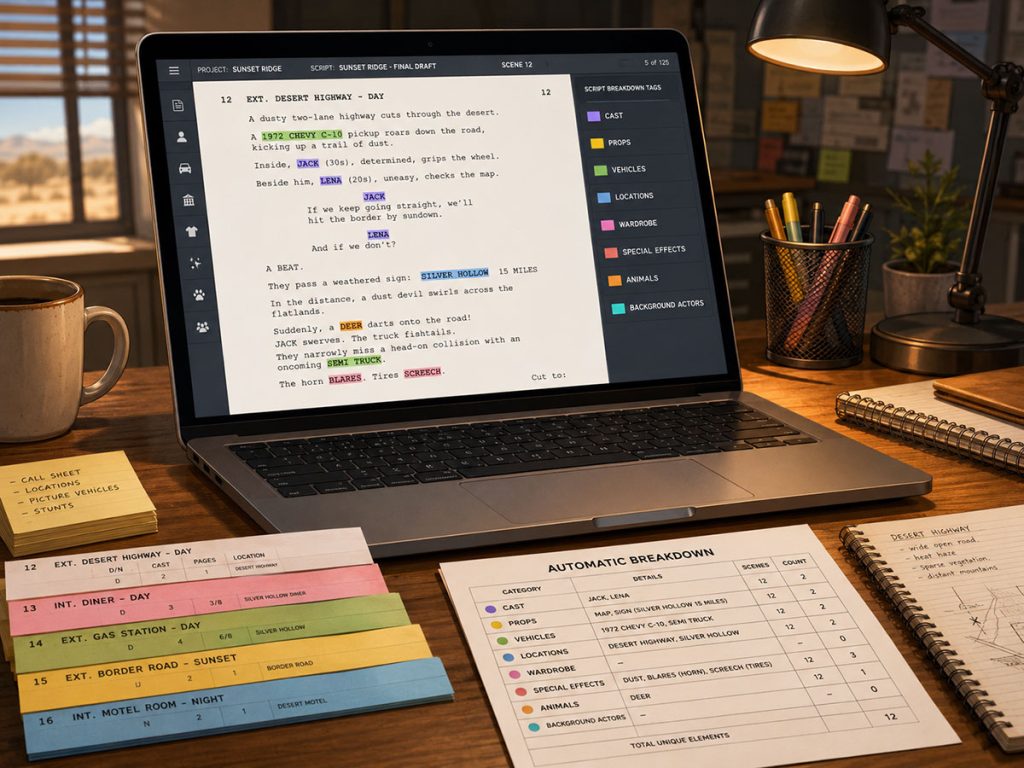
In Gorilla Scheduling, after you import the screenplay, you can tag directly from the screenplay display. You highlight a word or phrase, tap the spacebar, and select the appropriate breakdown category.
That workflow feels familiar to filmmakers who are used to tagging in Final Draft. But the advantage is that the tagging now lives inside the scheduling environment, where it can feed breakdown sheets, production strips, reports, and schedule decisions.
For example, you might highlight:
“rain machine” and tag it as Special Equipment
“yellow picture car” and tag it as Vehicle
“background pedestrians” and tag it as Background Actors
“practical fire effect” and tag it as Special Effects
“dog” and tag it as Animals
“police lights” and tag it as Props or Special Equipment, depending on your production’s system
The tagging process turns screenplay language into production data.
And production data is what allows the team to schedule intelligently.
Final Draft Tags Can Carry Into Gorilla
If elements are already tagged in Final Draft, those screenplay tags can import into Gorilla already attached to the breakdown category.
That can save a lot of time.
Instead of rebuilding the breakdown from scratch, the production team can start from the tagged information already prepared in the writing or breakdown stage. The imported tags retain their category relationships, giving the assistant director a stronger starting point for scheduling.
This is especially useful when a writer, producer, or pre-production team has already begun identifying props, cast, locations, vehicles, wardrobe, visual effects, or other elements.
The schedule does not have to begin as a blank board. It can begin as a continuation of the screenplay’s tagged production information.
👉 What Is a Production Strip in Film Scheduling?
Editing the Screenplay Inside Gorilla
Production prep often reveals small script issues.
A typo appears in a scene heading. A location name is inconsistent. An action line needs to be clarified. A shot needs to be added. A scene description needs a production note. Or something that happens all the time: Two different character names written in Final Draft which are the SAME character. Example: MR. SMITH and DONALD SMITH.
In many workflows, that means going back to the screenplay file, making a change, exporting again, re-importing, and hoping nothing gets scrambled in the process.
Gorilla Scheduling allows you to edit the screenplay display inside Gorilla. That means you can fix typing errors, add action lines, create shots, and combining character names without going back to the original screenplay and re-importing the entire script just to make small modifications.
This is not about rewriting the movie in the scheduling software. It is about keeping production-facing script information usable during prep.
For example, if the assistant director realizes that a line should clarify “rain machine” instead of “rain,” that detail can be corrected in the scheduling environment. If a shot needs to be added for storyboard or shot list planning, it can be created as part of the production workflow.
Small changes become easier. The workflow stays moving.
Why Seeing Action Lines Improves the Schedule
Scene headings tell you where and when.
Action lines tell you what the production must actually accomplish.
A scheduling tool that lets you see and work with action lines gives the assistant director a much better chance of catching production needs before the schedule is built.
Consider the action example from earlier. The slug line says city street at night. But the action line contains:
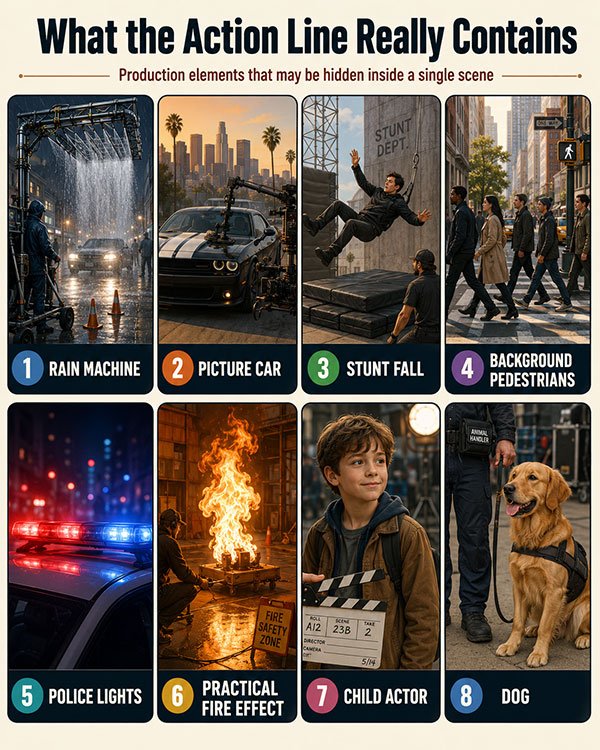
Each item affects scheduling.
The rain machine may require special equipment, extra setup time, water access, safety planning, and reset time.
The picture car may require permits, wrangling, insurance, and transport.
The stunt fall may require a stunt coordinator, rehearsal time, pads, and safety meetings.
Background pedestrians require casting, holding, and paperwork.
Police lights may require prop coordination, practical lighting, power, or permits.
A practical fire effect may require special effects crew, fire marshal approval, and safety controls.
A child actor can affect work hours and scheduling rules.
A dog may require an animal handler and extra time.
That is why seeing the screenplay inside the scheduling workflow is so useful. The schedule becomes grounded in the actual work, not just the scene number.
👉 How to Estimate Shooting Days from a Screenplay
Locations Can Flow Into the Location Module
Locations are not just labels. They are logistical engines.
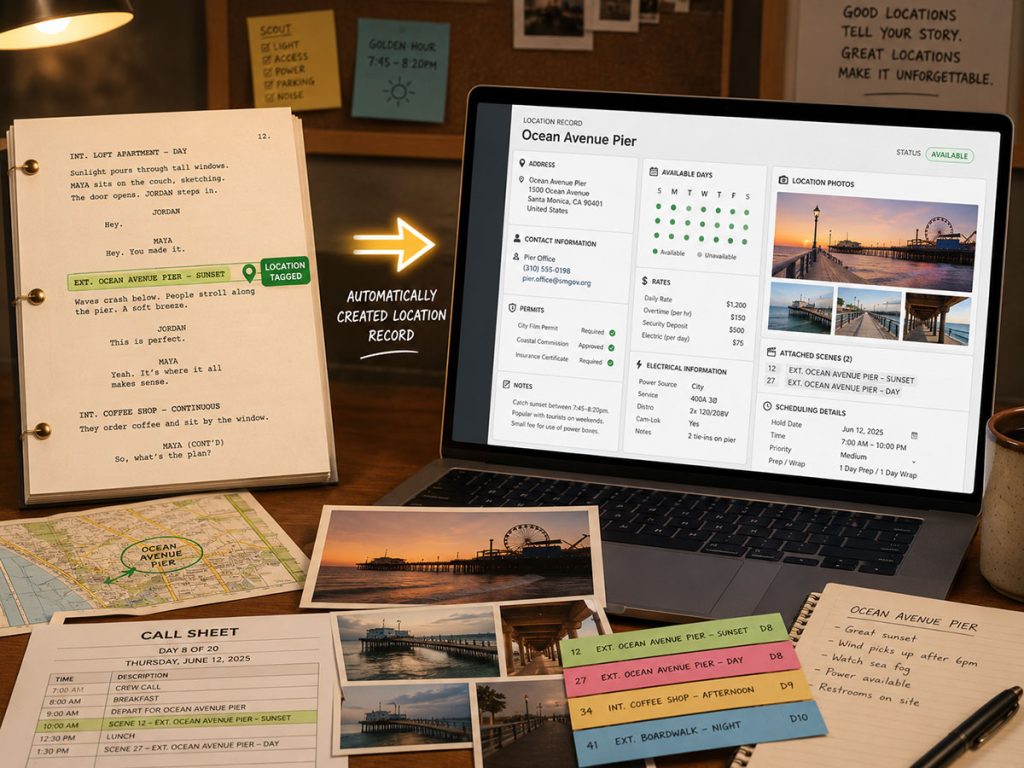
When locations are tagged in Final Draft and imported into Gorilla, they can automatically flow into Gorilla’s Locations module. From there, the production team can enter detailed information about each location.
This is a major workflow advantage because a location record can include far more than a name.
In Gorilla’s Location module, you can track details such as:
- Address
- Contact information
- Available days
- Shoot days
- Permits
- Electrical information
- Ceiling height
- Amps
- Location rates
- Attached scenes
That means a tagged location can become a living production record. The assistant director, location manager, producer, and production manager can all work from better information.
A location in a screenplay may be “Warehouse.” A production location record needs to know whether the warehouse has enough power, whether the roll-up door works, whether the crew can park, whether permits are ready, whether the rate changes after ten hours, and which scenes are attached.
The screenplay gives you the story location. The scheduling system turns it into a production location.
👉 How to Schedule Locations for a Film Production
Creating Shots from Final Draft and Expanding Them in Gorilla
A screenplay does not always stop at action and dialogue. Sometimes the production team wants to identify specific shots during prep.
In Final Draft, a line can be tagged as a Shot instead of an Action line. When imported into Gorilla, that tagged line can come into Gorilla as a Shot.
From there, you can specify the type of shot inside Gorilla. Examples include:
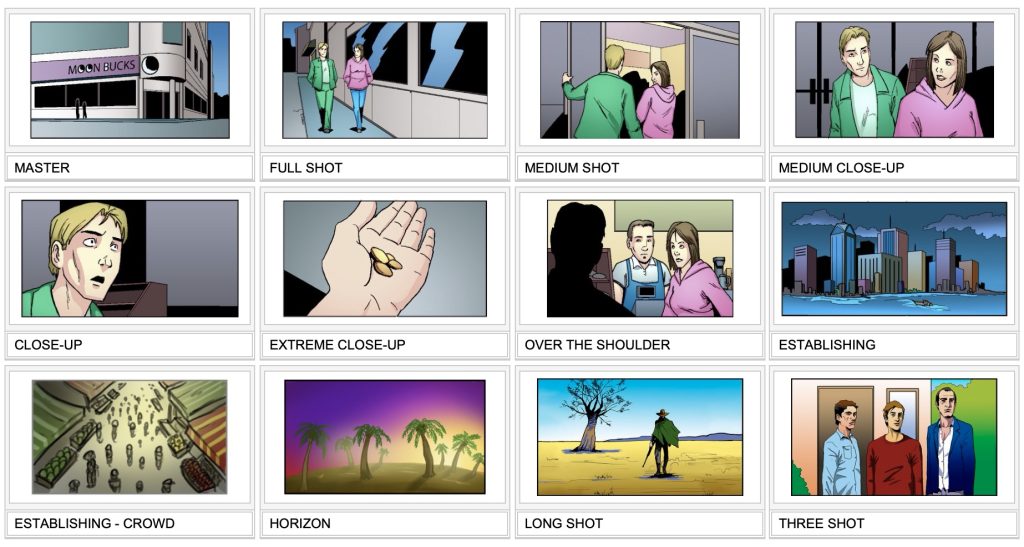
This becomes especially useful because Gorilla can carry those shots into its Storyboard module. You can expand the detail of each shot, create a shot list, and import a storyboard image for each shot. From there, the shot list can become a storyboard.
This is a powerful bridge between screenplay breakdown and visual planning.
The script identifies the beat. The schedule organizes the production. The shot list and storyboard help the director and department heads understand how that beat will be captured.
For filmmakers who want tighter integration between screenplay, scheduling, and visual planning, this workflow can reduce duplicate work.
👉 How to Write a Filmable Screenplay
Scene Summary Information Can Import Too
Scene summaries are useful because they give the production team a quick understanding of what each scene is about without reading the entire script every time.
When Scene Summary information is entered in Final Draft, it can also import into Gorilla.
That can help when reviewing production strips, reports, and schedule versions. A scene summary can remind the team what the scene accomplishes dramatically or logistically, especially when scene headings alone are too generic.
For example:
INT. APARTMENT – NIGHT
could describe dozens of scenes. But a summary like:
Alex discovers the missing file and hears someone at the door.
gives the assistant director and producer much more context.
Scene summaries help the schedule stay readable.
Production Strips Come from Breakdown Information
Once the script is imported and tagged, the scheduling workflow can move toward production strips.
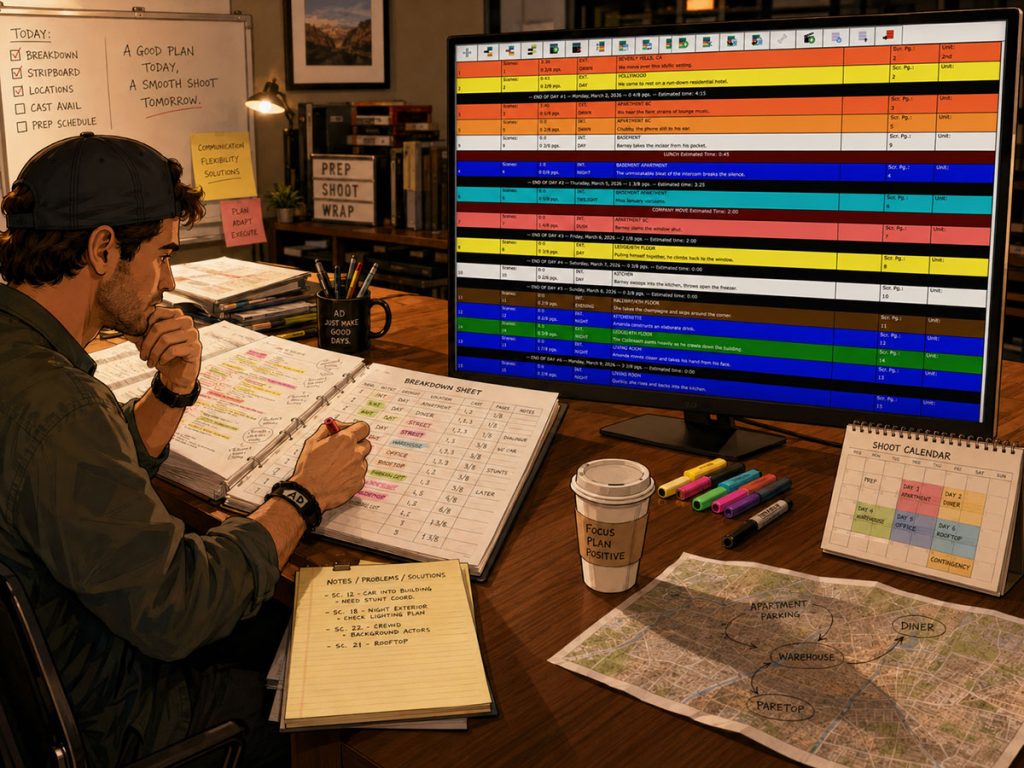
Production strips are the building blocks of a shooting schedule. Each strip represents a scene or scheduling unit and can include information like:
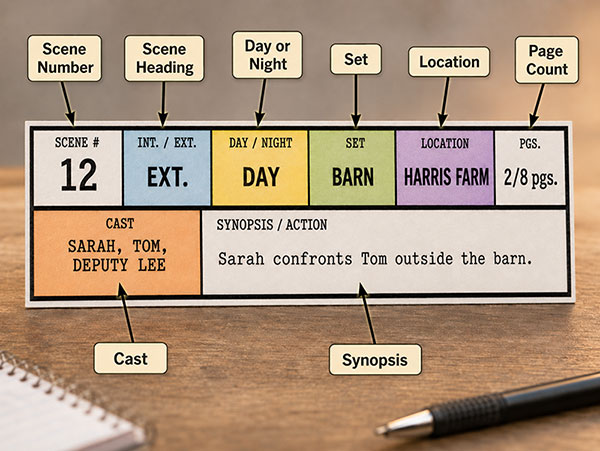
Gorilla Scheduling creates production strips from breakdown information. This matters because the stripboard should not be built from empty scene boxes. It should reflect what the breakdown has already revealed.
If a scene has a dog, picture car, rain machine, background actors, and stunt fall, the production strip should be connected to that information. The assistant director can then schedule the scene with the proper context.
A production strip should not just say what scene is being shot. It should help explain what kind of day that scene will create.
Building the Digital Stripboard
After production strips are created, the assistant director can begin building the digital stripboard.
This is where the schedule becomes a practical shooting plan.
A strong stripboard workflow should let you:
- Group scenes by location
- Sort by set
- Sort by day/night
- Calculate page counts
- Create day breaks
- Add banners
- Test alternate schedules
- Move unused scenes to a boneyard
Gorilla Scheduling supports a digital stripboard and can sort by multiple criteria, including set, location, day/night, and other production details. It also supports horizontal or vertical strip display, customizable strip layout, a third row for longer fields like synopsis or character names, banners with notes and optional page counts, multiple boards, and a boneyard for unused strips.
This gives the production team room to shape the schedule around the realities of the shoot.
A script may be written in story order. A schedule is usually built in production order. The stripboard is where that transformation happens.
👉 What Is a Stripboard in Film Production?
Day Breaks, Page Counts, and Scene Timing
Once the stripboard begins to take shape, the schedule must answer a practical question:
How much are we trying to shoot each day?
Page count matters, but it is not enough. A two-page dialogue scene is different from a two-page night exterior with stunts, rain, vehicles, children, animals, and fire effects.
A strong scheduling workflow should help track both page count and estimated scene time.
Gorilla Scheduling includes:
Auto page break after a chosen amount of script pages
Banners with notes and optional page counts that total into day breaks
Scene Timing tools that estimate time by production segments, page count, or manual entry
Scene Timing is especially useful because it lets the assistant director think beyond page count. You can estimate prep, lighting, rehearsal, blocking, camera setup, or other production segments. You can also use page count as a baseline or manually enter timing for unusual scenes.
This helps prevent fantasy scheduling, the dangerous art of pretending a complicated scene will behave because the page count looks small.
👉 How to Read a Shooting Schedule
Day Out of Days Reports and Budgeting
After the schedule is built, the production needs reports.
One of the most important is the Day Out of Days report, also called the DOOD. It shows when cast members or other production elements are working, holding, starting, finishing, traveling, or not needed.
When the screenplay breakdown is connected to the schedule, DOOD reports become more useful. Cast and elements are not separate from the schedule. They are part of the same information chain.
Gorilla Scheduling can create DOOD reports for cast and other breakdown element categories. Gorilla Budgeting can also link with scheduling data, including importing DOOD totals into budget line day counts.
That connection helps producers because work days become costs. Actor days, background days, props, vehicles, wardrobe, visual effects, and other elements can all affect the budget.
A well-built schedule does not just tell the crew what to shoot. It helps the producer understand what the shoot will cost.
👉 What Is a Day Out of Days Report?
Exporting Back to Final Draft
A connected workflow should not be a one-way street.
Gorilla Scheduling can export schedule information back to a Final Draft .fdx file. That can be useful when the production team wants to preserve schedule or breakdown-related information in a screenplay-compatible format.
It also gives productions more flexibility when working across different tools and collaborators.
Some workflows may need to move information from Gorilla back into Final Draft, or from Final Draft into another scheduling environment. The ability to export back to .fdx can support that movement.
In a real production office, flexibility matters. You do not always get to choose a perfect toolchain. Sometimes you need software that can pass information forward without turning the workflow into a paper goblin.
Exporting to FDX, Converting to SEX, and Opening in Movie Magic Scheduling
For productions that still need to deliver or work in Movie Magic Scheduling, Gorilla can support a bridge workflow.
Gorilla can export schedule and tagged breakdown information to a Final Draft .fdx file. That .fdx file can then be converted in Final Draft to a .sex scheduling export file. The .sex file can then be opened in Movie Magic Scheduling.
This workflow requires Final Draft for the conversion step, but it can be useful when a production needs to preserve breakdown and tagged information while moving between systems.
That matters because production teams often inherit mixed workflows. The producer may use one tool, the assistant director may prefer another, and a studio or collaborator may request a specific file format.
The more flexible the scheduling software, the easier it is to survive those handoffs.
Importing a PDF Screenplay When You Do Not Have the FDX File
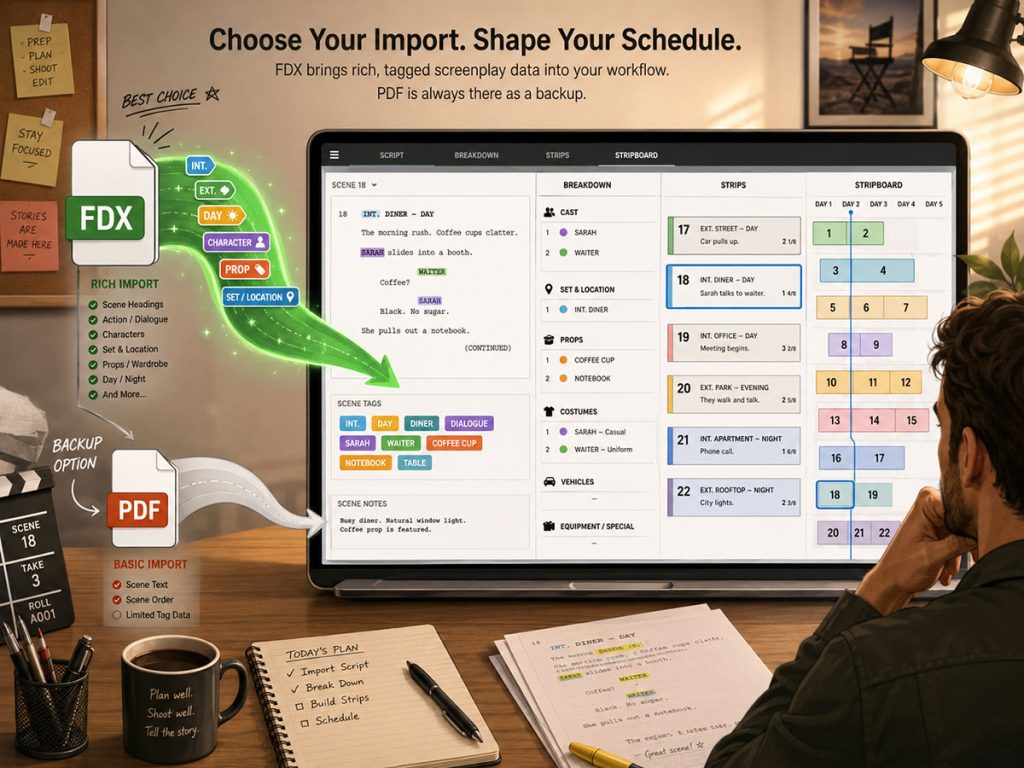
The cleanest workflow is usually to import the Final Draft .fdx file, especially when you want tagged information and screenplay structure to carry over.
But productions do not always receive the ideal file.
Sometimes all you have is a PDF.
Gorilla Scheduling can import a PDF screenplay. Tagged elements will not come in the same way they would from a properly tagged Final Draft file, because a PDF does not carry the same tagged element information. But PDF import can still be valuable when the .fdx file is unavailable.
This gives the production team a way to begin scheduling from the script even when the source file is not perfect.
For indie filmmakers, producers, assistant directors, and production managers, that flexibility can be the difference between waiting on paperwork and starting prep.
From Screenplay to Shootable Schedule: The Practical Workflow
A strong Final Draft to scheduling workflow usually moves through several stages.
First, prepare the screenplay as cleanly as possible. Scene headings should be consistent, character names should be clear, and important production elements should be tagged when possible.
Next, import the screenplay into the scheduling software. In Gorilla, the imported screenplay can be viewed in the scheduling environment, with Final Draft tags attached to their breakdown categories when available.
Then, continue breaking down the script. Highlight words or phrases, tap the spacebar, and assign categories. Add missing elements, correct small issues, and refine the breakdown.
Next, review locations and actors. Tagged locations can flow into the Location module, where detailed production information can be entered. Actor records can support contact info, roles, headshots, representatives, dietary restrictions, measurements, and rates.
Then, create production strips from the breakdown information. Use the digital stripboard to group scenes by location, set, day/night, cast, page count, or other scheduling priorities.
After that, build day breaks, estimate timing, add banners, and test alternate boards.
Finally, generate reports, connect schedule data to budgeting, and support call sheet workflow through the schedule.
The result is a screenplay that has been translated into a shootable production plan.
Not just imported. Translated.
What to Look for in Final Draft to Film Scheduling Software
A strong Final Draft to scheduling workflow should help filmmakers:
- Import a Final Draft
.fdxfile - Preserve tagged screenplay elements
- View enough screenplay content to break down scenes accurately
- Tag additional words or phrases inside the scheduling tool
- Edit the screenplay display for small production-facing changes
- Import scene summary information
- Carry tagged locations into a location module
- Create and manage detailed actor records
- Create shots and expand them into shot lists or storyboards
- Build production strips from breakdown information
- Create and revise a digital stripboard
- Track page counts and day breaks
- Estimate scene timing
- Generate Day Out of Days reports
- Support call sheet workflow
- Connect scheduling data to budgeting
- Export information back to Final Draft
- Import a PDF screenplay when the
.fdxfile is unavailable - Build production strips from breakdown information
That is the difference between a simple script import and a real production scheduling workflow.
Turn Your Screenplay into a Shootable Schedule with Gorilla Scheduling
A screenplay is the creative blueprint. A shooting schedule is the production plan.
Gorilla Scheduling helps filmmakers bridge that gap by importing Final Draft screenplay data, preserving tagged elements, supporting script breakdown, creating production strips, building digital stripboards, managing actors and locations, creating shots, generating reports, and connecting schedule data to Gorilla Budgeting.
You can tag elements directly from the imported screenplay, edit screenplay content inside Gorilla, import tagged locations into the Location module, create shots that can support storyboards, and export schedule information back to Final Draft.
Explore Gorilla Scheduling and see how it can help turn your screenplay into a shootable schedule.
Questions or Comments?
Have a question about stripboards or film scheduling? Feel free to leave a comment below — or reach out if you want to learn more about how professional tools can streamline your workflow.