Breaking down a screenplay is one of the most important steps in film pre-production. It is also one of the slowest.
Before a shooting schedule can be built, someone has to go through the script scene by scene and identify the production elements: props, set dressing, wardrobe, vehicles, animals, effects, background actors, special equipment, and everything else the production needs to track.
For many assistant directors, producers, and production managers, that process still means hours of manual tagging before the schedule even begins to take shape.
AI script breakdown changes the first pass.
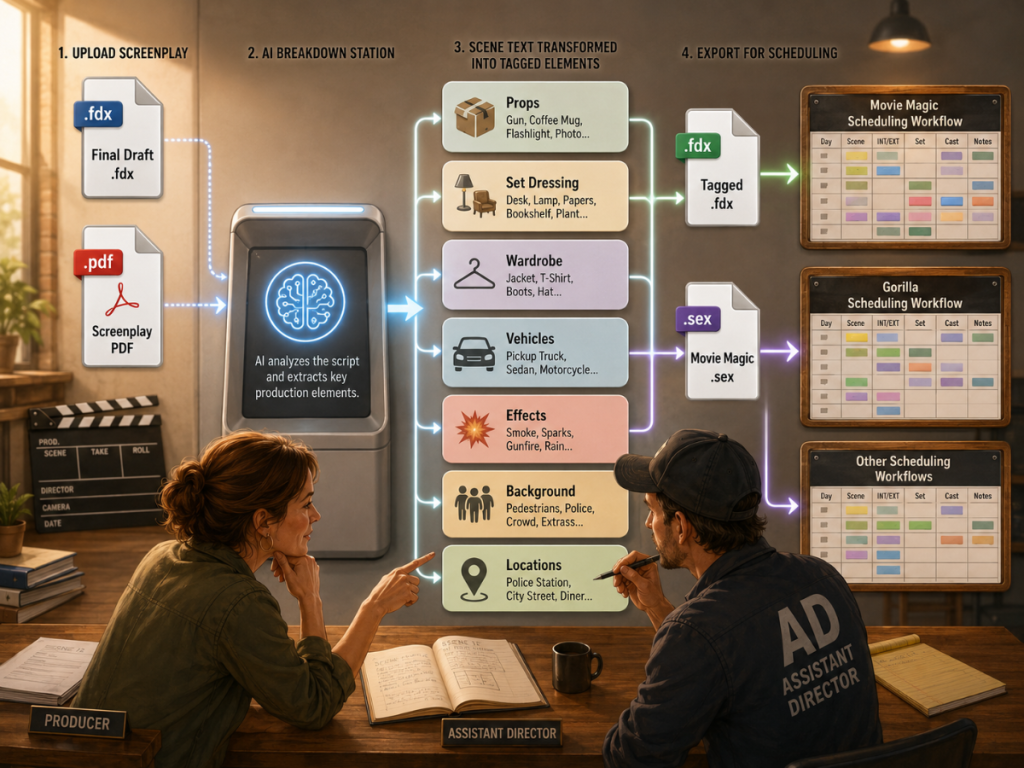
Instead of starting from a blank breakdown sheet, filmmakers can upload a screenplay, let AI identify likely production elements, review every suggestion, then export a tagged file that can move into their scheduling workflow. For Movie Magic Scheduling users, that means a faster way to prepare tagged script data before importing it into the scheduling program they already use.
👉 How to Break Down a Script for Film Production (Step-by-Step Guide)
What Is AI Script Breakdown?
AI script breakdown is the use of artificial intelligence to identify production elements in a screenplay.
A traditional script breakdown requires a person to read each scene and manually tag every important element. That work is still creative and production-minded. A human needs to understand context, genre, tone, scale, and what the production actually intends to shoot.
AI does not replace that judgment.
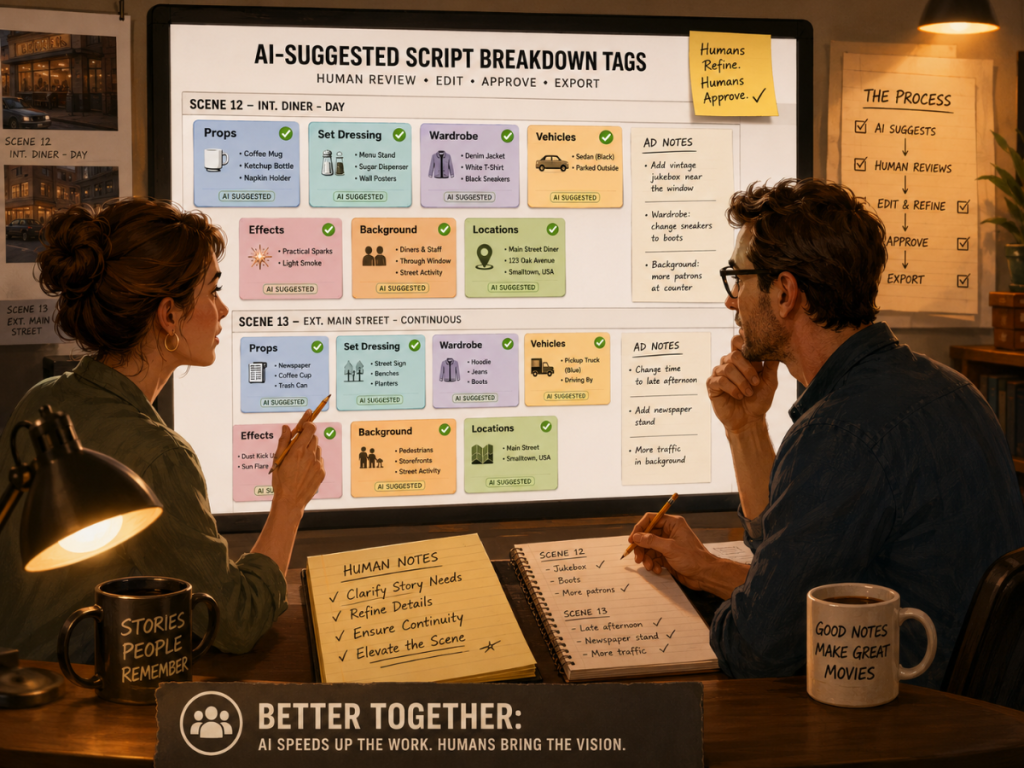
What AI can do is help with the first pass. It can scan the screenplay, identify likely elements, organize them by category, and give the production team a starting point. From there, the assistant director or producer reviews the suggestions, corrects categories, removes anything unnecessary, and confirms what belongs in the official breakdown.
The value is speed. The responsibility still belongs to the filmmaker.
👉 AI Script Breakdown vs Manual Tagging: Which Workflow Should Filmmakers Use?
Why Movie Magic Scheduling Users Should Care
Movie Magic Scheduling is widely used in film and television production, and many production teams already have established workflows built around it. For those users, the question is not always, “Should I switch scheduling software?”
Sometimes the better question is:
Can I get a faster breakdown into the scheduling software I already use?
That is where a software-agnostic AI breakdown tool becomes useful.
If a tool can export a tagged .sex file or .fdx file that Movie Magic Scheduling can import, then Movie Magic users can get the benefit of AI-assisted tagging without abandoning their existing scheduling workflow. The schedule can still be built in Movie Magic. The breakdown work simply begins faster.
This is especially useful for productions that receive a fresh draft and need to start prep quickly. Instead of manually tagging the entire script before importing, the production team can use AI to create a first-pass breakdown, review it, then bring the tagged file into Movie Magic Scheduling.
The workflow does not have to be a software revolt. It can be a smarter handoff.
👉 Script Breakdown Software: What Filmmakers Should Look For Before Choosing a Tool
How Breakdown Assistant AI Web Works
Breakdown Assistant AI Web is a standalone web service from Jungle Software. It does not require Gorilla Scheduling.
The workflow is simple:
Upload a Final Draft .fdx screenplay or a PDF screenplay.
Let AI identify production elements scene by scene.
Review and edit the suggested tags.
Download a tagged .fdx or .sex file.
Import that file into your scheduling software.
For Movie Magic Scheduling users, the .sex export is especially important because it gives the breakdown a path into a Movie Magic workflow. For Final Draft users or other scheduling tools that read .fdx, the .fdx export keeps the workflow flexible.
The goal is not to lock filmmakers into one scheduling program. The goal is to give them a faster first pass on the breakdown, then let them continue in the tools they already use.
What Elements Can AI Help Tag?
A script breakdown usually tracks the production elements that matter for scheduling and department planning.
That may include props, set dressing, wardrobe, vehicles, animals, special effects, visual effects, background actors, stunts, makeup, special equipment, and other production needs. The exact categories depend on the production and the scheduling software being used.
AI can help identify these elements inside the scene text.
For example, if a scene includes a character entering with a suitcase, sitting at a diner booth, wearing a raincoat, and watching a police car pass outside, those details may matter. The suitcase may be a prop. The diner booth may be set dressing. The raincoat may be wardrobe. The police car may be a vehicle or picture car.
A human still needs to review those suggestions. Not every noun in a screenplay needs to become a production element. Some details are atmospheric. Some are essential. Some are implied. Some are creative choices that may change later.
The best AI breakdown workflow is not “let the machine decide.” It is “let the machine find candidates so the production team can decide faster.”
👉 How to Turn a Script Breakdown Into a Film Budget
Why Review Still Matters
AI script breakdown is most useful when it keeps the human in control.
A production team should always review suggested tags before treating them as official breakdown elements. AI may identify something correctly but place it in the wrong category. It may flag something that is mentioned but not actually needed on screen. It may miss a production implication that an experienced assistant director would catch.
That review step is not a flaw. It is the workflow.
A good breakdown is not just a list of objects. It is a production interpretation of the screenplay. The assistant director and producer need to ask practical questions:
Does this item need to be tracked?
Which department owns it?
Is it required on screen?
Does it affect scheduling?
Does it affect budget?
Does it need to appear in reports?
AI can accelerate the hunt. The production team still decides what belongs on the wall.
From Tagged Script to Scheduling Software
Once the AI-assisted breakdown is reviewed, the next step is export.
This is where file format matters.
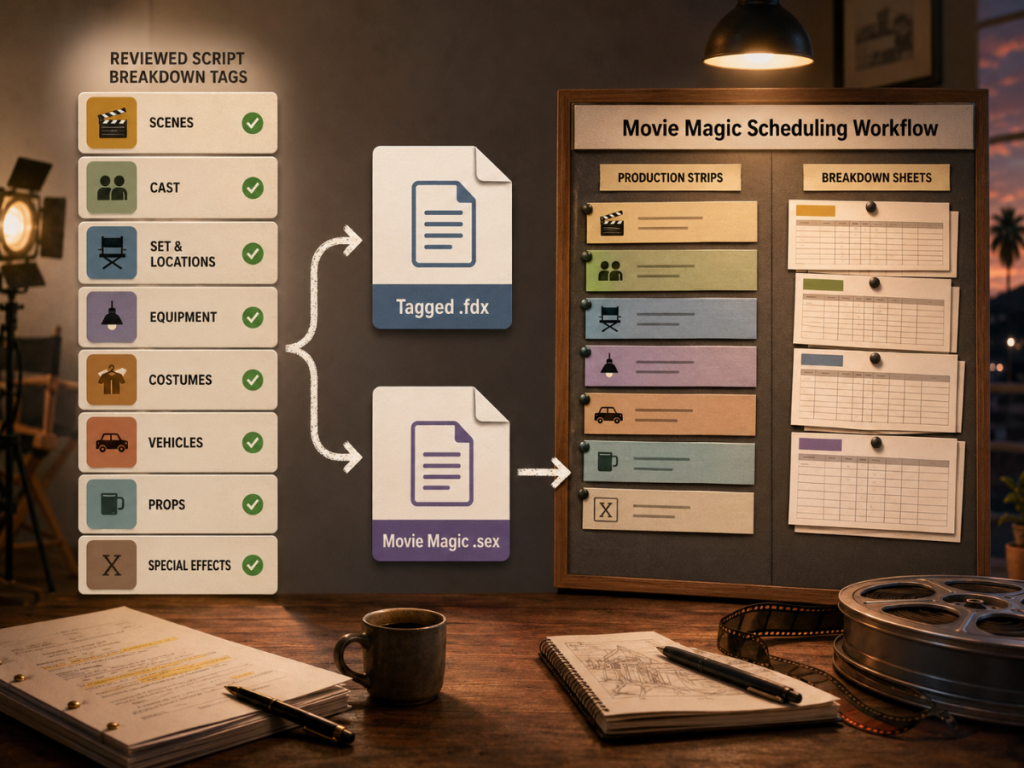
A tagged .fdx file can support workflows built around Final Draft and scheduling tools that accept Final Draft data. A tagged .sex file can support Movie Magic Scheduling workflows and other tools that recognize that scheduling exchange format.
For Movie Magic Scheduling users, this can make the process feel familiar. Instead of learning an entirely new scheduling platform, the user can bring tagged script data into Movie Magic and continue building breakdown sheets, strips, a stripboard, reports, and a shooting schedule.
That handoff is the point.
The AI tool helps with the breakdown pass. The scheduling software remains the scheduling software.
A Practical Workflow for Movie Magic Scheduling Users
A Movie Magic Scheduling user might use AI script breakdown like this:
Start with a Final Draft .fdx file or PDF screenplay.
Upload the script into Breakdown Assistant AI Web.
Let the AI create a first pass of tagged elements.
Review each suggested tag and clean up the categories.
Export the tagged .sex file.
Import that .sex file into Movie Magic Scheduling.
Continue scheduling inside Movie Magic with the tagged breakdown data already prepared.
That workflow is especially helpful when time is tight. It can help the team move from screenplay to breakdown sheets faster, which means the assistant director can start thinking about locations, cast days, day/night work, production strips, and the stripboard sooner.
It is not magic in the fairy-dust sense. It is magic in the “you just saved a lot of repetitive prep work” sense.
👉 What Is a Stripboard in Film Production? (Complete Guide for Filmmakers)
AI Breakdown Is Not Just for Movie Magic
Movie Magic Scheduling users are a natural audience for this workflow because .sex file export gives them a useful import path. But the same idea can help filmmakers using other scheduling workflows too.
If your scheduling software accepts .fdx or .sex files, an AI-assisted breakdown can help create a cleaner starting point before the schedule is built. If your team works in Final Draft, the tagged .fdx export can help keep the script and breakdown information connected. If your team uses another scheduling program, the same export logic may still apply depending on what that software can import.
The larger idea is software-agnostic pre-production.
A breakdown tool should help filmmakers move faster without forcing them to abandon the tools they already trust.
That is especially useful for independent producers, assistant directors, film students, and production teams who need speed but still want control.
👉 Film Scheduling Software: What to Look for Before You Choose
Where Gorilla Scheduling Fits In
Breakdown Assistant AI also works inside Gorilla Scheduling for Gorilla Premium users.
In the Gorilla version, the workflow is more integrated. Instead of exporting a file and importing it into another scheduling program, users can run AI-assisted tagging inside Gorilla, review suggestions, and send approved elements directly into the Gorilla breakdown and scheduling workflow.
That is useful for productions already using Gorilla Scheduling because it reduces the handoff step.
But the web version is different by design. Breakdown Assistant AI Web is for filmmakers who may be using Movie Magic Scheduling, Final Draft, or another scheduling workflow and simply want a faster way to create a tagged script.
So the choice is practical:
Use Breakdown Assistant AI Web if you want an independent, pay-per-script tool that exports tagged files for your existing scheduling workflow.
Use Breakdown Assistant AI inside Gorilla if you want the AI breakdown built directly into Gorilla Scheduling.
Both workflows serve the same larger purpose: getting from screenplay to schedule-ready breakdown faster.
Why AI Script Breakdown Helps Pre-Production
Pre-production is a chain reaction.
A script breakdown affects the shooting schedule. The schedule affects the budget. The budget affects production choices. Production choices affect call sheets, crew planning, location planning, and department prep.
If the breakdown starts late, everything else starts later too.
AI script breakdown can help compress that early stage. Instead of spending days finding the first round of elements manually, a production team can create a draft breakdown quickly, then spend its energy reviewing, correcting, and making production decisions.
That is where the time savings become meaningful.
The assistant director still needs to think. The producer still needs to review. Departments still need to confirm what they need. But the blank page problem is gone.
The breakdown begins as a first pass instead of a mountain.
When AI Breakdown Is Most Useful
AI script breakdown is especially helpful when a production needs speed, consistency, or a first-pass review of a long script.
It can be useful when a producer receives a new draft and needs to understand the production elements quickly. It can help an assistant director start building the breakdown before a full manual review is complete. It can help film students learn how scene details become production categories. It can help small production teams avoid missing obvious elements during early prep.
It is also useful when a team is not ready to switch scheduling software.
A Movie Magic Scheduling user may not want a new scheduling platform. A Final Draft user may want a tagged file without committing to a full scheduling suite. A producer may simply need one script broken down for a project.
That is why pay-per-script AI breakdown can make sense. It gives the production a useful service without forcing a subscription or workflow migration.
What to Check Before Importing Into Movie Magic Scheduling
Before importing any tagged file into Movie Magic Scheduling or another scheduling tool, review the breakdown carefully.
Check element names. Check categories. Check spelling. Remove duplicates. Make sure locations are named consistently. Confirm that wardrobe, props, vehicles, effects, and background elements are categorized in a way that matches your production workflow.
This cleanup matters because the import will only be as useful as the reviewed breakdown.
AI can save time, but it should not be treated as a final assistant director. Think of it as a smart first-pass breakdown assistant that hands you organized cards. You still decide what gets pinned to the board.
Once the reviewed file is ready, export the appropriate format and import it into your scheduling software.
👉 How to Read a Shooting Schedule
Final Thoughts: Keep Your Scheduling Software, Speed Up the Breakdown
AI script breakdown is not about replacing the assistant director, producer, or production team.
It is about removing some of the slowest repetitive work from the beginning of pre-production.
For Movie Magic Scheduling users, Breakdown Assistant AI Web offers a practical path: upload the script, review AI-suggested tags, export a tagged .sex file, and continue working in Movie Magic Scheduling. For Final Draft and other scheduling workflows, tagged .fdx export provides another flexible route.
For Gorilla Scheduling users, Breakdown Assistant AI is also available inside Gorilla Premium, where approved tags can flow directly into the Gorilla breakdown workflow.
The best workflow is the one that helps the team move from screenplay to schedule-ready information faster while keeping the filmmaker in control.
Because the goal is not simply to tag a script.
The goal is to get the production ready to shoot.
Explore Breakdown Assistant AI
Breakdown Assistant AI Web is a standalone web service for filmmakers using Movie Magic Scheduling, Final Draft, Gorilla Scheduling, or any scheduling workflow that accepts .fdx or .sex files.
Try Breakdown Assistant AI Web to upload a screenplay, create an AI-assisted first-pass breakdown, review the suggested tags, and export a tagged .fdx or .sex file for your scheduling software.
Explore Gorilla Scheduling if you want a full scheduling workflow with screenplay import, script breakdown, production strips, stripboards, Day Out of Days reports, scheduling reports, and integrated Breakdown Assistant AI for Gorilla Premium users.
Explore Gorilla Budgeting when you are ready to connect schedule data, cast days, locations, crew, breakdown elements, and DOOD totals to a professional film budget.
Explore Links
Breakdown Assistant AI Web
https://breakdownassistant.junglesoftware.com/
Breakdown Assistant AI Web product info
https://junglesoftware.com/breakdown-assistant-ai-web/
Gorilla Scheduling
https://junglesoftware.com/gorilla-scheduling/
Gorilla Budgeting
https://junglesoftware.com/gorilla-budgeting/