

A call sheet tells the crew what is supposed to happen today.
A shooting schedule tells the production what is supposed to happen across the entire shoot.
A Daily Production Report tells everyone what actually happened.
Film production is full of plans. The stripboard is a plan. The shooting schedule is a plan. The one-liner schedule is a plan. The production calendar is a plan. The call sheet is the day’s plan printed, emailed, highlighted, revised, and sometimes quietly cursed at before sunrise. Whew… that makes me tired reading that.
But once the day begins, reality enters the set wearing muddy boots.
Scenes run long. Weather changes. An actor gets delayed. A location has sound problems. Lunch is pushed. A camera setup takes longer than expected. The company wraps later than planned. One scene is completed, another is postponed, and the producer wants to know what this means for tomorrow.
That is where the Daily Production Report, often called a DPR or simply a Production Report, becomes important.
A Daily Production Report is the official record of what happened during a shoot day. It tracks what was scheduled, what was completed, what was delayed, who worked, how much was shot, when key events happened, and what notes or issues need to be documented.
It is not just paperwork.
It is the production’s daily truth serum.
What Is a Daily Production Report?
A Daily Production Report is a document completed during or after each shoot day to record what actually happened on set.
It usually tracks the day’s production activity, including scenes completed, pages shot, actual start and wrap times, delays, meal breaks, cast and crew information, weather, location notes, and any unusual events.
In many productions, the Daily Production Report may also be called:
- Production Report
- Film Production Report
- Daily Progress Report
- DPR
- PR
The exact name can vary, but the purpose is the same.
The report creates a daily record for producers, production managers, assistant directors, accountants, payroll, insurers, and other production stakeholders.
The Daily Production Report answers questions like:
What did we plan to shoot?
What did we actually shoot?
Did we complete the scheduled scenes?
How many pages were completed?
What time did the crew start?
What time did the company wrap?
Were there delays?
Were there accidents or incidents?
Did anything happen that affects tomorrow’s schedule?
Are we falling behind?
Is the budget being affected?
The DPR is not about what the production hoped would happen.
It is about what happened.
Daily Production Report vs. Call Sheet
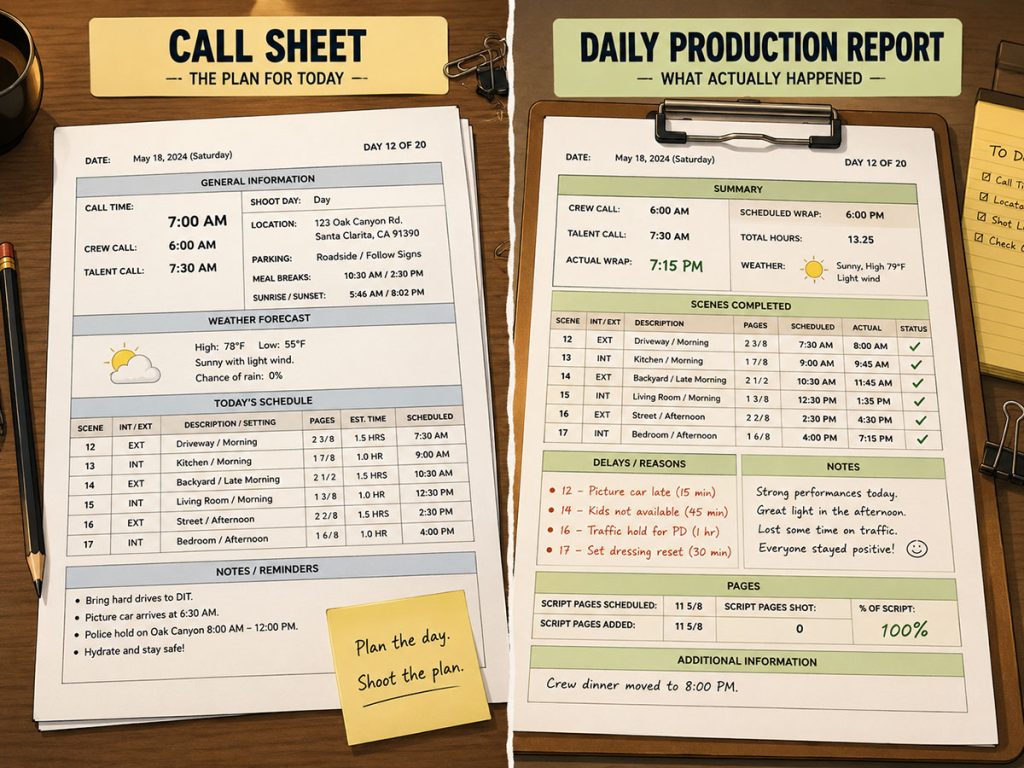
The easiest way to understand a Daily Production Report is to compare it to a call sheet.
A call sheet is prepared before the shoot day. It tells cast and crew where to go, when to arrive, what scenes are scheduled, what the weather looks like, where the location is, and what special notes apply.
A Daily Production Report is completed after the shoot day, or as the day is being tracked. It records what actually happened.
The call sheet says:
“Here is the plan for Day 7.”
The production report says:
“Here is what really happened on Day 7.”
For example, the call sheet may schedule:
Scene 12
Scene 13
Scene 14
Scene 15
But the Daily Production Report may show:
Scene 12 completed
Scene 13 completed
Scene 14 partially completed
Scene 15 moved to tomorrow
Delay caused by weather
Company wrapped 45 minutes late
That information matters because the next day’s schedule may need to change. The budget may be affected. Cast, crew, locations, equipment, and call sheets may need to be adjusted.
The call sheet launches the day.
The Daily Production Report closes the day’s ledger.
Daily Production Report vs. Shooting Schedule
A shooting schedule is created during pre-production. It organizes the scenes of the entire film into shoot days.
A Daily Production Report is created during production. It records the results of each individual shoot day.
The shooting schedule is predictive.
The DPR is historical.
A shooting schedule might show that Day 4 includes:
- House interior scenes
- 4 3/8 pages
- Cast members 1, 2, and 5
- Day interiors
- No company move
The Daily Production Report might show:
- 3 1/8 pages completed
- One scene pushed
- Lunch delayed
- Actor released at 6:10 p.m.
- Company wrapped at 7:45 p.m.
- Delay due to lighting reset
- Tomorrow’s call sheet needs revision
The shooting schedule helps plan the production.
The Daily Production Report helps measure the production.
Together, they tell the story of how the shoot is performing compared to the plan.
Why Daily Production Reports Matter
A Daily Production Report matters because film production moves fast, and memory is a terrible filing system.
By the time a production reaches Day 12, the team may barely remember exactly what happened on Day 3. If there is no daily record, important information can disappear into the fog.
A DPR helps document:
What was completed
What was missed
Why delays happened
How much work was accomplished
Who was present
What times were worked
Whether the production stayed on schedule
Whether costs may increase
Whether safety issues occurred
Whether the next day needs adjustment
This makes the DPR useful for several departments.
Producers
Producers use Daily Production Reports to track progress, identify problems, and understand whether the production is staying on schedule.
Production Managers
Production managers may use the report to monitor labor, timing, delays, meals, logistics, and costs.
Assistant Directors
The AD team may use the report to compare planned scenes against completed scenes and prepare for the next day.
Production Accountants
Accounting may use the information to help track payroll, overtime, meal penalties, and actual production activity.
Insurance and Legal
If there is an accident, damage, delay, or incident, the DPR can help document what happened.
Post-Production
Post may use production records to understand what was shot, what is missing, or what may require pickups.
The DPR is not glamorous. It’s kinda like the piece of paper on a clipboard in a factory where the foreman needs to check off things like time in/time out, this done, that done. Yeah, pretty boring, but it is useful
It is the paper trail wearing work boots.
What Information Goes Into a Daily Production Report?
Daily Production Reports vary depending on the production, but most include several common categories.
A DPR may include:
- Production title
- Shoot day number
- Date
- Location
- Unit
- Director
- Producers
- Assistant directors
- Production manager
- Scheduled scenes
- Completed scenes
- Incomplete scenes
- Page count scheduled
- Page count completed
- Actual call time
- Actual camera time
- Meal breaks
- Company wrap time
- Weather
- Cast information
- Background actor information
- Crew information
- Delays and reasons
- Accidents or incidents
- Equipment issues
- Location notes
- Safety notes
- Production notes
- Tomorrow’s concerns
Not every production needs the same level of detail. A small indie short may use a simpler report. A larger production may require more formal reporting with multiple department inputs.
But the core purpose stays the same:
Track the day accurately.
Scenes Scheduled vs. Scenes Completed
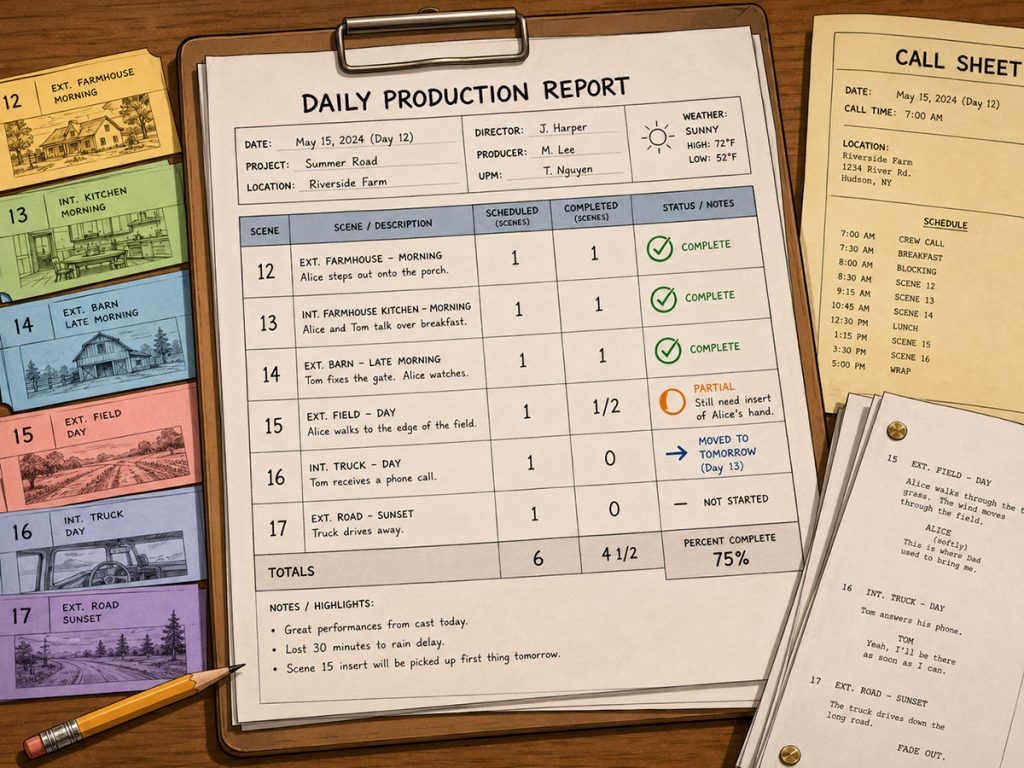
One of the most important parts of a Daily Production Report is the comparison between scheduled scenes and completed scenes.
A call sheet may list the planned scenes for the day.
The DPR records what actually got done.
For each scene, the report may track:
Scene number
Set or location
Brief description
Page count
Whether the scene was completed
Whether the scene was partially completed
Whether the scene was postponed
Notes about problems or changes
This information helps the production team understand whether the shoot is staying on track.
If the production repeatedly pushes scenes from one day to the next, the schedule (or the stripboard) may need to be revised. If certain types of scenes are consistently taking longer than estimated, the assistant director may need to adjust future days.
A DPR can reveal patterns.
Maybe night exteriors are running long.
Maybe company moves are costing more time than expected.
Maybe scenes with large cast are slower than planned.
Maybe the director’s coverage style requires more time.
Maybe the schedule is too aggressive.
The production report turns those hunches into records.
Page Count Shot
Page count is another key part of many Daily Production Reports.
The shooting schedule may estimate that the production will shoot 4 pages today. The DPR records how many pages were actually completed.
For example:
Scheduled: 4 2/8 pages
Completed: 3 5/8 pages
Remaining: 5/8 page
This helps the production track progress across the shoot.
If the production regularly completes fewer pages than scheduled, the team may need to revise the schedule, reduce coverage, add shoot days, simplify scenes, or move scenes around.
But page count should always be interpreted carefully.
A day with 2 completed pages may be a success if those pages involved a stunt, rain effect, difficult location, and complex camera movement.
A day with 6 completed pages may be normal if the scenes were simple dialogue in one controlled room.
The DPR should not be used to shame the day for being hard.
It should be used to understand what the day actually required.
Actual Times
A Daily Production Report often records actual timing information, such as:
General crew call
First shot
Meal breaks
Company move times
Camera wrap
Company wrap
Cast in and out times
Crew in and out times
Location access times
Delays
Overtime
This timing information matters because production days are expensive.
If the day starts late, breaks late, or wraps late, the budget may be affected. Overtime, meal penalties, location overages, additional transportation costs, or crew fatigue may become concerns.
Actual times also help the team improve future scheduling.
If a certain location took two hours longer to load in than expected, that should inform the next day at that location. If lighting setups consistently take longer than estimated, future scene timing should be adjusted.
A good DPR helps tomorrow become smarter than today.
Delays and Reasons for Delays
Delays are part of production.
The important thing is to document them accurately.
A Daily Production Report may include delay categories such as:
Weather
Cast delay
Location issue
Equipment problem
Lighting delay
Sound problem
Company move
Transportation issue
Meal delay
Permit issue
Safety issue
Art department delay
Makeup or wardrobe delay
Script change
Technical problem
The purpose is not to blame people. The purpose is to understand what happened.
If delays keep coming from the same source, the production can address them.
For example:
If company moves keep causing delays, the schedule may need fewer moves.
If locations keep causing delays, scouting records may need more detail.
If actor availability causes problems, cast scheduling needs adjustment.
If weather affects exterior days, the production may need cover sets.
If equipment problems repeat, rental or prep procedures may need review.
A delay that is documented can become a production lesson. A delay that is not documented becomes a rumor with a walkie.
And let me be perfectly clear having been on many a film shoot in my life — sh*t happens. It does not matter how much you plan, or how many times you’ve done this. Something will go wrong sometime (hopefully less often than not) and the schedule has to be adjusted.
Cast and Background Information
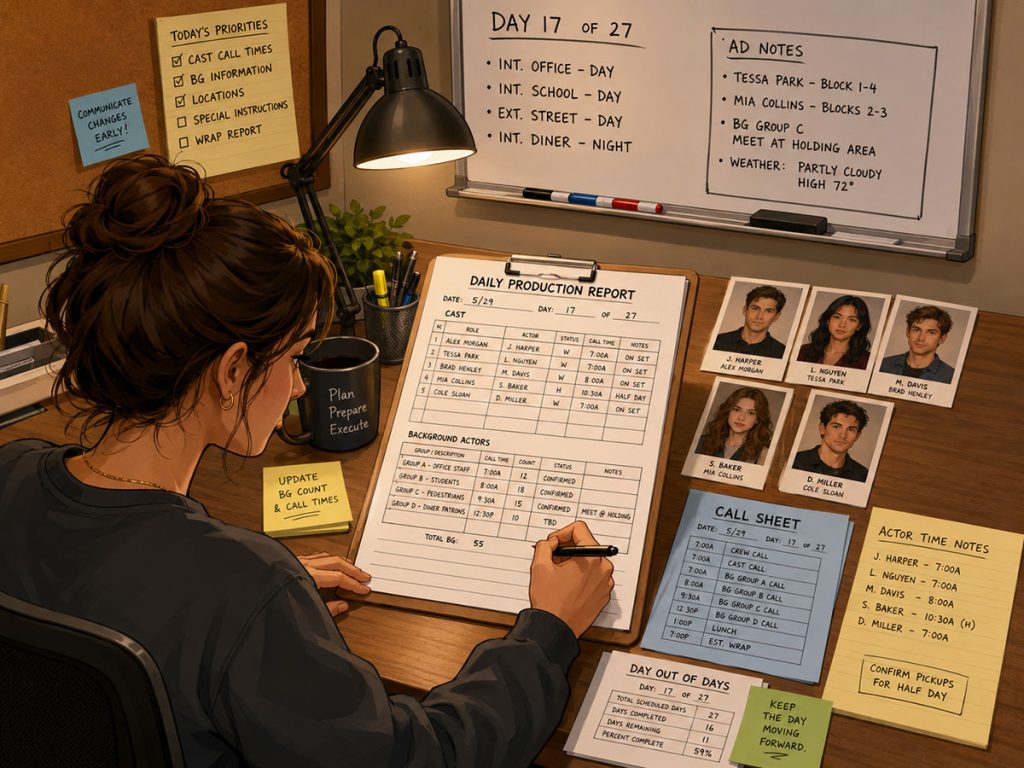
Daily Production Reports often track cast activity.
This may include:
Which actors worked
Call times
Arrival times
Makeup and wardrobe times
Set times
Dismissal times
Scenes worked
Hold days
Travel days
Special notes
Meal information
Background actor counts may also be included.
This matters for payroll, production tracking, meal counts, crowd management, wardrobe planning, and scheduling adjustments.
If a production had 40 background actors scheduled but only 25 were used, that may affect reporting. If a principal actor was held but did not work, that may affect cost. If cast were released late, that may affect turnaround and tomorrow’s call time.
Actor scheduling does not end when the call sheet goes out.
The DPR records what actually happened with the cast on the day.
Weather, Location, and Safety Notes
Weather and location conditions can strongly affect a shoot day.
A Daily Production Report may record:
Weather conditions
Temperature
Rain or wind
Lighting conditions
Location problems
Noise issues
Neighbor complaints
Access problems
Parking problems
Power issues
Safety concerns
Accidents
Damage
Incidents
Medical notes
Permit issues
These details are important because they explain why the day did or did not go according to plan.
For example, if an exterior scene was not completed because of rain, the DPR should document that. If a location had unexpected sound problems, that should be recorded. If there was an accident, damage, or safety concern, it should be noted clearly and handled according to production procedures.
The DPR is part of the production’s official record.
That means accuracy matters.
Do not use it as a creative writing exercise. Use it as a clear record of the day.
What Must Be Entered Manually?
This is an important point.
A Daily Production Report is not fully automatic because it records real events.
Some information may come from the schedule or call sheet, such as:
Production title
Shoot day
Date
Scheduled scenes
Scene numbers
Locations
Cast
Page counts
Unit information
But the most important DPR information often must be entered manually during or after the shoot day.
That may include:
Actual call time
Actual first shot
Actual meal times
Actual wrap time
Scenes completed
Scenes not completed
Pages actually shot
Delays
Reasons for delays
Weather changes
Accidents or incidents
Location issues
Cast release times
Crew notes
Production notes
Tomorrow’s concerns
This is not a flaw.
It is the point of the document.
A shooting schedule predicts.
A call sheet instructs.
A Daily Production Report records.
The DPR has to be completed with actual production information because it is documenting reality.
And reality rarely fills out forms for you. 🙂
Who Completes the Daily Production Report?
The responsibility can vary by production.
On many productions, information may come from several sources:
Assistant director team
Production office
Unit production manager
Production coordinator
Script supervisor
Production accountant
Location manager
Camera department
Sound department
Background PA
Payroll or timecard records
The final report may be assembled by the production office, assistant director department, or production management team, depending on the size and workflow of the production.
On smaller productions, one person may handle the DPR.
On larger productions, it may be a coordinated report built from multiple department records.
What matters is that someone owns the process.
A DPR that everyone assumes someone else is doing is a DPR that may not exist by wrap.
That is how paperwork becomes folklore.
How the Daily Production Report Helps Tomorrow’s Schedule
A DPR is not only about recording yesterday.
It helps improve tomorrow.
If the report shows the production fell behind, the AD and producer may need to revise the schedule. If a scene was not completed, it must be rescheduled. If a location caused delays, the next location day may need more prep. If a cast member wrapped late, tomorrow’s call time may need to respect turnaround requirements.
The Daily Production Report can help answer:
Do we need to move unfinished scenes?
Do we need to adjust tomorrow’s call sheet?
Are we falling behind on page count?
Are certain locations taking longer than expected?
Are company moves hurting the schedule?
Are night scenes causing fatigue?
Are cast days changing?
Does the budget need adjustment?
In this way, the DPR becomes a feedback loop.
The shooting schedule creates the plan.
The call sheet executes the day.
The Daily Production Report records the result.
The next schedule adjustment responds to reality.
That loop is how a production stays alive.
Daily Production Reports and the Budget
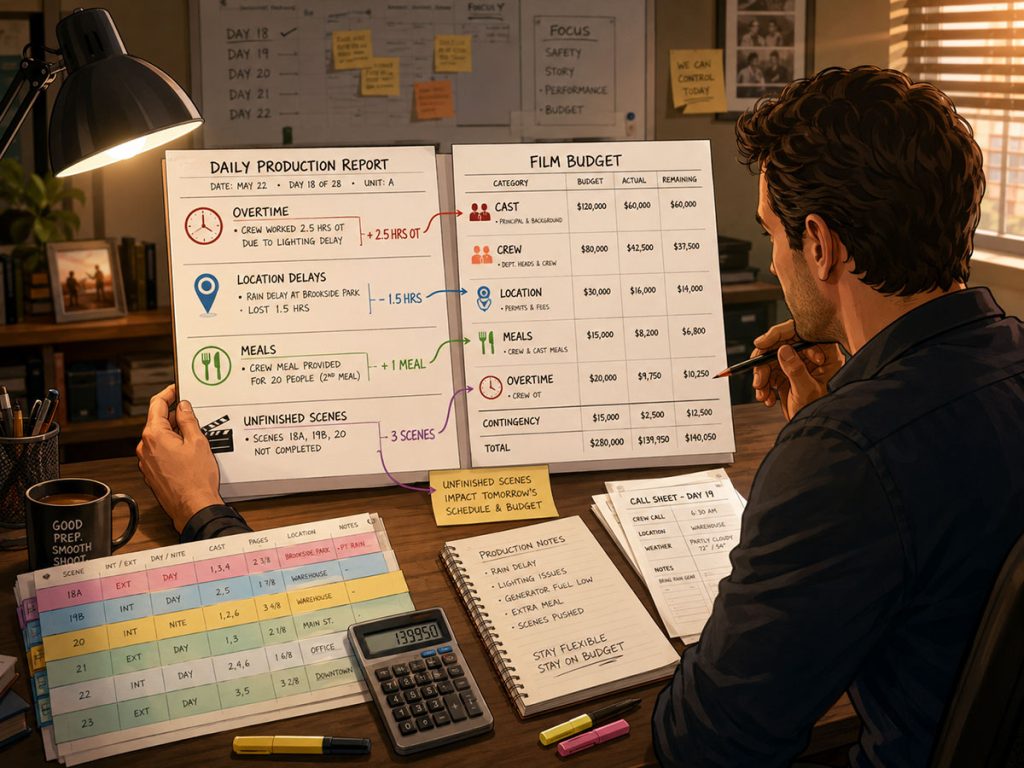
Daily Production Reports can reveal budget pressure.
They may document:
Overtime
Meal delays
Additional location time
Additional equipment usage
Extra background actor time
Weather delays
Company move delays
Scenes pushed to another day
Additional shoot days needed
Unexpected expenses
Incidents or damage
These details can affect actual production costs.
If a production repeatedly wraps late, overtime may increase. If scenes are pushed, additional days may be needed. If weather delays exterior work, location and crew costs may rise. If cast members are held longer than planned, cast costs may change.
The DPR helps producers and production managers see where the shoot is drifting from the budget.
The budget is built from assumptions.
The DPR reports what the assumptions met on set.
Sometimes they shake hands.
Sometimes they wrestle.
Daily Production Report vs. Script Supervisor Report
The Daily Production Report and script supervisor report are related, but they are not the same document.
The script supervisor report focuses heavily on what was shot from a continuity and editorial perspective. It may track takes, coverage, camera notes, matching issues, screen direction, dialogue changes, and editorial information.
The Daily Production Report focuses on the overall production day. It tracks what was scheduled, what was completed, timing, delays, cast, crew, locations, weather, and production notes.
Both reports are useful.
The script supervisor report helps editorial and continuity.
The Daily Production Report helps production management, scheduling, accounting, and overall tracking.
On some smaller shoots, records may be simplified or combined, but on larger productions these functions are usually distinct.
Daily Production Report vs. Camera and Sound Reports
Camera and sound reports are department-specific.
A camera report may track:
Rolls
Cards
Camera settings
Lenses
Scene and take information
Media notes
Technical issues
A sound report may track:
Audio files
Scene and take information
Microphones
Track assignments
Sound notes
Wild lines
Room tone
Technical problems
The Daily Production Report is broader.
It is not replacing camera or sound reports. It is summarizing the production day as a whole.
The DPR may reference camera or sound issues, but it does not usually contain every technical detail those departments track.
Think of the DPR as the daily production overview.
Camera and sound reports are specialized department records.
How Gorilla Scheduling Can Help with Daily Production Reports
Gorilla Scheduling includes a Production Report/Daily Production Report feature that helps productions create a record of the shoot day.
This is useful because the DPR sits naturally after the call sheet in the production workflow.
A production may begin with:
Script breakdown
Production strips
Stripboard
Shooting schedule
One-liner schedule
Production calendar
Call sheet
Daily Production Report
Gorilla Scheduling helps build many of the planning documents that feed the shoot day. Then the Production Report/DPR can be used to record what happened once the day is complete.
It is important to understand that a DPR is not automatically populated in the same way as some schedule-based reports. Some information may be connected to the schedule, but much of the most important Daily Production Report data must be entered manually after the shoot day because it reflects actual results.
That includes what was completed, actual timing, delays, notes, incidents, and other production realities.
That is exactly what a DPR should do.
It should not pretend the plan happened.
It should record what did.
Common Daily Production Report Mistakes
Mistake 1: Treating the DPR Like a Call Sheet
A call sheet is the plan. The DPR is the record.
Do not simply copy the call sheet and call it finished.
Mistake 2: Waiting Too Long to Complete It
If the report is completed days later, details may be forgotten.
Complete it as close to the shoot day as possible.
Mistake 3: Forgetting Unfinished Scenes
If a scheduled scene was not completed, record it clearly.
That scene must be rescheduled.
Mistake 4: Not Recording Delays
Delays explain why the day changed. Without delay notes, future schedule and budget decisions are harder to understand.
Mistake 5: Ignoring Actual Times
Actual call, meal, and wrap times matter for scheduling, payroll, and production tracking.
Mistake 6: Being Too Vague
“Ran late” is less useful than “Company move took 90 minutes longer than planned due to parking and load-in delay.”
Specific notes are better than fog.
Mistake 7: Not Sharing the Report with the Right People
The DPR may affect producers, production management, accounting, ADs, and future schedules. Make sure it reaches the people who need it.
Practical Workflow: How to Use a Daily Production Report
Here is a practical workflow:
- Build the shooting schedule during pre-production.
- Create the call sheet for the shoot day.
- Track actual events during the day.
- Note actual start times, meal breaks, delays, and wrap time.
- Record which scenes were completed.
- Record which scenes were partial or unfinished.
- Track page count completed.
- Add cast, background, location, weather, and safety notes.
- Document delays and reasons clearly.
- Complete the DPR as soon as possible after wrap.
- Review the DPR with the producer or production manager.
- Adjust the next schedule or call sheet if needed.
- File the DPR as part of the production record.
This workflow turns the DPR into more than paperwork.
It becomes part of the production’s daily decision-making system.
Daily Production Report Checklist
Before finalizing a DPR, check:
Production title
Shoot day and date
Location
Unit
Scheduled scenes
Completed scenes
Incomplete scenes
Page count scheduled
Page count completed
Actual call time
Actual first shot
Meal times
Company wrap
Weather
Cast notes
Background notes
Crew notes
Delay notes
Safety or incident notes
Location issues
Equipment issues
Budget-related concerns
Tomorrow’s schedule impact
Required signatures or approvals
The checklist does not replace the report, but it helps make sure the report is complete.
A DPR with missing information is still useful, but a complete DPR is much more powerful.
Final Thoughts
A Daily Production Report is one of the clearest records a production has.
It shows what happened on set, what was completed, what was delayed, what changed, and what the team may need to fix tomorrow.
The shooting schedule is the plan.
The call sheet is the daily instruction.
The Daily Production Report is the receipt.
For producers, it tracks progress and cost pressure.
For assistant directors, it reveals whether the schedule is working.
For production managers, it documents time, delays, and logistics.
For the production as a whole, it preserves the truth of the shoot day before memory turns it into mythology.
A good DPR does not make the day easier after it is over.
But it makes the next day smarter.
And in film production, that is often the difference between falling behind and finding the path forward.
Continue Learning Film Production Planning
If you’re diving deeper into production planning, understanding how stripboards connect to scheduling and budgeting is essential.
You may also find these guides helpful:
- How to Schedule a Film Shoot
- Film Budget Template (Free Guide)
- What is a Stripboard and How to Create one
- How to Write a Filmable Screenplay
- What Is a Call Sheet in Film? (Free Download)
- What Is a Crew Deal Memo (And Why It Can Save Your Production)
- Film Budget Categories Explained
- How a Shooting Schedule Impacts Your Film Budget
- What Is a Production Strip in Film Scheduling?
- How to Turn a Script Breakdown Into a Film Budget
Together, these form the foundation of an efficient, well-organized production.
Questions or Comments?
Have a question about stripboards or film scheduling? Feel free to leave a comment below — or reach out if you want to learn more about how professional tools can streamline your workflow.