

A film location is never just a place.
On the page, it may look simple:
INT. APARTMENT – NIGHT
EXT. DINER – DAY
INT. WAREHOUSE – DAWN
But once that scene becomes part of a shooting schedule, the location starts collecting questions like a production office collects coffee cups.
Can the crew park there?
Is there enough power?
Can lights fit under the ceiling?
Is there a place for actors to change?
Can sound be controlled?
Do we need a permit?
Can we shoot at night?
Where does base camp go?
Is the location available on the same days as the cast?
How many scenes are attached to it?
What does it cost?
What happens if the call sheet has multiple scene locations?
That is why film location scheduling is such an important part of pre-production.
Locations shape the shooting schedule, affect the budget, influence call sheets, determine company moves, and create practical limits that the script never politely mentions. A beautifully written scene can become difficult, expensive, or impossible if the location cannot support the production.
Good location scheduling helps filmmakers group scenes efficiently, reduce unnecessary moves, protect the budget, and keep the crew from spending half the day loading trucks instead of shooting the movie.
In this guide, we will walk through how to schedule locations for a film production, how locations connect to sets, why company moves matter, what information should be tracked, and how professional scheduling tools like Gorilla Scheduling help keep location planning organized.
What Is Film Location Scheduling?
Film location scheduling is the process of organizing a shooting schedule around the physical places where scenes will be filmed.
It includes deciding:
Which scenes shoot at each location
Which days each location is used
How locations are grouped on the stripboard
Whether scenes are day or night
Whether scenes are interior or exterior
How cast availability affects location days
Whether the company needs to move during a shoot day
What permits, restrictions, and logistics apply
How location choices affect the budget
How the location information flows into call sheets and reports
A screenplay is usually written in story order. A shooting schedule is built in production order. Location scheduling helps transform story order into something shootable.
For example, a screenplay may return to the same house ten times across the story. The production does not usually want to return to that house ten separate times. It may want to shoot all house scenes in a concentrated block, separated by set, day/night, cast, page count, and scene complexity.
That is the scheduling puzzle.
A good location schedule does not simply ask, “Where does the scene happen?”
It asks, “How can we shoot all location-based work efficiently without breaking the cast schedule, budget, or production day?”
Location vs. Set: The Difference Matters
One of the most important concepts in film location scheduling is the difference between a set and a location.
A set is the story place in the screenplay.
A location is the real-world place where the production films that set.
For example, the screenplay may include these sets:
Apartment kitchen
Apartment bedroom
Apartment hallway
Apartment rooftop
Apartment parking garage
Those might all be filmed at one real location. Or they might be filmed at several different places.
Likewise, one real location might double for multiple sets.
A single office building could become:
Police station
Hospital hallway
Corporate office
Government building
Apartment lobby
This distinction matters because the schedule needs to track both the story world and the production world.
The script may say the scene takes place in “INT. APARTMENT – NIGHT,” but the production needs to know the actual filming location: a stage, a real apartment, a warehouse build, a house, or a standing set.
In Gorilla Scheduling, each breakdown sheet includes a Location field where users can enter or choose an existing location from the Location module. That allows the production to connect the screenplay set to the real-world location record.
That connection is essential.
The set tells the story team where the scene happens.
The location tells the production team where everyone has to show up.
Start with the Script Breakdown
Location scheduling begins with the script breakdown.
During the breakdown, each scene is analyzed for location-related information:
Interior or exterior
Day or night
Set
Practical location needs
Special equipment
Vehicles
Stunts
Background actors
Props and set dressing
Weather concerns
Sound issues
Access needs
Production notes
Once every scene is broken down, the assistant director and producer can see how many locations the script requires and which scenes belong together.
This is where the first major location questions appear:
How many unique sets are in the script?
How many real-world locations are needed?
Can several sets be filmed at one location?
Can locations be combined?
Which locations are expensive or difficult?
Which scenes require night access?
Which exterior scenes are weather-sensitive?
Which locations need permits?
Which locations create company moves?
Without a breakdown, location scheduling is mostly guesswork.
With a breakdown, the production can begin building a practical plan.
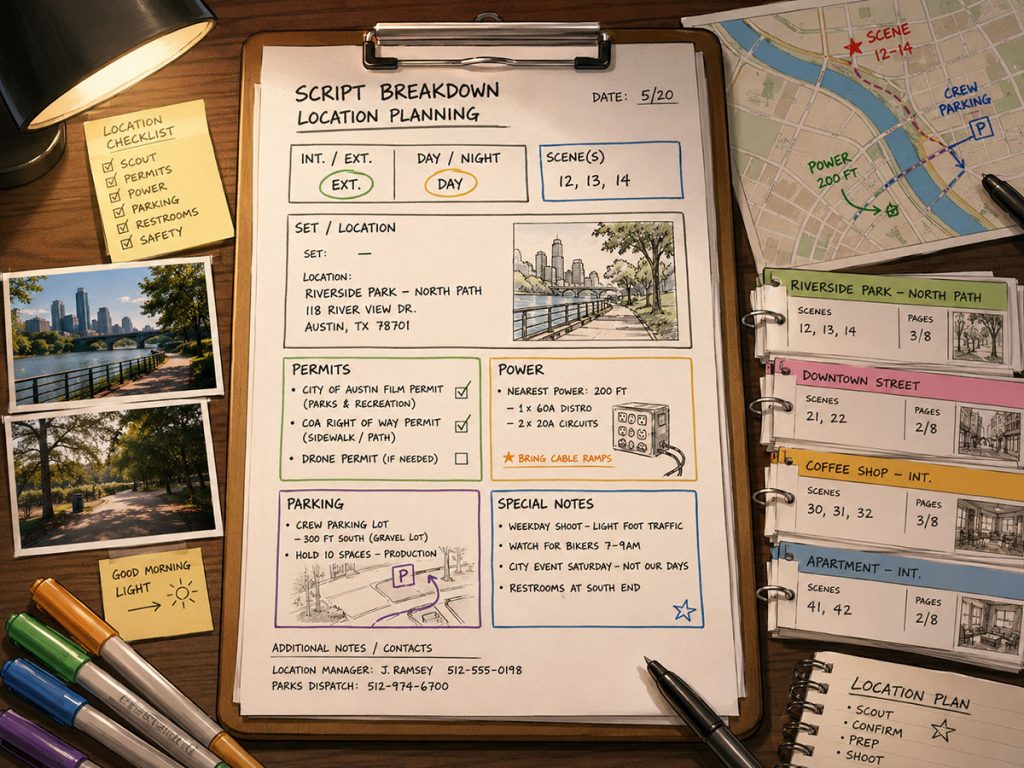
Create a Location Record for Every Real Location
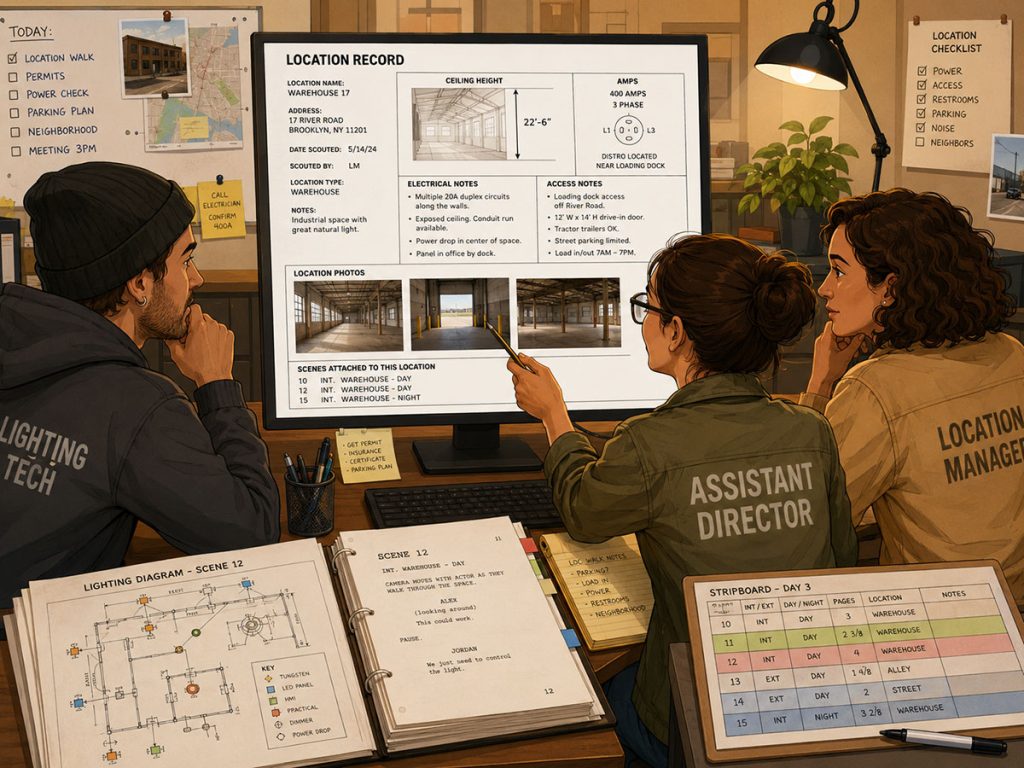
Once real filming locations are being considered, the production should create a record for each location.
A location record should store more than just an address.
A useful location record may include:
Location name
Address
Contact person
Phone number
Email address
Available dates
Confirmed shoot dates
Permit requirements
Location fee or rate
Parking information
Base camp options
Bathrooms
Holding areas
Actor changing areas
Power availability
Electrical notes
Amps
Ceiling height
Access restrictions
Load-in information
Noise issues
Neighbor concerns
Photos from multiple angles
Scenes attached to the location
Special safety notes
Insurance requirements
Restoration notes
This is where a lot of location scheduling problems can be prevented.
If the electrical details are missing, the lighting department may be surprised. If ceiling height is unknown, grip and electric may discover too late that the intended lighting plan is difficult. If there is nowhere for actors to change, wardrobe has a problem. If permits are unclear, the production may be exposed. If no photos are attached, department heads may be planning from memory and crossed fingers.
In Gorilla Scheduling, the Location module allows users to enter or import locations and store detailed location information in one place. That can include address, contact details, available days, shoot days, permit information, electrical details, ceiling height, amps, multiple photos, attached scenes, and other location-specific facts.
That kind of record turns a location from a vague idea into a production-ready resource.
A location is not just “the diner.”
It is “the diner with limited parking, strong morning light, 200 amps available, a low ceiling, two bathrooms, a back room for wardrobe, exterior scenes after 7 p.m., and a permit that needs to be filed by Tuesday.”
That is the version the schedule actually needs.
Use Location Photos for Better Planning
Location photos are not just pretty references.
They help departments make decisions.
The director may need to see angles.
The cinematographer needs to understand light and space.
The production designer needs to plan dressing.
The assistant director needs to think about movement and time.
The producer needs to understand practical limitations.
The location manager needs to document access, hazards, and restrictions.
A single photo is rarely enough.
Useful photo sets may include:
Wide exterior
Street access
Parking area
Interior wide shots
Ceiling and lighting reference
Power sources
Entrances and exits
Bathrooms
Holding areas
Wardrobe or changing space
Base camp possibilities
Sound concerns
Neighboring properties
Load-in path
Potential camera angles
Gorilla Scheduling allows multiple photos to be included in a location record, which can be especially helpful when preparing location reports or sharing information with the team.
Multiple angles help reduce surprises.
In production, surprises are not always charming. Sometimes they wear a location agreement and arrive ten minutes before call.
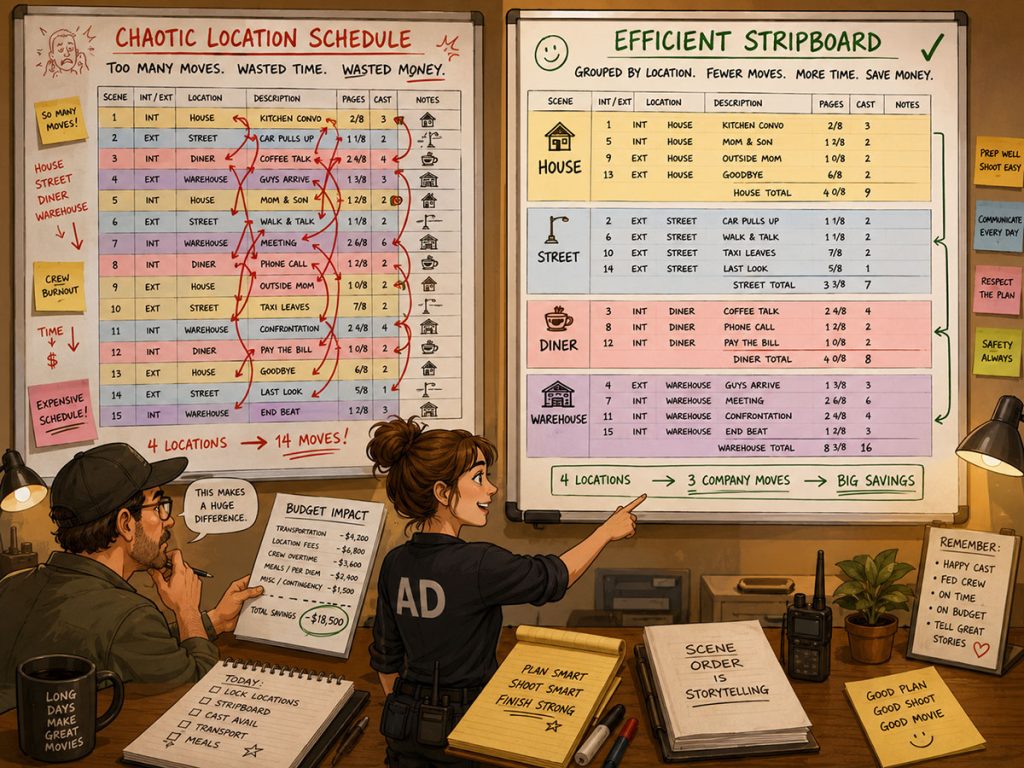
Group Scenes by Location
Once scenes and locations are identified, the stripboard becomes the main tool for location scheduling.
The assistant director can arrange production strips so scenes at the same location are grouped together whenever possible.
This can reduce:
Company moves
Repeated location fees
Travel time
Load-in and load-out time
Repeated lighting setups
Repeated set dressing
Crew fatigue
Transportation costs
Parking complications
Permit complexity
For example, if a script has eight scenes in a house, it is usually better to shoot those scenes in a block than return to the house repeatedly throughout the shoot.
But grouping by location is not the only concern. The schedule must also consider:
Day/night
Interior/exterior
Cast availability
Page count
Scene complexity
Weather
Special equipment
Art department prep
Location restrictions
Budget
A location-efficient schedule is not automatically a good schedule. It still has to work for the cast, crew, and production day.
That is why location scheduling is a balancing act.
Group the location, then test the day.
Reduce Company Moves
A company move happens when the production moves from one filming location to another during the same shoot day.
Company moves are expensive because they consume time.
The crew must wrap the first location, move equipment, relocate vehicles, reset work areas, prepare the second location, relight, reblock, and restart the production rhythm.
Even a short move can cost hours.
When scheduling locations, ask:
Can this day stay at one location?
Can nearby locations be grouped more efficiently?
Is the move worth the time it costs?
Can the second scene move to another day?
Can a location double for another set?
Can a scene be rewritten to avoid the move?
Will the company move create overtime risk?
Does the move happen before or after lunch?
A schedule with too many company moves may look efficient because it covers many scenes, but the actual shoot day may be slow, stressful, and expensive.
In Gorilla Scheduling, banners can be added to the stripboard for company moves, lunch, travel, pre-light, or other production notes. Banners can also include page counts that total on the day break, helping represent non-scene work that still consumes time.
That matters because a company move is not a scene, but it is absolutely part of the day.
If the schedule ignores the move, the day may look lighter than it really is.
And the day will not appreciate being lied to.
Consider Location Availability
A perfect location is not useful if it is not available when the production needs it.
Location availability can affect the entire shooting schedule.
A location may only be available on weekends.
A restaurant may only allow filming after closing.
A school may require summer dates.
A house may restrict night work.
A street may require city permits.
A warehouse may be unavailable during business hours.
A rooftop may depend on weather and safety conditions.
Before locking the schedule, confirm location availability.
Ask:
What days is the location available?
What hours can the production access it?
Is night shooting allowed?
Are there noise restrictions?
Are there neighborhood restrictions?
Is load-in allowed before the shoot day?
Can art department pre-dress the location?
Is there a hard wrap time?
Are permits tied to specific dates?
Can the production return for pickups?
Are there blackout dates?
In Gorilla Scheduling’s Location module, location records can track available days and shoot days, helping the team keep location availability connected to scheduling decisions.
This is important because location availability should be visible before the stripboard is locked.
A schedule built around imaginary location access is not a schedule.
It is a wish with columns.
Plan for Permits and Restrictions
Permits are a major part of film location scheduling.
Some locations require city permits, police support, fire safety, neighborhood notification, insurance certificates, parking permits, traffic control, drone permissions, or special approvals.
Permit needs can affect:
Schedule dates
Shoot hours
Crew size
Equipment placement
Parking
Street control
Noise
Stunts
Vehicles
Firearms
Lighting
Generators
Public access
Night work
A location may be technically available but not legally ready.
That distinction can wreck a schedule if discovered late.
When scheduling locations, track permit information early. Build permit deadlines into the production calendar and make sure call sheets reflect location restrictions.
Gorilla’s Location module can include permit information inside the location record, giving the production team a central place to store those details.
This is especially helpful when multiple locations have different rules.
A park, a private house, a city street, and a warehouse may all require very different permission paths.
The schedule should know that.
Day/Night and Interior/Exterior Location Planning
Day/night and interior/exterior details strongly affect location scheduling.
A day interior at a controlled location may be relatively straightforward.
A night exterior on a city street may require permits, lighting, safety, traffic control, neighbors, generators, and a careful crew turnaround plan.
When grouping location scenes, pay attention to:
Day interiors
Day exteriors
Night interiors
Night exteriors
Dawn or dusk scenes
Weather-sensitive exteriors
Controlled interiors
Public exteriors
Scenes that require specific natural light
It may make sense to group all daytime house interiors together, then schedule night interiors separately. Or a production may group night exteriors at the same location into one block to reduce repeated lighting setups.
But be careful.
A location might be available during the day but not at night. A neighborhood may allow filming but restrict lights after a certain hour. A restaurant might allow night interiors but not exterior signage. A rooftop might require extra safety conditions after dark.
Location scheduling is not just about where scenes happen.
It is about when that place can become the set.
Schedule Locations Around Cast Needs
Location grouping is important, but actor scheduling still matters.
A schedule may group all diner scenes in one block, but if the lead actor is unavailable on those days, the plan does not work. A location may be available for three days, but if a supporting actor appears in only one scene and must travel, the schedule may need adjustment.
When scheduling locations, cross-check:
Which cast members are needed at each location
Whether actor availability matches location availability
Whether guest actors can be clustered efficiently
Whether child actors have limited work hours
Whether background actors are needed
Whether fittings, makeup, or special wardrobe affect call times
Whether travel days are required
This is where the stripboard, actor schedule, and Day Out of Days report all work together.
A strong location schedule is efficient by location and smart by cast.
If it only solves one problem while creating another, the schedule is just moving the chaos from one drawer to another.
Think About Crew Logistics
Locations affect crew logistics in ways that are easy to underestimate.
A location needs more than a camera and actors.
It may need:
Crew parking
Truck parking
Base camp
Restrooms
Holding areas
Catering space
Craft service area
Production office space
Wardrobe and makeup space
Equipment staging
Generator placement
Sound control
Safety access
Emergency vehicle access
Trash removal
Security
Wi-Fi or communication support
A beautiful location may become difficult if it cannot support the crew.
When scheduling, the production should evaluate whether the location can handle the footprint of the shoot.
For small productions, this may be simple. For larger shoots, the logistics can become a major scheduling factor.
A location with limited access may take longer to load in. A remote location may require travel time. A location with no bathrooms may require rentals. A location with poor parking may require shuttles. A location with limited power may require generators.
All of that affects the schedule.
And the budget.
Track Electrical and Lighting Needs
Lighting departments need practical location information.
A location record should include details such as:
Available power
Amps
Breaker access
Ceiling height
Natural light direction
Window placement
Generator needs
Restrictions on rigging
Load-in access
Lighting safety concerns
Interior space limitations
Exterior light control
Night work restrictions
Ceiling height can matter because certain lighting plans need enough space. Electrical capacity matters because production lights require power. Access matters because gear has to get into the location before anyone can use it.
If the location record includes this information, the crew can prepare more accurately.
If it does not, the team may discover on the shoot day that the location cannot support the intended plan.
That is not a fun discovery. It is a scheduling goblin holding a light meter.
Gorilla Scheduling’s Location module can store details like ceiling height, amps, electrical notes, and other facts useful to technical departments.
This is where location scheduling becomes more than dates and addresses.
It becomes production preparation.
Connect Location Rates to the Budget
Locations affect the budget in many ways.
The obvious cost is the location fee or rate.
But the full cost may also include:
Permits
Site reps
Security
Police or fire safety
Parking
Bathrooms
Cleaning
Restoration
Insurance requirements
Overtime fees
Location manager costs
Travel
Lodging
Generators
Tents
Holding areas
Shuttles
Company moves
Scheduling is not where the final budget is calculated, but schedule data should still support budgeting decisions.
In Gorilla Scheduling, location rates can be entered and then imported into a linked Gorilla Budgeting file. That helps connect location scheduling decisions to the budget.
For example, if a location is scheduled for three days instead of two, the budget needs to reflect that. If a high-cost location can be reduced by grouping scenes more efficiently, the producer can see the potential savings.
The location schedule and film budget should not live in separate caves.
They should talk to each other.
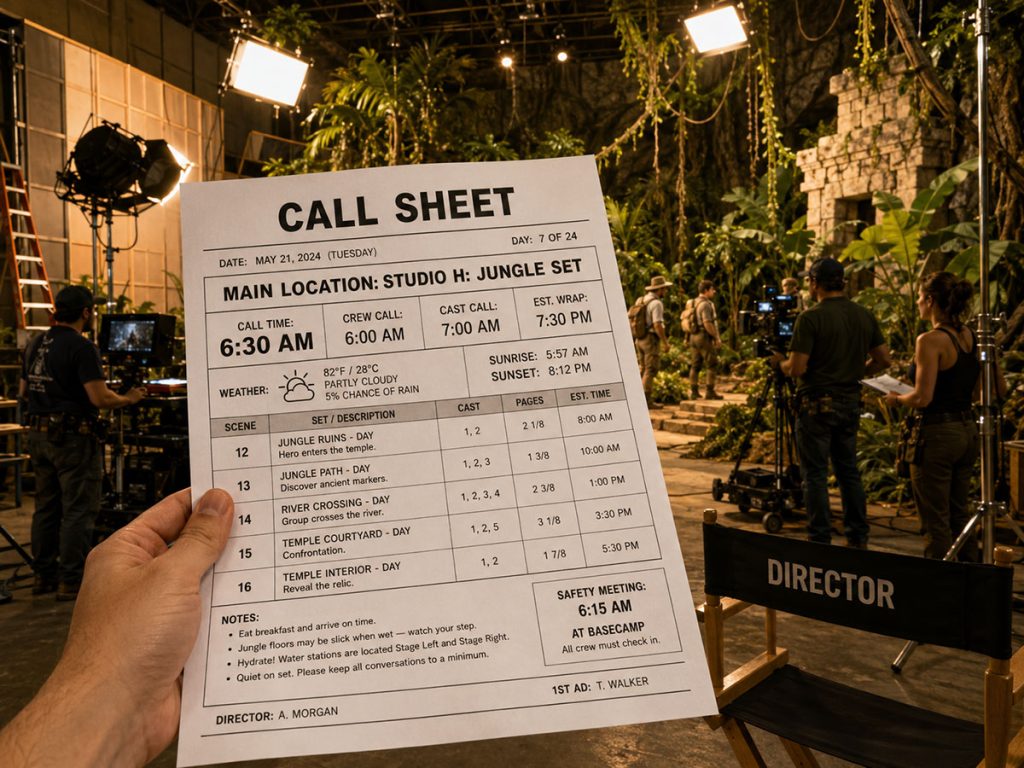
Use the Main Location for Call Sheets
Call sheets depend on location information.
But one shoot day may include multiple scenes at multiple locations.
That creates a practical question:
Where does the cast and crew show up?
If the call sheet lists several scene locations, the production still needs a clear main reporting location with a main call time.
Gorilla Scheduling includes a unique Main Location feature that allows the user to specify one single main location for the call sheet. This is useful when a day includes multiple scenes with different locations, but the crew needs one clear place to report.
For example, a shoot day might include:
Scene 12 – House Interior
Scene 18 – House Exterior
Scene 24 – Street Corner
Scene 31 – Diner Exterior
Even if several locations appear on the call sheet, the production may need everyone to report first to base camp, the house location, or a designated staging area.
The Main Location prevents confusion.
Because on a shoot day, “Where do we go?” should never be an existential question.
Run Location Reports
Location reports help the production team understand location information in different ways.
Useful reports may include:
Location Fact Sheet
Location Photo Gallery
Location and Scenes Report
Locations for Schedule
Locations, Scenes and Elements Report
hese reports can support different departments.
A Location Fact Sheet can summarize practical details.
A Location Photo Gallery can help departments review visual references.
A Location and Scenes Report can show which scenes are attached to each location.
A Locations for Schedule report can help the team review location usage across the shoot.
A Locations, Scenes and Elements Report can connect locations to the production elements required in those scenes.
Gorilla Scheduling includes multiple location reports like these, which can help the location manager, assistant director, producer, production designer, cinematographer, and production office stay aligned.
A schedule is not just a list of days.
It is a communication system.
Reports help that system speak clearly.
Location Scheduling and the Production Calendar
The shooting schedule focuses on shoot days, but location work begins before the shoot.
The production calendar should include location-related milestones such as:
Scouting
Tech scouts
Location agreements
Permit deadlines
Insurance certificate deadlines
Art department prep
Pre-light days
Load-in
Shoot days
Strike days
Restoration
Pickup dates
Location wrap
Final walkthroughs
A location may only shoot for one day, but it may require several prep steps before that day.
If those steps are not in the production calendar, the location may not be ready.
The production calendar helps make sure location work is not squeezed into the margins.
A schedule says when the crew shoots.
A production calendar says what has to happen before the crew arrives.
Location Scheduling and Call Sheets
Once the shooting schedule is built, location information flows into the call sheet.
The call sheet may include:
Main location
Scene locations
Address
Parking instructions
Base camp location
Crew call time
Cast call times
Weather
Nearest hospital
Safety notes
Permit restrictions
Special instructions
Company moves
Map links or directions
Contact information
If location records are incomplete, call sheets become harder to prepare.
If location records are accurate, the production office can build clearer call sheets.
The call sheet is the daily translation of the location schedule into action.
It tells people where to go, when to arrive, what to bring, and what to expect.
A good location schedule makes the call sheet stronger.
A bad location schedule makes the call sheet sweat.
Common Film Location Scheduling Mistakes
Mistake 1: Confusing Set and Location
A set is the story place. A location is the real filming place.
If those are not tracked clearly, the schedule can become confusing.
Mistake 2: Scheduling Too Many Company Moves
Company moves can destroy a day’s efficiency. Avoid them when possible.
Mistake 3: Ignoring Location Availability
A location schedule only works if the location is actually available at the required time.
Mistake 4: Forgetting Permits
A location may be creatively perfect but legally unavailable without the right permits.
Mistake 5: Not Tracking Technical Details
Power, ceiling height, access, lighting restrictions, and sound issues can affect the entire day.
Mistake 6: Underestimating Crew Logistics
Parking, bathrooms, holding, catering, and base camp are not luxuries. They are production survival systems.
Mistake 7: Not Connecting Locations to the Budget
Location rates, extra days, company moves, permits, and support costs all affect the budget.
Mistake 8: Not Specifying a Main Location on the Call Sheet
If the call sheet has multiple scene locations, the crew still needs one clear place to report.
Practical Workflow: How to Schedule Locations for a Film Production
Here is a practical location scheduling workflow:
- Break down the script scene by scene.
- Identify every set in the screenplay.
- Determine which real locations can represent those sets.
- Create location records for each real filming location.
- Enter address, contact, availability, permit, rate, and logistical details.
- Add multiple location photos from useful angles.
- Attach scenes to each location.
- Track day/night and interior/exterior needs.
- Confirm availability and restrictions.
- Add location dates to the production calendar.
- Build the stripboard and group scenes by location where possible.
- Check cast availability against location availability.
- Add banners for company moves, travel, lunch, pre-light, or special notes.
- Review location days for budget impact.
- Specify the main location for each call sheet.
- Generate location reports for the production team.
- Update location records as details change.
This process helps turn location planning from scattered notes into a usable production system.
And once the system is clean, the schedule gets easier to defend.
How Gorilla Scheduling Helps With Film Location Scheduling
Gorilla Scheduling includes a full Location module designed to help productions organize location information in one place.
Useful location scheduling features include:
- Creating or importing locations from another schedule
- Storing address and contact information
- Tracking available days and shoot days
- Connecting locations to breakdown sheets
- Selecting existing locations from the breakdown sheet Location field
- Storing permit information
- Entering electrical details such as amps and ceiling height
- Adding multiple location photos
- Tracking scenes attached to each location
- Entering location rates
- Importing location rates into a linked Gorilla Budgeting file
- Specifying a Main Location for call sheets
- Running Location Fact Sheet reports
- Running Location Photo Gallery reports
- Running Location and Scenes reports
- Running Locations for Schedule reports
- Running Locations, Scenes and Elements reports
These features support the real-world work of location scheduling.
A location is not just a row on a schedule. It is a bundle of creative, technical, logistical, legal, and budget information.
Gorilla Scheduling helps keep that bundle organized so the assistant director, producer, location manager, and production office can make better decisions.
Final Thoughts
Film location scheduling is one of the most important parts of pre-production.
Locations affect the shooting schedule, cast planning, crew logistics, permits, lighting, transportation, call sheets, production calendars, and film budgets.
A strong location schedule helps the production group scenes efficiently, reduce company moves, avoid unnecessary costs, and make sure the crew knows exactly where to go.
The goal is not just to find beautiful places to film.
The goal is to find locations the production can actually use.
A great location supports the story.
A well-scheduled location supports the shoot.
And when both work together, the production has a much better chance of getting through the day without the map bursting into flames.
Continue Learning Film Production Planning
If you’re diving deeper into production planning, understanding how stripboards connect to scheduling and budgeting is essential.
You may also find these guides helpful:
- How to Schedule a Film Shoot
- Film Budget Template (Free Guide)
- What is a Stripboard and How to Create one
- How to Write a Filmable Screenplay
- What Is a Call Sheet in Film? (Free Download)
- What Is a Crew Deal Memo (And Why It Can Save Your Production)
- Film Budget Categories Explained
- How a Shooting Schedule Impacts Your Film Budget
- What Is a Production Strip in Film Scheduling?
- How to Turn a Script Breakdown Into a Film Budget
Together, these form the foundation of an efficient, well-organized production.
Questions or Comments?
Have a question about stripboards or film scheduling? Feel free to leave a comment below — or reach out if you want to learn more about how professional tools can streamline your workflow.