
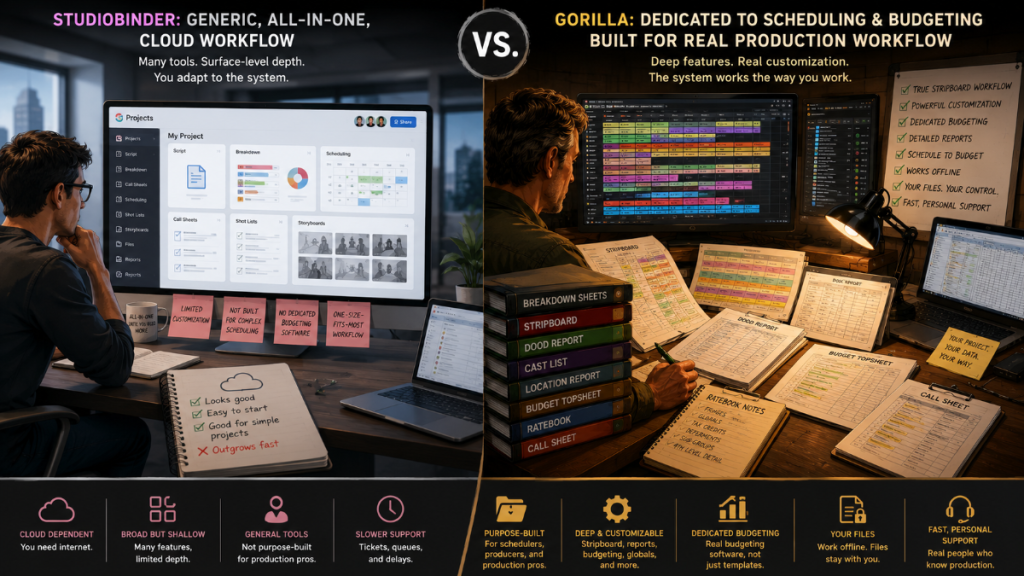
Choosing film production software is not just a feature checklist. It is a workflow decision.
A director may care about storyboards and shot lists. An assistant director may care about breakdown sheets, stripboards, day breaks, DOOD reports, and call sheets. A producer may care about budgets, reports, ratebooks, cost assumptions, fringes, tax credits, and how scheduling changes affect the budget. A film school instructor may care about teaching students the real order of pre-production: screenplay, breakdown, schedule, reports, budget, call sheets.
That is why a comparison between Gorilla and StudioBinder should start with the real question:
Are you looking for a broad cloud-based production management platform, or a dedicated scheduling and budgeting workflow built around the practical mechanics of film production?
StudioBinder is best understood as a cloud-based, all-in-one production management and collaboration platform. Gorilla is best understood as a focused film scheduling and budgeting system designed around screenplay import, script breakdown, production strips, stripboards, reports, budgets, and call sheets.
Both can be useful. They are simply built around different production philosophies.
👉 Pre-Production Software for Filmmakers
Quick Answer
StudioBinder may be the better fit if your production needs a cloud-first workspace for collaboration, scriptwriting, storyboards, mood boards, shot lists, production calendars, task boards, file sharing, and online call sheet distribution.
Gorilla may be the better fit if your priority is a dedicated film scheduling and budgeting workflow that follows the chain from screenplay import to breakdown sheets, stripboard scheduling, production reports, budgeting, DOOD-to-budget data, call sheets, and classroom instruction.
The choice is less about which program is “better” in the abstract and more about which one matches the way you prep a production.
What StudioBinder Is Best Known For
StudioBinder has built a strong reputation as a modern, cloud-based production management platform. Its strength is breadth. It brings many creative and logistical tools into one online system: screenwriting, script breakdowns, stripboards, storyboards, mood boards, shot lists, calendars, task boards, contacts, call sheets, and collaboration.
That makes StudioBinder attractive for productions that want everything online and centralized. Teams can work in a shared environment, invite collaborators, distribute call sheets digitally, and manage many production documents in a browser-based workflow.
For production companies, agencies, video teams, schools, and teams that rely heavily on cloud access, StudioBinder’s collaboration-first structure can be a major advantage. It is built to keep many people connected around the same production hub.
👉 Production Management Software for Filmmakers
What Gorilla Studio Is Built For
Gorilla Studio is built around the production spine: screenplay, breakdown, stripboard, schedule, reports, budget, and call sheets.
That may sound less flashy than an all-in-one cloud platform, but for many filmmakers, assistant directors, production managers, line producers, and film schools, that spine is the whole beast. 🦍
Gorilla Scheduling is designed to import a screenplay, break it down into production elements, organize those elements into breakdown sheets, build a stripboard, schedule shoot days, and generate the reports production teams need. Gorilla Budgeting is designed to build and manage production budgets with traditional budgeting tools such as globals, fringes, sub-groups, tax credits, deferments, 4th level detail, ratebook integration, and expense tracking.
Gorilla 11 strengthens that workflow with improved Final Draft import, screenplay display improvements, scene summaries, dual dialogue support, color-coding improvements, Breakdown Assistant AI, V.O./O.S./Non-Speaking tagging, password lock, currency tools, actor placeholders, short names, and DOOD-to-budget days-worked integration.
That makes Gorilla especially relevant for productions that care less about being inside a browser all day and more about the accuracy of the schedule, the structure of the budget, and the production logic connecting the two.
👉 Film Scheduling Workflow: How to Build a Shooting Schedule Step by Step
Script Breakdown and Scheduling
A good schedule starts before the stripboard. It starts with a usable screenplay import and a meaningful breakdown.
StudioBinder offers script breakdown and stripboard scheduling tools inside a cloud production environment. This can work well when the team wants a shared online workspace and quick access to production information from different departments.
Gorilla Studio approaches breakdown and scheduling as a dedicated production process. After importing a screenplay, you can build breakdown sheets, tag production elements, organize categories, generate strips, and move into the stripboard. Gorilla’s workflow is designed for the AD/production manager mindset: identify the elements, organize the scenes, build shoot days, print reports, and keep the schedule tied to practical production decisions.
That distinction matters. A stripboard is not just a pretty stack of colored rectangles. It is the pressure map of the production. When you move a scene, you are moving cast, locations, props, wardrobe, vehicles, animals, special effects, makeup, background, crew assumptions, meal timing, company moves, and budget implications.
Gorilla Studio is built to live in that pressure map.
Budgeting Workflow
This is one of the clearest differences between the two products.
StudioBinder does not include dedicated film budgeting software. It offers helpful budgeting articles, guides, and downloadable budget templates, including film budget spreadsheets, cashflow templates, and P.O. log resources. Those can be useful for producers who need a starting point or a spreadsheet-based reference. But templates are not the same as dedicated budgeting software. StudioBinder’s own budgeting materials point users toward free templates rather than a built-in budgeting module, and its publicly promoted production software features emphasize writing, breakdowns, shot lists, storyboards, schedules, call sheets, calendars, and collaboration.
Gorilla Budgeting, however, is dedicated budgeting software. It is built for traditional film budgeting with globals, fringes, sub-groups, tax credits, deferments, 4th level detail, ratebook integration, expense tracking, topsheets, detail reports, and integration with Gorilla Scheduling.
For producers and line producers, the difference is important. A budget template can help you estimate costs. Dedicated budgeting software helps you manage the structure of a production budget, revise it, report it, and connect it to scheduling assumptions.
With Gorilla Studio, the schedule-to-budget relationship becomes even more useful because total days worked for elements can be imported into a linked budget from a DOOD report. That means the schedule is not just an isolated planning document. It can help inform the budget.
👉 How to Create a Film Budget from a Shooting Schedule
AI-Assisted Breakdown
AI is most useful in production software when it reduces drudgery without removing human judgment.
That is the idea behind Breakdown Assistant AI in Gorilla 11. It can automatically suggest tags for an imported screenplay, but the user still accepts or rejects those tags. This is the right balance for production work: AI suggestions, human approval.
That matters because breakdown decisions are not merely text extraction. A screenplay may mention a prop in dialogue that never needs to appear on set. A character may be heard but not seen. A car may be background atmosphere in one scene and a picture vehicle in another. A costume note may affect wardrobe continuity. A food item might be a prop, set dressing, or both depending on the scene.
Gorilla’s AI-assisted approach is designed to speed up the first pass while keeping the production brain in charge.
👉 AI Script Breakdown vs Manual Tagging: Which Workflow Should Filmmakers Use?
Final Draft Import and Screenplay Display
A film scheduling system is only as good as the screenplay data it can understand.
Gorilla 11 adds important Final Draft import improvements, including support for scene summaries, screenplay text styles such as underline, bold, italics, and colors, improved color-coding accuracy, and proper dual dialogue display. For screenplays with complex formatting, dual dialogue, imported summaries, or color-coded text, those details can make the difference between a clean import and a messy cleanup session.
Gorilla Studio also supports importing screenplay display from another schedule. That can be useful when a project has been started in one schedule but needs to carry screenplay display work forward into another file.
These improvements are particularly helpful for users who already rely on Final Draft and want the screenplay-to-breakdown workflow to feel less like a translation accident and more like a clean handoff.
👉 From Final Draft to Breakdown Sheet: What Gorilla 11 Improves
Film School and Classroom Use
StudioBinder has a strong education angle because it is cloud-based, visual, and collaborative. For classes where students need to share projects online, collaborate through a browser, and move between writing, visual planning, calendars, and call sheets, StudioBinder can make sense.
Gorilla has a different classroom strength. It teaches the mechanics of professional pre-production: script import, breakdown sheets, element tagging, stripboards, shoot days, scheduling reports, DOODs, budgets, call sheets, and the relationship between a schedule and a budget.
For film schools, that distinction is powerful. Students do not only need to know how to click through software. They need to understand why a production strip exists, why an element appears on a DOOD, why V.O. and O.S. matter, why an actor placeholder may be needed before casting, why a company move costs time, and why moving one scene can change the budget.
Gorilla’s focused workflow can help instructors teach the production grammar underneath the interface.
Cloud Collaboration vs Focused Production Workflow
The biggest philosophical difference is cloud collaboration versus dedicated production workflow.
StudioBinder is cloud-based. That makes it useful when your team wants to log in from different locations, collaborate online, share view-only pages, manage permissions, send call sheets, and keep the production inside one browser-based workspace.
Gorilla is not cloud-based in the same way. It is a dedicated desktop production system where users can send schedules and budgets to one another. For some teams, that is a limitation. For others, it is a benefit.
A focused desktop workflow can be appealing when production data needs to remain local, when a school lab wants installed software, when a production office wants fewer moving parts, or when the priority is schedule and budget work rather than broad online collaboration.
Neither approach is universally right. The best choice depends on how your team actually works.
Production Data, Cloud Access, and Security
Cloud collaboration can be extremely useful. It allows team members to log in from different locations, share documents, review call sheets, update production information, and keep departments connected. For many productions, that convenience is a major reason to choose a cloud-based production platform.
But production data is sensitive.
A shooting schedule can reveal locations, cast movements, company moves, night shoots, minors, stunts, vehicles, special effects, security concerns, and confidential production plans. A budget can reveal salaries, vendor rates, above-the-line costs, financing assumptions, tax incentives, deferments, and other private business information. A script breakdown can reveal creative details long before the film is released.
That does not mean cloud software is automatically unsafe. Responsible cloud platforms use security policies, permissions, backups, and privacy practices. It does mean filmmakers should ask a practical question before putting an entire production online:
Where does your production data live, who controls access to it, and what happens if that account, platform, or provider is compromised?
The entertainment industry has already seen what can happen when sensitive production information is exposed. The 2014 Sony Pictures cyberattack leaked private company data, emails, unreleased films, and internal materials. More recently, a leak involving an upcoming Avatar: Aang, The Last Airbender film showed that unreleased entertainment content remains a target.
Gorilla takes a different approach. Your Gorilla schedules and budgets stay with you as files on your own computer. You can still share them with other Gorilla users, much like sending a Word document, Photoshop file, Final Draft file, or budget file. You can also place those files in iCloud, Dropbox, Google Drive, or another secure file-sharing system if that is how your production office works.
The difference is control. With Gorilla, the production decides where the working files live, how they are shared, who receives them, and what security practices are used around them. For some teams, cloud collaboration is worth the tradeoff. For other productions, especially those dealing with confidential scripts, sensitive cast schedules, unreleased material, or private budget data, local control may be preferable.
This is not a fear-based argument. It is a workflow and risk-management question.
If your production needs constant online collaboration, StudioBinder’s cloud-based model may be useful. If your production wants dedicated scheduling and budgeting tools while keeping working files under your own control, Gorilla offers a more self-contained option.
Cost Analysis: What Should Filmmakers Compare?
Cost comparisons between production software can be slippery because pricing models are not always built the same way.
Before choosing between Gorilla and StudioBinder, compare the total workflow cost, not just the monthly sticker price.
Ask these questions:
- How many users need full editing access?
- Is the software priced by user, project, feature tier, or product bundle?
- Does the plan include scheduling, budgeting, call sheets, and reports?
- Are budgeting tools native software features, or are they templates?
- Are call sheets included, limited, or sold separately?
- Does the team need cloud collaboration, or will a focused local workflow be enough?
- Does the production need one project, multiple projects, or ongoing production company use?
- Does the school need individual student accounts, lab installs, or a class license?
- Will the software still be useful after the first project wraps?
For example, a cloud production platform may be attractive for a team that needs many people collaborating online. But if extra seats, higher tiers, or advanced features are required, the actual cost may rise as the team grows.
A dedicated scheduling and budgeting system may be more cost-effective for users who primarily need professional scheduling, budgeting, reports, and call sheet workflow without paying for a larger online collaboration suite.
👉 Film Scheduling Software: What to Look for Before You Choose
👉 Film Budgeting Software: What to Look for Before You Choose
Comparison Table
| Category | Gorilla 11 | StudioBinder |
|---|---|---|
| Core identity | Dedicated film scheduling and budgeting workflow | Cloud-based all-in-one production management platform |
| Best for | Filmmakers, ADs, producers, production managers, film schools needing scheduling and budgeting depth | Teams needing online collaboration, production docs, visual planning, calendars, task boards, and cloud access |
| Screenplay import | Strong Final Draft workflow with Gorilla 11 import/display improvements | Online screenwriting and script import/sync workflow |
| Script breakdown | Manual tagging plus Breakdown Assistant AI suggestions with user approval | Cloud-based script breakdown tools |
| Stripboard scheduling | Dedicated stripboard workflow built for production scheduling | Cloud stripboard scheduling tools |
| Budgeting | Dedicated budgeting software with globals, fringes, tax credits, deferments, 4th level detail, ratebook integration, expense tracking, and reports | Does not include dedicated budgeting software. StudioBinder offers budgeting articles, guides, and downloadable templates, but budgeting is not a native production budgeting module. |
| Schedule-to-budget workflow | Gorilla can use DOOD days-worked data to inform a linked budget | Strong production management ecosystem; verify direct budget integration before claiming |
| Call sheets | Koala Call Sheets add-on and Gorilla scheduling/report workflow | Cloud call sheet creation, sending, and tracking depending on plan |
| AI | Breakdown Assistant AI for screenplay tagging suggestions with human approval | StudioBinder offers script breakdown tools, but it does not appear to offer an AI-assisted production breakdown feature comparable to Gorilla’s Breakdown Assistant AI. |
| Production data control | Schedule and budget files stay with the user and can be shared manually or through the production’s chosen file-sharing system | Cloud-based production workspace where project data is stored and accessed through the online platform |
| Collaboration | Local/focused workflow; schedules and budgets can be shared between users | Cloud collaboration, sharing, permissions, messaging, and view-only access depending on plan |
| Film school use | Strong for teaching breakdown, stripboards, schedules, DOODs, budgets, and production reports | Strong for cloud-based classroom collaboration and online production management |
| Best deciding factor | Choose Gorilla if scheduling/budgeting depth and production workflow are the priority | Choose StudioBinder if cloud collaboration and all-in-one online production management are the priority |
When StudioBinder May Be the Better Fit
StudioBinder may be the better fit when a production wants a cloud-based production hub.
That can include:
- Online collaboration across many team members
- Browser-based access from different locations
- Shared scripts, docs, storyboards, shot lists, mood boards, calendars, and call sheets
- Team permissions and collaborator access
- Digital call sheet distribution and tracking
- A broad production management environment rather than a specialized scheduling/budgeting system
StudioBinder can also be useful for film schools that want students and instructors working in a shared online platform, especially when the class emphasizes collaboration, visual planning, and general production organization.
In short: if the priority is cloud collaboration across the full production process, StudioBinder deserves serious consideration.
When Gorilla Studio May Be the Better Fit
Gorilla Studio may be the better fit when the production needs dedicated scheduling and budgeting tools.
That can include:
- Importing a screenplay and building breakdown sheets
- Tagging elements for scheduling and reports
- Using AI suggestions while keeping human approval
- Building and revising a stripboard
- Generating scheduling reports
- Managing DOOD logic
- Connecting schedule information to budget assumptions
- Creating traditional film budgets
- Working with globals, fringes, tax credits, deferments, 4th level detail, ratebook data, and expense tracking
- Teaching film students how scheduling and budgeting actually connect
Gorilla is especially strong for users who think in production documents: breakdown sheets, strips, stripboards, one-liners, DOODs, topsheets, detail reports, budgets, and call sheets.
In short: if the priority is the practical machinery of film scheduling and budgeting, Gorilla 11 is built for that job.
Why Dedicated Scheduling and Budgeting Still Matter
Modern production tools often promise to do everything. That can be useful, but film scheduling and budgeting are specialized crafts.
A shooting schedule is not just a calendar. A budget is not just a spreadsheet. A breakdown is not just highlighted text. These documents form a chain of decisions.
The screenplay tells you what must be produced.
The breakdown identifies what each scene requires.
The stripboard organizes the shoot.
The schedule determines when scenes happen.
The reports reveal cast, locations, elements, and production pressure.
The budget translates those decisions into money.
The call sheet tells the crew what tomorrow requires.
When those pieces are disconnected, productions drift into spreadsheet fog. When they are connected, producers and ADs can make better decisions.
That is the center of Gorilla’s value: it is built around the chain.
Final Thoughts
Gorilla Studio and StudioBinder are not the same kind of production tool wearing different hats.
StudioBinder is a cloud-based production management platform with broad collaboration features across writing, planning, visual tools, calendars, tasks, call sheets, and team workflows.
Gorilla is a focused film scheduling and budgeting workflow designed for the practical work of importing a screenplay, breaking it down, scheduling it, reporting it, budgeting it, and preparing it for production.
Choose StudioBinder if your team needs an online collaboration hub.
Choose Gorilla if your production needs dedicated scheduling and budgeting tools with a workflow built around the way films are actually broken down, scheduled, budgeted, and taught.
The best software is the one that matches the production you are actually trying to make.
Explore Gorilla
Gorilla Scheduling helps filmmakers import screenplays, build breakdown sheets, create stripboards, schedule shoot days, generate production reports, and move toward call sheets.
Gorilla Budgeting helps producers build traditional film budgets with globals, fringes, tax credits, deferments, 4th level detail, ratebook integration, expense tracking, topsheets, and detail reports.
Breakdown Assistant AI, available with Gorilla 11, helps speed up the breakdown process by suggesting screenplay tags while letting the user accept or reject each result.
Koala Call Sheets extends the production workflow with call sheet creation and distribution options.
The Gorilla Ratebook helps users work with production rates while building budgets.
Explore: