
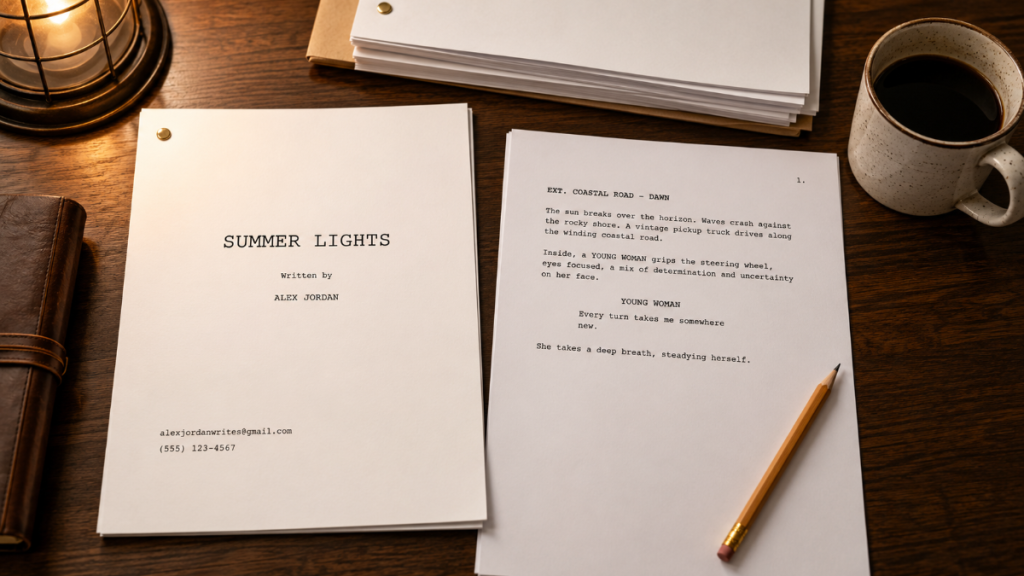
Proper screenplay format is more than a writing rule. It is the shared language that lets readers, producers, assistant directors, actors, department heads, and production teams understand the script quickly.
A well-formatted screenplay tells the reader where the scene takes place, whether it is inside or outside, whether it happens during the day or night, who speaks, what the audience sees, and how the story moves. It also helps the production team turn the script into a breakdown, a shooting schedule, a budget, and eventually a call sheet.
That is why screenplay format matters.
A script that ignores basic formatting can feel amateur even if the story has potential. A script that follows industry conventions gives the reader confidence. It tells them the writer understands not only storytelling, but also the practical form of filmmaking.
👉 How to Break Down a Script for Film Production (Step-by-Step Guide)
Why Proper Screenplay Format Still Matters
Screenplays are working documents.
They are read by agents, managers, producers, directors, actors, assistant directors, script supervisors, production designers, editors, and financiers. Each person may look at the script for a different reason, but they all depend on the same basic format.
A producer may look at page count and production scale. An assistant director may look at scene headings, locations, cast, day/night work, and breakdown elements. A director may focus on action, rhythm, and visual storytelling. Actors look at dialogue and character moments. Department heads look for what the script requires from their areas.
Proper screenplay format keeps all of that information readable.
The goal is not to make every script look identical. The goal is to make the script easy to read, evaluate, break down, schedule, and produce.
👉 Film Scheduling Workflow: How to Build a Shooting Schedule Step by Step
Use Standard Screenplay Page Size and Margins
A standard screenplay is written for 8.5 x 11 inch pages in the United States. Screenplays are typically formatted in a way that supports the long-standing rule of thumb that one properly formatted page equals roughly one minute of screen time.
That rule is not perfect, but it is useful.
A page with rapid action may play faster. A page with quiet pauses may play slower. A page of dense description may not translate directly to screen time. Still, the format gives producers and readers a practical estimate of length.
Margins and indentation are part of that system. Scene headings, action, character names, dialogue, parentheticals, transitions, and shots each have conventional placement on the page. Screenwriting software usually handles this automatically, which is one reason writers should use proper screenwriting tools instead of ordinary word processors.
A script that is formatted manually in a general writing app can easily drift out of alignment. That may seem minor, but small formatting errors can affect readability, page count, and first impressions.
Use Courier 12-Point Font
Traditional screenplay format uses 12-point Courier.
Courier is a monospaced font, which means each character takes up the same amount of horizontal space. That consistency helps preserve the approximate relationship between page count and screen time.
This is not the place to show off with decorative fonts, unusual spacing, colored text, or custom layouts. Those choices may feel creative, but they usually make the script harder to read and less professional.
The screenplay should disappear into the story. The reader should not be thinking about the font. They should be thinking about the scene.
Keep the Title Page Simple
The title page should be clean and professional.
A standard screenplay title page usually includes the title, the writer’s name, and contact information or representation details. It should not include artwork, taglines, character descriptions, plot summaries, mood boards, posters, or decorative design.
The title page is not a sales brochure. It is the front door to the script.
Keep it simple:
Title
Written by
Writer name
Contact information or representation
If the script is based on another work, adapted from source material, or has a specific credit requirement, that may also need to be handled carefully. But for most original screenplays, simple is best.
Start the Screenplay with the Screenplay
After the title page, the first page of the script should begin the screenplay.
Do not include a cast list, character biographies, theme statement, introduction, artwork, map, glossary, or explanation of the world before the story begins. If the reader needs to understand the world, the screenplay should teach them through scenes.
A screenplay is not a novel, pitch deck, or production bible. Those documents may have their place, but they do not belong in the body of a standard spec screenplay.
Start with the first scene.
Give the reader a clear entry point into the movie.
Format Scene Headings Clearly
Scene headings, also called slug lines, tell the reader where and when a scene takes place.
A basic scene heading usually includes:
INT. or EXT.
Location
Time of day
For example:
INT. APARTMENT – NIGHT
EXT. CITY STREET – DAY
INT./EXT. CAR – MOVING – DAY
Scene headings are important for both reading and production. They help organize the story, but they also help the assistant director and production team identify locations, day/night work, interiors, exteriors, and scheduling needs.
In production, scene headings can affect script breakdowns, stripboards, shooting schedules, location reports, and budgets. If scene headings are inconsistent, the production workflow becomes messier.
For example, if the same place is called “DINER,” “ROADSIDE DINER,” and “OLD DINER” in different scenes, the scheduling team may have to clean up those locations before building the schedule.
👉 Final Draft to Film Scheduling: How to Turn a Screenplay into a Shootable Schedule
Write Action Lines Visually
Action lines describe what the audience can see and hear.
Good screenplay action is clear, visual, and efficient. It does not need to describe every thought inside a character’s head. It does not need to explain the entire backstory. It should focus on what is happening on screen.
Instead of writing prose like a novel, write actions the camera could capture:
Maria opens the envelope.
The hallway light flickers.
A police siren rises in the distance.
The key snaps in the lock.
Action lines are where the movie becomes visible. They are also where many production elements appear. Props, vehicles, animals, stunts, effects, background actors, and set details may all enter the production workflow through action description.
👉 How to Turn a Script Breakdown Into a Film Budget
Format Character Names and Dialogue Properly
Character names appear above dialogue, usually centered in the dialogue block area. Dialogue appears beneath the character name.
This format helps the reader move quickly through conversations and understand who is speaking.
Character names should be consistent. If a character is introduced as “ELENA,” do not later switch between “ELENA,” “LENA,” and “MS. RIVERA” unless the change is intentional and clear. Inconsistent character names can create confusion during reading, breakdown, scheduling, and casting.
Dialogue should sound like speech, but it should still be disciplined. Avoid using dialogue to explain everything the audience can already see. Avoid long speeches unless the moment truly earns them. Let the scene carry meaning through behavior, conflict, rhythm, and subtext.
A properly formatted screenplay makes dialogue easy to read. A well-written screenplay makes dialogue worth reading.
Use Parentheticals Sparingly
Parentheticals are short notes placed between a character name and dialogue. They are usually used to clarify how a line is delivered or who the character is speaking to.
For example:
JAMES
(to Maria)
Don’t open it.
Parentheticals can be useful, but they should be used carefully. Too many parentheticals can make the writer seem like they are directing every performance from the page.
Actors and directors need room to interpret the scene. If the dialogue and action are clear, the performance direction is often unnecessary.
Use parentheticals when they prevent confusion. Avoid them when they simply tell the actor how to act.
Avoid Unnecessary Camera Directions
Many new screenwriters want to include camera directions because they can see the movie vividly in their heads.
That is understandable. Film is visual.
But in most spec scripts, the writer should avoid overloading the page with camera directions such as CLOSE UP, PAN TO, TRACKING SHOT, ZOOM IN, or ANGLE ON unless the shot is truly essential to understanding the story.
The screenplay should communicate what the audience experiences, not micromanage the camera.
Instead of writing:
CLOSE UP ON THE GUN
You might write:
The gun rests under the table, inches from Michael’s hand.
The second version gives the reader the same visual importance without forcing camera language into the scene.
There are exceptions. Some scripts use camera directions effectively when the shot is central to the storytelling. But as a general rule, action writing should carry the visual emphasis.
Keep Transitions Simple
Transitions such as CUT TO:, DISSOLVE TO:, SMASH CUT TO:, and FADE OUT can be used in screenplays, but they do not need to appear after every scene.
Modern screenplay style tends to use transitions sparingly. Scene headings already imply that the story moves from one scene to another. Too many transitions can slow the read and make the page feel old-fashioned or overly controlled.
Use transitions when they add meaning, rhythm, or clarity.
FADE IN: at the beginning and FADE OUT. at the end are still common, but even those can vary depending on the script and writer preference.
The goal is clarity, not decoration.
Watch Your Page Count
For feature screenplays, page count matters.
A script that is too short may feel underdeveloped. A script that is too long may feel difficult to finance, produce, or distribute. Many feature screenplays fall roughly in the 90 to 120 page range, though there are exceptions depending on genre, pacing, and project type.
The old rule of thumb is that one screenplay page equals about one minute of screen time. Again, this is approximate, not sacred law.
A 92-page thriller may play beautifully. A 128-page drama may feel slow unless it truly earns the length. A 135-page independent film may raise budget concerns immediately because more pages can mean more shoot days, more locations, more cast days, and more production complexity.
Page count is not just a writing issue. It can become a production issue.
👉 How to Estimate Shooting Days from a Screenplay
Format for Readability, Not Decoration
A screenplay should be easy to read.
That means clean pages, strong scene headings, clear action, consistent character names, properly formatted dialogue, and disciplined use of parentheticals and transitions.
Avoid unusual formatting unless there is a strong story reason. Avoid dense blocks of action. Avoid paragraphs that look like they wandered in from a novel and refused to leave. Avoid special fonts, colored pages, illustrations, graphics, or decorative borders in the script itself.
White space matters. Rhythm matters. The reader should feel pulled through the story, not trapped in a formatting swamp.
Good formatting will not save a weak story, but bad formatting can hurt a strong one.
Screenplay Format and Script Breakdown
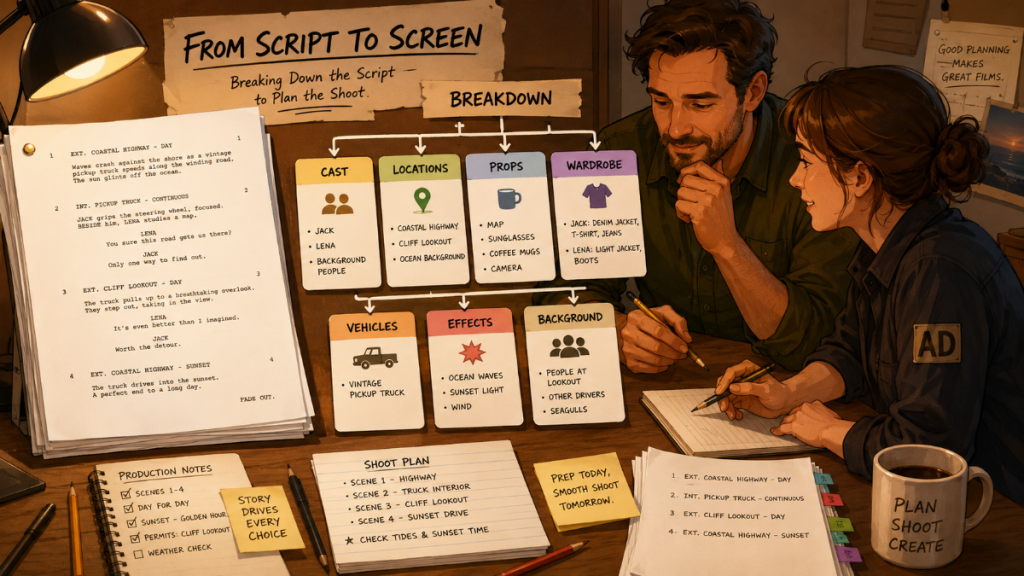
Proper screenplay format becomes especially important when the script moves from writing into pre-production.
During script breakdown, the production team identifies the elements needed to shoot each scene: cast, locations, props, wardrobe, vehicles, makeup, stunts, special effects, visual effects, background actors, and more.
Clean formatting makes that work easier.
Clear scene headings help identify locations and day/night work. Consistent character names help create cast records. Clean action lines help reveal props, vehicles, wardrobe, and effects. Proper page count helps estimate shoot days. Dialogue formatting helps separate speaking roles from action description.
In Gorilla 11, Gorilla Scheduling can import screenplay data and support the breakdown workflow. Breakdown Assistant AI can help identify production elements during script breakdown, allowing filmmakers to review AI-suggested tags and decide what belongs in the production breakdown.
AI can assist the process, but production judgment still matters. The goal is not to let software decide what the movie needs. The goal is to help the team catch important elements earlier.
👉 AI Script Breakdown vs Manual Tagging: Which Workflow Should Filmmakers Use?
Screenplay Format and Film Scheduling
A properly formatted screenplay is easier to turn into a shooting schedule.
The assistant director needs clean scene information to create production strips, build a stripboard, review locations, schedule cast, organize day/night work, and generate reports.
If the screenplay is formatted inconsistently, the scheduling workflow slows down. Scene headings may need cleanup. Characters may need to be standardized. Locations may need to be merged or renamed. Page counts may need review. Breakdown elements may need correction.
This is one reason professional formatting is not just about impressing a reader. It helps the production team work.
Gorilla Scheduling can take screenplay information into a professional scheduling workflow, including breakdowns, production strips, stripboards, Day Out of Days reports, actor records, location records, and scheduling reports.
👉 Film Scheduling Workflow: How to Build a Shooting Schedule Step by Step
Screenplay Format and Film Budgeting
A screenplay also affects the budget.
Page count can influence shoot days. Locations affect permits, transportation, site fees, security, and company moves. Cast affects actor costs and Day Out of Days patterns. Props, wardrobe, vehicles, stunts, effects, animals, and background actors all create budget implications.
That is why formatting and breakdown matter before budgeting begins.
A clean screenplay helps the production team identify what the script requires. Once those requirements are broken down and scheduled, they can inform the budget.
Gorilla Budgeting can connect with Gorilla Scheduling so scheduling data can help inform budget detail lines. This can include cast, crew, locations, breakdown elements, available rates, and DOOD totals into budget line day counts.
The script starts as a writing document. By the time it reaches production, it becomes a scheduling and budgeting engine.
👉 How to Create a Film Budget from a Shooting Schedule
Common Screenplay Formatting Mistakes
Many screenplay formatting problems are easy to avoid once you know what to look for.
The most common mistakes include inconsistent scene headings, incorrect font, overly dense action blocks, too many parentheticals, unnecessary camera directions, character names that change without reason, excessive transitions, title pages with too much information, and page counts that suggest the script may not be production-ready.
Another common mistake is confusing writing documents with production documents. A screenplay is not the place for pitch art, actor wish lists, production notes, budget assumptions, or explanations to the reader. Those may belong in a pitch deck, treatment, lookbook, budget, or production file.
The screenplay should remain clean.
Let the story do its work.
A Simple Proper Screenplay Format Checklist
Before sending a screenplay out, review the basics:
Use 12-point Courier.
Use a simple title page.
Begin the script with the first scene.
Keep scene headings clear and consistent.
Use action lines to describe what can be seen and heard.
Keep character names consistent.
Format dialogue cleanly.
Use parentheticals sparingly.
Avoid unnecessary camera directions.
Use transitions only when they add clarity or rhythm.
Keep page count within a practical range for the type of project.
Make sure the script is readable, clean, and production-friendly.
This checklist will not write the movie for you. But it will keep formatting from getting in the way of the movie.
Final Thoughts: Format Helps the Story Travel
Proper screenplay format is not about obeying arbitrary rules. It is about communication.
A screenplay has to travel. It moves from writer to reader, from reader to producer, from producer to director, from director to assistant director, from assistant director to department heads, from schedule to budget, and finally from plan to set.
Clean format helps that journey.
It helps the reader focus on the story. It helps the production team understand what the script requires. It helps software import, break down, tag, schedule, and budget the screenplay more accurately.
The format is not the art. The format is the vessel.
Use it well, and the story has a better chance of reaching the screen.
Explore Gorilla
Once a screenplay is properly formatted, the next step is turning it into a production plan.
Explore Gorilla Scheduling to import screenplay data, break down scenes, tag production elements, create production strips, build stripboards, generate Day Out of Days reports, and create professional scheduling reports.
Explore Gorilla Budgeting to turn schedule and breakdown information into professional budget detail lines, track expenses, review budget reports, and understand the financial shape of the production.
Explore Breakdown Assistant AI if you want AI-assisted script breakdown tools in Gorilla 11 to help identify production elements before the schedule is built.
Explore Gorilla Links
Gorilla Scheduling
https://junglesoftware.com/gorilla-scheduling/
Gorilla Budgeting
https://junglesoftware.com/gorilla-budgeting/
Breakdown Assistant AI
https://junglesoftware.com/breakdown-assistant-ai/