
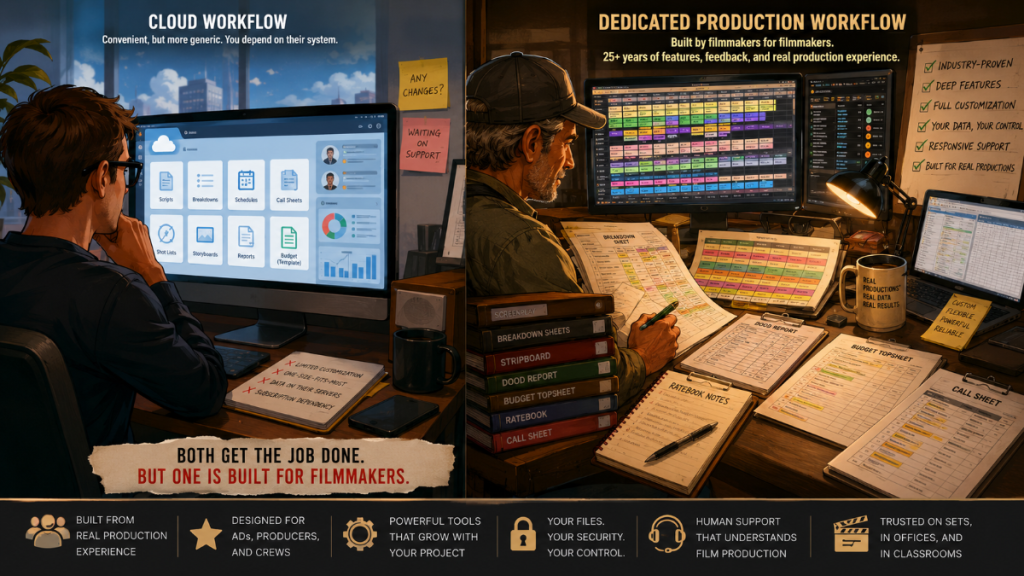
AI has entered pre-production, and that changes the software conversation.
For years, film scheduling and budgeting software centered around manual breakdowns, stripboards, reports, budgets, and production documents. Now, newer platforms are trying to automate more of that early work: reading scripts, identifying elements, generating schedules, estimating budgets, creating summaries, and helping production teams move faster.
That is where Filmustage fits into the market.
Filmustage is an AI-powered pre-production platform that promotes automated script breakdown, AI scheduling, AI budgeting, storyboards, shot lists, call sheets, and collaboration. Gorilla is different. Gorilla is a dedicated film scheduling and budgeting workflow built for filmmakers, assistant directors, producers, production managers, and film schools who want a practical connection between screenplay import, breakdown sheets, stripboards, schedules, reports, budgets, and call sheets.
Both tools speak to pre-production. But they approach it from different directions.
Filmustage starts with AI automation.
Gorilla starts with the production workflow.
👉 Script Breakdown Software: What Filmmakers Should Look For Before Choosing a Tool
Quick Answer
Filmustage may be the better fit if you want a cloud-based AI pre-production assistant that can automate script breakdowns, generate planning materials, support AI-driven budgeting templates, and help a team experiment with faster early-stage analysis.
Gorilla may be the better fit if you want dedicated film scheduling and budgeting software built around traditional production workflow: screenplay import, breakdown sheets, production elements, stripboards, DOOD reports, scheduling reports, call sheets, detailed budgets, globals, fringes, tax credits, ratebook integration, and schedule-to-budget planning.
The main difference is not simply “AI vs no AI.” Gorilla also includes Breakdown Assistant AI. The better distinction is this:
Filmustage is an AI-first pre-production platform. Gorilla is a production-workflow-first scheduling and budgeting system with AI assistance where it helps.
What Filmustage Is Best Known For
Filmustage is best known for AI-powered script breakdown and pre-production automation.
Its platform promotes automated tagging of cast, props, locations, VFX, wardrobe, and other production elements. Filmustage also presents itself as a connected system for schedules, DOOD reports, call sheets, storyboards, shot lists, budgeting templates, script analysis, and collaboration.
That makes Filmustage attractive for filmmakers who want to move quickly from script upload to a first-pass breakdown and early production plan. For teams that are comfortable with cloud tools and want AI to do as much early interpretation as possible, Filmustage can feel like a fast way to reduce manual prep work.
The key word is automation.
Filmustage is trying to help users get from script to production planning materials quickly, with AI doing much of the first pass.
👉 AI Script Breakdown vs Manual Tagging: Which Workflow Should Filmmakers Use?
What Gorilla Is Built For
Gorilla is built around the full production chain.
That chain begins with screenplay import and script breakdown. It continues into production elements, breakdown sheets, stripboards, shooting schedules, reports, budgets, call sheets, and production decisions.
Gorilla Scheduling helps users import a screenplay, break down scenes, tag elements, build stripboards, organize shoot days, create cast and crew records, manage locations, and generate production reports. Gorilla Budgeting is dedicated film budgeting software with globals, fringes, sub-groups, tax credits, deferments, 4th level detail, ratebook integration, expense tracking, and traditional budget reports.
The value is not only in individual features. The value is in how the pieces connect.
A breakdown is not isolated from a schedule.
A schedule is not isolated from a DOOD.
A DOOD is not isolated from days worked.
Days worked are not isolated from the budget.
Gorilla is designed around that kind of production logic.
👉 Film Scheduling Workflow: How to Build a Shooting Schedule Step by Step
AI Script Breakdown
This is one of the most important comparison points.
Filmustage strongly promotes AI script breakdown. It is built around the idea that AI can automatically analyze a script, identify elements, and help generate the early planning structure for a production. For users who want AI to process an entire screenplay quickly, Filmustage puts that front and center.
Gorilla takes a different approach with Breakdown Assistant AI.
Breakdown Assistant AI can suggest production tags from an imported screenplay, but the user reviews and approves the results. The goal is not to remove the production team from the process. The goal is to speed up the first pass while keeping the assistant director, producer, or production manager in control.
That distinction matters.
AI may identify a car, but a production person decides whether it is a picture vehicle, background vehicle, prop, set dressing, transportation note, or not worth tagging at all. AI may see a character name, but the production team decides whether that person is speaking, non-speaking, V.O., O.S., background, or part of a special scheduling issue. AI may catch useful details, but production judgment still decides what belongs on the breakdown sheet.
Gorilla’s message is simple:
AI suggestions, human approval.
Scheduling and Stripboards
Filmustage includes scheduling tools, DOODs, conflict detection, and AI-supported scheduling features. Its platform is designed to help users move from script breakdown into an organized production plan, with the appeal of automation and cloud access.
Gorilla Scheduling is built around the dedicated scheduling workflow used by assistant directors and production teams. It supports screenplay import, breakdown sheets, production strips, stripboards, multiple boards, boneyard strips, conflict alerts, customizable strip layouts, banners, sorting, scene timing, reports, and DOODs.
For productions that want AI help generating an early schedule, Filmustage may be appealing.
For productions that want to work deeply inside a traditional stripboard and scheduling environment, Gorilla gives users a focused production scheduling system.
A stripboard is not just an output. It is a workspace. It is where the production thinks.
Budgeting Workflow
Filmustage now promotes budgeting as part of its AI pre-production workflow. Its budgeting page describes auto-generating a budgeting template pre-filled from script breakdown results and DOOD data. It also describes customizable budgeting templates, spreadsheet export, and future enhancements such as automatic fringe calculations, real-time cost estimation, custom template uploads, and compatibility with industry-standard budgeting tools.
That is useful, but it should be understood clearly.
Filmustage budgeting appears to be built around AI-generated budget templates and spreadsheet-style workflows. It may help users create a faster first-pass cost structure from a script and schedule.
Gorilla Budgeting is dedicated film budgeting software.
Gorilla Budgeting includes traditional production budgeting tools such as topsheets, detail reports, globals, fringes, sub-groups, tax credits, deferments, 4th level detail, ratebook integration, expense tracking, and schedule-to-budget workflow. It is built for producers and line producers who need to structure, revise, report, and manage a budget in a dedicated budgeting environment.
So the distinction is not “Filmustage has no budgeting.” It does.
The distinction is:
Filmustage offers AI-assisted budget template generation. Gorilla offers dedicated film budgeting software.
👉 Film Budgeting Software: What to Look for Before You Choose
Call Sheets and Reports
Filmustage includes call sheets and reports as part of its platform. This makes sense for an AI pre-production system that wants to connect script data, schedules, and production communication inside one cloud environment.
Gorilla supports call sheet workflow through Koala Call Sheets and its scheduling/report system. Gorilla Scheduling also creates dozens of industry-standard production reports, including reports that help teams track cast, elements, locations, DOODs, and scheduling needs.
The difference is once again workflow.
Filmustage is trying to keep many connected tools inside one online AI-assisted platform.
Gorilla is built around the production documents that emerge from a dedicated scheduling and budgeting workflow.
Cloud AI Platform vs Local Production Files
Filmustage is a cloud-based AI pre-production platform. That gives users online access, team collaboration, shared projects, and AI-powered processing. For some teams, that is exactly what they want.
Gorilla works differently. Gorilla schedules and budgets live as files with the user. You can send them to other Gorilla users, copy them, archive them, back them up, or place them in iCloud, Dropbox, Google Drive, or another file-sharing system if that is how your production office works.
Cloud access can be convenient. Local file control can also be valuable.
A production schedule can reveal cast movements, locations, company moves, night shoots, stunt days, minors, security needs, and confidential production plans. A budget can reveal salaries, vendor rates, financing assumptions, tax credits, deferments, and private business information.
That does not mean cloud software is automatically unsafe. Responsible cloud platforms have security practices, permissions, backups, and privacy policies. But it does mean productions should ask practical questions:
Where does the data live?
Who controls access?
What happens if an account is compromised?
Can the production keep working without internet access?
Who owns the file workflow?
For some teams, a cloud AI platform is the right tradeoff. For other productions, especially those handling confidential scripts, sensitive schedules, or private budget information, keeping working files under production control may be preferable.
Film School and Classroom Use
Filmustage has an academic program and promotes AI-assisted pre-production as a way for students and professors to work faster. That can be useful in classrooms where the goal is to introduce students to modern AI tools, quick breakdowns, and cloud-based collaboration.
Gorilla has a different classroom strength.
Gorilla teaches the underlying production workflow: screenplay import, breakdown sheets, element tagging, strips, stripboards, DOODs, reports, budgets, rate assumptions, and call sheets. It helps students learn how a script becomes a schedule and how a schedule becomes a budget.
That matters because students should not only learn what software can generate. They should learn why production documents exist.
Why does a prop appear on a breakdown sheet?
Why does a cast member appear on a DOOD?
Why does an O.S. or V.O. tag matter?
Why does moving a scene affect actors, locations, vehicles, crew, and budget?
Why does a budget need fringes, globals, tax credits, sub-groups, and reports?
For film schools, the best choice depends on the teaching goal.
Use Filmustage if the class wants to explore AI-first pre-production automation.
Use Gorilla if the class wants to teach the bones of film scheduling and budgeting.
👉 How to Break Down a Script for Film Production
Cost Analysis: What Should Filmmakers Compare?
Cost analysis is not only about the monthly fee. It is about what the production gets for the money.
Filmustage currently offers a free plan with non-AI tools and partial AI breakdown, and a paid Director’s Cut plan that unlocks full AI features through a coin-based system. This can be attractive for users who want to test AI pre-production tools without a large upfront commitment.
Gorilla is structured around dedicated Scheduling, Budgeting, Combo, Premium, add-on, and subscription options. That makes the comparison less about one subscription line item and more about total workflow value.
Before choosing, ask:
- Do you need AI automation, dedicated scheduling depth, dedicated budgeting depth, or all three?
- Do you want a cloud platform or local production files?
- How many active projects will you need?
- How much AI usage will a real project require?
- Does the AI credit/coin model fit your production volume?
- Do you need traditional budgeting features such as globals, fringes, tax credits, deferments, and ratebook integration?
- Do you need exports into other tools?
- Do you need film school seats, lab installs, or classroom licenses?
- Will the software still serve you after the first AI pass is finished?
A cheap tool can become expensive if it does not support the full production workflow.
A more specialized tool can become cost-effective if it replaces disconnected spreadsheets, manual reports, separate breakdown documents, and budget rebuilding.
Comparison Table
| Category | Gorilla | Filmustage |
|---|---|---|
| Core identity | Dedicated film scheduling and budgeting software | AI-powered cloud pre-production platform |
| Best for | Filmmakers, ADs, producers, production managers, and film schools needing scheduling and budgeting depth | Teams that want AI automation for breakdowns, schedules, budgets, summaries, storyboards, and early planning |
| AI script breakdown | Breakdown Assistant AI suggests tags for user review and approval | AI Smart Breakdown is a central platform feature |
| Human control | AI suggestions with human approval | AI-first automation with user editing and oversight |
| Scheduling | Dedicated stripboard scheduling, breakdown sheets, production strips, DOODs, reports, conflict tools, multiple boards, and scheduling workflow | Scheduling, DOODs, conflict detection, and AI-supported planning tools |
| Budgeting | Dedicated film budgeting software with topsheets, detail reports, globals, fringes, sub-groups, tax credits, deferments, 4th level detail, ratebook integration, expense tracking, and schedule-to-budget workflow | AI-assisted budget template generation and spreadsheet-style budget workflow |
| Call sheets | Koala Call Sheets add-on and scheduling/report workflow | Call sheets included as part of the platform |
| Data control | Schedules and budgets stay with the user as local files and can be shared manually or through the production’s chosen file-sharing system | Cloud-based project platform with online collaboration and AI processing |
| Film school use | Strong for teaching production workflow, breakdowns, stripboards, reports, budgets, and schedule-to-budget logic | Strong for introducing AI pre-production automation and cloud collaboration |
| Best deciding factor | Choose Gorilla if production workflow depth and budgeting/scheduling structure matter most | Choose Filmustage if AI-first automation and cloud-based pre-production are the priority |
When Filmustage May Be the Better Fit
Filmustage may be the better fit when a team wants AI to do as much early pre-production work as possible.
That can include:
- AI script breakdown
- AI-assisted scheduling
- AI-generated budget templates
- Script analysis
- Script summaries
- Storyboards and shot lists
- Call sheets
- Cloud collaboration
- Fast first-pass planning
Filmustage may be especially attractive for indie filmmakers, small teams, or students who want to upload a script and quickly see production data begin to form.
In short: choose Filmustage when the priority is AI speed and cloud-based automation.
When Gorilla May Be the Better Fit
Gorilla may be the better fit when the production needs a deeper scheduling and budgeting workflow.
That can include:
- Importing a screenplay
- Building breakdown sheets
- Tagging elements
- Using AI suggestions while keeping human approval
- Building production strips
- Working inside a traditional stripboard
- Creating DOOD reports
- Connecting schedule data to budget planning
- Building structured film budgets
- Using globals, fringes, tax credits, deferments, sub-groups, 4th level detail, ratebook integration, and expense tracking
- Keeping production files under local control
- Teaching students the full chain from script to schedule to budget
In short: choose Gorilla when the priority is production depth, scheduling structure, budget control, and a workflow designed around how films are actually prepped.
Why This Comparison Matters
AI can speed up pre-production, but it does not replace production thinking.
A screenplay is not a spreadsheet waiting to happen. It is a story that must be translated into people, places, things, time, money, risk, and logistics.
That translation still requires judgment.
The right tool depends on where you want that judgment to live. If you want AI to generate as much as possible and then refine the result, Filmustage may be useful. If you want a dedicated scheduling and budgeting system where AI supports the production workflow rather than becoming the workflow, Gorilla may be the better fit.
The future of pre-production will probably include both AI and traditional production discipline.
The question is which one leads.
Final Thoughts
Filmustage and Gorilla are both relevant to modern pre-production, but they are not the same kind of tool.
Filmustage is an AI-powered cloud platform that focuses on automating the early stages of pre-production: breakdowns, schedules, budget templates, storyboards, shot lists, call sheets, and analysis.
Gorilla is a dedicated film scheduling and budgeting system built around screenplay import, breakdown sheets, production strips, stripboards, reports, budgets, and call sheets. It includes AI assistance, but the workflow remains grounded in production control.
Choose Filmustage if you want an AI-first pre-production assistant.
Choose Gorilla if you want a dedicated scheduling and budgeting workflow with AI assistance, traditional production documents, budget depth, and local file control.
Both tools can help filmmakers plan. The right choice depends on whether your production needs automation first or production workflow first.
Explore Gorilla
Gorilla Scheduling helps filmmakers import screenplays, break down scenes, tag elements, build stripboards, schedule shoot days, create reports, and prepare for production.
Gorilla Budgeting helps producers build structured film budgets with globals, fringes, tax credits, deferments, 4th level detail, ratebook integration, expense tracking, topsheets, and detail reports.
Breakdown Assistant AI helps speed up the breakdown process by suggesting screenplay tags while allowing the user to accept or reject each result.
Koala Call Sheets extends the production workflow with call sheet tools.
The Gorilla Ratebook helps production teams work with labor rates while building budgets.
Explore: