
How to Create a Film Budget: A Practical Guide for Filmmakers
From screenplay breakdowns and shoot days to topsheets, labor costs, fringes, and contingency, learn how to build a film budget that makes sense before the cameras roll.
Screenwriting is creative. Casting brings the characters to life. Location scouting can feel like exploring an entirely new world. Even planning what everyone will eat on set can be more entertaining than staring at a budget.
Then somebody asks the question every producer eventually has to answer: How much is this movie actually going to cost?
Film budgeting may not be the most glamorous part of pre-production, but it is one of the most consequential. A good budget translates your creative plans into a financial roadmap, identifies expensive assumptions before they become expensive mistakes, and gives the production team a common set of numbers to work from.
Should You Create the Schedule or the Budget First?
Many new filmmakers assume the budget has to come first. In practice, a preliminary budget may be needed early to test whether the project is feasible or to raise financing. But a dependable production budget needs a realistic shooting schedule.
Why? Because the shooting schedule determines the number of production days, and each additional day may affect cast, crew, equipment, transportation, catering, locations, and more. If you haven't estimated how long the production will take, a large portion of the budget is still guesswork.
A better process is iterative: prepare a preliminary budget, break down and schedule the script, refine the costs, and adjust the schedule when necessary. Scheduling and budgeting should inform one another, not operate in separate worlds.
Begin with the Screenplay Breakdown
A screenplay is both a story and a production blueprint. Before assigning dollar amounts, identify what every scene requires: cast members, background performers, locations, props, costumes, picture vehicles, animals, special effects, visual effects, stunts, and equipment.
Consider a scene that reads: EXT. CITY STREET – NIGHT. A car skids to a stop as dozens of people scatter in the rain. The description is only one sentence, but the costs may involve a street permit, background actors, a picture car, wet-down or rain effects, lighting, traffic control, stunt supervision, safety personnel, and an extended night schedule.
Using Gorilla Scheduling Online, filmmakers can organize scene breakdowns and build a stripboard and shoot-day plan. Those decisions become the basis for cost estimates in Gorilla Budgeting Online.
Choose a Film Budget Template and Account Structure
Professional film budgets use a hierarchy of sections and accounts. That structure lets producers, accountants, and department heads recognize where a cost belongs and how it affects the total production budget.
Some studios, financiers, payroll providers, or accounting departments require specific account numbers and templates. If your project has those requirements, start there. Account numbering is not universal, and examples from another production should not be treated as mandatory industry codes.
Independent productions have more flexibility. The important thing is to use a consistent system so camera expenses stay with camera, wardrobe expenses stay with wardrobe, and all costs can be reviewed at both summary and detail levels.
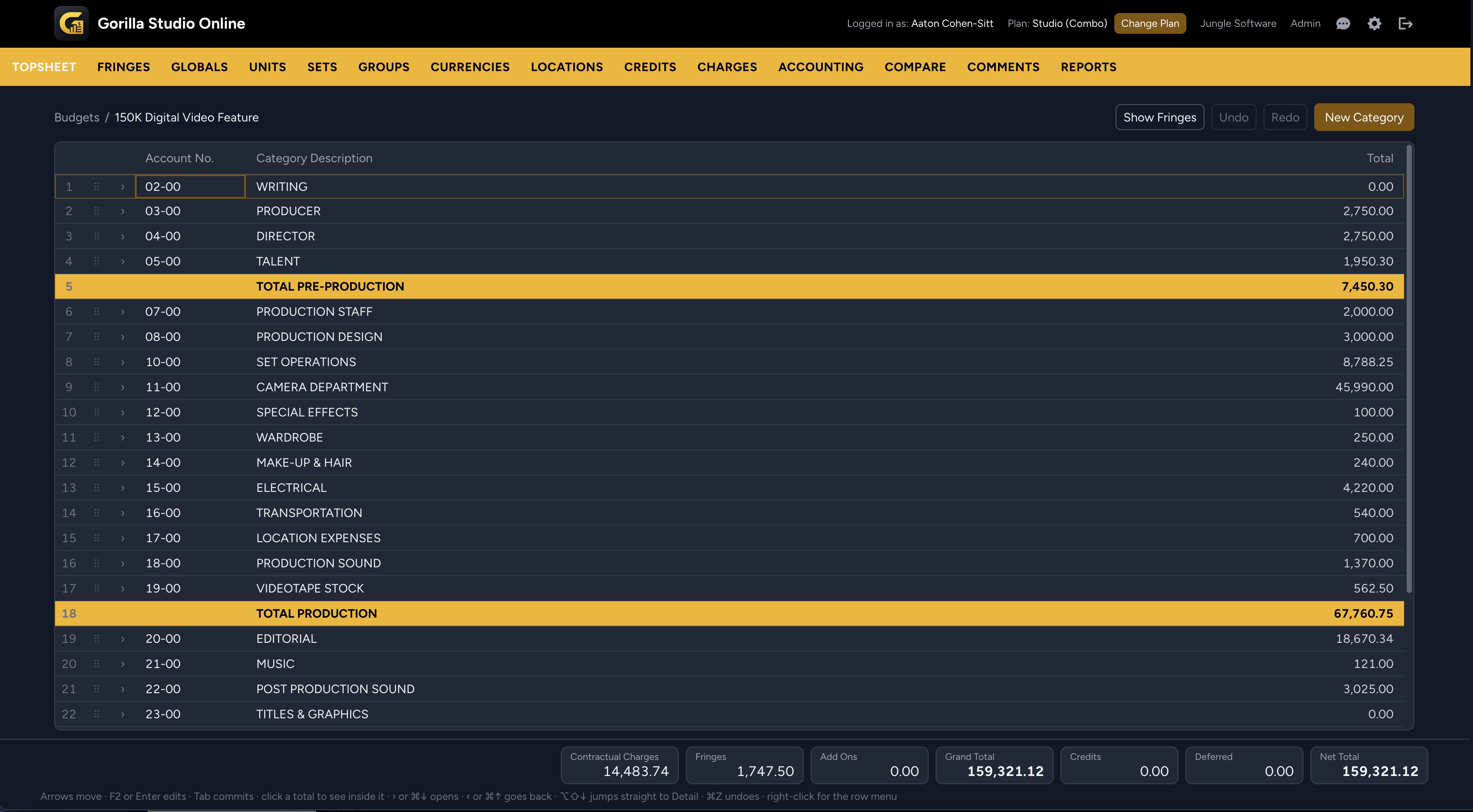
Gorilla Budgeting Online supports structured accounts, categories, groups, templates, globals, fringes, and production reports, directly in a web browser.
Understand the Four Main Sections of a Film Budget
The exact names vary by production and template, but many budgets separate costs into four broad areas:
Above-the-Line
Story rights, writers, producers, director, principal cast, and other key creative agreements. These often involve negotiated compensation and contractual obligations.
Below-the-Line Production
Production staff, camera, grip, electric, production sound, art department, props, wardrobe, hair and makeup, locations, transportation, and related shooting costs.
Post-Production
Editing, sound editing and mixing, music, color finishing, visual effects, graphics, deliverables, and other work performed to complete the film.
Other Costs
Insurance, legal, accounting, financing expenses, publicity, general expenses, contingency, and other items as required by the budget structure.
These are organizing conventions, not rigid laws. Certain costs may appear in different places depending on the production's chart of accounts. What's important is that no major cost is overlooked or counted twice.
The Three Levels of a Film Budget: Topsheet, Account, and Detail
1. Topsheet: the big picture
The topsheet summarizes the production's costs by department or account. Producers and financiers can quickly see the overall total and the largest expense categories without reviewing every line item.
2. Account level: what each department costs
The account level breaks down a category such as Camera into more specific costs. For example, a Camera account might include a director of photography, camera operators, assistants, camera packages, lenses, media, and expendables.
3. Detail level: how each cost is calculated
The detail level records units, quantities, rates, and the assumptions behind a line item. A simple calculation might be 4 rental weeks × $2,500 per week = $10,000.
| Expense | Quantity | Rate | Subtotal |
|---|---|---|---|
| Camera package rental | 4 weeks | $2,500/week | $10,000 |
| Media and expendables | 1 allowance | $1,200 | $1,200 |
| Example total | $11,200 |
Illustrative numbers only; not current vendor quotes or a recommended equipment package.
Notice that a clean topsheet depends on accurate detail. If a rental lasts five weeks instead of four, the detail needs to change, and the account and topsheet totals should reflect the revised assumption.
Estimate Costs Based on the Real Shooting Plan
Film production costs rarely behave like simple retail purchases. Crew may be hired by day, week, or guaranteed period. Equipment often has weekly rental structures. Locations may charge separately for prep, filming, and restoration. Post-production services may require multiple stages and deliverables.
Before accepting a number, ask where it came from. Is it a quote, a contracted rate, a historical estimate, or an allowance? Does it include prep and wrap? Is it subject to minimum calls, overtime, premiums, or travel costs?
Producer's tip: Review high-cost scenes individually. A single rain sequence, stunt, night exterior, company move, or period set can change multiple budget departments, not just the most obvious one.
Be especially careful with the number of shoot days. Saving a day can reduce some costs, but forcing too much work into one day may increase overtime or create the need for pickups. A smaller schedule is not automatically a cheaper schedule.
Don't Forget Fringes, Globals, and Contingency
Fringes
Fringes are additional employer-related costs calculated on eligible compensation. Depending on the worker, agreement, jurisdiction, and payroll arrangements, these may include employer payroll taxes, workers' compensation, pension, health contributions, and other required charges.
There is no single fringe percentage that applies to every performer or crew member. Use current, applicable agreement and payroll information rather than copying a figure from an old budget.
Globals
Globals are reusable budget values such as a rate or a standard production assumption. When the same rate is used in multiple places, a global can help keep those calculations consistent and simplify revisions.
Contingency
Contingency is money reserved for unforeseen costs. Weather, schedule changes, equipment issues, location problems, and other surprises can affect even careful productions. The appropriate amount depends on the project's risks and financing requirements; don't assume one universal percentage.
Gorilla Budgeting Online includes tools for managing globals, fringes, and other calculations within a structured film budget.
Can You Create a Film Budget in Excel?
Absolutely. Excel can be a useful place to begin, especially for simple projects, early rough estimates, or individual department worksheets. You can create rows for descriptions, quantities, rates, and subtotals, then use formulas to calculate totals.

The difficulty comes as the project becomes more complex. What happens if a crew rate changes and that rate appears in several departments? Are all relevant fringes applied? Which spreadsheet tab is authoritative? Do your reports and totals still agree after revisions?

| Consideration | Excel / spreadsheets | Professional budgeting software |
|---|---|---|
| Early rough estimates | Fast and flexible | Also useful, but more structured |
| Account hierarchy | Built and maintained manually | Designed around production accounts |
| Reusable rate assumptions | Possible with careful formulas | Managed with budgeting tools such as globals |
| Fringes and calculations | Must be set up and audited | Dedicated fringe and calculation tools |
| Topsheet and detail reports | Custom formatting required | Production-oriented reports |
The choice is not Excel versus professionalism. A carefully maintained spreadsheet can work. But as productions grow, dedicated film budgeting software can reduce manual setup and make reviewing, adjusting, and presenting a professional budget easier.
Review, Revise, and Communicate the Budget
The first budget is rarely the final budget. The director may add a scene, the line producer may find a more affordable location, an equipment quote may change, or a cast deal may create new costs. Each change should prompt a review of its effect on the schedule and other budget departments.
Try reviewing the budget from several perspectives:
- Creative: Does the budget preserve what is essential to the story?
- Production: Do the budget assumptions match the actual schedule and breakdown?
- Departmental: Do department heads recognize the amounts and the work expected?
- Financial: Are calculations defensible, contingencies included, and reports understandable?
Online budgeting can make the latest working budget easier to access without passing revised spreadsheet files back and forth. But an online tool does not replace the producer's responsibility to approve assumptions and track decisions.
Gorilla Budgeting Online offers browser-based account structure, cost calculations, globals, fringes, Ratebook integration, and production reports. Its companion scheduling application supports the script-breakdown and shooting-schedule side of pre-production.
A Practical Film Budgeting Checklist
- Read the screenplay and identify production requirements.
- Complete a scene-by-scene script breakdown.
- Develop a preliminary schedule and estimate shoot days.
- Choose an account structure or required production budget template.
- Separate above-the-line, below-the-line, post, and other costs.
- Build your topsheet, account categories, and detail lines.
- Enter quantities, rates, rental periods, prep, and wrap costs.
- Apply relevant fringes and review current labor assumptions.
- Allow for insurance, permits, travel, post-production, and contingency.
- Review expensive scenes and compare costs against the schedule.
- Obtain quotes and department-head input where possible.
- Revise the budget and clearly identify the current working version.
A budget is not merely an estimate of what you hope the film will cost. It is an explanation of how the production intends to use its resources. The more accurately you connect the story, breakdown, schedule, and budget, the better prepared you'll be when production begins.