
Proper Screenplay Format: A Complete Guide to Writing a Professional Script
From the title page to scene headings, action, dialogue, and transitions, learn how to format a screenplay that readers can follow and production teams can work with.
A screenplay can contain an extraordinary story, memorable characters, and dialogue that practically leaps off the page. But if the formatting is confusing, readers may struggle to see the movie inside it. Proper screenplay format isn't decoration. It's the shared visual language that helps writers, producers, directors, actors, and assistant directors understand a script.
The good news is that you don't need to memorize every margin before writing your first scene. Professional screenwriting software handles most of the mechanics. Still, understanding why each element appears where it does will make you a more confident writer and help prevent problems when your screenplay moves into production.
1. Start With the Basics: Font, Margins, and Page Layout
For a conventional feature-film spec screenplay, the familiar standard is 12-point Courier or an appropriate Courier-style screenplay font on US Letter pages (8.5 by 11 inches). The monospaced font and established spacing conventions make scripts predictable to read and help preserve conventional page-length estimates.
Use 12-point Courier or a screenplay-specific Courier variant. Avoid decorative typefaces.
US Letter is common in the United States; follow the recipient's specifications for international submissions.
Traditionally about 1.5 inches on the left and 1 inch on the right, with conventional screenplay element indents.
Today, an appropriately exported PDF is common. Print and binding requirements apply only when specifically requested.
Professional software sets element indents and page breaks automatically. Don't try to make your screenplay look like one by inserting dozens of spaces in a word processor. The text may shift when it is reopened, exported, or imported elsewhere.
2. Keep the Screenplay Title Page Simple
Your title page should introduce the screenplay, not compete with it. Center the title and include a writing credit and the author's name. Contact information or representation details may appear toward the lower portion of the page, unless the submission guidelines require identifying information to be removed.
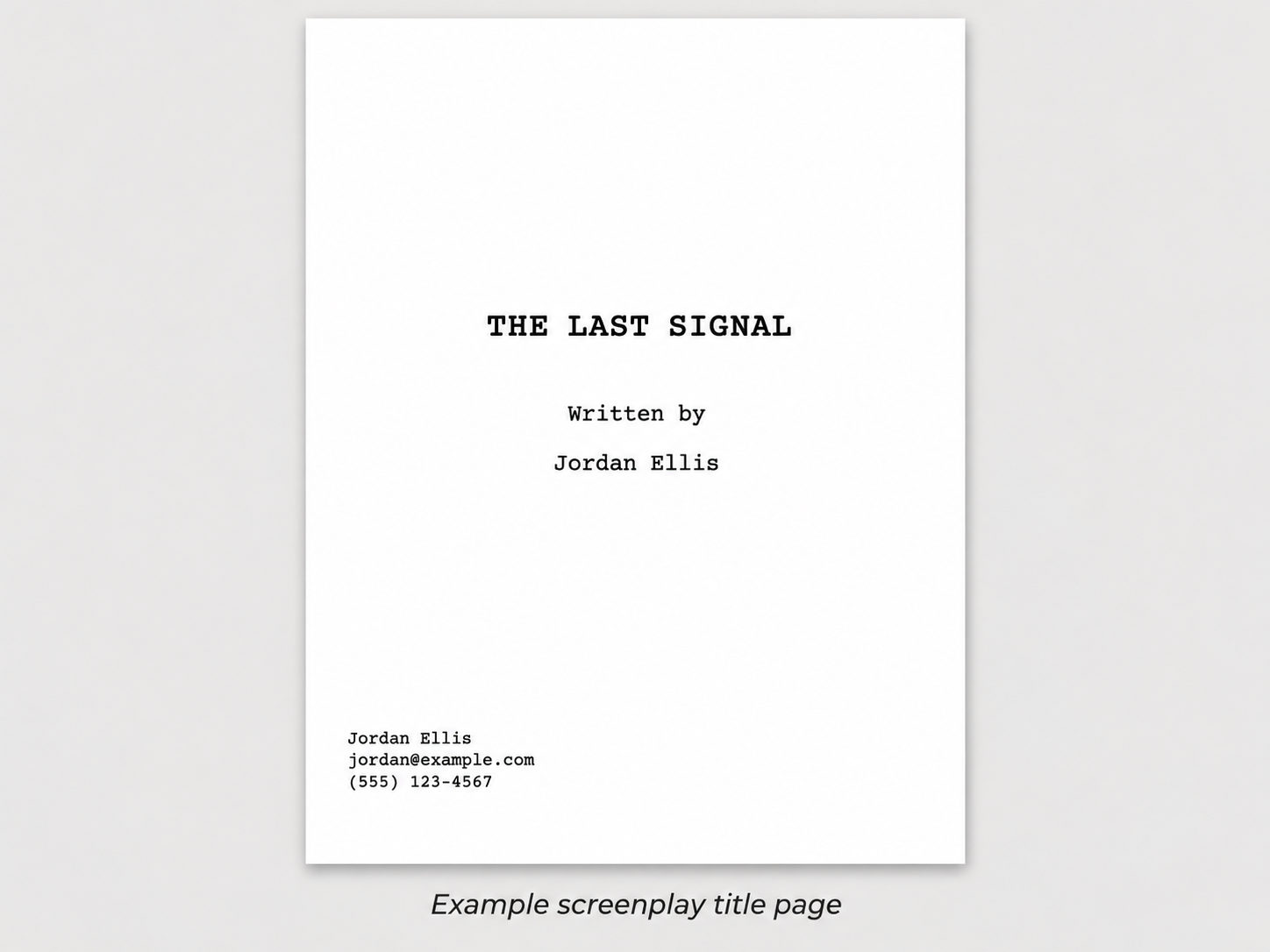
Avoid putting a synopsis, cast list, personal biography, artwork, or promotional claims on the title page. And don't insert them before the first scene. If you need a pitch deck, treatment, or lookbook, create those as separate documents.
3. Understand the Main Screenplay Elements
Screenplays are organized with formatting elements. Each tells the reader what sort of information follows. These are the building blocks of a standard screenplay:
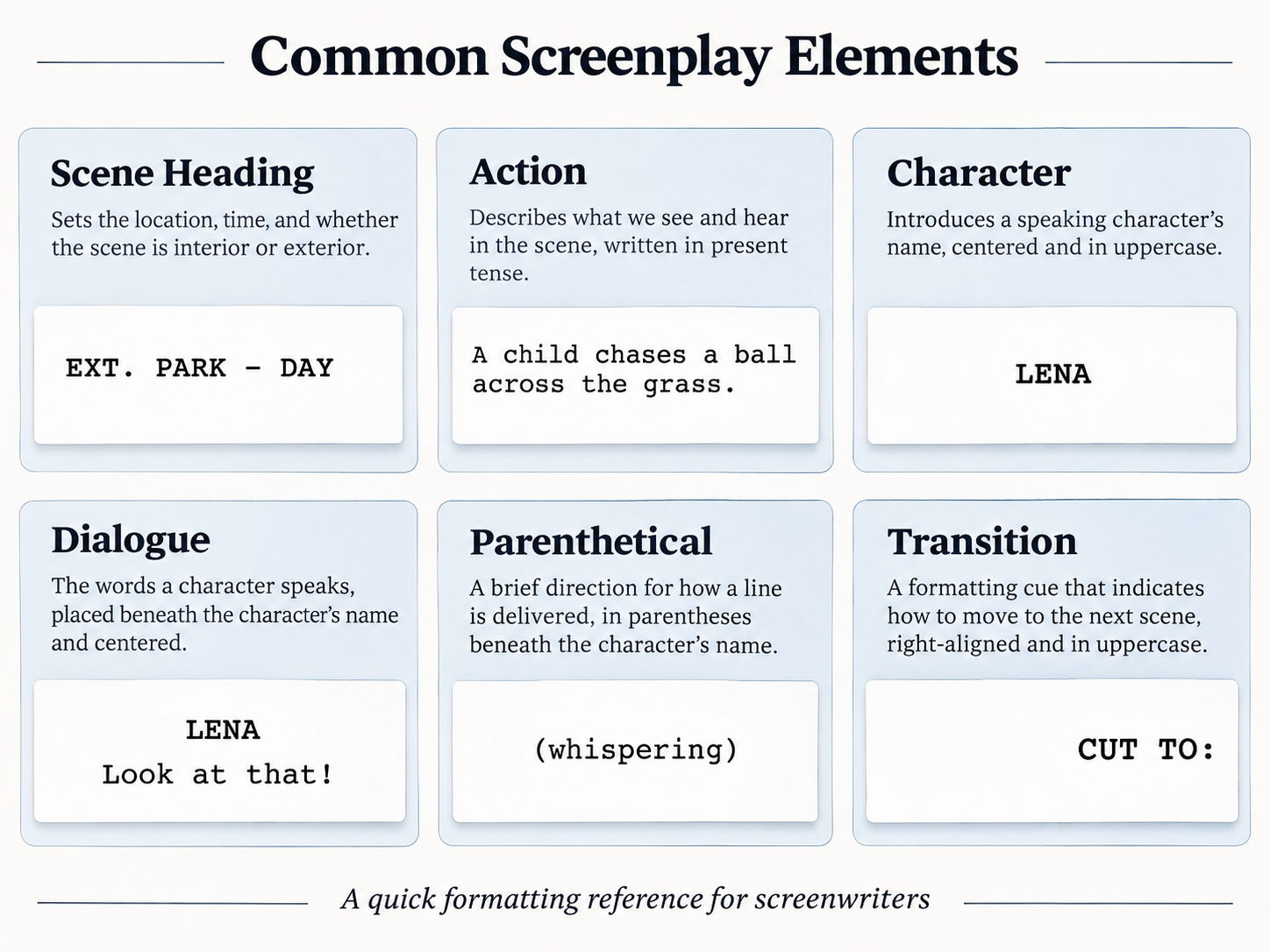
Scene heading (slug line)
Scene headings establish whether a scene takes place inside or outside, where it happens, and the general time of day. Examples include INT. KITCHEN - NIGHT and EXT. CITY STREET - DAY. Use clear, consistent names for recurring locations.
Action
Action describes what an audience can see and hear, usually in the present tense. Write in vivid, economical paragraphs. “The phone vibrates. Maya studies the caller ID but lets it ring” gives the reader something filmable; an explanation of Maya's unspoken life history usually doesn't.
Character
A speaking character's name appears in uppercase as a character cue, conventionally placed above dialogue. On a character's first introduction in action, writers commonly capitalize the name as well. Keep spelling consistent, especially when preparing a production breakdown.
Dialogue
Dialogue appears beneath the character cue in a narrower, indented block. Its formatting makes spoken lines visually distinct from action. Let character voice and dramatic situation carry the meaning; the indentation is the software's job.
Parenthetical
A parenthetical is a short instruction beneath a character cue, such as (quietly) or (into phone). Use it only when it clarifies meaning or essential action. Don't direct every expression, pause, or emotional beat.
Transition
Transitions such as CUT TO: or FADE OUT. traditionally appear aligned to the right. You don't need a CUT TO: between every scene; a new scene heading normally communicates the edit.
4. How to Format an Individual Screenplay Scene
Let's put those elements together in a brief, original example. The scene heading orients us; action establishes the setting; character cues and dialogue make the exchange readable.
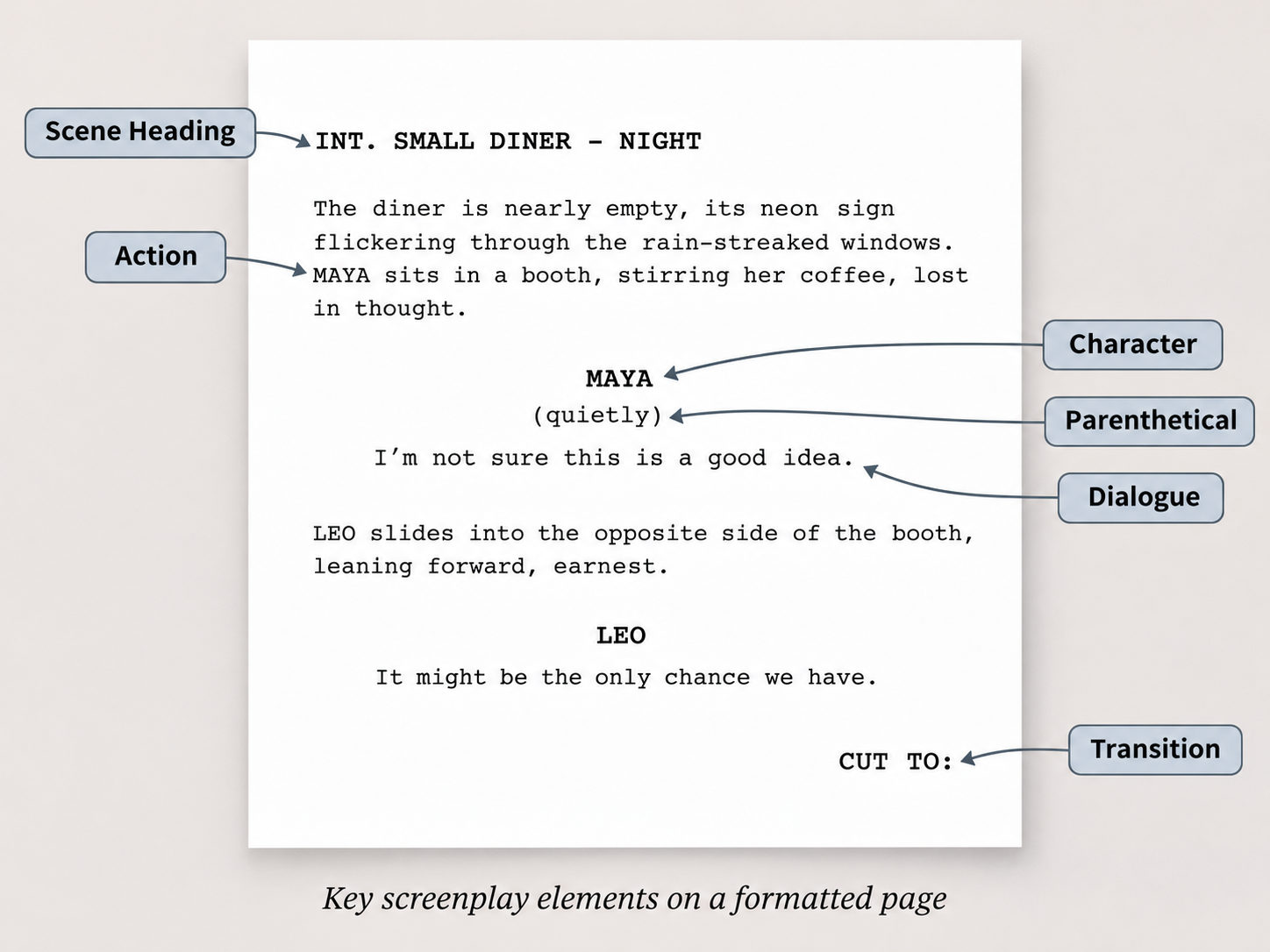
INT. SMALL DINER - NIGHT
The diner is nearly empty. Rain rolls down the windows. MAYA sits in a booth, turning a cold coffee cup between her hands.
MAYA
(quietly)
I'm not sure this is a good idea.
LEO slips into the opposite seat and sets a worn envelope on the table.
LEO
It might be the only chance we have.
CUT TO:
Notice what the passage doesn't do. It doesn't explain Maya's entire backstory, label her emotion five different ways, or instruct the camera to push in dramatically. The physical action and exchange already suggest tension.
For more on creating believable characters, read our guides to developing a main character and writing compelling supporting characters.
5. Write for the Screen, Not for the Page Alone
Keep action paragraphs focused
Long, dense action blocks can slow a reader. Break paragraphs when the visual focus changes. Favor specific behavior, sound, and setting details over abstract explanations. Not every action paragraph must be one line, but white space helps the story move.
Use parentheticals with restraint
Sometimes a short parenthetical prevents confusion: a line spoken into a phone, a word whispered so another character cannot hear it, or a delivery that genuinely reverses the intended meaning. Most of the time, good dialogue and surrounding action do the work.
Don't turn a spec script into a shot list
Writing CLOSE-UP OF THE KEY or TRACKING SHOT THROUGH THE HALLWAY in every scene restricts the reader's experience and often adds unnecessary production instructions. There are legitimate exceptions when a visual reveal or camera perspective is essential to the story. Use them deliberately, not automatically.
Detailed camera setups, coverage, and shot planning usually belong in pre-production. Jungle Software's Shot Monkey storyboard and shot list software is designed for that next level of visual planning.
Use transitions when they matter
Many consecutive scenes need no written transition. Reserve explicit transitions for stylistic emphasis, unusual narrative movement, or moments where they meaningfully improve comprehension.
6. Screenplay Page Count and Readability
You've probably heard the rule that one screenplay page equals approximately one minute of screen time. That's a useful planning convention, not a stopwatch. Fast action, silent sequences, dense dialogue, and directing choices can all change the finished duration.
Many feature scripts fall somewhere around 90 to 120 pages, but genre, intended runtime, budget, and the requirements of a producer or competition matter more than an arbitrary cutoff. A 130-page script isn't automatically unacceptable, and a 90-page script isn't automatically well paced.
Before making cuts to satisfy a page-count target, ask whether each scene advances the conflict, reveals character, or changes the audience's understanding. For story architecture, see The Three-Act Structure for a Screenplay.
7. Choosing Screenwriting Software: Page One and Other Options
Modern screenwriting applications can automatically format scene headings, action, character cues, dialogue, parentheticals, and transitions. The right choice depends on how you write, whether you collaborate, and what happens when your script moves toward production.
| Application | What to consider |
|---|---|
| Page One | Jungle Software's online screenwriting app combines standard script formatting with planning, revision, and breakdown-oriented workflows. |
| Final Draft | A widely used professional screenwriting application with established revision and production features. |
| Movie Magic Screenwriter | A long-running alternative with professional formatting and writing tools. |
| Fade In | A focused desktop screenwriting application with professional formatting and multiple import/export options. |
| WriterDuet | Emphasizes online collaboration and shared writing workflows. |
| Celtx | Offers screenwriting alongside other pre-production-oriented tools. |
No single program is the right fit for every writer. Evaluate format compatibility, collaboration, revision controls, ease of use, export options, and the needs of the people who will receive your script.
Where Page One fits
Page One is Jungle Software's browser-based screenwriting application. It handles standard screenplay elements as you type and offers writing and revision tools intended to support the process from draft through production preparation. Rather than concentrating only on how the finished PDF looks, it also considers how a script's scenes and production information will be used later.
That approach can be particularly useful for writers who also direct, produce, or work with assistant directors. If you're comparing programs, the most important question is not which one has the longest feature list. It's which one helps you write effectively and hand off a clean, usable screenplay.
8. Why Proper Formatting Matters When the Script Goes Into Production
Formatting isn't just a concern for agents, producers, or screenwriting contests. Once a project moves toward production, screenplay structure becomes valuable scheduling information. Scene headings distinguish interiors from exteriors and day work from night work. Character cues help identify speaking parts. Consistent scene and location naming reduces cleanup.
With Gorilla Scheduling Online, production teams can break down scenes, organize production elements, build a stripboard, and construct shooting schedules. Good script structure gives the team a cleaner starting point, although imported material should always be reviewed for accuracy.
For the larger workflow, see Guide to the Preproduction Process and our How to Create a Film Budget guide.
9. Proper Screenplay Format: Final Checklist
- Use a conventional screenplay font, typically 12-point Courier.
- Check page size and any recipient-specific submission requirements.
- Keep the title page simple and remove identifying information when anonymity is required.
- Begin with the story, not a synopsis or cast list.
- Format each new scene with a clear scene heading.
- Write action in present tense using filmable sights and sounds.
- Keep character names consistent and dialogue properly formatted.
- Use parentheticals and transitions only when helpful.
- Avoid unnecessary camera instructions in a spec script.
- Read your exported PDF from beginning to end for line breaks, page breaks, orphaned cues, and readability.
- When handing a script to production, check scene headings and imported data with the scheduling team.
A screenplay's formatting should become almost invisible to the reader. When it does, the characters, conflict, and images on the page get the attention they deserve.
Write the Script. Then Prepare It for the Screen.
Explore Page One online screenwriting software for professional screenplay writing and revisions. When production planning begins, discover Gorilla Scheduling Online and Shot Monkey for scheduling and visual planning.