
Pre-production is where a movie stops being an idea and starts becoming a plan.
The screenplay may be finished. The director may have a vision. The producer may have a target budget. But until the script is broken down, scheduled, budgeted, and organized into working production documents, the project is still floating in creative space.
That is where pre-production software for filmmakers becomes important.
The challenge is that “pre-production software” can mean almost anything. Some tools focus on writing. Some focus on scheduling. Some focus on budgeting. Some focus on call sheets, task management, shot lists, collaboration, or cloud storage. Others try to be an all-in-one production hub.
The question is not whether software sounds impressive.
The better question is:
Can it help turn a screenplay into a real production plan?
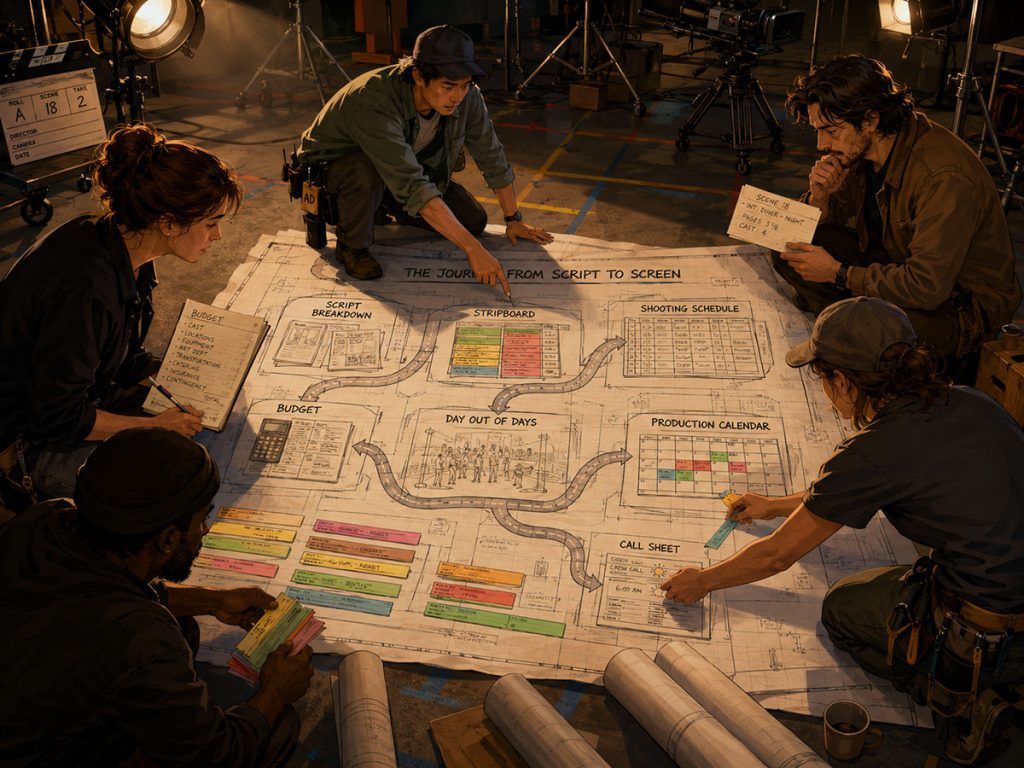
A useful pre-production system should help filmmakers move from script to breakdown, from breakdown to stripboard, from stripboard to schedule, from schedule to budget, and from schedule to call sheets. It should make the production easier to understand, not bury it under digital clutter.
This guide explains what pre-production software should actually do, how filmmakers should evaluate it, and where tools like Gorilla Scheduling, Gorilla Budgeting, and Koala Call Sheets fit into a professional workflow.
What Is Pre-Production Software?
Pre-production software is any tool that helps filmmakers plan a production before shooting begins.
That can include software for screenwriting, script breakdowns, scheduling, budgeting, production calendars, call sheets, shot lists, locations, cast management, crew management, reporting, and communication.
But not every pre-production tool does the same job.
A screenwriting app helps create the script.
A breakdown tool helps identify the production elements inside the script.
Scheduling software helps organize scenes into shoot days.
Budgeting software helps estimate and track the cost of the production.
Call sheet software helps communicate each shoot day’s plan to cast and crew.
The strongest pre-production workflows connect these pieces instead of treating every document as a separate island.
A filmmaker does not just need a pile of files. A filmmaker needs a working chain of information.
The script informs the breakdown.
The breakdown informs the schedule.
The schedule informs the budget.
The schedule also informs the call sheet.
Reports help producers, assistant directors, department heads, and crew understand what is happening.
That is the heart of pre-production software.
It should help the production make decisions before those decisions become expensive.
Why Pre-Production Is More Than Planning Documents
A common mistake is thinking pre-production is just paperwork.
It is not.
Pre-production is where creative choices become logistical consequences. A scene written as “EXT. DESERT ROAD – NIGHT” may look simple on the page, but it can affect locations, permits, vehicles, lighting, generators, transportation, company moves, safety, overtime, meal planning, and budget.
A dog in one scene is not just a dog. It may be an animal handler, paperwork, rehearsal, additional time, and special scheduling consideration.
A crowd scene is not just a crowd scene. It may involve background actors, holding areas, wardrobe, makeup, catering, assistant directors, and location logistics.
Good pre-production software should help reveal these hidden production realities.
It should not only store information. It should help the team see the consequences of the script.
That is why a serious pre-production workflow usually starts with the screenplay and moves outward from there.
👉 How to Write a Filmable Screenplay
From Screenplay to Script Breakdown
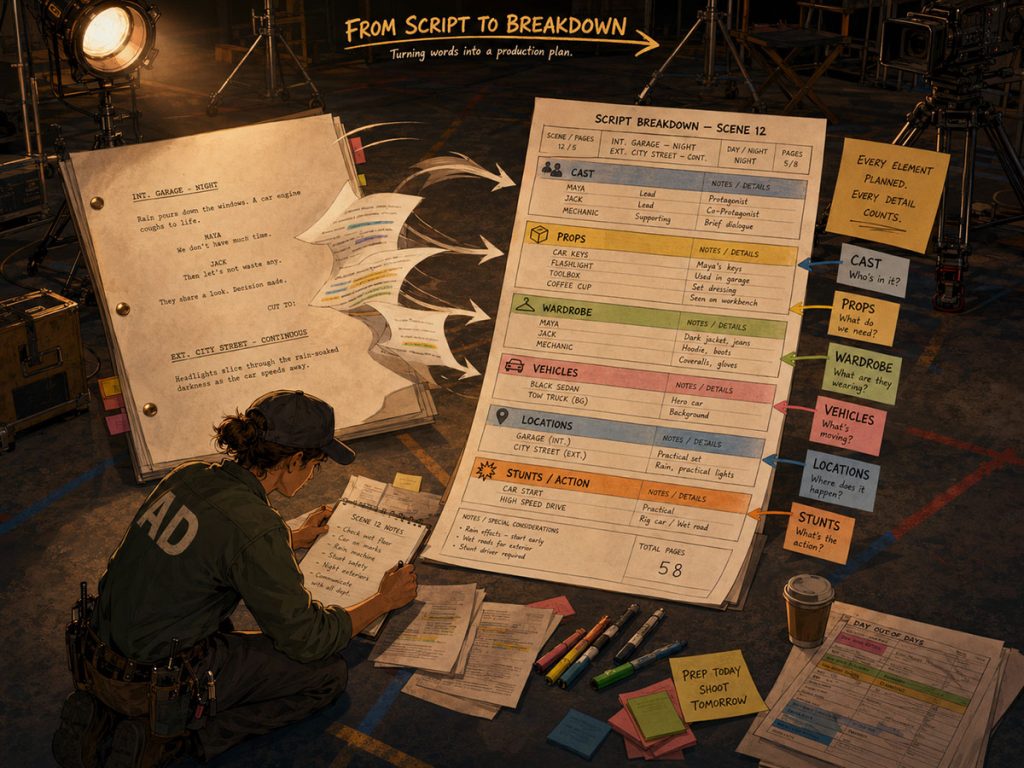
Before a film can be scheduled or budgeted properly, the script needs to be broken down.
A script breakdown identifies the production elements required for each scene. These may include cast, background actors, props, wardrobe, vehicles, stunts, animals, special effects, visual effects, makeup, set dressing, locations, and other elements.
This is where the screenplay becomes production data.
A breakdown helps answer questions like:
Who is in each scene?
Where does the scene take place?
Is it day or night?
What props are needed?
Are there stunts, animals, vehicles, or special effects?
Which elements repeat across multiple scenes?
The better the breakdown, the stronger the schedule and budget will be.
If the breakdown is sloppy, the schedule inherits the sloppiness. The budget does too. One missing prop might not matter. One missing cast member, location, stunt, or vehicle can turn into a real production problem.
Gorilla Scheduling can import screenplay data and help create breakdowns from that material. That makes it easier to move from the script into the practical planning stage without rebuilding everything manually.
👉 Final Draft to Film Scheduling: How to Turn a Screenplay into a Shootable Schedule
From Breakdown to Production Strips
Once scenes are broken down, they can become production strips.
A production strip is a compact scheduling unit that represents a scene or group of scene information. Strips often include scene number, set, location, page count, day or night, cast, and other details needed for scheduling.
Production strips are the building blocks of the shooting schedule.
This is where pre-production software should begin to feel less like a filing cabinet and more like a planning engine. Instead of staring at a screenplay and guessing how to shoot it, the assistant director or scheduler can begin arranging scenes based on location, cast availability, day or night, page count, production complexity, and other factors.
Production strips help the team see the shape of the movie.
They make it easier to notice that five scenes happen in the same location, that a certain actor only works three days, or that night scenes may need to be grouped carefully.
In Gorilla Scheduling, strips can be organized and displayed in different ways, including horizontal or vertical strip layouts. The software also supports customizable strip layouts, so important information such as scene number, set, location, page count, script page, and other fields can appear where the production team needs them.
👉 What Is a Production Strip in Film Scheduling?
From Production Strips to Stripboard
The stripboard is where scheduling strategy becomes visible.
A stripboard lets the production team arrange production strips into a shooting order. This is where the assistant director, producer, director, and production manager start making practical decisions:
Should all scenes at one location be grouped together?
Can day scenes and night scenes be scheduled efficiently?
How many pages can realistically be shot in one day?
Are cast members grouped efficiently?
Are company moves eating too much time?
Is the schedule protecting the hardest scenes?
A good stripboard does not simply arrange scenes. It helps the team think.
Gorilla Scheduling includes professional stripboard tools that allow filmmakers to sort by criteria such as set, location, day or night, and more. It also supports multiple boards per schedule, split-screen stripboard views, a boneyard for unused strips, banners, and automatic backup of stripboards to Excel.
That flexibility matters because scheduling is rarely a straight line. It is a puzzle with weather, cast, locations, page counts, company moves, creative priorities, and budget pressure all tugging at the same blanket.
👉 What Is a Stripboard in Film Production?
From Stripboard to Shooting Schedule
A shooting schedule is not just a list of scenes in order. It is the production’s battle plan.
It decides what gets shot, when it gets shot, who is needed, where the company goes, and how the work is spread across shoot days. A strong shooting schedule balances creative priorities with real-world limitations.
This is where dedicated film scheduling software becomes valuable.
A spreadsheet can list scenes. A calendar can show dates. But professional film scheduling requires more than that. It needs to manage production strips, boards, day breaks, cast requirements, locations, page counts, day or night work, and reports.
The schedule also needs to change. Often.
Actors become unavailable. A location shifts. A director wants to move a difficult scene earlier. A weather-dependent exterior needs to slide. A company move becomes too expensive. A producer asks whether reducing one shoot day is possible.
Pre-production software should make those changes manageable. It should help the team revise the plan without losing track of what changed downstream.
Gorilla Scheduling is built around this kind of professional scheduling workflow. It can create breakdowns, production strips, stripboards, shooting schedules, Day Out of Days reports, actor records, location records, and scheduling reports.
👉 How to Schedule a Film Shoot
From Schedule to Production Calendar
A production calendar gives the team a larger view of the production timeline.
While a shooting schedule focuses on what scenes are shot and when, a production calendar can help organize prep, shoot, wrap, rehearsals, travel, tech scouts, location holds, equipment pickups, cast fittings, department deadlines, and other major milestones.
This matters because production planning is not limited to shoot days.
If a scene shoots on Wednesday, the location may need to be secured weeks earlier. Props may need to be built. Wardrobe may need fittings. Cast may need rehearsal. Permits may need approval. Equipment may need to be reserved.
Good pre-production software should help connect the detailed scene schedule with the broader production timeline.
The calendar view helps department heads understand not just what is happening today, but what must be ready before the shoot day arrives.
👉 What Is a Production Calendar in Film?
From Schedule to Day Out of Days
A Day Out of Days report, often called a DOOD, shows when cast members or other production elements work across the shooting schedule.
For actors, a DOOD report can show start work, work days, hold days, travel days, and finish work. For production teams, it helps answer important questions:
How many days does each actor work?
Are cast days grouped efficiently?
Are there expensive gaps?
Can roles be scheduled more economically?
Which elements appear across multiple shoot days?
A DOOD report is one of the most useful planning tools in pre-production because it translates the schedule into work patterns.
Gorilla Scheduling can create DOOD reports for cast and for other breakdown element categories such as props, set dressing, costumes, background actors, visual effects, and more. That makes the report useful beyond cast scheduling alone.
Even better, when Gorilla Scheduling is linked with Gorilla Budgeting, those DOOD totals can help inform budget line day counts. This is where pre-production software starts to become genuinely connected.
The schedule is no longer just a schedule. It becomes budget intelligence.
👉 What Is a Day Out of Days Report?
From Schedule to Budget
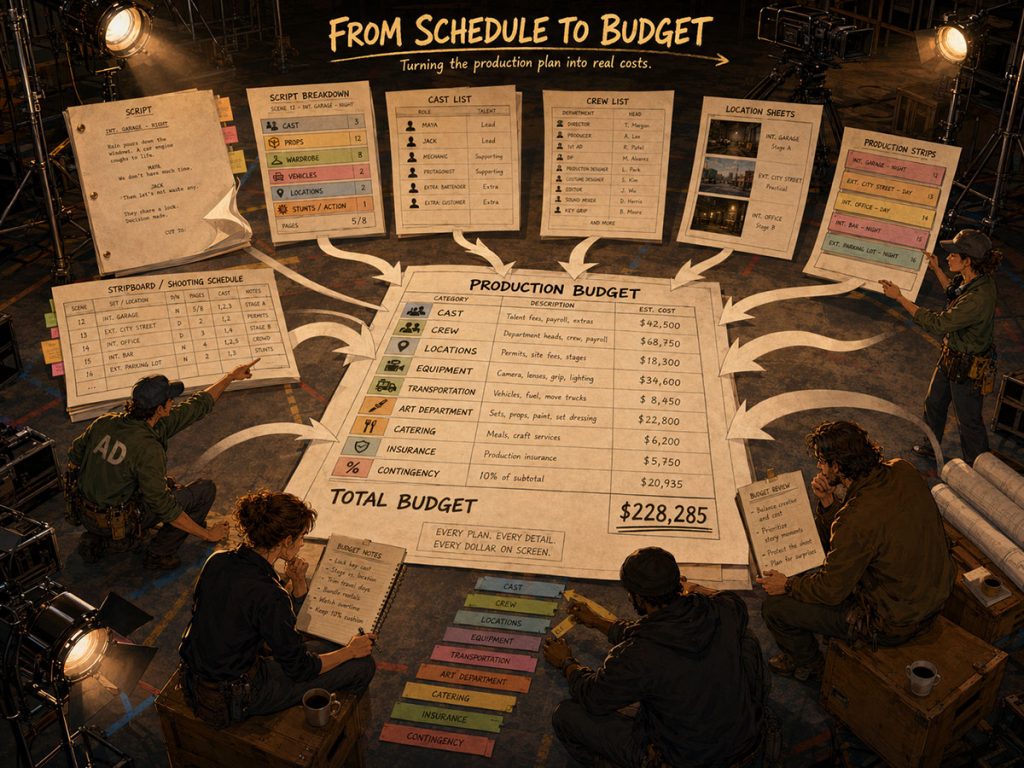
The budget and schedule are twins with different personalities.
The schedule tells you how the movie will be made. The budget tells you what that plan will cost.
If the schedule changes, the budget may change. More shoot days can affect crew costs, cast costs, equipment rentals, locations, catering, transportation, insurance, and fringes. More night work may create different rate considerations. More company moves can add time and cost. More cast days can reshape payroll.
This is why pre-production software should not treat scheduling and budgeting as totally separate worlds.
A connected workflow helps the producer or line producer understand the financial impact of production choices earlier. It also helps reduce manual re-entry, which is where many mistakes creep in wearing tiny accountant shoes.
Gorilla Budgeting can link with Gorilla Scheduling and import schedule data such as cast, crew, locations, breakdown elements, rates when available, and DOOD totals into budget line day counts. This helps the budget reflect the actual production plan instead of relying entirely on hand-entered numbers.
A budget is stronger when it is built from the schedule, not guessed beside it.
👉 How to Turn a Script Breakdown Into a Film Budget
From Schedule to Call Sheets
Once the schedule is built, the production still needs to communicate each shoot day clearly.
That is the job of the call sheet.
A call sheet tells cast and crew where to be, when to arrive, what scenes are being shot, who is needed, what the weather may be, where parking is, who to contact, and what special notes apply to the day.
The call sheet is one of the most visible documents in production. Everyone sees it. Everyone depends on it.
If the call sheet is disconnected from the schedule, the production team may need to manually re-enter scene information, cast information, locations, and timing details. That can work, but it also creates room for errors.
A stronger workflow lets the call sheet come from the schedule.
Koala Call Sheets is a Jungle Software add-on that can generate call sheets from Gorilla schedules. That matters because the schedule already contains much of the information the call sheet needs. When those tools are connected, the production can reduce duplicate work and keep the daily plan more consistent.
👉 What Is a Call Sheet in Film?
What Reports Should Pre-Production Software Generate?
Reports are where pre-production planning becomes shareable.
Different people need different views of the same production. A director may need to understand the creative shooting order. A producer may need the budget impact. A production manager may need locations, cast, and crew logistics. Department heads may need element lists. A financier may need high-level budget reports.
Good pre-production software should generate clear reports without forcing the team to rebuild information manually.
Useful reports may include:
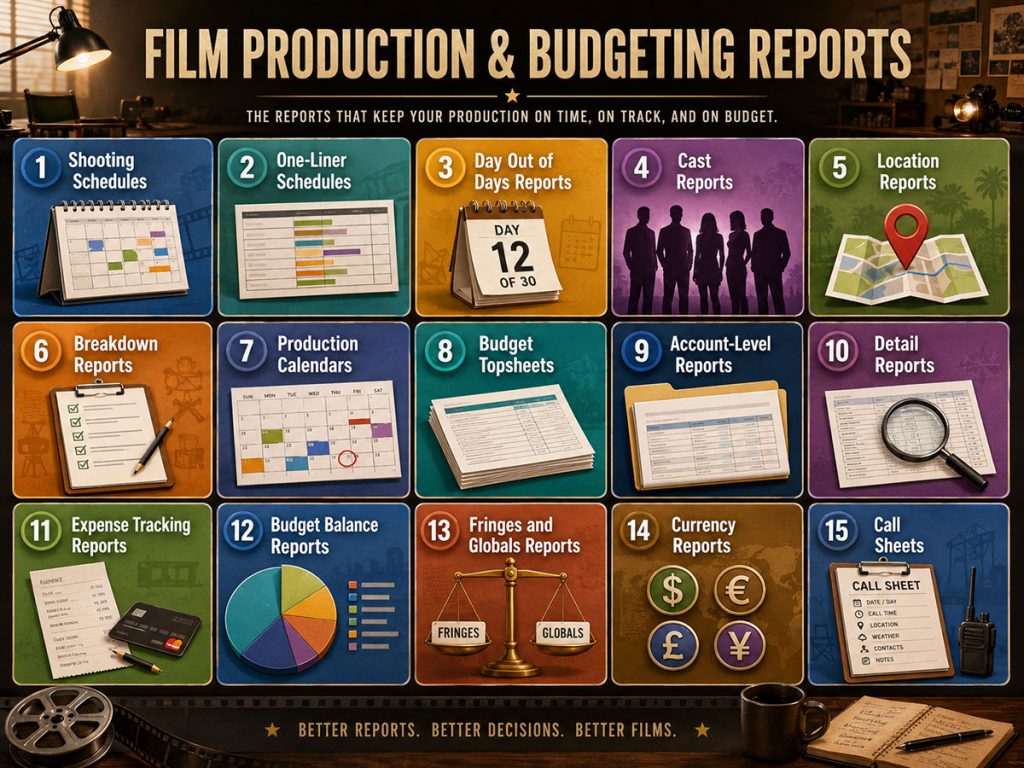
The point is not to create paperwork for paperwork’s sake. The point is to give each person the view they need to do their job.
Gorilla Scheduling and Gorilla Budgeting both support professional reporting. Gorilla Budgeting includes reports such as Topsheet, Account Level Report, Detail Report, Tracking Expenses Report, Budget Balance Report, Globals Report, Fringes Report, Currency Report, and Credits Report.
Good reports turn production data into decisions.
Bad reports turn production data into archaeology.
👉 What Is a One-Liner Schedule in Film Production?
Spreadsheets, Templates, and Software: Where Each Fits
Not every production needs the same level of software.
A tiny short film may be fine with a spreadsheet budget, a simple schedule, and a basic call sheet template. A student project may need flexibility more than structure. An early development estimate may only need rough numbers.
Templates and spreadsheets are useful when the project is small, early, or informal.
But as the production grows, the risk changes.
When multiple departments depend on the same information, when cast work days need to be tracked, when locations need careful grouping, when the budget depends on the schedule, and when professional reports need to be shared, dedicated software becomes more valuable.
The real issue is not whether spreadsheets are good or bad. The issue is whether the production has outgrown them.
A spreadsheet can hold information. Pre-production software should help that information move through the production workflow.
👉 Film Scheduling Software vs Spreadsheets and Film Budgeting Software vs Spreadsheets
What to Look for Before Choosing Pre-Production Software
When choosing pre-production software, filmmakers should look past the marketing language and ask practical workflow questions.
Can the software help import or organize screenplay data?
Can it support a real script breakdown?
Can it create production strips and stripboards?
Can it manage day breaks, cast, locations, and page counts?
Can it generate useful scheduling reports?
Can the schedule inform the budget?
Can it create Day Out of Days reports?
Can call sheets be generated from the schedule?
Can the budget support professional account structure, fringes, globals, reports, and expense tracking?
Can the software grow with the production?
The best tool depends on the kind of production you are making. Some filmmakers need a lightweight planning system. Others need professional scheduling and budgeting depth.
For serious film scheduling and budgeting, the ability to handle real production workflows matters more than a shiny interface.
👉 Film Scheduling Software: What to Look for Before You Choose and Film Budgeting Software: What to Look for Before You Choose
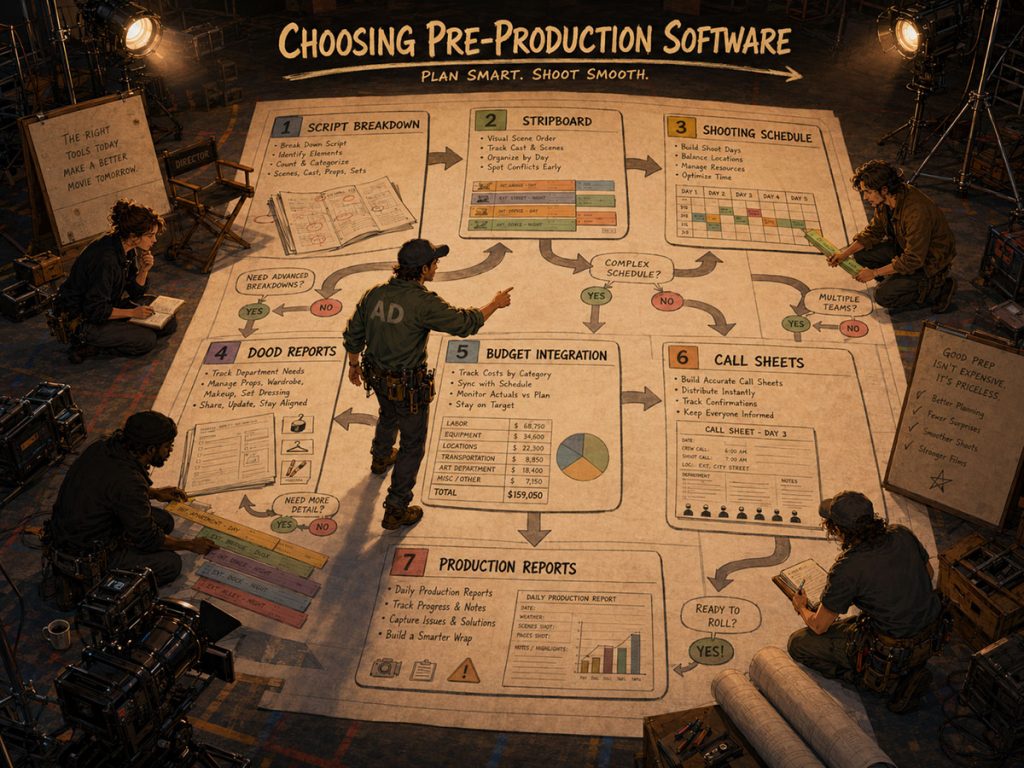
Where Gorilla Scheduling, Gorilla Budgeting, and Koala Call Sheets Fit
Jungle Software’s tools are designed around the core pre-production workflow: schedule, budget, and call sheets.
Gorilla Scheduling helps filmmakers move from screenplay data into breakdowns, production strips, stripboards, shooting schedules, Day Out of Days reports, actor records, location records, and scheduling reports.
Gorilla Budgeting helps filmmakers create professional film budgets with topsheet, account, and detail structure. It also supports budget templates, fringes, globals, contingencies, credits, budget groups, budget sets, budget locations, in-kind donations, block and defer line items, Excel imports, multiple currencies, accounting, expense tracking, and budget reports.
When linked with Gorilla Scheduling, Gorilla Budgeting can import cast, crew, locations, breakdown elements, rates when available, and DOOD totals into budget line day counts.
Koala Call Sheets can generate call sheets from Gorilla schedules, helping the production move from the schedule to the daily communication document used by cast and crew.
Together, these tools support a practical chain:
Script data becomes a breakdown.
Breakdown elements become strips.
Strips become a stripboard.
The stripboard becomes a shooting schedule.
The schedule generates reports.
The schedule informs the budget.
The schedule can feed call sheets.
That is what pre-production software should do: help the movie become shootable.
Suggested internal links:
- Gorilla Scheduling page
- Gorilla Budgeting page
- Koala Call Sheets page
Pre-Production Software Should Make the Production Clearer
Software should not make pre-production feel bigger, noisier, or more complicated than it already is.
The best pre-production tools make the work clearer.
They help the producer see the cost.
They help the assistant director see the schedule.
They help department heads see what is needed.
They help cast and crew understand the day.
They help the production avoid preventable surprises.
A production does not become professional because it uses software. It becomes professional because the planning is clear, connected, and usable.
The right software supports that clarity.
If you want a connected pre-production workflow, Jungle Software offers tools designed to help filmmakers move from script breakdown to schedule, budget, and call sheets.
Explore:
Gorilla Scheduling
https://junglesoftware.com/gorilla-scheduling/
Gorilla Budgeting
https://junglesoftware.com/gorilla-budgeting/
Koala Call Sheets
https://junglesoftware.com/koala/
Final Takeaway
Pre-production software should do more than store files.
It should help filmmakers turn a screenplay into a working production plan. That means supporting the breakdown, organizing production strips, building the stripboard, creating the shooting schedule, generating Day Out of Days reports, informing the budget, producing call sheets, and giving the team clear reports.
For very small productions, templates and spreadsheets may be enough.
For larger or more professional productions, connected pre-production software can help reduce duplicate work, improve accuracy, and give the team a clearer path from script to shoot.
The real value is not the software itself.
The real value is a production plan that everyone can understand before the first call time arrives.
Questions or Comments?
Have a question about stripboards or film scheduling? Feel free to leave a comment below — or reach out if you want to learn more about how professional tools can streamline your workflow.