
Free Storyboard Templates
PRODUCTION TOOLS & TEMPLATES Free Storyboard Templates Plan shots visually with free storyboard templates and learn how storyboards help directors, cinematographers, and production teams prepare
Compare Celtx and Gorilla Scheduling for script breakdown, scheduling, production management, and professional pre-production workflows.
Celtx is media pre-production software, designed for creating and organizing media projects like screenplays, films, videos, stageplays, audio plays, documentaries, comics, games, and podcasts.
Most people don’t know this, but Celtx is an acronym for Crew, Equipment, Location, Talent and XML. It started as desktop software and eventually moved to a cloud-based system. Much of feature development and language translations of the application were driven largely by the feedback and volunteer efforts of members of the international Celtx community.
Second, What is Gorilla?
Gorilla is film scheduling and budgeting software geared towards films, tv episodes, shorts, and documentaries. It started in 2002 and gained popularity because of its all-in-one solution providing breakdown, cast, crew, locations, storyboards, shot lists and budgeting in one package.
Note: This article focuses on a Film and Video Scheduling Comparison Only. To see our comparison of Celtx Budgeting and Gorilla Budgeting Comparing Celtx Budgeting and Gorilla Budgeting.
Celtx as a Screenwriting Solution
This article is not going to focus on the screenwriting part of Celtx. Most Celtx users use it for screenwriting, although there is a pre-production component. That pre-production component is what we are going to compare to Gorilla, since Gorilla is not screenwriting software. (Check out Page One, Jungle Software’s FREE screenwriting app that integrates with Gorilla). To learn more about Celtx as a Screenwriting program, check out our article on Comparing Screenwriting Programs

In Celtx you can import a screenplay in a variety of formats (or start your own screenplay as mentioned above).
Once imported, you will see the screenplay in Celtx. You can then highlight an element in the script (a prop or a costume, for example), and then attach that element to a Breakdown Category. Any Film Scheduling program “should” be able to do this. If it can’t, close up shop and look somewhere else.
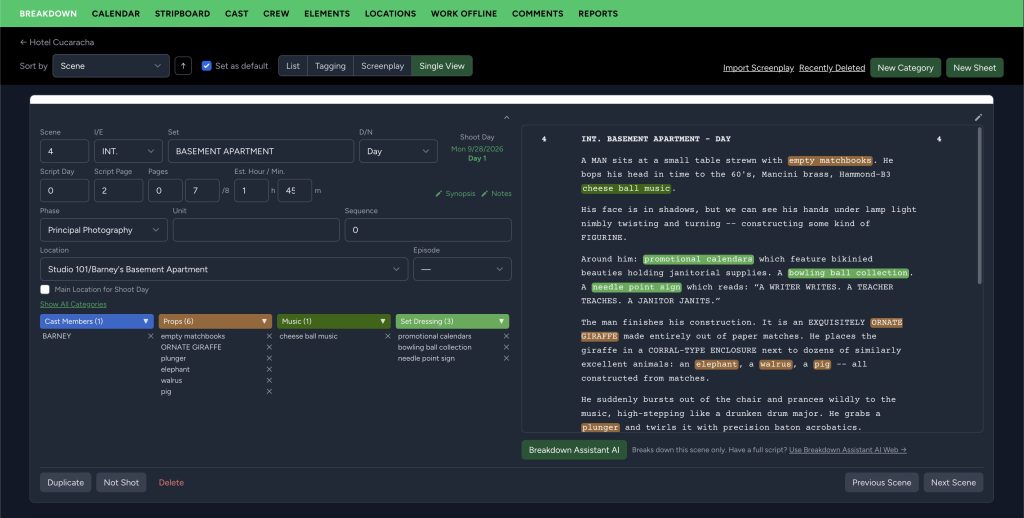
Gorilla can also import a screenplay in a variety of formats including the FDX file which is used by Final Draft, and the .SEX file which is exported from Movie Magic Screenwriter. Once imported, Gorilla will display your scenes and their attached elements as seen above.
In both programs you can attach elements to a scene.
Gorilla has some additional features such as Element Linking and Merging Breakdown Sheets.
Element Linking allows you to “link” multiple elements together. For example, let’s say you have a character called BLIND MAN. Every time you see this character you also want him to have SUNGLASSES on and also have a BLACK HAT and a CANE. Below is another example of how to use Element Linking
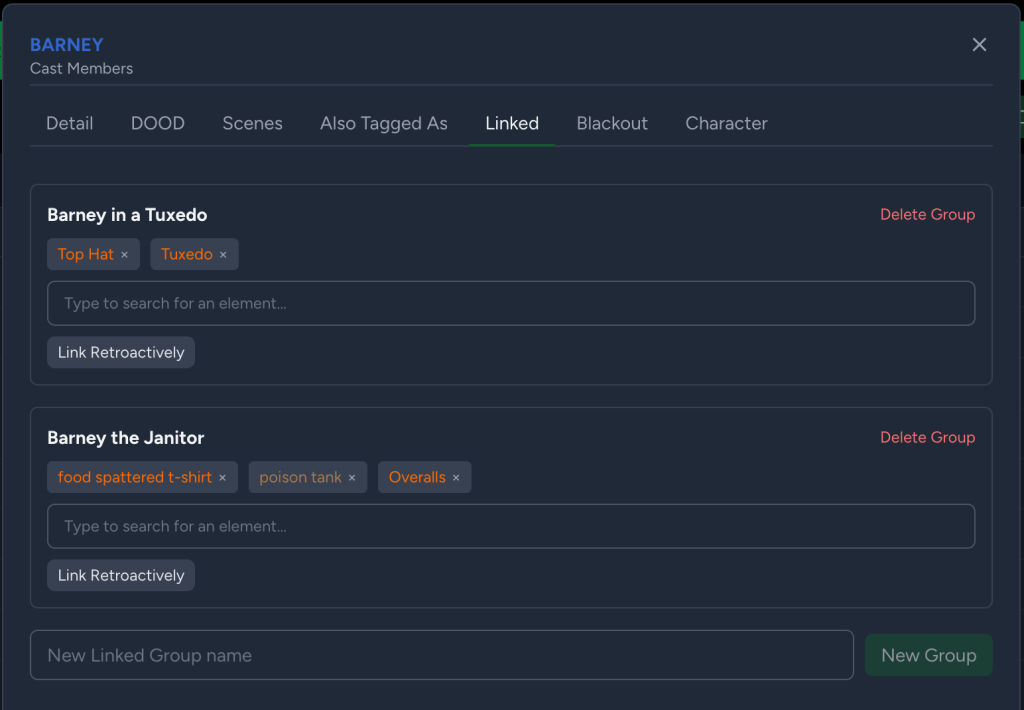
In the above screenshot, the BARNEY character is “linked” to three elements. What this means, is that every time you add the BARNEY character to a scene, all three linked elements will also be added to the scene.
This can be very convenient if you have a particular Character (say a Villain) who always is dressed in the same outfit, with a mask, and a weapon, the same makeup, etc.
There is also a keyboard quick-key that allows you to add the Character to a Scene while suppressing the linked elements. So, if production calls for the character to appear without their usual villain garb, (i.e.: Clark Kent or Peter Parker), this is easily handled.
Another handy feature that Gorilla has is the ability to add scenes to elements. Normally, when breaking down a screenplay your starting point is the SCENE. You go to the Scene and add elements to it, as the screenshots above show in both Celtx and Gorilla.
But if you know a certain Prop or Set Dressing needs to be attached my multiple scenes, you need to go to each scene and attach that element to it. In Gorilla, you have the ability to go to the ELEMENT record, in the example shown below: bowl of fruit, and then attach scenes to it.
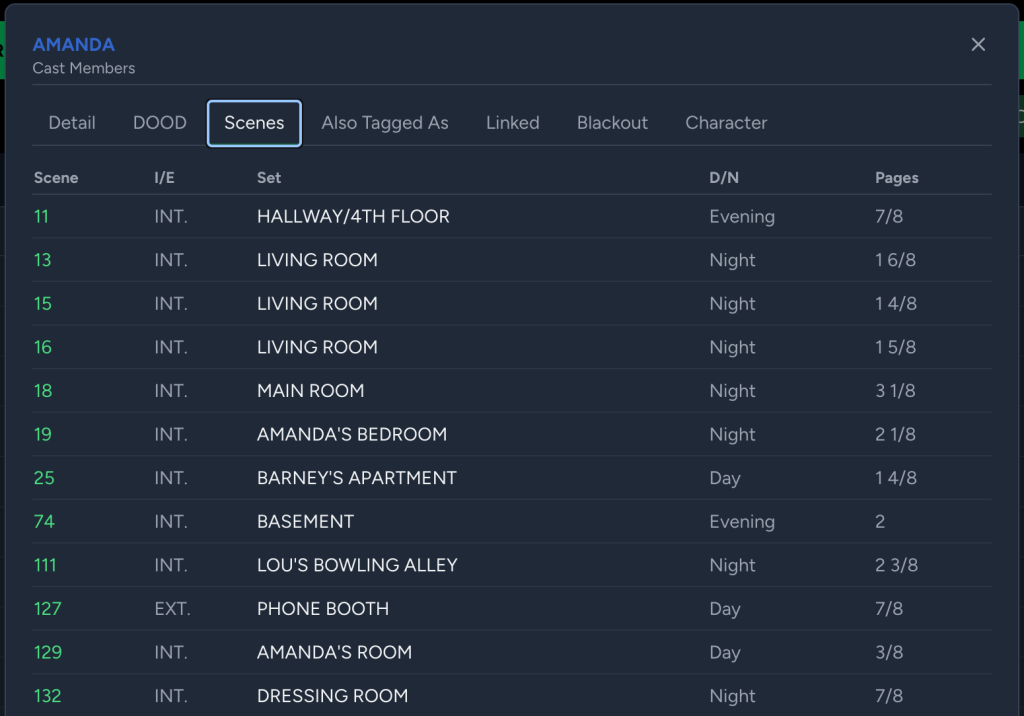
In Celtx, when you go to the element (as shown below with the Greenery: palm trees), you can see the scene that it is attached to it you hover over the Scene number, but you cannot add a scene to that element. In order to do that, you have to return to the Breakdown screen.

Both Celtx and Gorilla Scheduling have a Stripboard. To learn more about a stripboard, see our article: What is a Stripboard?
Below is a screenshot of the Stripboard in Celtx.

You can add shoot days to the board, and drag the scenes up and down the board, which is the common way of scheduling them.
There is also a checkbox on the right which allows you to check if the scene is “complete” which is a nice addition. In general, the interface is clean and simple to use.
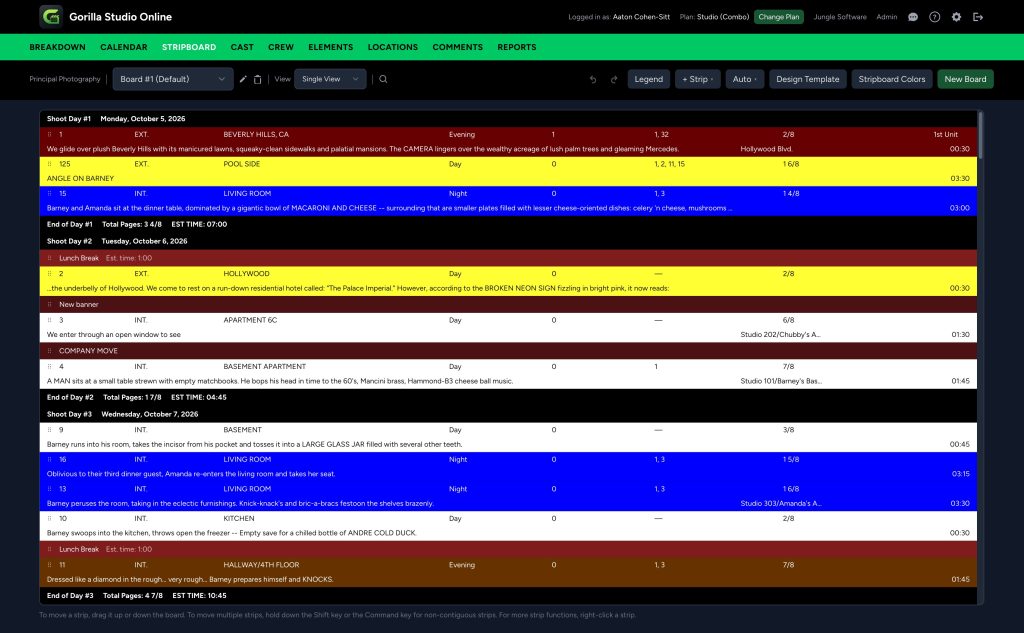
In Gorilla, you can also drag and drop the scenes on the board to schedule them. Some additional Stripboard features in Gorilla that you won’t see in Celtx include:
• Multiple Board Saves
You can save multiple boards allowing you to plan out different scenarios for your production.
• Automatic Sorting
Automatically sort by Location, Set, Scene Number, and other criteria.
• Vertical Orientation
Display the Stripboard in vertical strips (mimicking the traditional Stripboard).
• Custom Stripboard Design
Customize the look of the board, by rearranging the fields on the strip and add divider lines.
Reports: Celtx vs. Gorilla
Both Celtx and Gorilla allow you to run reports — you need to get your data out of both programs, of course.
Here is a list of the reports Celtx has pertaining to Scheduling:

Here is a partial list of the reports Gorilla has:
Actors, Photos, Scenes
Art Department
Blackout
Breakdown Notes
Breakdown Sheet Boxes
Breakdown Sheet Summary
Cast Breakdown (Scenes)
Casting
Character Description
Character/Scene
Crew Call Sheet
Day Schedule
Elements and their Scenes
Equipment
Header Board
Meetings/Rehearsals
Cast Breakdown (Shoot Days)
Cast Call Times
Category List
Daily Production Report
Day out of Days (DOOD)
Exhibit G (SAG Report)
One Line Schedule
Shooting Schedule
Stripboard
I hope this article helps you understand the differences and the similarities between Celtx and Gorilla. To explore more about film scheduling and budgeting, sign-up here for a Free version of Gorilla.
PRODUCTION TOOLS & TEMPLATES Free Storyboard Templates Plan shots visually with free storyboard templates and learn how storyboards help directors, cinematographers, and production teams prepare
SCRIPT BREAKDOWN & SCHEDULING Breaking Down Your Script How to Breakdown (or Tag or Markup) your Script (with Script Breakdown Sheet) What is a Script
SCREENWRITING & STORY Tagging and Preparing a Screenplay for Production with Final Draft Learn how screenplay tagging helps identify cast, props, wardrobe, locations, and other
SCREENWRITING & STORY Tagging and Preparing a Screenplay for Production with Page One Learn how screenplay tagging helps identify cast, props, wardrobe, locations, and other
SCRIPT BREAKDOWN & SCHEDULING Movie Magic Scheduling vs. Gorilla Compare Movie Magic Scheduling and Gorilla Scheduling, including script breakdown, stripboards, scheduling workflows, reporting, and production