
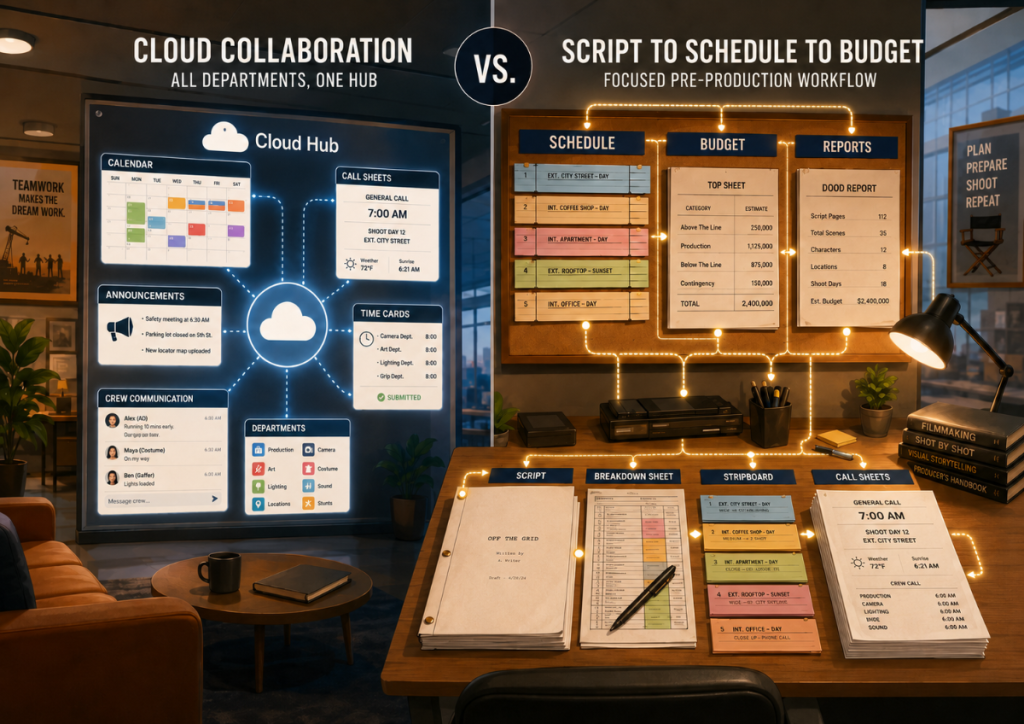
Choosing film production software is not just about comparing features. It is about choosing the workflow you want your production team to live inside.
That is why Gorilla vs. Yamdu is an interesting comparison.
Yamdu is a broad cloud-based production management platform. It is designed to bring many departments, documents, schedules, call sheets, time cards, production data, and communication into one online hub.
Gorilla is focused on the practical pre-production workflow filmmakers and producers use every day: screenplay import, breakdown sheets, stripboards, scheduling, production reports, budgeting, call sheets, and production planning.
Both tools can help productions organize work. But they approach the problem from different directions.
Yamdu asks: How can the whole production team collaborate in one cloud platform?
Gorilla asks: How can producers, ADs, production managers, and film schools move clearly from script to schedule to budget?
👉 How to Create a Film Budget from a Shooting Schedule
Quick Summary: Gorilla vs. Yamdu
Choose Gorilla if you want:
- Dedicated film scheduling and budgeting tools.
- A practical workflow from screenplay import to breakdown sheets, stripboards, reports, call sheets, and budget.
- Gorilla Scheduling and Gorilla Budgeting working together.
- Breakdown Assistant AI with Gorilla Premium.
- Improved Final Draft import, scene summaries, styled screenplay display, and dual dialogue support.
- DOOD reports, actor placeholders, currency tools, and budget workflow improvements.
- A strong tool for independent filmmakers, producers, assistant directors, production managers, and film schools.
Choose Yamdu if you want:
- A broad cloud-based production-management hub.
- A centralized online workspace for many departments.
- Cloud collaboration, shared production data, announcements, access management, time cards, and team-wide communication.
- A platform that can connect scheduling, call sheets, production data, and external tools across a larger organization.
- A web-based workflow where many users can access current information in one place.
This is not a simple “one is better than the other” comparison. It is a question of fit.
If you want a connected cloud production hub, Yamdu deserves a look.
If you want focused scheduling and budgeting software with a clear pre-production workflow, Gorilla is a strong fit.
What Is Gorilla?
Gorilla is Jungle Software’s production software ecosystem for filmmakers, producers, assistant directors, production managers, line producers, and film schools. It includes both traditional desktop tools and a new generation of online scheduling and budgeting applications.
Gorilla Scheduling Desktop and Gorilla Budgeting Desktop continue to support the established Mac and Windows workflow many users already know. Gorilla Scheduling Online and Gorilla Budgeting Online now bring the Gorilla workflow into the browser, with online access, collaboration, centralized projects, and a more modern interface.
Gorilla Scheduling helps users import screenplays, create breakdown sheets, build stripboards, organize shoot days, manage cast, crew, and locations, and generate professional production reports. Gorilla Budgeting helps producers build and revise budgets, manage accounts, apply globals and fringes, use Ratebook integration, track expenses, and create budget reports.
The important change is choice. Productions can now use Gorilla as a desktop workflow, an online workflow, or a combination of both depending on how they prefer to work.
Jungle’s current Gorilla Online page describes Gorilla Scheduling Online and Gorilla Budgeting Online as browser-based production tools with collaboration, online access, centralized projects, and a connected scheduling-to-budgeting workflow.
👉 From Final Draft to Breakdown Sheet: What Gorilla 11 Improves
Gorilla’s main strength is focus. It is not trying to be every department’s communication hub. It is built around the core production planning work that has to be done correctly before cameras roll.
What Is Yamdu?
Yamdu is a cloud-based production management platform for film, TV, commercials, documentaries, unscripted projects, education, and visual media production.
Yamdu describes itself as a single source of truth for production data. Its platform includes tools for script import, AI-enhanced breakdowns, shooting schedules, DOOD reports, call sheets, project calendars, production calendars, time cards, budgeting workflows, and integrations with other tools.
Yamdu also positions itself for production managers, coordinators, line producers, accounting, casting, locations, AD departments, post-production supervisors, students, and schools.
That makes Yamdu broader than a traditional scheduling or budgeting application. It is closer to a cloud-based production operating system.
That breadth can be powerful. It can also be more than some productions need.
Workflow Philosophy: Focused Tools vs. Cloud Hub
The biggest difference between Gorilla and Yamdu is philosophy.
Yamdu is built around centralized production collaboration.
The idea is that production data should live in one cloud-based place where many departments can access updated schedules, documents, announcements, call sheets, calendars, crew lists, and production information.
Gorilla is built around focused production work, now available in both desktop and online workflows.
The idea is that producers, assistant directors, production managers, line producers, and students need practical tools to break down a script, create a schedule, organize a stripboard, print reports, build a budget, and understand how the production plan works.
With Gorilla Scheduling Online and Gorilla Budgeting Online, that focused workflow can now live in the browser. Productions can log in from different locations, collaborate with team members, access centralized projects, and work in a more modern online interface while still staying close to the core mechanics of scheduling and budgeting.
Both ideas are valid.
A large production team may want many departments inside one broad connected cloud environment. A producer, indie production company, assistant director, line producer, or film school may want a more direct tool for the actual work of building schedules and budgets.
The danger with broad platforms is that the software can become a second production to manage. The strength of Gorilla is that the workflow stays close to the work: script, breakdown, stripboard, shoot days, reports, budget, and now online collaboration.
Gorilla is no longer simply the desktop alternative to a cloud hub. With Gorilla Online, the comparison is more specific: Yamdu is a broad cloud production management platform, while Gorilla is a focused scheduling and budgeting ecosystem available in both desktop and online versions.
Script Breakdown and Screenplay Import
Both Gorilla and Yamdu support script-based workflows.
Yamdu promotes script import, AI-enhanced breakdown suggestions, and integrations with script formats and tools such as Final Draft and PDF. Yamdu’s site describes importing scripts and using AI to create breakdown suggestions for creative departments to confirm and populate.
Gorilla 11 also improves screenplay import, especially for Final Draft workflows. Gorilla 11 can import scene summaries, preserve more screenplay display styling, support colors, bold, italics, underline, and display dual dialogue properly.
Gorilla Premium also includes Breakdown Assistant AI, which can suggest production elements from imported screenplays while keeping the user in control of what is accepted.
The difference is how the breakdown connects to the rest of the workflow.
Yamdu connects breakdown information into a broader cloud production hub.
Gorilla connects breakdown information into scheduling, stripboards, elements, reports, call sheets, and budgeting.
Scheduling and Stripboards
Scheduling is central to both products.
Yamdu includes shooting schedules, schedule import, drag-and-drop stripboard-style scheduling, and real-time DOOD reports. Yamdu also emphasizes keeping departments updated through a shared online platform.
Gorilla Scheduling is a dedicated scheduling application built around breakdown sheets, stripboards, shoot days, day breaks, elements, cast, crew, locations, reports, and DOODs.
For users coming from traditional film scheduling workflows, Gorilla may feel more direct and production-paperwork oriented.
For teams that want the schedule to live inside a larger cloud workspace with announcements, access, time cards, and department-wide visibility, Yamdu may be appealing.
The deciding question is:
Do you want your scheduling software to be a focused scheduling tool, or part of a broader online production hub?
Budgeting: Dedicated Budgeting Tools and Connected Workflows
Budgeting is one of the most important parts of this comparison, but it should now be framed carefully because both products have evolved.
Gorilla includes dedicated budgeting tools through Gorilla Budgeting Desktop and Gorilla Budgeting Online. Gorilla Budgeting is built around professional production budget structure, including accounts, categories, groups, globals, fringes, incentives, expense tracking, Ratebook integration, and budget reports.
Yamdu also supports budgeting workflows. Yamdu’s public help center describes both a Showbiz Budgeting export workflow and Yamdu Budgeting Beta. Yamdu also describes Dynamic Globals, which can update budget costs when schedule changes occur.
That makes the distinction less about whether Yamdu connects scheduling and budgeting, and more about the style of workflow.
Gorilla’s budgeting strength is its focused scheduling-and-budgeting ecosystem, especially for users who want dedicated tools for building and managing production budgets.
Yamdu’s budgeting strength is its place inside a broader cloud production management environment, where budget-related information can connect with schedules, production data, and external budgeting workflows.
For producers and line producers, the practical question is not only “Does it budget?” The better question is: “Does this budgeting workflow match the way my production team actually works?”
Call Sheets and Production Communication
Yamdu includes call sheet creation and emphasizes sending, tracking, announcements, and team-wide communication. It is designed for productions that want many participants working from one shared online platform.
Gorilla has call sheet workflow through Koala Call Sheets, an add-on that works with Gorilla production data. Gorilla’s call sheet approach is more focused: build your schedule, organize cast and crew, then create call sheets for production use.
Yamdu may be stronger for teams that want communication, announcements, confirmations, cloud-based access, and broad crew visibility inside one platform.
Gorilla may be stronger for users who want practical scheduling and call sheet tools without putting the whole production inside a cloud collaboration system.
Film Schools and Education
Both Gorilla and Yamdu have an education story.
Yamdu promotes use by schools and universities, including classroom collaboration, announcements, onboarding sessions, and helping students understand how production stages are interconnected.
Gorilla has a long history in film education. Jungle Software has been creating production software for filmmakers and educators for over 25 years. Gorilla is useful in courses that teach assistant directing, producing, production management, scheduling, budgeting, call sheets, and production paperwork.
For film schools, the question is what kind of learning environment you want.
Yamdu may be useful when the goal is to simulate a cloud production office where many students collaborate across departments.
Gorilla may be better when the goal is to teach the mechanics of production planning: script breakdown, scheduling, stripboards, DOOD reports, call sheets, and budgets.
👉 Academic Options for Gorilla
In other words, Yamdu can teach production collaboration.
Gorilla can teach production structure.
Both are valuable. Many film programs need the second one first.
Cloud Collaboration: Yamdu and Gorilla Online
When this comparison was first written, Yamdu had a clearer advantage as the cloud-first platform. That has changed now that Gorilla Scheduling Online and Gorilla Budgeting Online have been released.
Yamdu remains a broad cloud production management hub. It is built around centralized production data, communication, call sheets, calendars, time cards, documents, and multi-department collaboration.
Gorilla Online takes a more focused approach. Rather than trying to be every department’s full production operating system, Gorilla Online brings the core scheduling and budgeting workflow into the browser. Users can import scripts, break down scenes, build stripboards, organize shoot days, manage budgets, create reports, collaborate with team members, and access projects online.
The difference is no longer simply “Yamdu is cloud, Gorilla is desktop.” A better comparison is this:
Yamdu is a broad cloud production management platform.
Gorilla is a focused scheduling and budgeting ecosystem available in both desktop and online versions.
For teams that want one large production hub across many departments, Yamdu may still be the better fit. For teams that want professional scheduling and budgeting tools with online collaboration and browser access, Gorilla Online is now a more direct comparison than it was before.
Gorilla Scheduling Online is currently positioned around screenplay import, scene breakdown, stripboards, shoot days, cast and crew management, reports, and online collaboration. Gorilla Budgeting Online is positioned around detailed production budgets, cost revisions, reports, Ratebook integration, browser access, and sharing the project without emailing versions back and forth.
Pricing and Buying Considerations
Gorilla offers clear subscription choices for Scheduling, Budgeting, Combo Pack, Premium, and Academic use through Jungle Software’s pricing page.
Yamdu pricing should be checked directly with Yamdu because cloud software pricing, plan structure, user limits, storage, education pricing, onboarding, and enterprise options can change. Yamdu’s site has a pricing page, but plan details may require direct review or contact with Yamdu.
For buyers, the key is not just monthly cost. It is what you are paying for.
With Yamdu, you are evaluating a cloud production management environment.
With Gorilla, you are evaluating scheduling and budgeting tools designed around the core production planning process.
If you need the whole cloud command center, Yamdu may be worth the larger operational commitment.
If you need strong film scheduling and budgeting tools, Gorilla may give you a more direct path.
Gorilla vs. Yamdu Feature Comparison
| Feature / Workflow | Gorilla | Yamdu |
|---|---|---|
| Script import | Yes | Yes |
| AI breakdown suggestions | Yes, with Gorilla Premium | Yes, AI-enhanced breakdown tools |
| Breakdown sheets | Yes | Yes |
| Stripboard scheduling | Yes | Yes |
| DOOD reports | Yes | Yes |
| Call sheet workflow | Yes, with Koala Call Sheets | Yes |
| Location Module | Yes | Yes |
| Dedicated film budgeting application | Yes, Gorilla Budgeting | Budgeting workflows / Showbiz integration / Yamdu Budgeting Beta |
| Actors / cast management | Yes | Yes |
| Scheduling-to-budget connection | Yes, with Gorilla Combo Pack | Yes, through Yamdu budgeting workflows, Dynamic Globals, and Showbiz export |
| Crew Deal Memo | Yes | Not found in public Yamdu feature docs |
| Import total days worked from DOOD into budget | Yes | Yes / supported through current Yamdu budgeting workflows or Showbiz export |
| Actor placeholders for early budgeting | Yes | Yes |
| Third Row Stripboard | Yes | Not found as a specific Yamdu feature |
| Split Screen Stripboard | Yes | Yes |
| Production Checklists | Yes | Partial / task and production workflow tools |
| Cloud collaboration hub | Yes, with Gorilla Scheduling Online and Gorilla Budgeting Online | Yes |
| Browser-based access | Yes, with Gorilla Online | Yes |
| Announcements / team communication | Yes, with Gorilla Scheduling Online | Yes |
| Work offline and sync later | Yes, Gorilla Scheduling Online allows users to work offline with no internet connection, then sync changes when they reconnect | Not clearly documented for the full Yamdu browser platform; Yamdu offers mobile app access for selected on-the-go workflows |
| Time cards | Not the main focus | Yes |
| Production calendar / Gantt-style planning | Not the main focus | Yes |
| Film school workflow | Strong for teaching scheduling/budgeting mechanics. Gorilla Online includes ‘School Mode’ — ability for Professors to monitor student projects. | Strong for teaching cloud collaboration and production management |
| Best fit | Productions and schools needing focused scheduling and budgeting tools, available as Desktop or Online workflows | Teams needing centralized cloud production management across many departments |
When Gorilla Is the Better Fit
Gorilla is the better fit if you want focused production software for the core mechanics of pre-production.
Choose Gorilla if you need:
- Dedicated film scheduling.
- Dedicated film budgeting.
- A script-to-breakdown-to-schedule workflow.
- A schedule-to-budget workflow.
- DOOD reports.
- Budget reports.
- Call sheet support through Koala Call Sheets.
- Final Draft import improvements.
- Breakdown Assistant AI with Gorilla Premium.
- Film school pricing and course-friendly production tools.
- A workflow that does not require moving the entire production into a cloud platform.
Gorilla is especially strong for producers, assistant directors, production managers, independent filmmakers, and educators who want practical production tools rather than a sprawling collaboration system.
When Yamdu May Be the Better Fit
Yamdu may be the better fit if you want a broad, online production-management hub.
Choose Yamdu if you need:
- Cloud collaboration across many departments.
- Shared production data in one online platform.
- Team announcements and communication tools.
- Online call sheets and tracking.
- Time cards and production workforce workflows.
- Production calendars and Gantt-style planning.
- A system designed to keep many departments connected in one cloud environment.
Yamdu is a serious tool, especially for productions that want one shared digital home for production data and communication.
Final Verdict: Gorilla vs. Yamdu
Gorilla and Yamdu both help productions organize pre-production, but they are built around different ideas.
Yamdu is strongest as a cloud production management hub for teams that want many departments, documents, schedules, call sheets, announcements, time cards, and production data in one online system.
Gorilla is strongest as practical film scheduling and budgeting software for producers, ADs, production managers, independent filmmakers, and film schools that need a clear path from script breakdown to schedule to budget.
If your production needs a centralized cloud workspace for many departments, Yamdu may be the better fit.
If your production needs focused scheduling and budgeting tools with a strong pre-production workflow, Gorilla 11 is a strong choice.
The best way to decide is to try the workflow yourself.
Explore Gorilla 11 Features:
https://junglesoftware.com/new-features-gorilla-11/
View Gorilla Pricing:
https://junglesoftware.com/subscription-pricing/
Try the Gorilla Demo:
https://junglesoftware.com/downloads/
Compare Gorilla with other production tools:
https://junglesoftware.com/comparison/