
A film set runs on decisions.
What scenes are shooting today?
Who is needed?
Which location is next?
How many pages are scheduled?
Which actors are working?
What did the production finish yesterday?
Is the budget still on track?
Those answers do not live in one person’s head. At least, they should not.
They live in production reports.
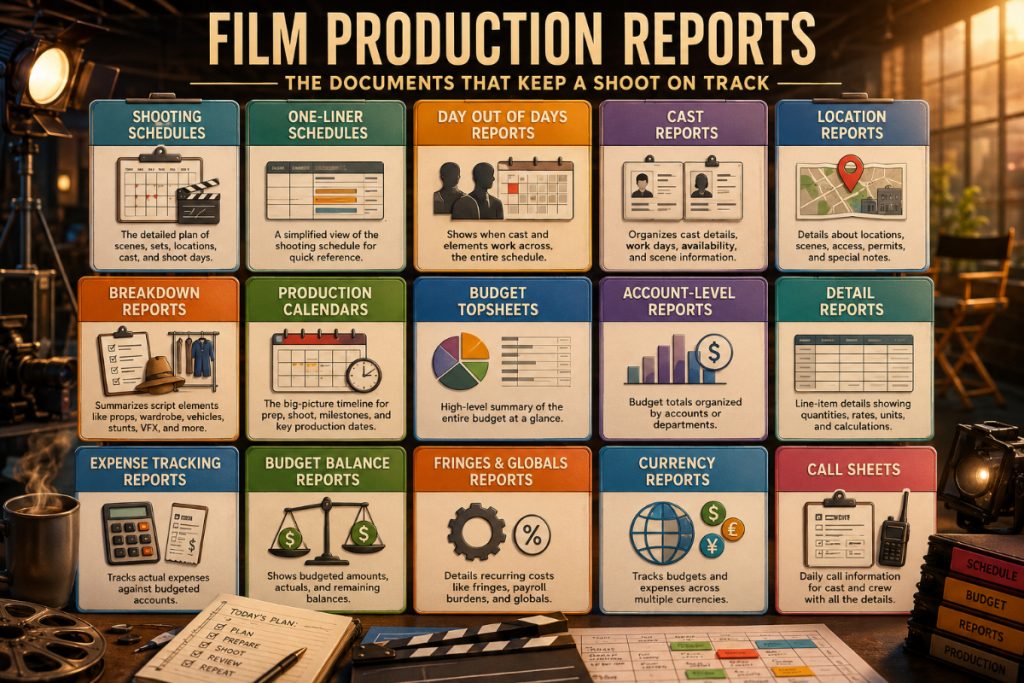
Film production reports turn the chaos of filmmaking into documents people can actually use. They help assistant directors organize the schedule, producers track progress, production managers plan resources, accountants understand costs, and department heads know what is coming next.
Without reports, a production can still move. But it moves like a shopping cart with one cursed wheel.
This guide explains the most important film production reports, what each one does, and how they work together to keep a shoot on schedule, on budget, and under control.
What Are Film Production Reports?
Film production reports are documents that organize important production information into a clear, usable format.
Some reports are created during pre-production. These help the team plan the shoot before cameras roll. Examples include shooting schedules, one-liner schedules, Day Out of Days reports, cast reports, location reports, breakdown reports, production calendars, budget topsheets, and call sheets.
Other reports become especially important during production. These help the team track what happened, what changed, what was completed, and how the production is performing against the plan. Examples include daily production reports, expense tracking reports, budget balance reports, and other cost reports.
The best reports do not merely summarize information. They help people make better decisions.
A shooting schedule helps determine the day’s work.
A Day Out of Days report helps manage actor and element work patterns.
A location report helps the team understand where the company is going.
A budget report helps producers see whether the plan is financially realistic.
A call sheet turns the schedule into daily instructions.
Each report is a different lens on the same production.
Why Production Reports Matter
A film production has too many moving parts to manage casually.
Cast availability changes. Locations shift. Weather interferes. Scenes move. Vehicles arrive late. A company move takes longer than expected. A night shoot runs heavy. A department needs more prep. A budget line starts glowing red like a haunted exit sign.
Reports help the team see these issues early.
Good reporting helps answer practical questions:
Are we shooting the right scenes in the right order?
Are cast members scheduled efficiently?
Are locations grouped logically?
Are breakdown elements being tracked?
Are departments prepared for upcoming scenes?
Are production costs matching the approved budget?
Are the daily plans being communicated clearly?
Without reports, these questions get answered through memory, hallway conversations, text threads, and heroic guesswork. That might work for a tiny shoot. It is not a reliable system for a professional production.
Reports create a shared source of truth.
Shooting Schedule
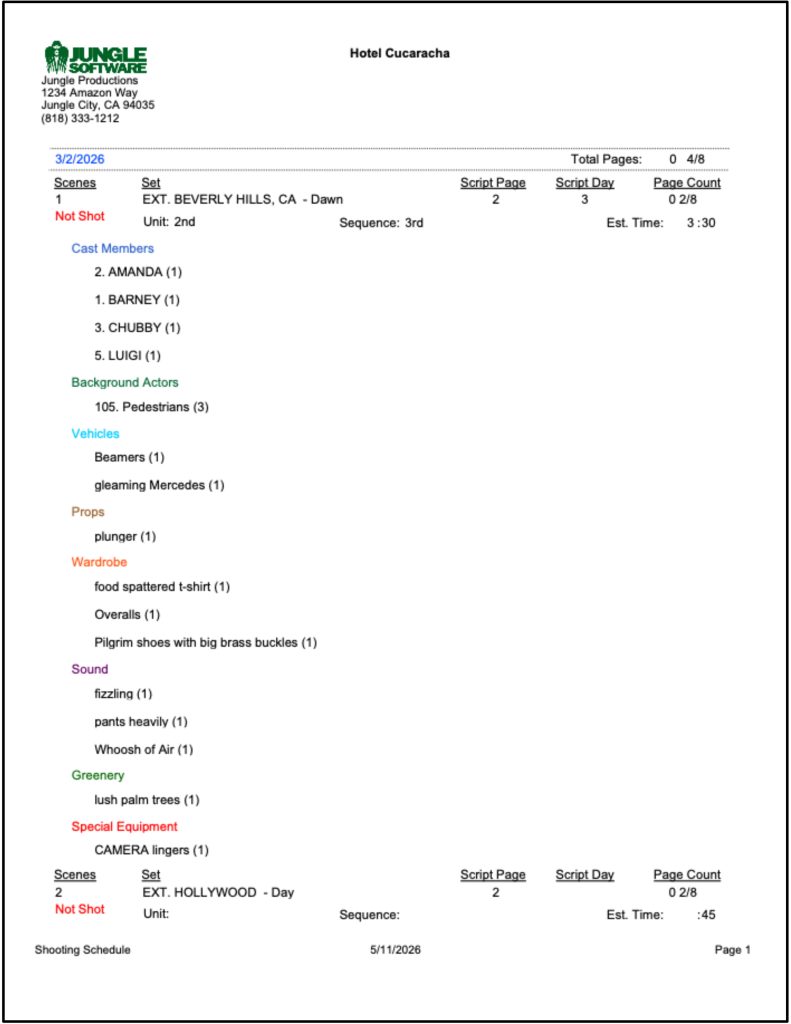
The shooting schedule is the master plan for what scenes will be filmed and when.
It usually includes scene numbers, sets, locations, day or night, page counts, cast requirements, shoot days, and notes. For assistant directors and producers, the shooting schedule is one of the most important documents in the production.
A good shooting schedule does more than arrange scenes. It balances creative priorities with production realities.
It helps determine:
Which scenes shoot on each day.
Which cast members are needed.
Which locations are grouped together.
How many script pages are planned per day.
Where company moves happen.
Which scenes may be difficult, expensive, or risky.
In Gorilla Scheduling, the shooting schedule comes from the stripboard workflow. Scenes can be organized into production strips, arranged on boards, sorted by criteria such as location, set, day/night, cast, and other elements, then reported in formats the production team can use.
👉 How to Schedule a Film Shoot
One-Liner Schedule
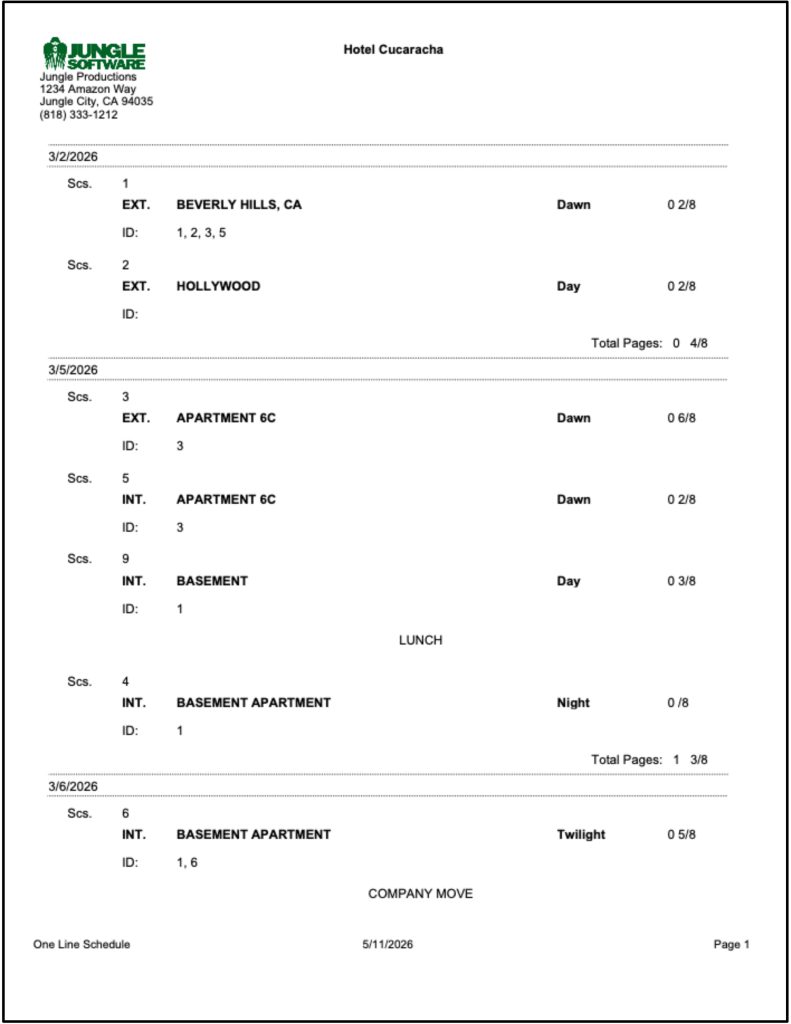
A one-liner schedule is a condensed version of the shooting schedule.
Instead of displaying every possible detail, it gives the team a quick overview of the shoot. It often includes shoot day, scene number, set, location, day/night, page count, and key cast or notes.
The one-liner is useful because not everyone needs the full stripboard or detailed shooting schedule every time they check the plan.
A director may use it to understand the creative flow.
A producer may use it to review production efficiency.
A department head may use it to prepare upcoming work.
A cast member may use it to see where their scenes fall.
The one-liner is the schedule’s pocket-sized cousin: compact, practical, and much less likely to start a meeting by accident.
👉 What Is a One-Liner Schedule in Film Production?
Day Out of Days Report
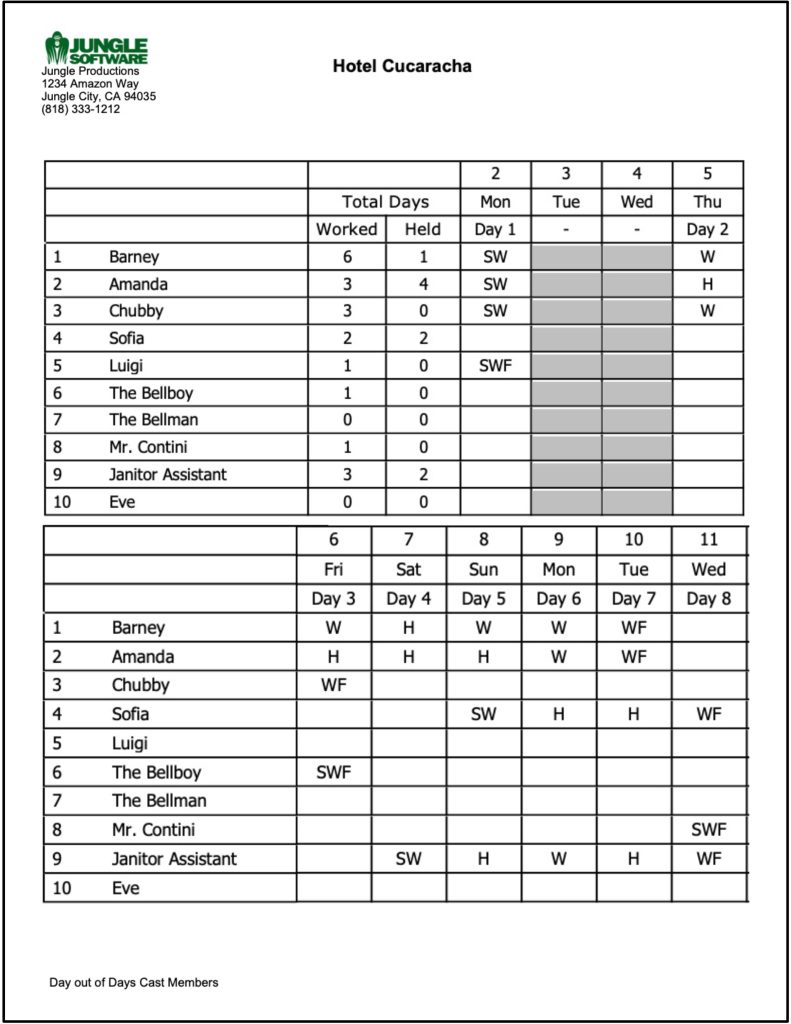
A Day Out of Days report, often called a DOOD, shows when cast members or other production elements work across the schedule.
For cast, a DOOD can show work days, hold days, travel days, start work, and finish work. For producers and assistant directors, this is essential because cast scheduling has a direct impact on cost, availability, and production efficiency.
But DOOD reports can also be useful beyond cast.
Gorilla Scheduling can create DOOD reports for cast and for breakdown element categories such as props, set dressing, costumes, background actors, visual effects, and more. That gives the production a clearer view of when important elements are needed throughout the shoot.
A DOOD helps answer:
How many days does each actor work?
Are cast days grouped efficiently?
Are there expensive gaps in the schedule?
Which props, costumes, or elements repeat across multiple days?
Can certain elements be scheduled more efficiently?
When linked with Gorilla Budgeting, Gorilla Scheduling’s DOOD totals can also help inform budget line day counts. That makes the DOOD more than a schedule report. It becomes a budgeting bridge.
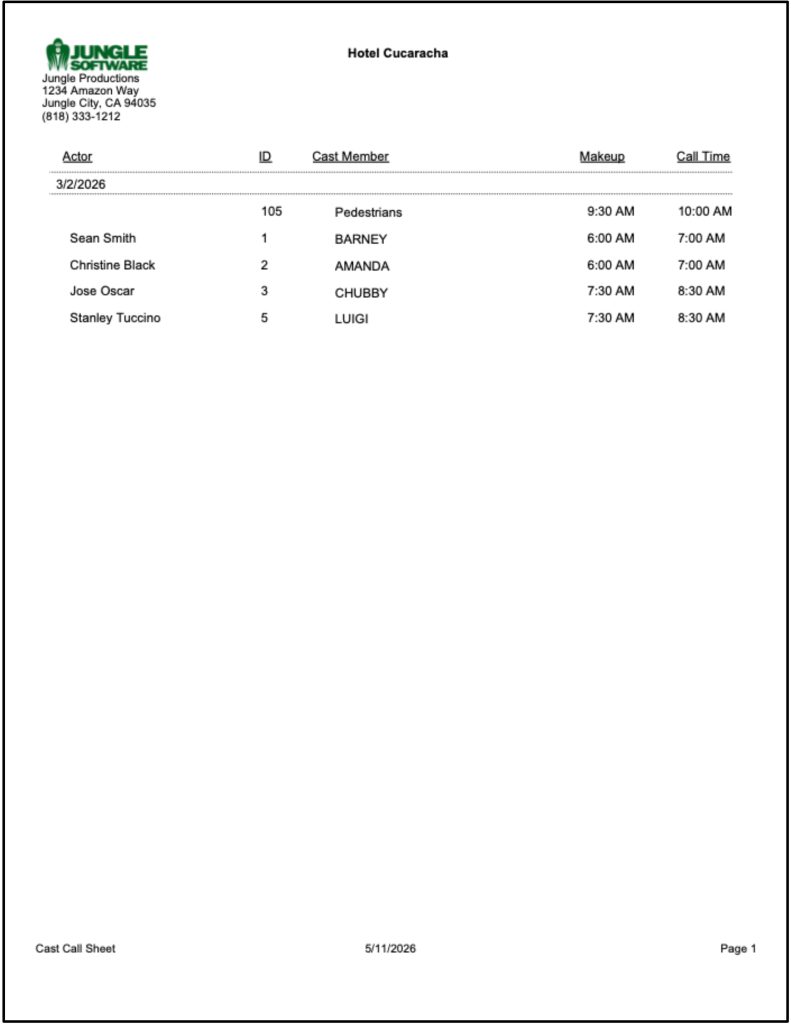
Cast Reports
A cast report organizes information about the performers required for the production.
Depending on the production, a cast report may include actor names, character names, scene appearances, work days, contact details, availability notes, start work, finish work, and other scheduling details.
Cast reports help the production team understand who is needed and when.
They are especially useful for:
Coordinating actor schedules.
Managing availability conflicts.
Reviewing cast-heavy shoot days.
Preparing call sheets.
Estimating actor-related costs.
Supporting Day Out of Days planning.
On a small shoot, this might be managed informally. On a larger production, cast information needs to be organized carefully because one actor conflict can ripple through the entire schedule like a dropped wrench in a quiet room.
👉 How to Schedule Actors for a Film Shoot
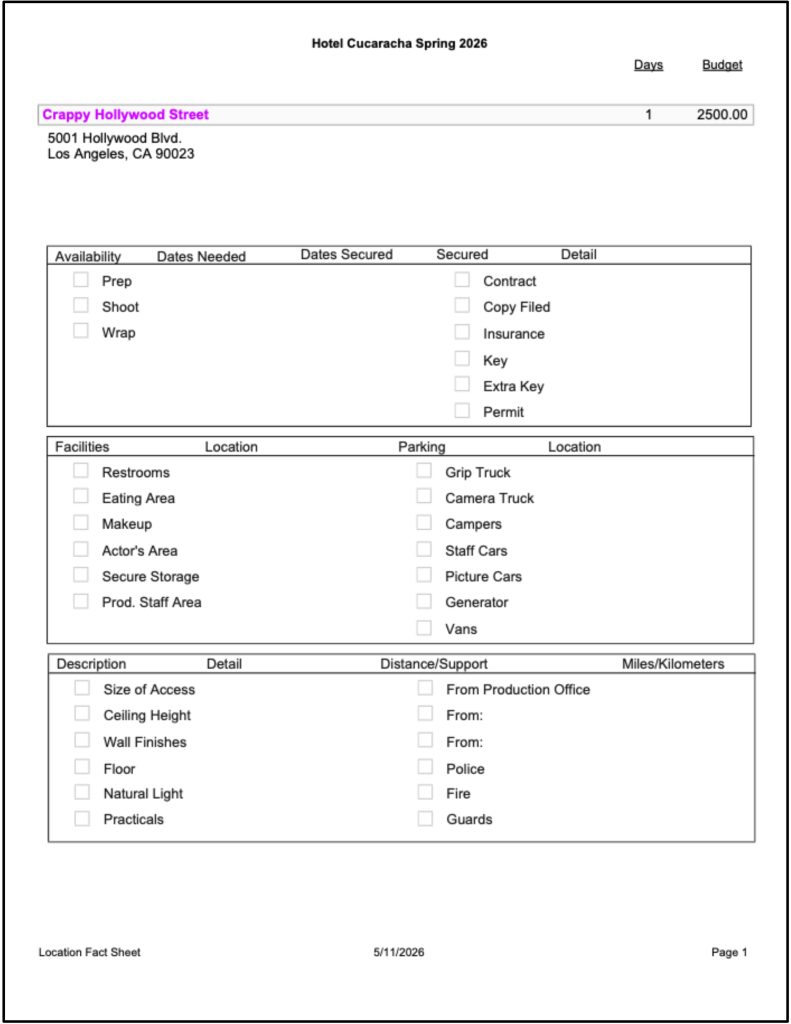
Location Reports
A location report organizes information about the places where scenes will be filmed.
Locations affect nearly every department. They influence transportation, permits, parking, holding areas, power, sound, company moves, weather planning, meal logistics, safety, and budget.
A useful location report may include:
Location name.
Scenes assigned to that location.
Interior or exterior status.
Day or night requirements.
Company move notes.
Permit or access details.
Contact information.
Special restrictions.
Related cast or department needs.
Location reports help producers and assistant directors see whether the schedule is grouping locations efficiently. They also help department heads understand what they need to prepare.
If three scenes are scheduled at the same location, the report helps keep that visible. If a location requires special access, police, fire safety, generators, parking, or weather backup, the team needs to know early.
👉 How to Schedule Locations for a Film Production
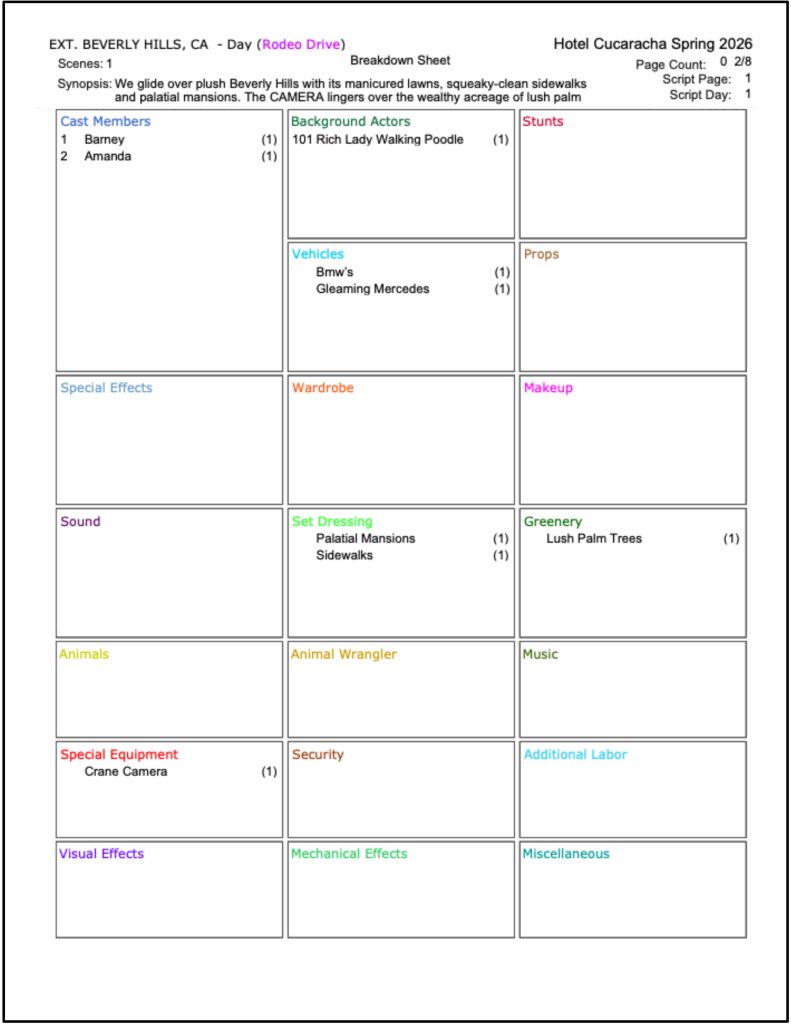
Breakdown Reports
A breakdown report summarizes the production elements identified in the script breakdown.
These elements may include cast, background actors, props, wardrobe, vehicles, animals, stunts, special effects, visual effects, makeup, set dressing, locations, and other scene-specific requirements.
Breakdown reports are useful because they help the team understand what the script actually requires.
A scene is not just “Scene 18.” It may be:
Three cast members.
Two picture vehicles.
Rain effects.
A police uniform.
A hero prop.
Background actors.
Night lighting.
A stunt coordinator.
A special effects note.
Breakdown reports make these elements visible before they turn into production-day surprises.
Gorilla Scheduling can help create breakdowns from screenplay data and organize breakdown elements so they can support scheduling reports, DOOD reports, and budgeting workflows.
👉 How to Break Down a Script for Film Production
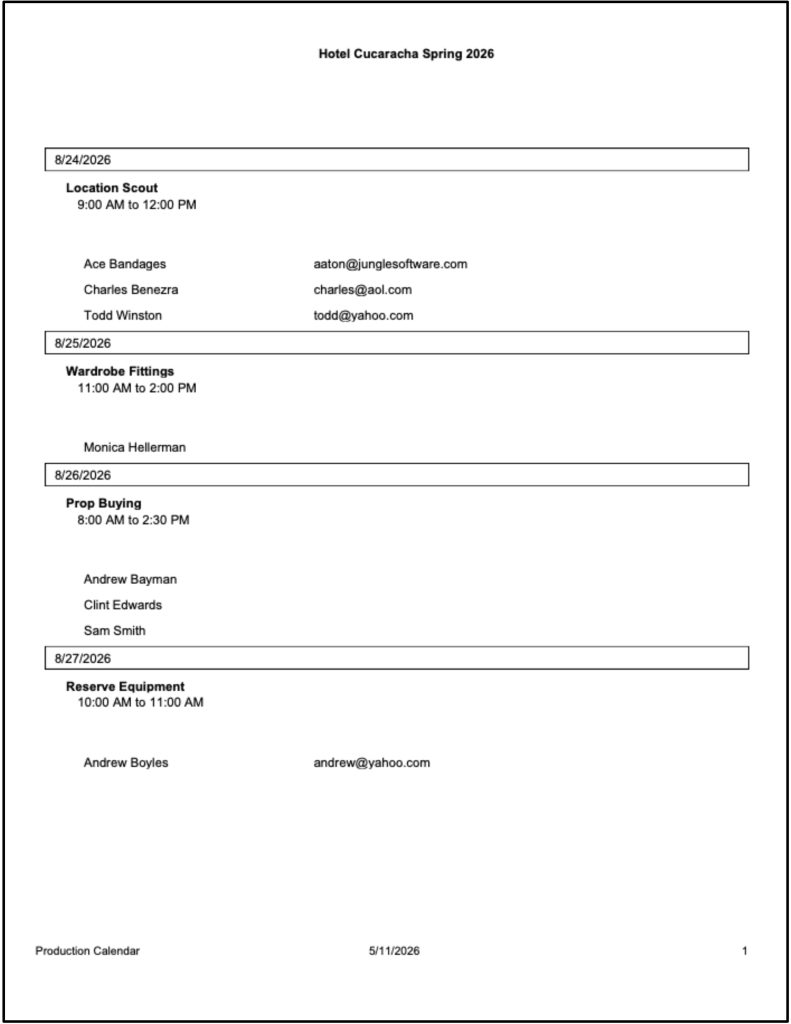
Production Calendar
A production calendar gives the team a broader view of the production timeline.
While the shooting schedule focuses on scenes and shoot days, the production calendar can help organize prep, shoot, wrap, rehearsals, travel, tech scouts, equipment pickups, location holds, cast fittings, deadline dates, and department milestones.
A production calendar is especially helpful because filmmaking does not begin on the first shoot day.
A location must be secured before the scene shoots.
Wardrobe may need fittings before cast arrives.
Props may need to be built, bought, or rented.
Equipment may need to be reserved.
Departments need deadlines, not just call times.
The production calendar helps everyone see what must happen before the work appears on the shooting schedule.
👉 What Is a Production Calendar in Film?
Call Sheets
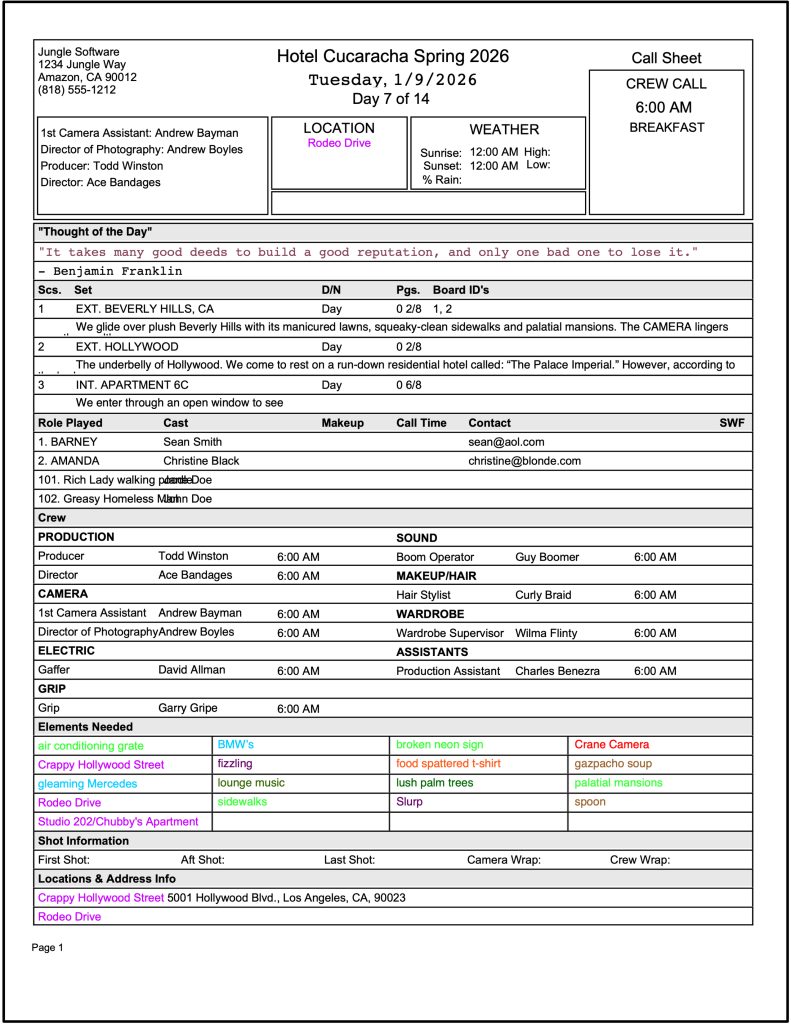
A call sheet turns the schedule into daily instructions for cast and crew.
It tells everyone where to go, when to arrive, what scenes are shooting, who is needed, who to contact, what the weather may be, where parking is located, and what special notes apply.
A call sheet is one of the most important daily production documents because it is the document most people on the crew actually see.
A strong call sheet usually includes:
Production title.
Shoot day and date.
Crew call time.
Location details.
Scene information.
Cast call times.
Department notes.
Weather.
Contacts.
Safety notes.
Meal information.
Parking or travel details.
Koala Call Sheets can generate call sheets from Gorilla schedules, which helps reduce duplicate data entry and keeps the daily plan connected to the schedule.
👉 What Is a Call Sheet in Film?
Budget Topsheet
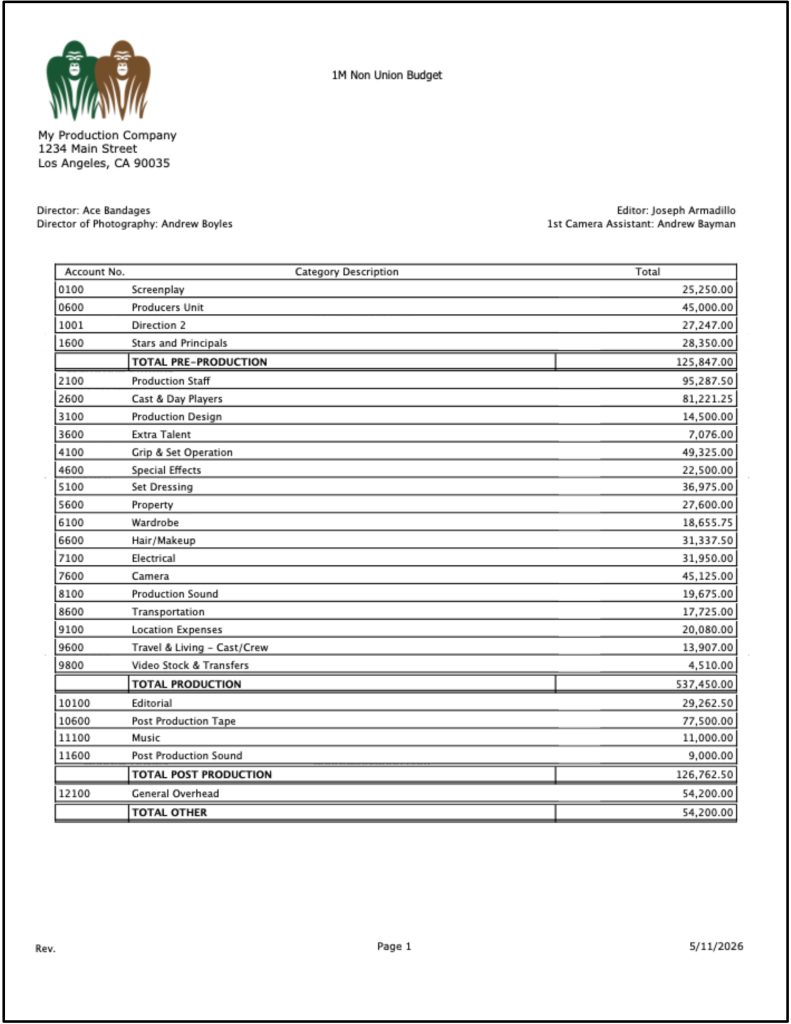
A budget topsheet is the high-level summary of a film budget.
It gives producers, financiers, and production managers a quick view of the major budget sections and overall cost. The topsheet does not usually show every detail line. Instead, it shows the big financial shape of the production.
A topsheet may include major categories such as above-the-line, production, post-production, insurance, contingency, and other high-level sections.
The topsheet is useful when decision-makers need to understand the financial picture without digging through every account and detail line.
In Gorilla Budgeting, the topsheet is part of a professional budget structure that includes Topsheet, Account, and Detail levels. This allows producers to move from the big picture down into account-level or detail-level information when needed.
👉 Film Budgeting Software: What to Look for Before You Choose
Account-Level Reports
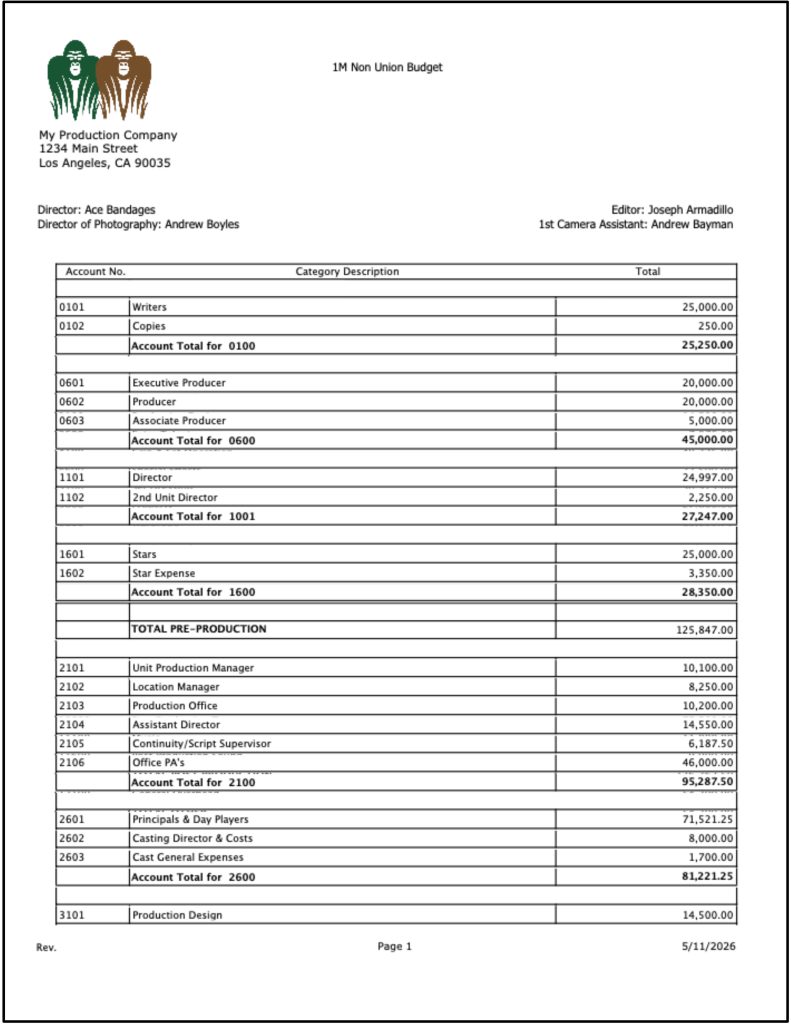
An account-level report shows the budget organized by production accounts.
This gives the team more detail than a topsheet, but less detail than a full line-item report. It is useful for reviewing department-level or account-level costs without getting buried in every individual expense.
For example, a producer might want to compare account totals for cast, camera, locations, transportation, art department, wardrobe, post-production, or insurance.
Account-level reports help answer:
Which departments are carrying the most cost?
Which accounts are changing?
Where might the budget need review?
Are certain sections higher than expected?
This is where the budget starts to become a management tool instead of just a summary.
Detail Reports
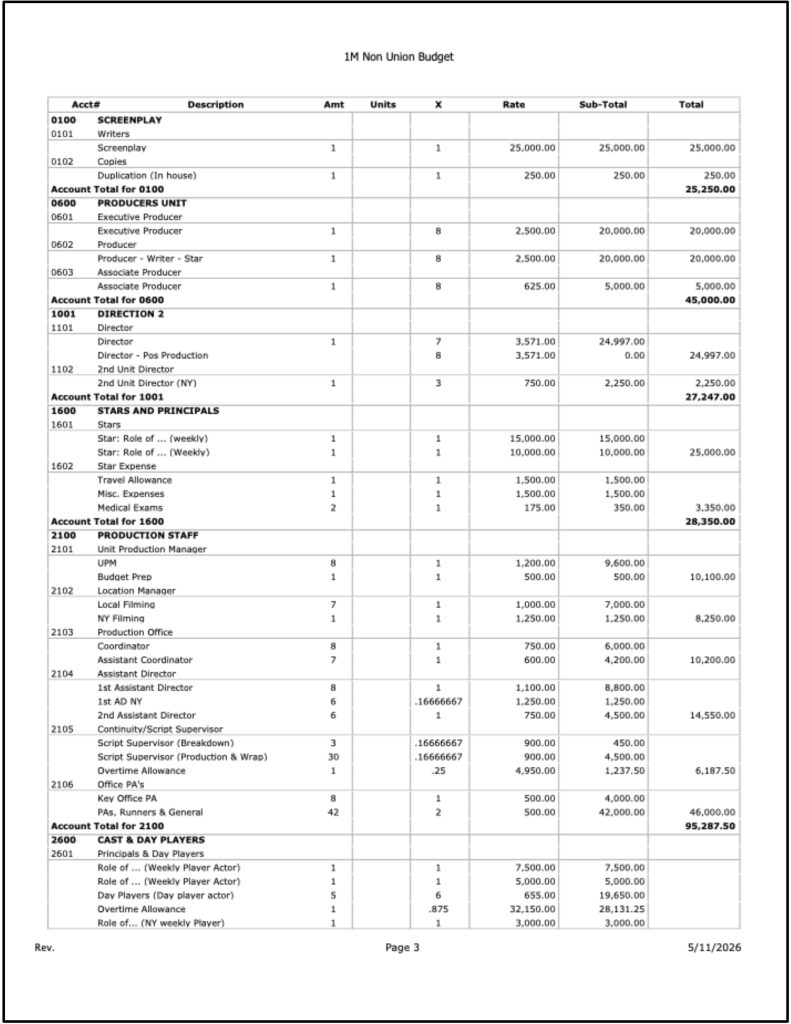
A detail report shows the individual budget line items that support the account totals.
This is where quantities, rates, units, days, notes, and calculations become visible. For producers, line producers, and production managers, detail reports are often where the real budget investigation happens.
A detail report can help explain why an account costs what it costs.
The camera account may not simply be “expensive.” It may include a camera package, lenses, support, operators, prep days, test days, or specialty gear. The locations account may include permit fees, location fees, police, fire safety, parking, holding areas, and company moves.
Detail reports make those costs visible.
They are especially important when reviewing assumptions, negotiating costs, or revising the budget.
👉 Film Budget Categories Explained
Expense Tracking Reports
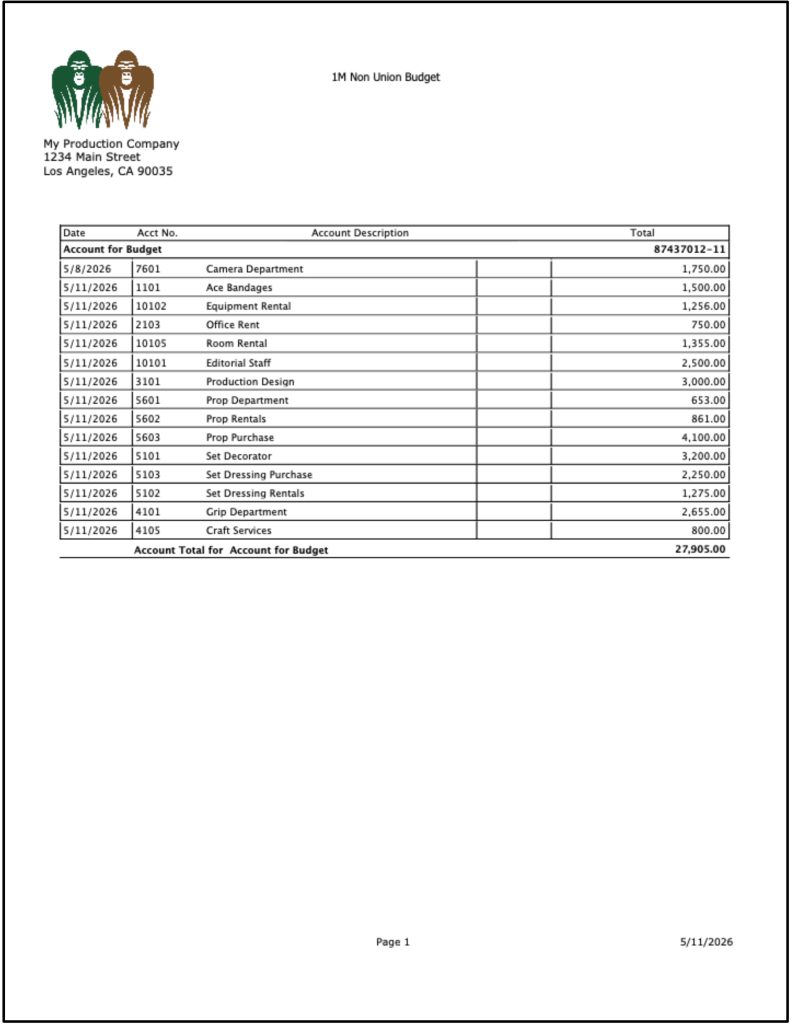
An expense tracking report compares actual spending against the budget.
This becomes especially important once production is underway. A budget is only useful if the team can understand whether spending is matching the plan.
Expense tracking reports can help producers see:
What has been spent.
Which accounts have activity.
Which costs are exceeding expectations.
Which departments need attention.
Whether actuals are tracking close to the approved budget.
Gorilla Budgeting includes an accounting module attached to the Account level, allowing expenses to be tracked against budgeted accounts. This helps the production compare budgeted costs with actual spending more clearly.
👉 Film Budgeting Software vs Spreadsheets
Budget Balance Reports
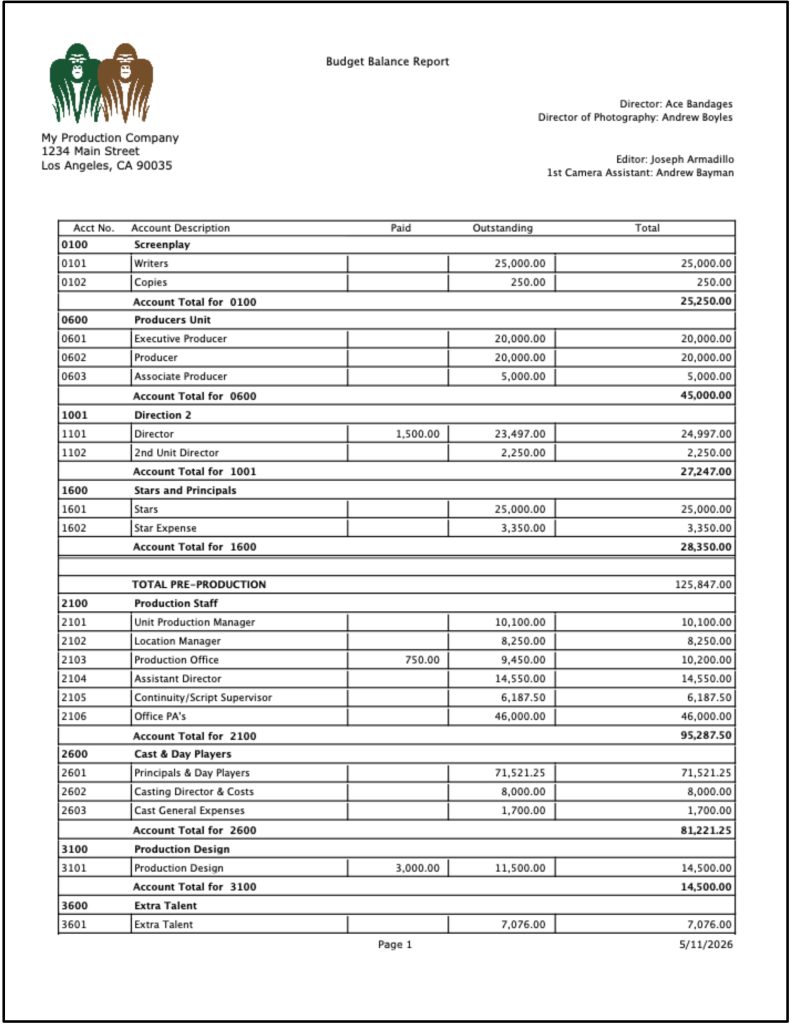
A budget balance report shows the budgeted amount, actual expenses, and remaining balance.
This is one of the most practical reports during production because it answers a direct question:
How much money is left?
A budget balance report helps identify whether a department still has room, whether an account is close to being spent out, or whether the production needs to make adjustments.
Gorilla Budgeting includes a Budget Balance report that compares budgeted amounts, expenses, and remaining balances. This gives producers a clearer view of where the production stands financially.
Without that kind of tracking, budget conversations can become foggy fast. Everyone has numbers. Nobody has the same numbers. The fog gets a clipboard and starts running the meeting.
Fringes and Globals Reports
Fringes and globals reports help explain recurring calculations in the budget.
Fringes often refer to payroll-related costs such as taxes, insurance, pension, health, workers compensation, or other percentage-based or flat-rate costs depending on the production.
Globals are reusable values that can affect multiple budget lines, such as shoot days, prep days, rates, mileage, hotel costs, per diem, or other repeated assumptions.
These reports are useful because they show the assumptions behind the budget.
If a global value changes, many budget lines may change.
If a fringe is applied incorrectly, the budget may be inaccurate.
If a payroll burden is missing, the production may be underestimating costs.
Gorilla Budgeting supports percentage and flat-rate fringes, along with globals, so recurring calculations can be managed in a more controlled way.
Currency Reports
Currency reports are useful when a production involves multiple currencies.
Not every project needs this. But when a production has international locations, foreign vendors, remote post-production, overseas travel, or co-production financing, currency tracking becomes important.
A currency report can help clarify which budget lines use which currency and how conversions are being handled.
This matters because multi-currency budgets can become confusing quickly, especially if one department estimates in U.S. dollars, another vendor quotes in Canadian dollars, and a post-production service uses a different currency.
Gorilla Budgeting supports multiple currencies, including the ability to specify different currencies per line item. Its Currency Report helps make those currency differences easier to review.
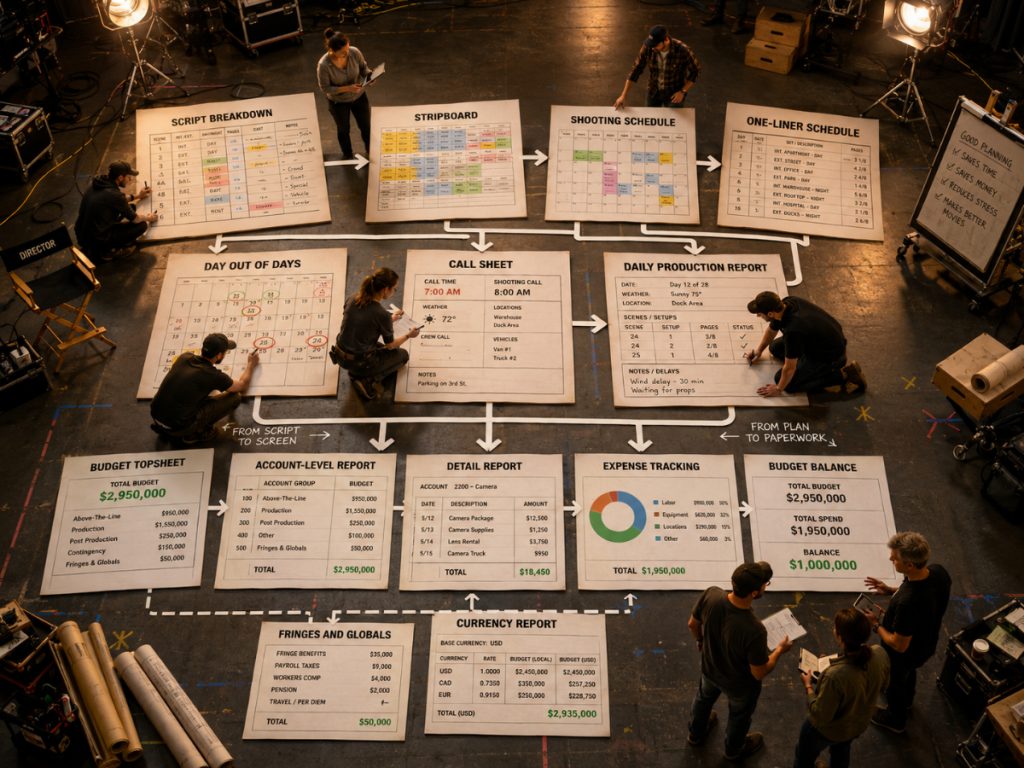
How These Reports Work Together
Film production reports should not feel like isolated paperwork.
They are connected.
The script breakdown feeds the stripboard.
The stripboard feeds the shooting schedule.
The shooting schedule feeds the one-liner, DOOD, cast reports, location reports, and call sheets.
The schedule also affects the budget.
The budget generates topsheet, account-level, detail, fringes, globals, currency, expense tracking, and budget balance reports.
The call sheet guides the shoot day.
The daily production report records what actually happened.
That is the full reporting chain.
When these reports are connected, the production team can make better decisions. When they are scattered across disconnected spreadsheets, PDFs, emails, and notes, the production spends more time hunting for truth than using it.
This is where professional film production software becomes useful. The value is not just “making reports.” The value is keeping the information behind those reports organized and consistent.
Where Gorilla Scheduling and Gorilla Budgeting Fit
Gorilla Scheduling and Gorilla Budgeting are built around the production reporting workflow.
Gorilla Scheduling helps filmmakers create breakdowns, production strips, stripboards, shooting schedules, Day Out of Days reports, actor records, location records, and scheduling reports. This supports the planning side of production, especially for assistant directors, producers, and production managers.
Gorilla Budgeting supports professional budget reporting, including Topsheet, Account Level Report, Detail Report, Tracking Expenses Report, Budget Balance Report, Globals Report, Fringes Report, Currency Report, and Credits Report.
When Gorilla Scheduling and Gorilla Budgeting are linked, schedule data can inform the budget. That includes importing cast, crew, locations, breakdown elements, rates when available, and DOOD totals into budget line day counts.
Koala Call Sheets can generate call sheets from Gorilla schedules, helping the production turn schedule data into a daily communication document.
Together, these tools help filmmakers move from planning to reporting without rebuilding the same information over and over.
If your production reports are scattered across spreadsheets, PDFs, email threads, and handwritten notes, it may be time for a more connected workflow.
Jungle Software offers tools for professional film scheduling, budgeting, and call sheets:
Gorilla Scheduling
https://junglesoftware.com/gorilla-scheduling/
Gorilla Budgeting
https://junglesoftware.com/gorilla-budgeting/
Koala Call Sheets
https://junglesoftware.com/koala/
Final Takeaway
Film production reports are not paperwork for the sake of paperwork.
They are the documents that help a production understand itself.
A shooting schedule shows the plan.
A one-liner summarizes it.
A DOOD shows work patterns.
Cast and location reports organize key production needs.
Breakdown reports reveal what the script requires.
Call sheets communicate the day.
Daily production reports record what happened.
Budget reports show what the plan costs and how spending is tracking.
The stronger the reports, the clearer the production becomes.
And on a film shoot, clarity is not a luxury. It is how the crew makes the day.
Questions or Comments?
Have a question about stripboards or film scheduling? Feel free to leave a comment below — or reach out if you want to learn more about how professional tools can streamline your workflow.