
JUNGLE SOFTWARE · FILM SCHEDULING GUIDE
Film Scheduling with Gorilla: From Screenplay to Shooting Schedule, Now Online
Learn how screenplay breakdowns, digital stripboards, shoot days, locations, cast, reports, and collaboration come together in Gorilla Scheduling Online.
A screenplay tells us what happens in the story. A shooting schedule tells the production how to make it happen. Between those two documents lies one of the most important parts of filmmaking: turning creative intentions into a workable plan.
It is tempting to schedule a film by reading the script and guessing how many scenes can fit into a day. But the scene that occupies half a page may require a complicated location, a large cast, specialized equipment, or an effect that takes hours to prepare. The four-page dialogue scene that follows might be filmed in one room with two actors. Page count matters, but it is only one piece of the scheduling puzzle.
Gorilla Scheduling Online brings the essential film scheduling workflow into a web browser. You can import a screenplay, break down scenes, arrange a stripboard, organize shoot days, manage cast and crew, and create production reports without installing desktop scheduling software. Production teams can also collaborate online, subject to their subscription plan and permissions.
1. Begin with the screenplay
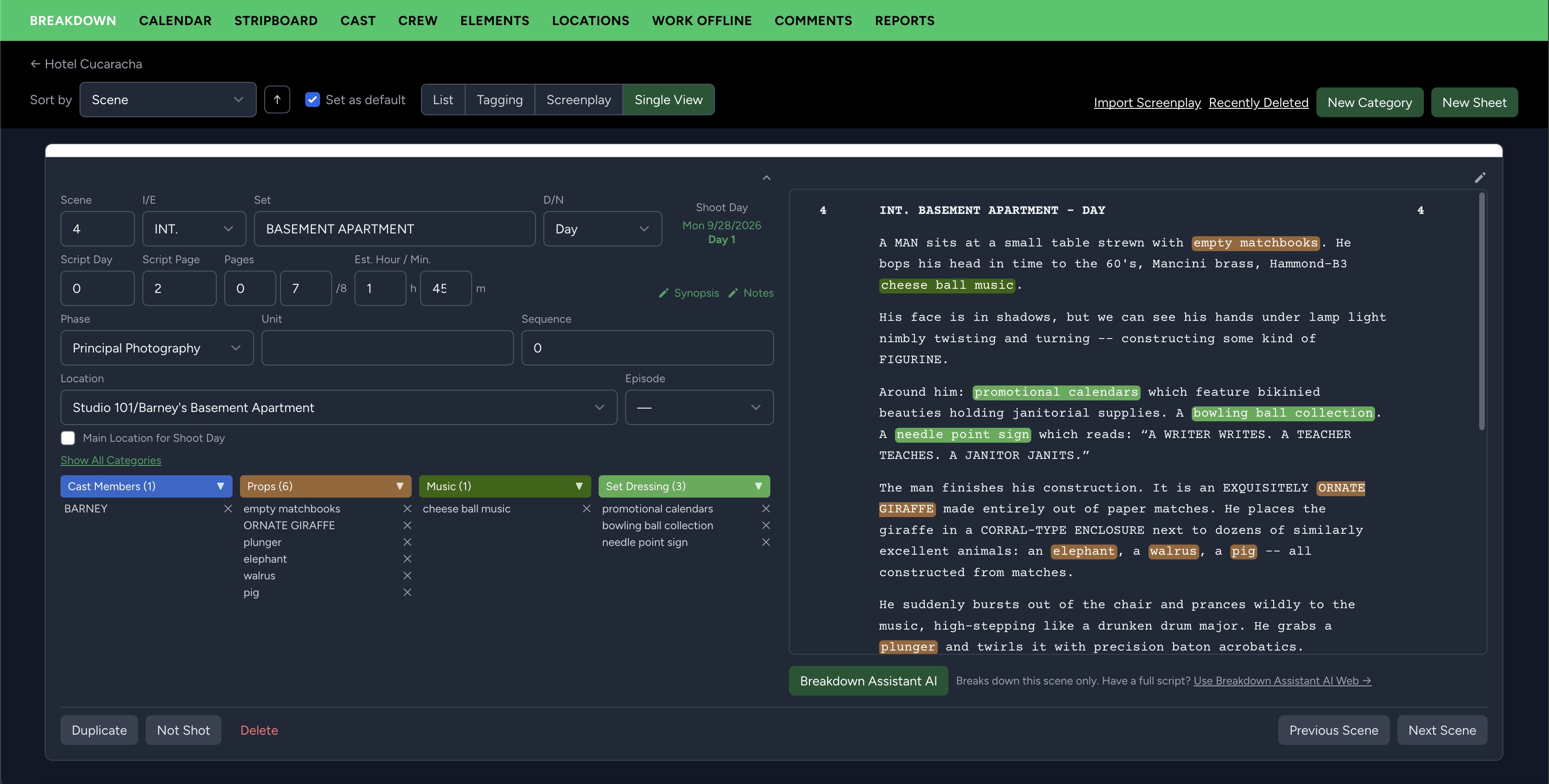
Scheduling starts by understanding the script. Gorilla Scheduling Online supports importing screenplays, including Final Draft (.fdx) and PDF files, so a project can begin with the scenes and information already written. The imported scene headings provide a framework for identifying interiors and exteriors, sets, day and night scenes, and other details the schedule will need.
Before rearranging a single scene, review the imported material. Check scene numbers, headings, cast references, and page counts against the original script. A well-organized breakdown begins with accurate source material, particularly when the screenplay has been revised during pre-production.
Scheduling principle: A screenplay is organized to create dramatic momentum. A shooting schedule is organized around people, places, logistics, and the time available. They serve different purposes, even when they describe the same scenes.
2. Break down the script, scene by scene
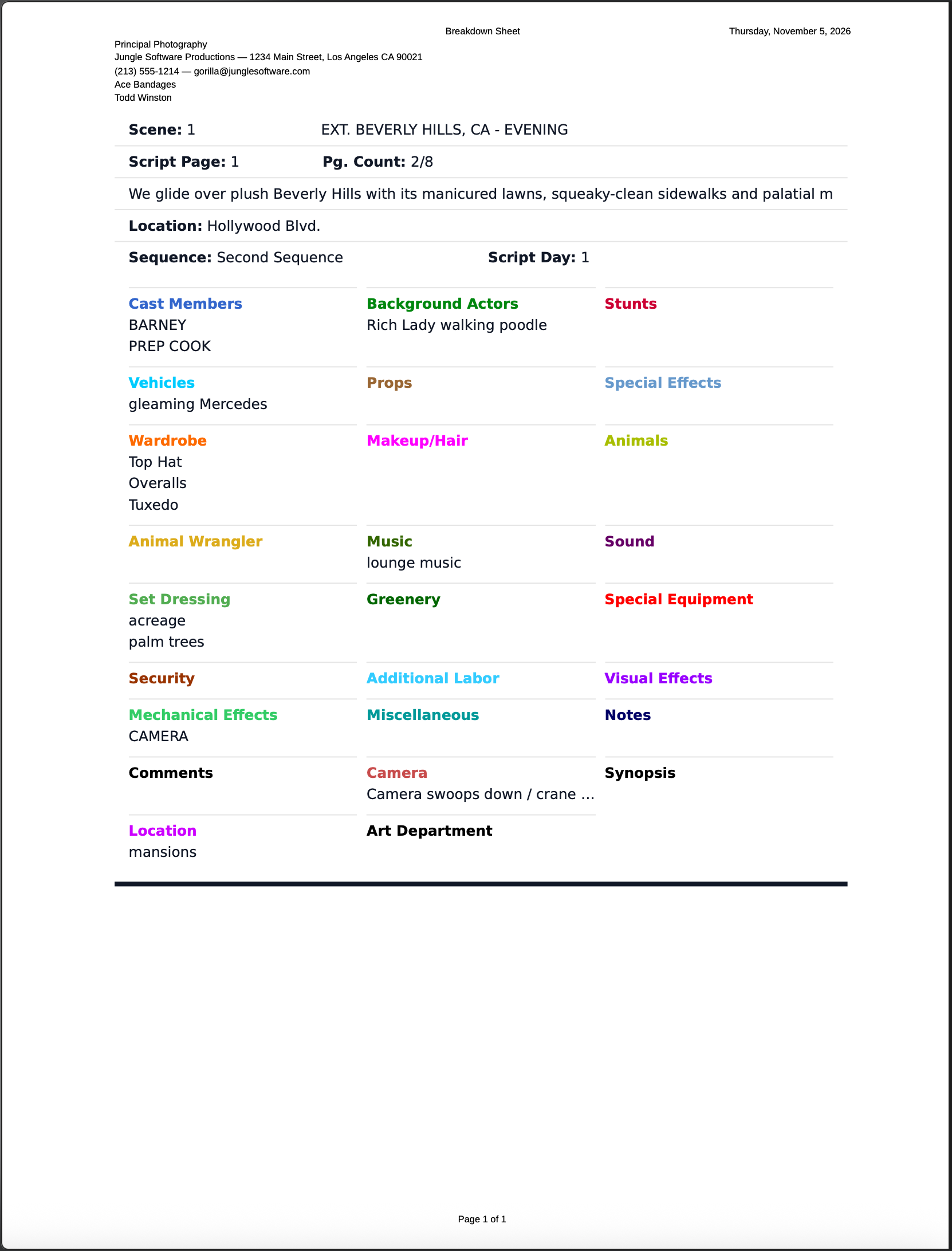
A script breakdown identifies what must be available to shoot each scene. The cast is only the beginning. Props, wardrobe, vehicles, background performers, special effects, set dressing, animals, and other requirements can affect the schedule just as much as the actors' availability.
Gorilla Scheduling Online keeps these production elements associated with their scenes. Rather than maintain separate notes that must later be reconstructed, the breakdown becomes part of the scheduling project.
- Cast: Who appears, speaks, or must be present for the scene?
- Props and set dressing: What must be prepared, purchased, built, or reset?
- Wardrobe and makeup: What continuity and preparation requirements affect the day?
- Vehicles, stunts, and effects: What resources demand additional time, permits, or safety planning?
- Locations: Where is the story set, and where will the scene actually be filmed?
Manual breakdown or AI-assisted first pass?
Some productions prefer to identify every element manually. Others want help making the first pass through the script. Breakdown Assistant AI can suggest production elements for review, helping the team identify items that might otherwise be overlooked. The production team remains responsible for checking and refining the breakdown before treating suggestions as scheduling requirements.
Breakdown Assistant AI is included with certain Gorilla Online subscription plans and available as an add-on for others. It is not required to perform a manual breakdown.
3. Build the stripboard: where the schedule takes shape
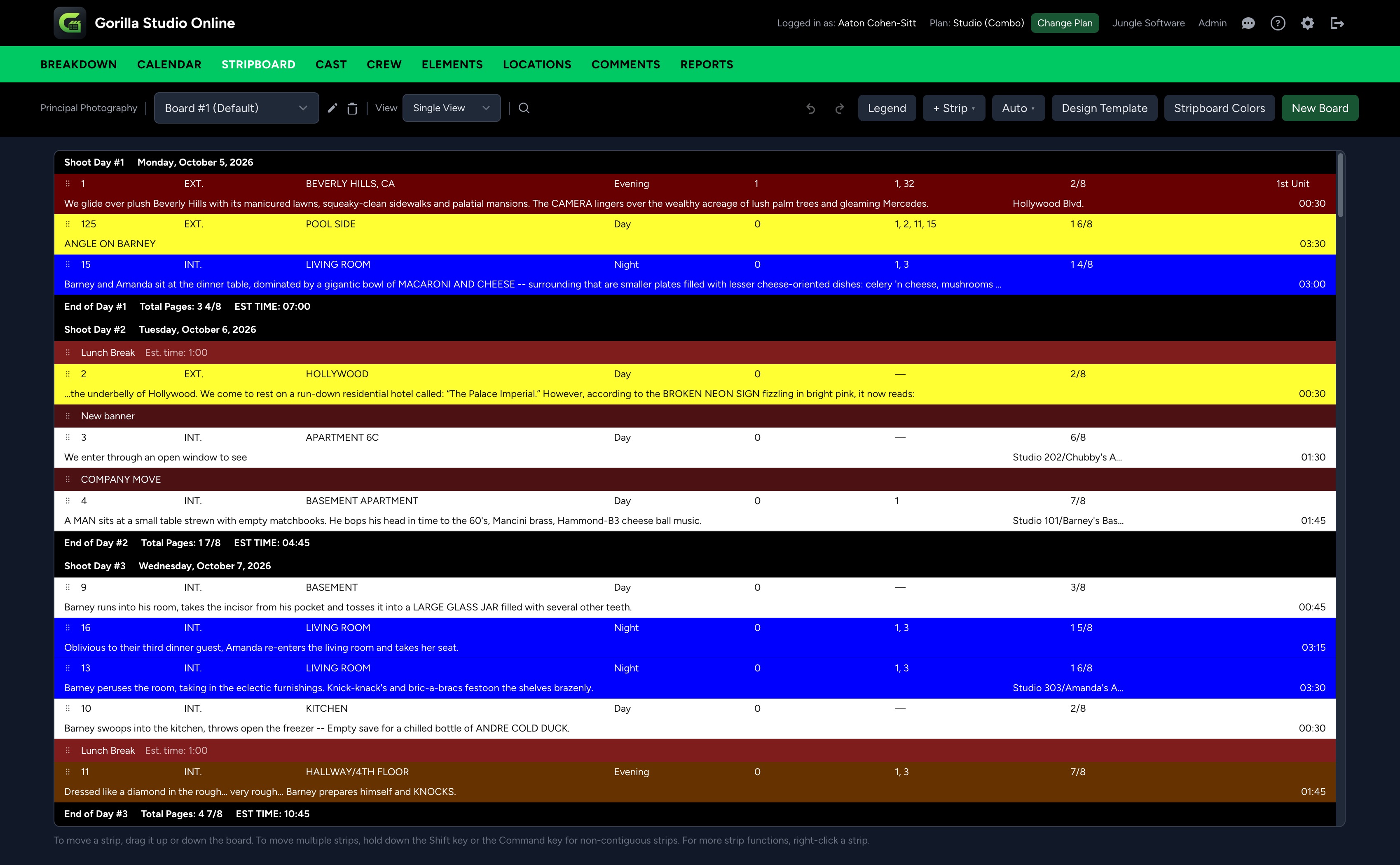
The stripboard has been a central scheduling tool for generations of filmmakers. Before digital scheduling, assistant directors and production managers used paper strips representing individual scenes. They could move the strips around a physical board to see how scenes might fit into shooting days.
Digital stripboards preserve that useful visual approach. In Gorilla Scheduling Online, you can arrange and rearrange scenes, group them into shoot days, and reconsider the order as practical constraints emerge. A schedule is rarely built perfectly on the first try. Cast availability changes; a location becomes unavailable; a difficult exterior must move to a different day. A flexible stripboard makes those changes easier to evaluate.
Why scene order changes during scheduling
Imagine a screenplay that returns to the same diner six times. Those scenes may appear at widely separated points in the story, but shooting them on the same day, or on nearby days, could reduce location costs, company moves, and setup time. That grouping must still account for cast, lighting, meal breaks, and the actual workload. Efficient scheduling is not simply putting every scene from one set together.
The stripboard helps you test those tradeoffs. Moving scenes visually is faster than repeatedly rewriting the shooting schedule by hand, and it helps the producer or assistant director explain scheduling choices to the rest of the team.
4. Understand the difference between a set and a location
One of the most important distinctions in production planning is the difference between the place named in the screenplay and the real place where cameras will roll.
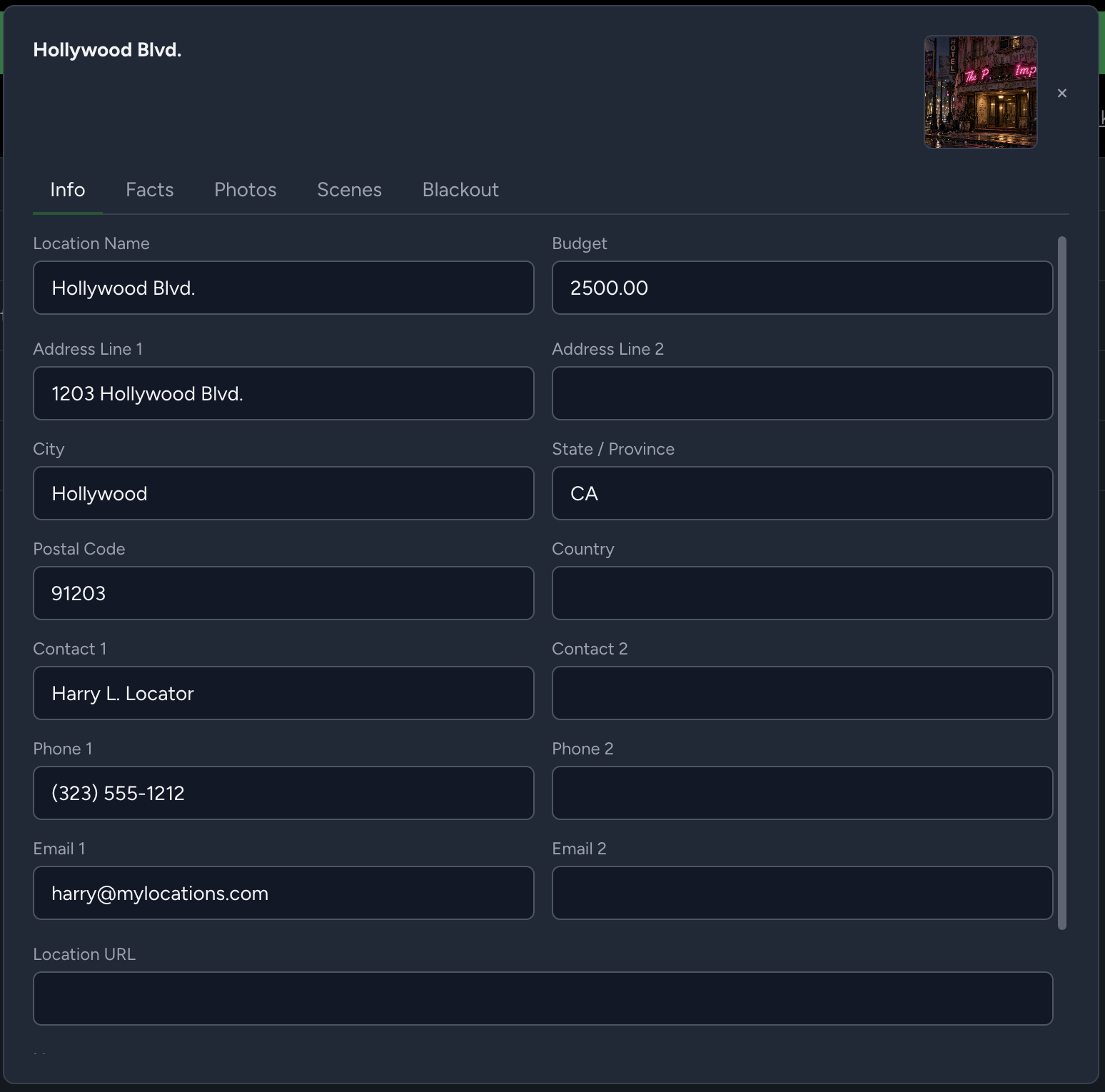
Consider the scene heading EXT. CENTRAL PARK – DAY. The screenplay's set is Central Park. But the production might actually shoot at a park in Los Angeles, on a backlot, or at another location chosen to represent Central Park. That physical shooting site is the location.
Why does it matter? You might have several screenplay sets inside one actual building, or one fictional set that requires more than one location. Tracking the real filming location lets the production plan access, transport, permits, equipment, crew movement, and location availability with fewer surprises.
Gorilla Scheduling Online provides tools to organize location information alongside the scenes and shoot days. Think beyond the location name: consider loading access, noise restrictions, parking, bathrooms, holding areas, and the time required to move from one site to another.
5. Organize shoot days around realistic constraints
Every shoot day is a balancing act. The number of scenes is not necessarily the best measure of how demanding the day will be. A short scene with a complicated stunt or a large group of background actors might require more preparation than several pages of simple dialogue.
When building a schedule, weigh the practical variables together:
People and availability
Actors' work dates, crew needs, performer restrictions, and the departments required for each scene.
Places and movement
Location access, company moves, travel time, permits, parking, and daylight conditions.
Scene complexity
Page counts, scene timing, effects, action, background performers, and the time needed for setup and resets.
Production priorities
Budget, weather contingencies, equipment availability, and scenes that must be grouped together.
Gorilla Scheduling Online lets you organize scenes into shoot days while keeping the stripboard connected to the scheduling project. The goal is not to force every day to contain the same number of script pages. It is to create a plan that the production can actually execute.
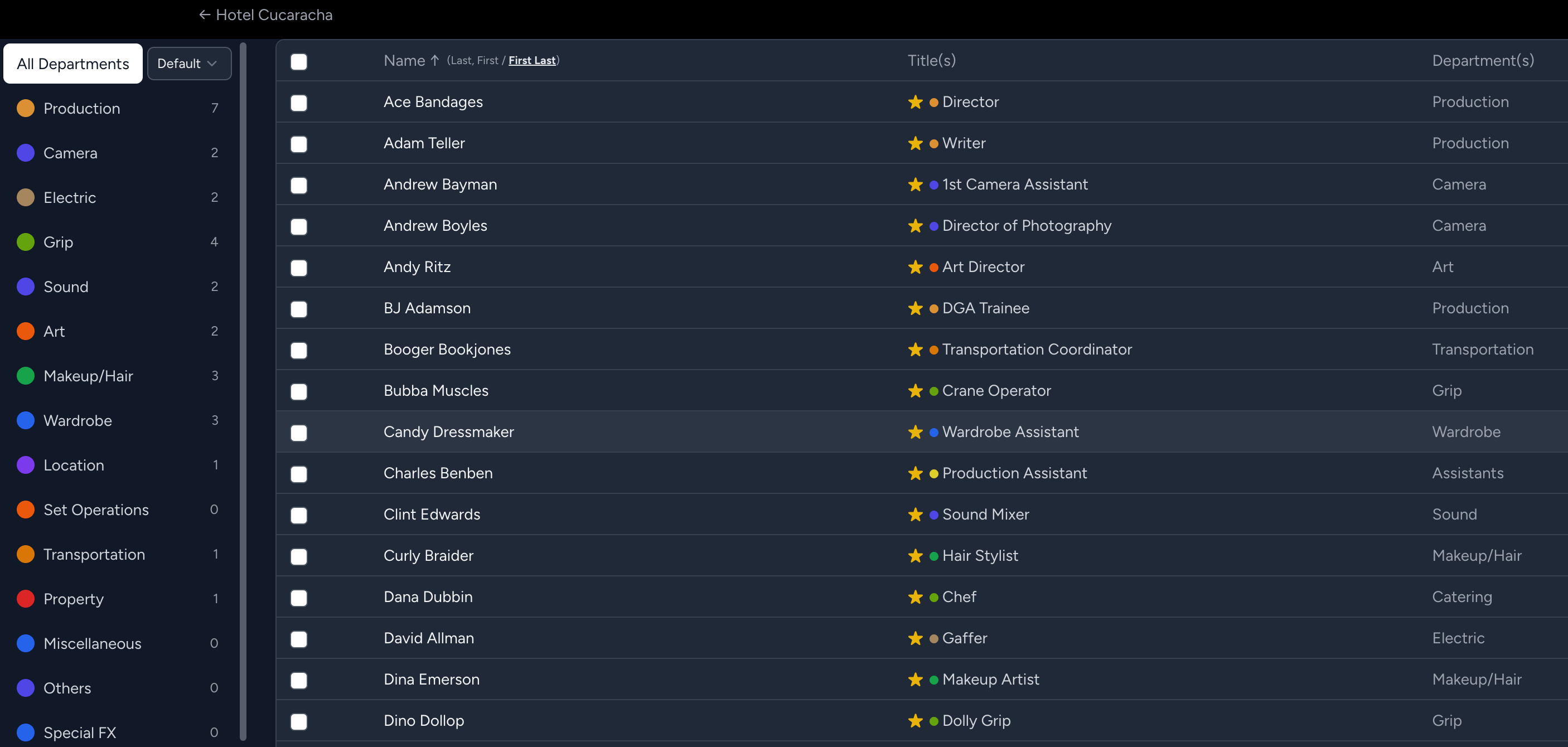
6. Manage cast, crew, and scheduling information
A good schedule is only as useful as the information behind it. Cast and crew availability, contact details, locations, and scene requirements all influence which days are workable. When that information is scattered across email threads, spreadsheets, and printed notes, even small changes become harder to manage.
Gorilla Scheduling Online keeps cast, crew, and production information within the scheduling environment. Depending on the subscription and permissions, members of the production team can access the shared project and collaborate on updates without continually passing separate scheduling files between computers.
7. Turn your schedule into production reports
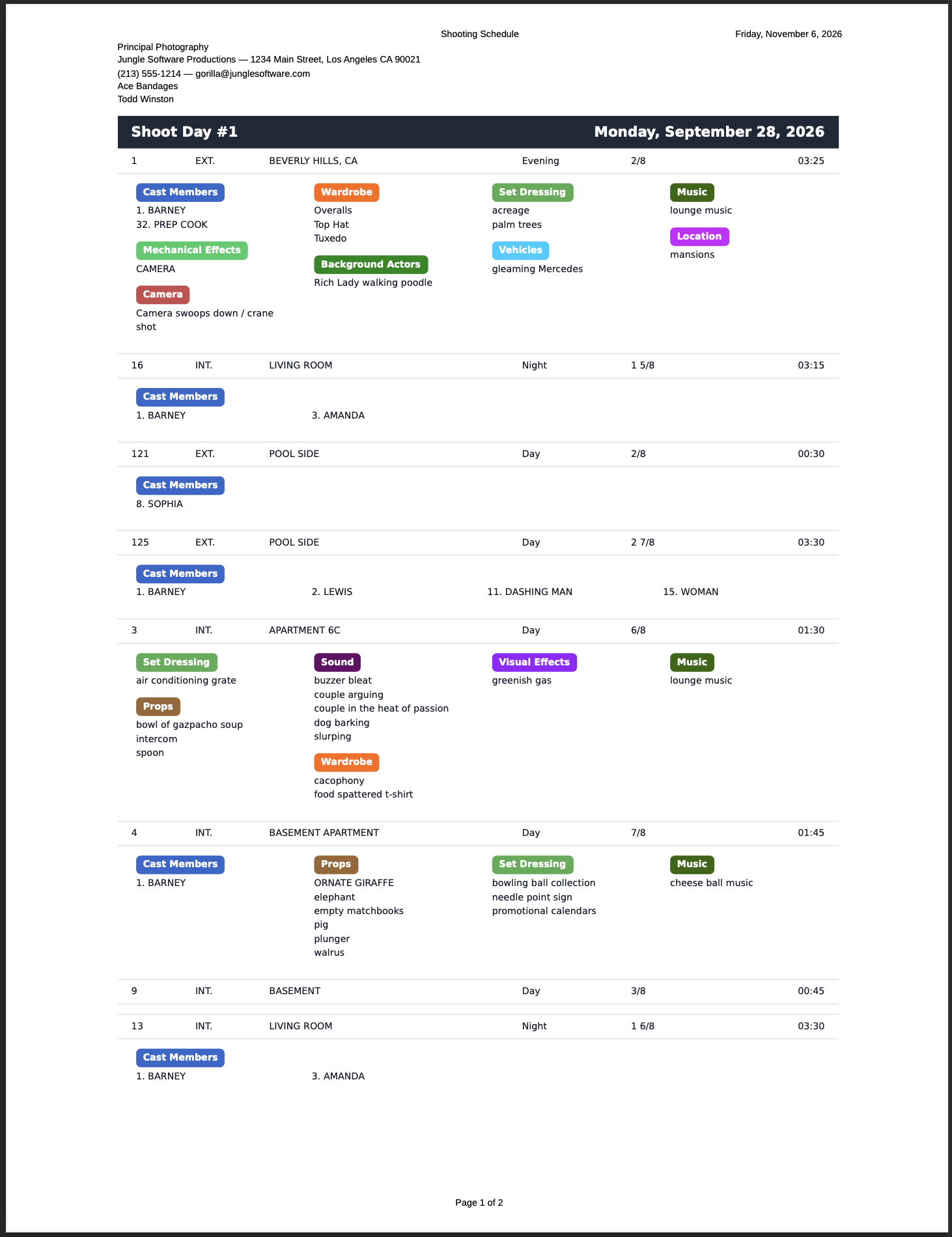
A stripboard may be where the schedule is developed, but the rest of the production needs clear documents. Actors need to know their work dates; department heads need to prepare their resources; producers need to review the plan and its implications.
Gorilla Scheduling Online can generate reports from project information, including shooting schedules, one-line schedules, breakdown sheets, cast Day Out of Days, element reports, location reports, and other production documents. Report availability and options can vary by plan.
Because these documents draw on the scheduling data, revising the plan does not have to mean manually rebuilding every report from scratch. It is still important to review the output for accuracy before sharing it with the crew.
8. Collaborate without passing project files back and forth
Productions rarely have one person making every decision. An assistant director may be adjusting the stripboard while a producer reviews the schedule and a production manager checks locations and availability. In a traditional file-based workflow, these activities can result in competing copies of the same project.
Gorilla Scheduling Online is browser-based and supports plan-dependent collaboration. Authorized team members can work with shared production information, helping everyone refer to the same developing schedule. Permissions and subscription limits matter, so check the relevant plan before inviting the full team.
For film schools, a web-based approach can also make it easier to teach professional breakdown and scheduling concepts without requiring students to manage desktop installations. Learn more about Gorilla Online for Film Schools.
9. What about storyboards and shot lists?
Scheduling answers when and where scenes can be filmed. Storyboards and shot lists answer a different question: how will the camera capture them?
For visual shot planning, Jungle Software offers a separate online application: Shot Monkey. It is designed for storyboards, detailed shot lists, camera setups, shot types, camera-movement overlays, and production-ready shot reports. These features belong to Shot Monkey, rather than the Gorilla Scheduling Online application.
For example, a director might use the shooting schedule to see that a tense conversation is planned for Tuesday, then use Shot Monkey to design the wide shot, alternating over-the-shoulders, and close-ups needed to cover the scene. The two activities serve the same production but solve different planning problems.
10. A connected approach to pre-production
Film scheduling is not an isolated task. The script influences the breakdown; the breakdown shapes the schedule; the schedule affects cast days, locations, crew needs, and the budget. Storyboarding then helps the creative team translate scenes into camera setups and coverage.
Within the Jungle Software ecosystem, Page One focuses on screenplay writing and revisions, Gorilla Scheduling Online handles breakdowns and production scheduling, Gorilla Budgeting Online supports production budgeting, and Shot Monkey supports visual shot planning.
These are distinct tools with complementary roles. The larger objective is simple: preserve the production thinking developed at each stage instead of starting over every time a screenplay moves closer to the camera.
Film scheduling is creative problem-solving
The best shooting schedule is not necessarily the one with the fewest days or the most scenes packed into every hour. It is the plan that allows the director, cast, and crew to do their best work while respecting real-world constraints.
That requires judgment, communication, and flexibility. Software cannot make those decisions for a filmmaker, but it can make the information easier to understand, rearrange, and share. That's the role Gorilla Scheduling Online is designed to play: helping production teams move from the screenplay to a clear, workable plan.
Ready to schedule your next production?
Start with your screenplay, organize the breakdown, build the stripboard, and turn the schedule into practical information for the whole production team.
Jungle Software product features and availability are subject to the current app version, subscription plan, and project permissions.