
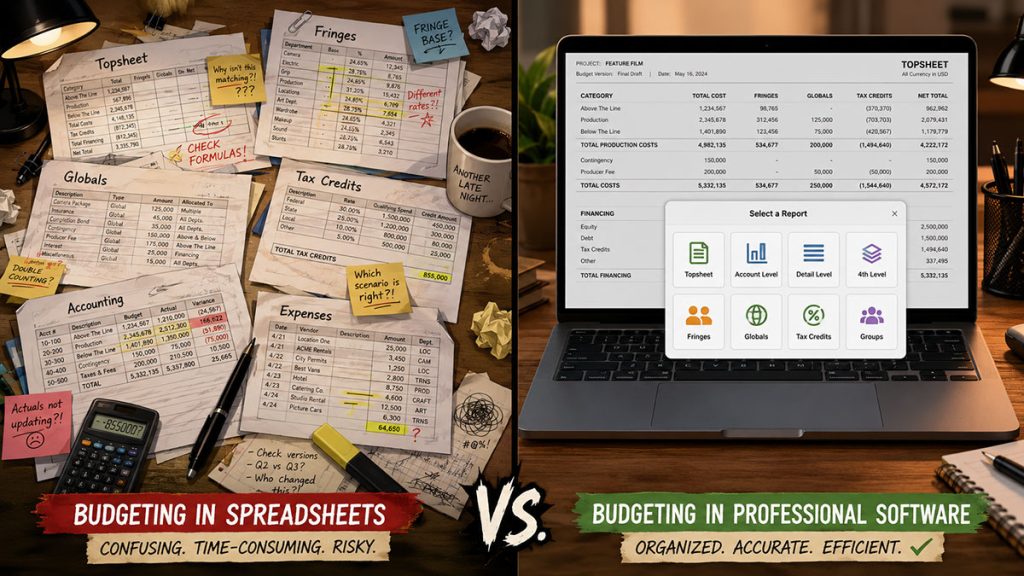
Every film budget starts as a question:
Can we afford to make this?
For a tiny project, the answer might live comfortably in a spreadsheet. A student film, short film, proof-of-concept, branded piece, or early estimate can often survive with a film budget template, a few formulas, and a producer who knows where everything is hiding.
But as the production grows, the budget stops being a simple list of costs.
It becomes a working production document. It has to organize departments, track account numbers, calculate fringes, handle globals, compare budgeted costs against actual expenses, support schedule-based day counts, and generate reports that other people can understand.
That is where the spreadsheet starts to creak like an overloaded grip truck.
This guide compares film budgeting software vs spreadsheets from a practical production point of view. The goal is not to declare spreadsheets “bad.” They are useful, familiar, and sometimes exactly the right tool. The real question is: when is a spreadsheet enough, and when does dedicated film budgeting software become the safer professional choice?
Why Spreadsheets Are Such a Common Starting Point
Spreadsheets are popular because they are immediate. Most producers, filmmakers, production managers, and students already know the basics of Excel or Google Sheets. You can open a template, change line items, adjust quantities, and quickly build a rough budget without learning a new system.
That makes spreadsheets especially helpful during the earliest stage of planning.
If you are estimating a short film, exploring whether a screenplay is financially possible, preparing a pitch, or sketching out a low-budget production, a spreadsheet can be perfectly reasonable. It gives you a fast way to think through costs before the production structure becomes more formal.
A spreadsheet is also useful for department-level detail. A production designer, costume designer, location manager, or post supervisor might want their own cost breakdown before those numbers are folded into the master budget.
In other words, spreadsheets are not the enemy. They are often the first sketch on the napkin before the blueprint arrives.
For filmmakers still learning the basics, a strong template can be a great place to begin.
👉 Film Budget Template in Excel
When a Film Budget Template Is Enough
A film budget template can be enough when the project is small, the cost structure is simple, and only a few people need to work from the budget.
For example, a spreadsheet may work well for:
A short film with a small cast and crew.
A student production with limited departments.
A self-funded indie project in early development.
A rough estimate before a script breakdown is complete.
A quick comparison between production approaches.
A department-specific estimate that feeds into a larger budget.
The key word is simple.
If your budget is mostly a list of expenses, a spreadsheet can do the job. You can group costs by department, use formulas for totals, and create a basic topsheet. For a small production, this may be all you need.
The problems usually begin when the budget has to behave like a professional production system rather than a flexible worksheet.
A spreadsheet can tell you what you typed into it. It cannot always protect you from the thing you forgot to connect.
Where Spreadsheets Start to Break Down
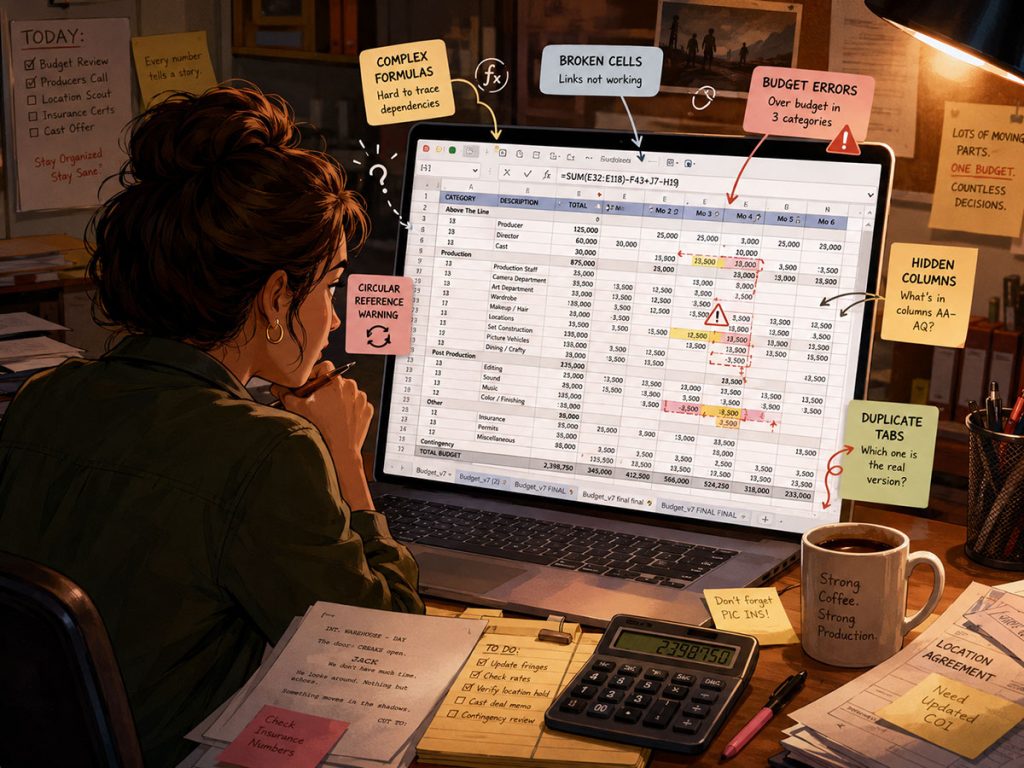
Spreadsheets become risky when too much of the budget depends on manual organization.
One broken formula can distort a department total. One copied range can leave out a line item. One fringe calculation can be applied to the wrong account. One outdated version can travel through email while the producer, production manager, and accountant are all looking at different numbers.
This is where spreadsheet budgeting becomes less about math and more about version control, formula maintenance, and institutional memory.
On a professional production, the budget is not just a private planning document. It may need to be reviewed by producers, financiers, department heads, accountants, production managers, and sometimes unions, agencies, or studios. The more people who rely on the budget, the more dangerous it becomes when the structure is hidden inside custom tabs and formulas.
A spreadsheet can be flexible. Too much flexibility, however, can become a trapdoor.
👉 Film Budgeting Software: What to Look for Before You Choose
Professional Budget Structure: Topsheet, Account, and Detail
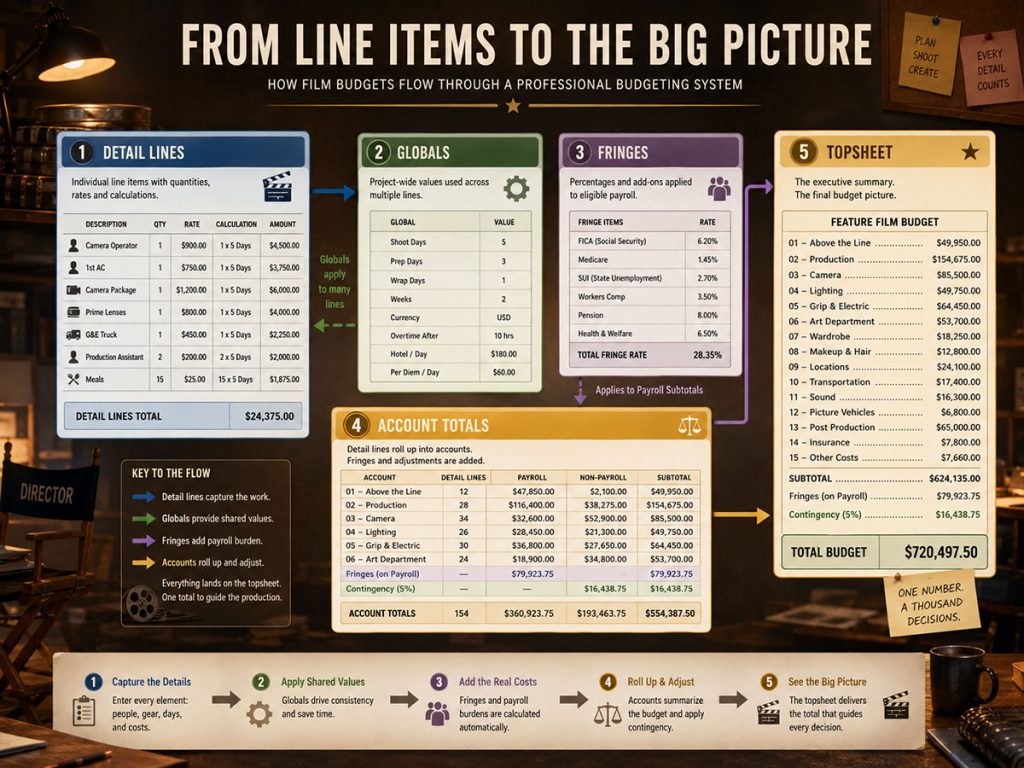
One major difference between film budgeting software and a spreadsheet is structure.
A professional film budget usually needs more than a long list of costs. It needs a hierarchy that allows producers to move from the big picture down to the smallest line item.
A common structure looks like this:
Topsheet: The high-level summary of major budget sections.
Account level: The organized production accounts inside each section.
Detail level: The individual costs, quantities, rates, units, and notes that support each account.
This structure matters because different people need different levels of information.
A financier may want the topsheet.
A line producer may need account-level totals.
A production manager may need detail-level support.
An accountant may need to track actual expenses against the correct accounts.
In a spreadsheet, you can build this manually, but you have to maintain the structure yourself. In dedicated film budgeting software, that hierarchy is part of the system.
For example, Gorilla Budgeting uses a professional three-level budget structure: Topsheet, Account, and Detail. That allows the budget to stay organized as the project grows, instead of becoming a patchwork of tabs, links, and custom formulas.
Gorilla Budgeting also supports an optional fourth level by allowing Excel files to be imported as fourth-level detail under an account. That is a useful middle ground: department spreadsheets can still exist, but they can sit beneath the main professional budget structure rather than replacing it.
👉 Film Budget Categories Explained
Fringes and Globals: Why Spreadsheet Formulas Get Risky
Fringes and globals are where many film budget spreadsheets begin to wobble.
A simple budget may only need line item totals. A professional budget often needs to calculate payroll-related costs, union-related costs, insurance, taxes, pension, health, vacation, holiday pay, or other fringes depending on the production.
Some fringes may be percentage-based. Others may be flat-rate. Some may apply to certain labor lines but not others. Some may be capped or calculated differently depending on the category.
Then come globals.
Globals are reusable values that can affect multiple areas of the budget. For example, you may want to define a standard shooting day rate, mileage rate, prep week count, box rental, per diem, currency conversion, or other recurring value. Change the global, and the related budget lines can update.
In a spreadsheet, these calculations are possible, but they require discipline. Formulas must be built correctly, protected carefully, and updated consistently. A filmmaker who is not used to production budgeting may not even realize which lines should be fringed and which should not.
Dedicated film budgeting software is designed to make these calculations more controlled.
Gorilla Budgeting supports both percentage and flat-rate fringes, along with globals, so repeated values and production-wide calculations can be managed more cleanly. This does not remove the need for budgeting knowledge, but it gives that knowledge a safer structure to live in.
Department-Level Detail Still Matters
One reason filmmakers like spreadsheets is that they are easy to customize.
A costume department might want notes about rentals, purchases, alterations, multiples, cleaning, and returns. A production design team may want a detailed breakdown by set. Locations may need permit fees, police, fire safety, parking, holding areas, and company moves.
Those details matter.
The mistake is assuming that the master production budget has to become an enormous spreadsheet just because departments need detail. On larger productions, department-level detail should support the budget without turning the main budget into a labyrinth.
This is where a hybrid approach can work well.
A department can still prepare detailed Excel files. Those files can then be imported or attached beneath the correct account in the main budget. In Gorilla Budgeting, Excel files can be imported as fourth-level detail under a budget account, which allows the production to preserve department detail while keeping the main budget structure organized.
That is the sweet spot: spreadsheets where they are useful, budgeting software where control matters.
Why Schedule Integration Matters
A film budget is never truly separate from the schedule.
If the schedule changes, the budget changes.
Add a shooting day, and crew costs may increase. Move scenes to night, and rates or premiums may change. Add cast work days, and payroll changes. Increase location moves, and transportation, location fees, and company move costs may shift.
This is why schedule integration can be so valuable.
A spreadsheet budget often depends on manually transferring information from the schedule into the budget. That means someone has to count days, update cast work, track locations, review breakdown elements, and make sure the numbers are still accurate after every schedule revision.
That manual transfer is a classic budget gremlin. It looks harmless until it eats three shoot days.
When scheduling and budgeting tools can communicate, the production has a better chance of keeping the budget aligned with the actual plan.
Gorilla Scheduling can link to Gorilla Budgeting, allowing budgeting data to be informed by the schedule. Gorilla Budgeting can import cast, crew, locations, and breakdown elements from a linked schedule. When rates are available in Gorilla Scheduling, those rates can also be imported into budget detail lines.
This can save time, but more importantly, it reduces the risk of building a budget from stale schedule information.
👉 How to Turn a Script Breakdown Into a Film Budget
DOOD Totals and Budget Line Counts
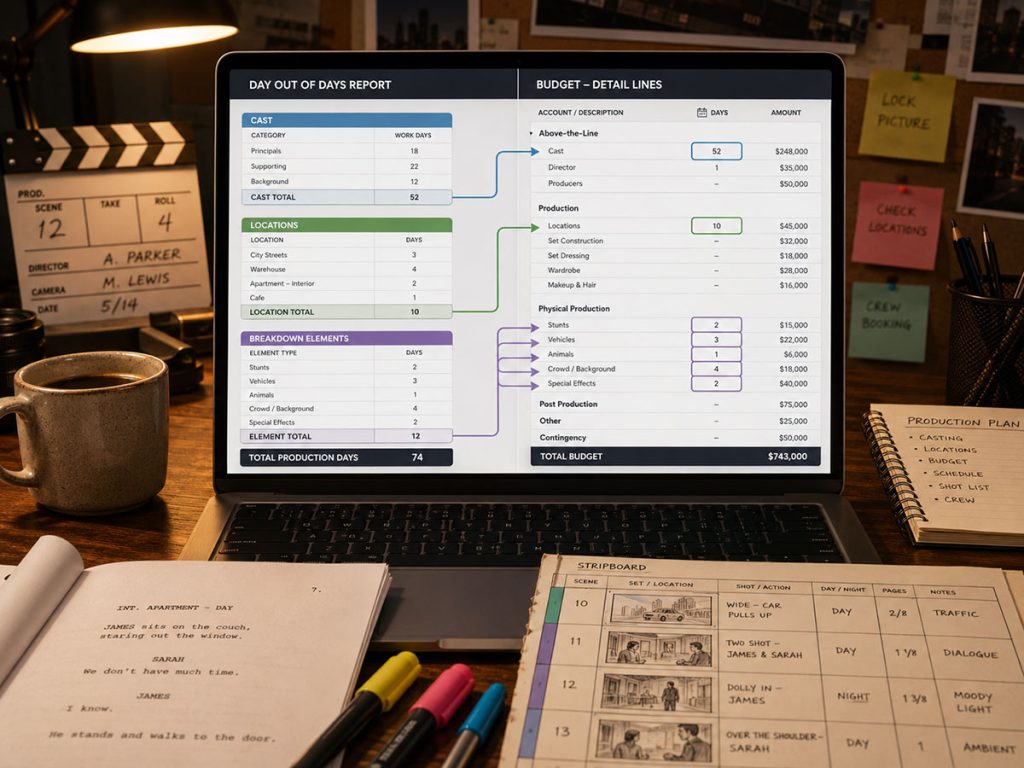
A Day Out of Days report is one of the most important bridges between scheduling and budgeting.
A DOOD report shows when cast members or other production elements work across the shooting schedule. For budgeting, those totals can be extremely useful because many costs are driven by the number of days someone or something is needed.
If an actor works 12 days, that affects the actor’s compensation, fringes, travel, lodging, per diem, and sometimes other related costs. If a picture vehicle appears across multiple shoot days, that affects rental days, transport, and insurance. If a special effect appears several times, the cost may depend on the number of use days or prep days.
In a spreadsheet workflow, the producer or production manager often has to take those totals from the schedule and manually enter them into budget lines. That is workable on a small project, but it becomes more fragile as the schedule changes.
Gorilla Budgeting can import DOOD totals from a linked Gorilla schedule into budget line day counts. This is a practical production feature because it connects the budget to the actual scheduling logic instead of relying entirely on manual re-entry.
👉 What Is a Day Out of Days Report?
Ratebook Support vs Manual Rate Entry
Labor rates are another area where spreadsheets can become difficult to manage.
A small independent production might use negotiated flat rates or simple weekly estimates. But once a budget involves union categories, guild agreements, commercial rates, regional rate differences, or different labor classifications, manual rate entry becomes more demanding.
You may need to know which rate applies, where it applies, and whether it changes depending on the type of production. You may also need to account for categories such as SAG, DGA, Local 600, Basic Crafts, WGA, Canada, commercials, area standards, or other labor groups.
A spreadsheet can store those numbers, but it does not inherently know what they mean. Someone has to research, enter, update, and apply them correctly.
Gorilla Budgeting offers a Gorilla Ratebook add-on with thousands of industry labor rates, including SAG, DGA, Local 600, Basic Crafts, WGA, Canada, Commercials, Area Standards, and other rate categories. For productions that need rate support, that can be a significant advantage over manual spreadsheet entry.
The benefit is not just speed. It is consistency.
Expense Tracking and Accounting
A budget is not finished when the numbers are approved.
During production, the budget becomes a measuring tool. Producers need to know what was budgeted, what has been spent, and what remains.
This is where spreadsheet budgeting often splits into separate documents: one file for the budget, another for expenses, another for purchase orders, another for cost tracking, another for reports.
That can work if the production is small and the process is carefully managed. But the more accounts, expenses, and revisions involved, the more important it becomes to track actual costs against the original budget structure.
Gorilla Budgeting includes an accounting module attached to the Account level, allowing expenses to be tracked against budgeted accounts. Its Budget Balance report can compare the budgeted amount, expenses, and remaining balance.
That gives the budget a second life beyond planning. It becomes a live production control document.
👉 Film Budgeting Software: What to Look for Before You Choose
Multiple Currencies and Production Complexity
Multiple currency support may not matter on every project. But when it does matter, it matters quickly.
International productions, travel shoots, co-productions, remote vendors, post-production services, and foreign locations can all introduce currency complexity. A spreadsheet can handle currency conversion, but it often requires custom formulas, exchange rate notes, and careful labeling.
The risk is not just math. It is clarity.
Which line is in U.S. dollars?
Which line is in Canadian dollars?
Which exchange rate was used?
Was the same conversion applied across the whole budget?
Did one department estimate in a different currency without making it obvious?
Gorilla Budgeting supports multiple currencies, including the ability to specify different currencies per line item. It also includes a Currency Report, which helps make currency-related budgeting more visible.
For a local microbudget film, this may be unnecessary. For a production with international elements, it can be the difference between an organized budget and a financial fog machine.
Reporting: One Source of Truth vs Scattered Spreadsheets
Reports are one of the most practical reasons to move from spreadsheet budgeting to film budgeting software.
A producer may need a topsheet for investors.
A line producer may need account-level detail.
A production manager may need a detail report.
An accountant may need an expense tracking report.
A department head may need a filtered section.
A financier may want a budget balance report.
In spreadsheet workflows, these reports often become separate tabs or separate exported files. That can be fine until something changes. Then every report has to be updated, checked, and redistributed.
Professional film budgeting software can generate reports from the same budget data, which helps reduce scattered versions.
Gorilla Budgeting includes reports such as:
Topsheet.
Account Level Report.
Detail Report.
Tracking Expenses Report.
Budget Balance Report.
Globals Report.
Fringes Report.
Currency Report.
Credits Report.
This kind of reporting is not just cosmetic. It helps different stakeholders review the budget at the level they need without forcing everyone to dig through the same giant worksheet.

When to Upgrade From Spreadsheets to Film Budgeting Software
You do not need to upgrade just because software exists.
You should upgrade when the production budget has outgrown the spreadsheet’s ability to stay reliable, clear, and professionally organized.
A practical way to think about it:
If the budget is mostly a rough estimate, a spreadsheet may be enough.
If the budget needs account structure, fringes, globals, schedule imports, rate support, expense tracking, multiple currencies, or formal reports, budgeting software becomes much more useful.
The upgrade point usually arrives when the cost of a mistake becomes higher than the cost of using a better system.
That mistake might be a missed fringe.
A wrong cast day count.
A stale schedule number.
A broken formula.
A forgotten location cost.
A department spreadsheet that never made it into the master budget.
An expense that was tracked but not tied back to the right account.
Spreadsheets are excellent for flexibility. Film budgeting software is better for structure, reporting, and production control.
The smartest workflow often uses both.
Use spreadsheets for early thinking, department detail, and rough exploration. Use professional budgeting software when the budget becomes the main financial map of the production.
Film Budgeting Software vs Spreadsheets: A Practical Comparison
Rather than thinking of this as a war between two tools, think of it as a question of production stage.
A spreadsheet is fast, familiar, and flexible. It is great for early estimates, simple projects, and department-specific detail.
Film budgeting software is structured, reportable, and built for production workflows. It is better when the budget needs professional hierarchy, calculations, imports, tracking, and reporting.
The difference is not whether one tool can technically do the job. A spreadsheet can do many things if you build enough formulas and tabs.
The difference is how much risk you want to carry inside the file.
A professional film budget should not depend on one person remembering which tab contains the real totals.
Where Gorilla Budgeting Fits
Gorilla Budgeting is designed for filmmakers who need a professional budgeting system without giving up practical flexibility.
It supports a three-level budget structure, budget templates, fringes, globals, contingencies, credits, groups, budget sets, budget locations, in-kind donations, block and defer line items, hidden sections, Excel imports, multiple currencies, and detailed reporting.
It can also connect with Gorilla Scheduling, allowing productions to import linked scheduling data such as cast, crew, locations, breakdown elements, rates, and DOOD totals into budget line day counts where applicable.
For productions that need rate support, the Gorilla Ratebook add-on provides thousands of industry labor rates across categories such as SAG, DGA, Local 600, Basic Crafts, WGA, Canada, Commercials, Area Standards, and more.
And because Gorilla Budgeting has long-term support, frequent updates, and strong tech support, it is built for filmmakers who want a budgeting tool they can actually rely on across real projects.
The point is not that every production needs software from day one. The point is that once your budget becomes a professional production document, it deserves a professional structure.
If your film budget has outgrown a spreadsheet, Gorilla Budgeting gives you a professional way to organize accounts, track detail, calculate fringes and globals, import scheduling data, and generate clear reports.
Final Takeaway
Spreadsheets are useful. Templates are useful. Early estimates are useful.
But a production budget eventually has to do more than hold numbers. It has to guide decisions, communicate clearly, connect with the schedule, support reporting, and help producers understand where the money is going.
For small projects, a spreadsheet may be enough.
For professional productions, dedicated film budgeting software can become the difference between a budget that merely exists and a budget that actually works.
Questions or Comments?
Have a question about stripboards or film scheduling? Feel free to leave a comment below — or reach out if you want to learn more about how professional tools can streamline your workflow.