

Movie Magic Budgeting has been one of the most recognized names in professional film budgeting for many years. For producers, line producers, production managers, and accountants, it helped define what a serious film budget should look like: topsheet, account level, detail level, fringes, globals, reports, and a structured production budget that can be reviewed by people who actually need to make financial decisions.
That history matters.
But when filmmakers search for a Movie Magic Budgeting alternative, they usually are not just looking for another place to type numbers. They are asking a bigger production question:
What budgeting software will help me build, revise, explain, and track a real film budget from prep through production?
A professional budgeting tool should do more than create a clean-looking budget. It should help you work from templates, organize costs properly, manage fringes and globals, import schedule information, use reliable rate data, handle department-level detail, track expenses, manage currencies, and generate reports that producers and financiers can understand.
Because a film budget is not only a document.
It is the financial blueprint of the production.
Why Filmmakers Look for a Movie Magic Budgeting Alternative
A filmmaker may look for a Movie Magic Budgeting alternative for several reasons.
Some are starting their first serious production budget and want a professional tool without feeling trapped in a steep learning curve. Some have used traditional budgeting software before and want better integration with scheduling. Some need department-level detail, expense tracking, multiple currencies, or stronger reporting. Others simply want to compare tools before committing to a budgeting workflow that may shape the entire production.
The important thing is to compare budgeting software based on real production needs, not just name recognition.
A useful budgeting tool should help answer questions like:
- Can I start with a professional film budget template?
- Can I work in the standard topsheet, account, and detail structure?
- Can I manage fringes and globals?
- Can I import information from the shooting schedule?
- Can I use reliable labor rates?
- Can department heads submit detailed budgets?
- Can I track actual expenses against budgeted accounts?
- Can I generate clean reports?
- Can I manage tax credits, currencies, and contingency?
- Can the software grow with the production?
A budget is not finished when the first numbers are entered. It changes as the schedule changes, as rates are confirmed, as locations are locked, as departments submit details, and as expenses begin to land.
Good software should help with that entire workflow.
👉 What To Look For in Film Budgeting Software
Start with the Budget Structure
A professional film budget usually needs a clear hierarchy.
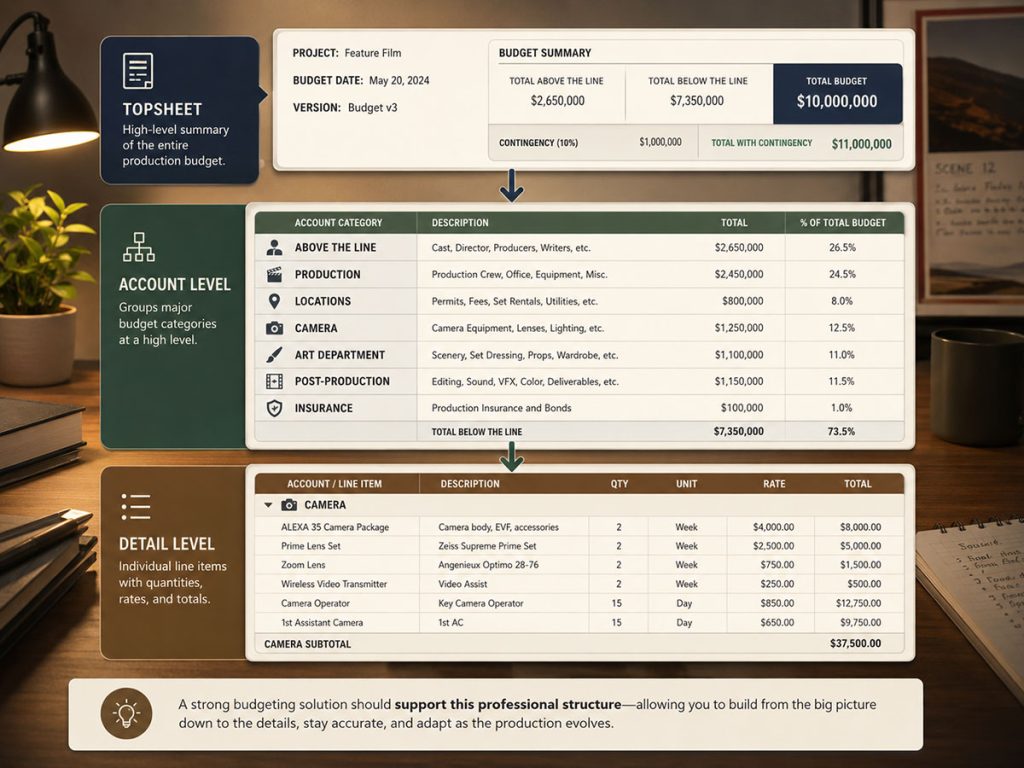
The most common structure has three major levels:
Topsheet
The high-level summary of the budget. This gives producers, financiers, investors, executives, and decision-makers the overall cost picture.
Account Level
The grouped budget categories. This is where major sections such as Above the Line, Production, Locations, Camera, Art Department, Post-Production, Insurance, and Contingency can be reviewed.
Detail Level
The individual line items. This is where quantities, rates, units, fringes, totals, and notes live.
Any serious Movie Magic Budgeting alternative should support this kind of professional structure. Without it, the budget may become too flat. A flat budget can look simple, but it often becomes harder to explain once the project grows.
Gorilla Budgeting uses the traditional three-level film budget structure: Topsheet, Account, and Detail. That makes it familiar to professionals who understand standard film budgeting logic while still allowing room for additional workflow features.
Good budgeting software should let you move easily from the big picture to the fine print. A producer may need the topsheet. A line producer may need account totals. A department head may need detail lines. A production accountant may need expense tracking.
Everyone is looking at the same budget, but not everyone needs the same depth.
Look for Strong Budget Templates
A blank budget is a dangerous little meadow. It looks peaceful until you realize there are missing categories hiding in the grass.
Starting with a professional template helps prevent omissions. A good template gives the budget structure before the producer begins adjusting the numbers. It reminds the team to think about categories such as cast, crew, locations, transportation, camera, lighting, art department, wardrobe, post-production, insurance, contingency, fringes, and other production costs.
A Movie Magic Budgeting alternative should offer useful templates for different kinds of productions.
Gorilla Budgeting includes many budget templates, ranging from simple independent budgets to studio budgets. That means a filmmaker can start with a structure that matches the scale of the production instead of building every account from scratch.
A template should not be treated as the final budget. It is the starting architecture. The producer still needs to customize it based on the script, schedule, locations, cast, crew, union assumptions, shooting days, department needs, and production strategy.
But starting with the right template saves time and reduces the chance of forgetting important costs.
👉 Why Starting from a Film Budget Template Matters
Fringes Need Real Control
Fringes are one of the places where a film budget can quietly change shape.
Payroll taxes, pension, health, benefits, workers compensation, union-related costs, and other fringe calculations can have a major effect on the total budget. If they are not handled correctly, the budget may look artificially low.
A strong budgeting tool should support both percentage fringes and flat-rate fringes.
That matters because not every fringe behaves the same way. Some are percentages applied to labor. Some may be fixed costs. Some may apply only to certain categories or groups. Some may be tied to union rules or payroll assumptions.
Gorilla Budgeting supports fringes, including percentage and flat-rate fringes.
When comparing a Movie Magic Budgeting alternative, do not only ask whether the software “has fringes.” Ask whether fringes can be applied in a way that reflects the actual production.
A fringe is not decorative math. It is part of the true cost of hiring people.
Globals Help Keep the Budget Flexible
Film budgets are full of repeated assumptions.
A meal allowance. A hotel rate. A mileage rate. A kit rental. A weekly crew rate. A location rate. A travel per diem. A standard box rental. A recurring production fee.
If these values appear throughout the budget, changing them manually can be slow and risky.
Globals help solve that problem.
A global lets you define a value once and use it throughout the budget. When the assumption changes, the related budget lines can be updated more efficiently.
A Movie Magic Budgeting alternative should include globals because budgeting is not static. Assumptions change constantly. The software should help the producer adjust the budget without crawling through every line item with a lantern and a growing sense of dread.
Gorilla Budgeting includes globals as a standard feature, making it easier to manage repeated values across the budget.

Schedule Integration Is a Major Difference
One of the biggest questions when comparing budgeting software is whether it connects to the schedule.
The shooting schedule drives the budget.
Cast days, crew days, location days, background actors, props, costumes, set dressing, vehicles, special effects, and other breakdown elements can all affect costs. If the schedule and budget are completely separate, the producer has to re-enter or estimate information manually.
That creates more work and more chances for mistakes.
Gorilla Budgeting can import from a linked Gorilla Scheduling file. It can import cast, crew, locations, and breakdown elements such as props, set dressing, costumes, and other production needs.
Even better, if a rate is entered for a crew member or prop in Gorilla Scheduling, that item can be imported into the Detail level of the budget with the rate.
That is a useful difference because it connects scheduling decisions to budgeting decisions. The budget begins to reflect the production plan instead of floating beside it like a financial balloon.
A Movie Magic Budgeting alternative should not only help you build a budget. It should help the budget respond to the schedule.
👉 How a Shooting Schedule Impacts Your Film Budget
DOOD Totals Should Feed the Budget
A Day Out of Days report shows how many days cast members and production elements are needed.
Those totals often become budget quantities.
If an actor works 14 days, that number matters. If a prop appears across eight shoot days, that may matter. If a location is used for six days, that affects rates, permits, parking, security, and site fees. If wardrobe items are required across multiple days, the budget should reflect that.
Gorilla Budgeting can link with Gorilla Scheduling and import DOOD totals into budget line day counts.
That is a practical schedule-to-budget feature because the producer does not have to manually translate every work-day total into the budget. The schedule can help feed the budget.
When evaluating a Movie Magic Budgeting alternative, this is the kind of workflow feature worth looking for. The goal is not only to make a budget. The goal is to make the budget smarter because it is connected to the production plan.
👉 How Day Out Of Days Reports Affect Production Costs
The Ratebook Question
A budget depends on rates.
Crew rates, union rates, daily rates, weekly rates, flat rates, and job classifications all shape the budget. If the producer has to look up every rate manually, the process becomes slower and more vulnerable to mistakes.
This is where Gorilla Budgeting offers a useful distinction.
The Gorilla Ratebook is an add-on product that includes thousands of industry labor rates, including SAG, DGA, Local 600, and many other film union rates.
The workflow is direct. You can click the rate field for an item, such as Director of Photography, select the proper union, choose the rate type, such as daily, flat, or weekly, and populate the rate field for that line item.
For producers building professional budgets, that can save time and help standardize rate entry.
When comparing a Movie Magic Budgeting alternative, ask where the rates come from. Are they manually entered? Can they be selected from a ratebook? Can the software help with daily, weekly, flat, or union-specific rates?
The more serious the budget, the more important rate accuracy becomes.

Department-Level Detail Can Get Complicated
Many film budgets become more complicated once department heads get involved.
The wardrobe supervisor may have hundreds of costume items. The art department may have long lists of props, set dressing, materials, rentals, paint, builds, and replacements. Locations may have permits, parking, security, police, restrooms, trash removal, cleaning, power, and site fees.
Those department budgets are often prepared in Excel.
A good Movie Magic Budgeting alternative should have a way to bring that detail into the main budget without forcing the producer to retype everything.
Gorilla Budgeting includes an optional fourth level. This allows an Excel file to be imported as a fourth-level budget under a specific account. If a department head creates a detailed Excel budget with quantities and rates, that file can be imported into Gorilla using an import map to help organize the data.
Imagine several department heads each preparing their own detailed Excel budgets. Instead of manually copying those numbers into the main budget, the producer can import them into the proper accounts.
That helps preserve detail without cluttering the primary budget levels.
The main budget stays readable. The department detail still has a home. Everyone wins except the copy-paste goblin.
Excel Import and Export Still Matter
Even when a production uses professional budgeting software, Excel still appears everywhere.
Department heads send Excel files. Producers review Excel summaries. Accountants may need exported information. Financiers may ask for spreadsheet versions. Vendors may provide costs in spreadsheet form.
A good budgeting tool should not pretend Excel does not exist.
Gorilla Budgeting can import Excel files, including the optional fourth-level department import workflow. It can also support Excel import/export workflows that help production teams move information between department files and the main budget.
The goal is not to replace every spreadsheet in the production universe. That would be optimistic sorcery.
The goal is to keep the main budget structured while still allowing spreadsheet information to move in and out when needed.
Expense Tracking Is a Big Practical Advantage
A budget is not only built in prep. It must be monitored during production.
Once the shoot begins, producers need to know what has actually been spent. A location account may be budgeted for $50,000, but if permits, parking, site fees, police, security, and cleanup are eating through the account faster than expected, the team needs to know before the account is exhausted.
Gorilla Budgeting includes an Accounting module attached to the Account level. This allows expenses to be tracked against an account.
For example, if the Locations account is budgeted for $50,000, each location expense can be entered against that account. Then the production can run reports such as a Budget Balance report to see how actual spending compares to the budget.
That gives the budget a production-tracking role, not just a planning role.
When comparing a Movie Magic Budgeting alternative, ask whether the software helps track actual expenses or only builds the original budget.
A budget that cannot track spending is useful. A budget that helps you see where the money is going during production is much more useful.
👉 How Daily Production Information Can Affect Budget Tracking

Multiple Currencies Can Matter More Than You Think
Film production does not always stay in one country or one currency.
A production may shoot in one country, post in another, pay vendors overseas, use international crew, or manage co-production costs across several currencies.
A Movie Magic Budgeting alternative should be able to handle currency complexity when needed.
Gorilla Budgeting supports multiple currencies and allows a different currency to be specified for each line item. That means one account can include Chinese Yuan, another can include Euros, and another can use U.S. dollars.
This can be helpful for international productions, travel-heavy projects, foreign vendors, or any production where costs do not all live in one currency.
Currency support is easy to ignore until the budget actually needs it. Then it becomes a very loud little trumpet.
Tax Credits, Credits, and Incentives
Tax credits and production incentives can change the financial shape of a film.
Some incentives reduce net cost. Some affect financing. Some require careful tracking, documentation, or location-based organization. Some may depend on qualifying spend, jurisdiction, labor, or production activity.
Film budgeting software should help producers account for credits and incentives clearly.
Gorilla Budgeting includes film credits and credits reporting. It also includes budget locations and budget groups, which can help organize costs in ways that support clearer review.
When comparing budgeting tools, ask whether the software can help you separate, report, and understand credits instead of burying them in a miscellaneous note.
Tax credits can be powerful. They should not be treated as a sticky note with a dollar sign.
Reports Should Be Easy to Generate
A film budget has to communicate.
The producer may need one report. The production accountant may need another. A department head may need a detail report. A financier may want the topsheet. A production manager may need a budget balance report. A line producer may need fringes, globals, credits, currency reports, or tracking expenses.
A Movie Magic Budgeting alternative should generate reports cleanly.
Gorilla Budgeting includes many reports, including:
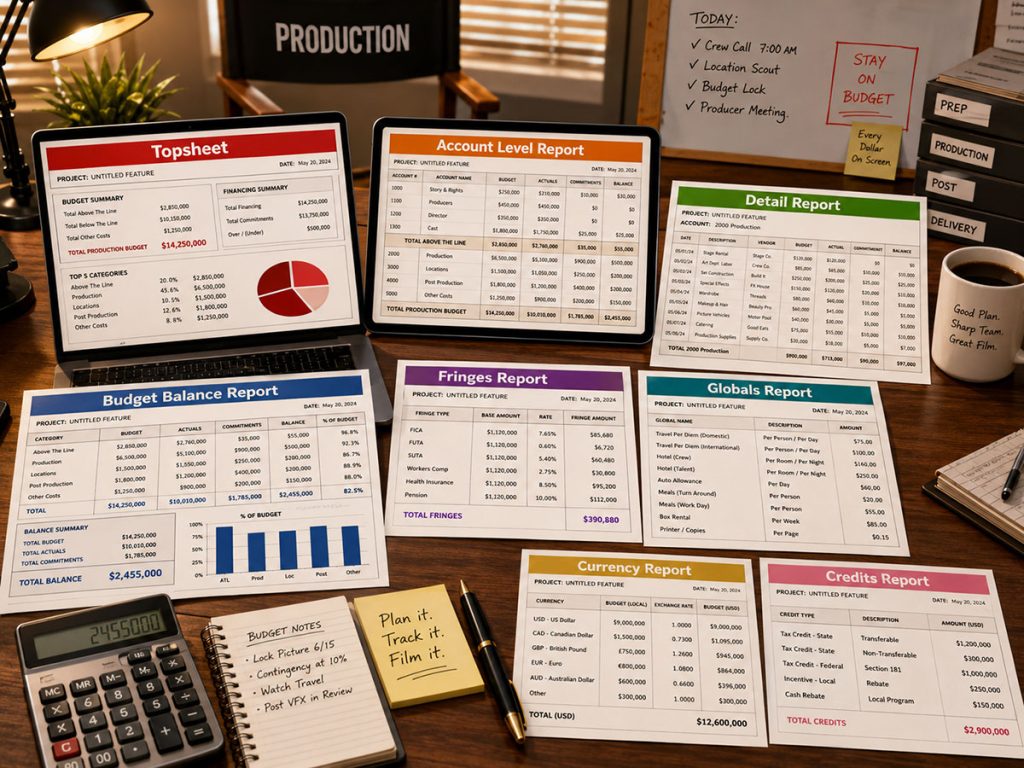
Reports matter because the budget is not only where costs are built. It is where decisions are explained.
A clean report can reduce confusion, support financing conversations, guide production meetings, and help producers understand what has changed.
A messy report can make everyone stare at the same page while quietly aging.
Reporting Workflow: Messy vs. Organized
A report workflow can become chaotic fast.
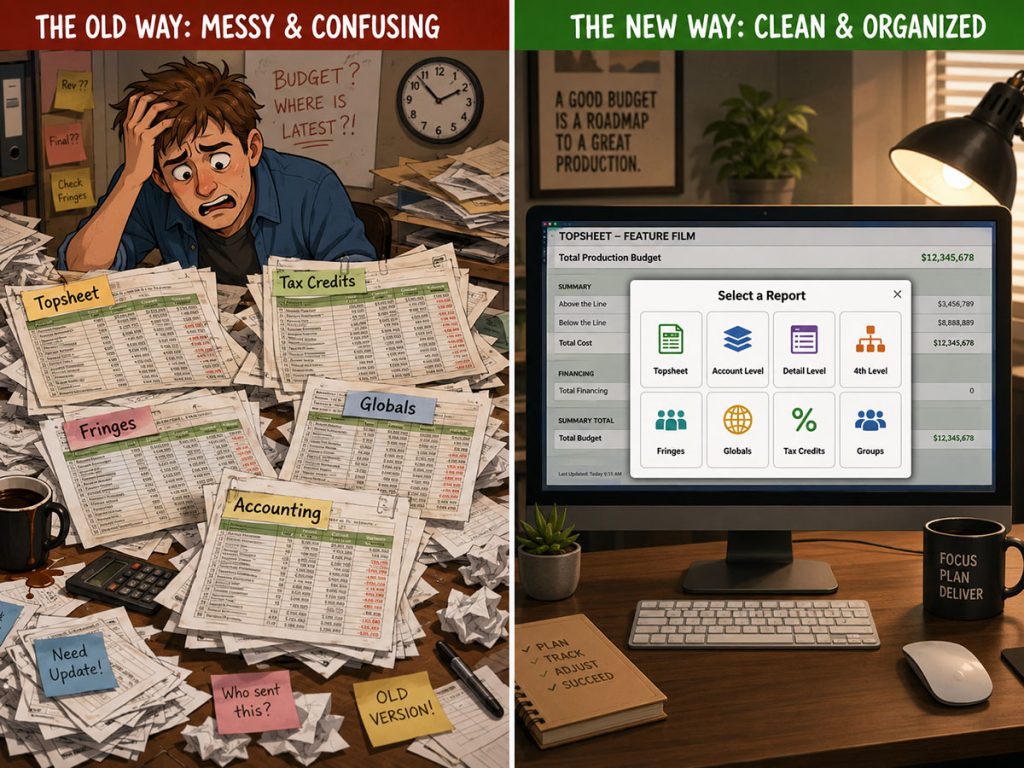
If every report is a separate spreadsheet, the production team may end up juggling multiple versions of the topsheet, tax credits, fringes, globals, accounting, and expense reports. Someone may be looking at yesterday’s file. Someone else may have the latest changes but not the latest fringes. Another person may be working from an old export.
That is where a centralized reporting workflow becomes valuable.
Instead of chasing scattered spreadsheets, the producer should be able to select and generate the report needed from the budgeting system.
This does not mean spreadsheets have no place. They do. But the main budget should act as the source of truth.
A strong Movie Magic Budgeting alternative should help the production avoid report chaos. The easier it is to generate topsheet, account, detail, fringes, globals, tax credits, groups, and other reports, the easier it is to keep everyone aligned.
Long-Term Support and Updates
When choosing budgeting software, support matters.
A film budget can be complex. Questions come up. Imports need help. Reports need clarification. A production may need to understand how to handle a particular rate, fringe, account, currency, or expense workflow.
A budgeting tool should be backed by software support that understands production needs.
Jungle Software has been around for many years, receives frequent updates, and is known for strong tech support across its Gorilla products. For filmmakers building budgets under pressure, that support can matter.
Software is not only a feature list. It is also the company behind the tool when the budget file starts muttering at midnight.
What to Compare Before Choosing a Movie Magic Budgeting Alternative
Before choosing a Movie Magic Budgeting alternative, compare the full workflow.
A serious budgeting tool should help you:
Start from professional templates
Build a budget in topsheet, account, and detail levels
Manage percentage and flat-rate fringes
Use globals for repeated assumptions
Apply contingency, credits, groups, sets, and locations
Import from the shooting schedule
Bring in cast, crew, locations, and breakdown elements
Use DOOD totals as budget line counts
Access reliable labor rates through a ratebook
Import department-level Excel budgets
Support an optional fourth level
Track expenses against accounts
Run budget balance reports
Handle multiple currencies
Generate topsheet, account, detail, fringes, globals, credits, currency, tracking expenses, and budget balance reports
Revise the budget as production changes
Receive long-term software support
Movie Magic Budgeting has earned its place in production history. But filmmakers comparing alternatives should look beyond tradition and ask what kind of budgeting workflow they need now.
The question is not simply:
Can this software create a film budget?
The better question is:
Can this software help me build, revise, explain, connect, and track the budget throughout the production?
That is where professional budgeting software becomes valuable.
Looking for a Professional Movie Magic Budgeting Alternative?
If you are comparing film budgeting software, look beyond the topsheet alone. A professional budgeting tool should help you build a structured budget, start from templates, manage fringes and globals, import schedule information, use reliable rates, support department-level detail, track expenses, handle multiple currencies, and generate reports your production can actually use.
Gorilla Budgeting is built for filmmakers who need a professional budgeting workflow, from topsheet to account to detail level. Use templates, manage fringes and globals, import from a linked Gorilla schedule, use The Gorilla Ratebook add-on, bring in fourth-level Excel department budgets, track expenses through the Accounting module, work with multiple currencies, and generate detailed production budget reports.
Explore Gorilla Budgeting and see how it can help you build a smarter, more production-ready film budget.
Questions or Comments?
Have a question about stripboards or film scheduling? Feel free to leave a comment below — or reach out if you want to learn more about how professional tools can streamline your workflow.